


惯性聚合 高效追踪和阅读你感兴趣的博客、新闻、科技资讯
阅读原文 在惯性聚合中打开

推荐订阅源

量子位
Stack Overflow Blog
Stack Overflow Blog
人人都是产品经理
人人都是产品经理
The GitHub Blog
The GitHub Blog
Engineering at Meta
Engineering at Meta
Vercel News
Vercel News
奇客Solidot–传递最新科技情报
奇客Solidot–传递最新科技情报
Y
Y Combinator Blog
The Cloudflare Blog
Last Week in AI
Last Week in AI
B
Blog
钛媒体:引领未来商业与生活新知
钛媒体:引领未来商业与生活新知
T
Tailwind CSS Blog
V
Visual Studio Blog
博客园 - 三生石上(FineUI控件)
小众软件
小众软件
Google DeepMind News
D
DataBreaches.Net
博客园 - 司徒正美
B
Blog RSS Feed
Microsoft Azure Blog
罗磊的独立博客
Hugging Face - Blog
Hugging Face - Blog
L
LangChain Blog

ImageKit.io Blog

Next.js Image Optimization with ImageKit Use Video as a Background in Your Next.js Project How to Fix Autoplay Video in Next.js How Durian Scaled a Visual-First Retail Experience to 350K Monthly Visitors Online How Matsmart accelerated image delivery across countries with ImageKit AI in Digital Asset Management: From Smart Workflows to Agentic Automation How Joseph Joseph unified and secured global video delivery with ImageKit How Modall powers fast, effortless media delivery across 40+ projects with ImageKit Digital Asset Management (DAM) Trends: 2026 Report How to add a poster image to Video.js player (and automate it) HLS streaming with Video.js + React Building the future of storytelling with fast, AI-powered video delivery How PushOwl delivers 100M+ image-rich notifications seamlessly with ImageKit How Homify delivers millions of interior design images seamlessly with ImageKit Better event discovery with lightning‑fast videos & images Adding video player in React Native Video player in Angular applications Crop and resize videos in React Next.js image and video upload React image and video upload React video optimization How we quadrupled our traffic to 625K monthly page views How Apollo 24|7 boosted performance & reduced costs with ImageKit Simplify your media workflows with ImageKit DAM integrations Extending Lighthouse for custom image and video optimization analysis Brand Asset Management: What is it? How does it work? WordPress Digital Asset Management Guide - Manage your WP media assets better Why Shopify retailers need a digital asset management solution DAM vs. SharePoint: Which is best for you? AI-powered Metadata and Tagging in Digital Asset Management
Step-by-step Guide for writing G2 Review | ImageKit.io
Vignesh.S.Krishnan · 2022-12-14 · via ImageKit.io Blog

G2.com is one of the software industry's most recognized peer-review platforms. With its authentic reviews from actual buyers, G2 guides buyers in choosing the right software based on their business needs.

This guide is a 6-step guide for an endorsement from you to us which would help a lot of peers looking to get a solution to streamline how they work with their images and videos.

STEP 1

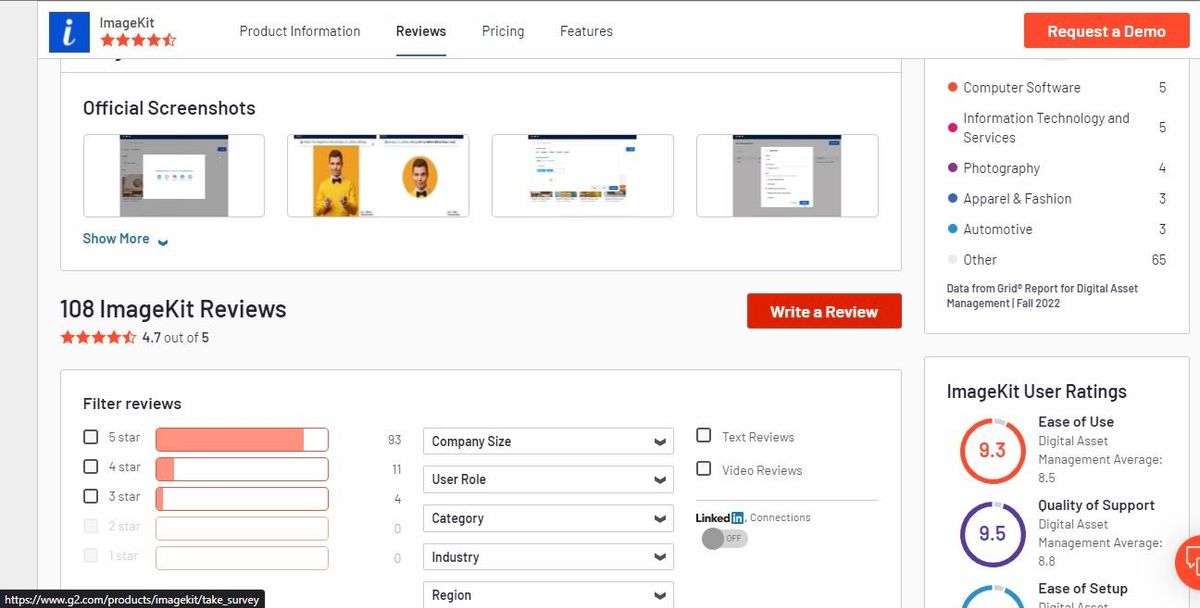
Visit G2.com and search for ImageKit. In the ImageKit profile, click the write review button to proceed to the review screen.
STEP 2

Once you click the write a review button, you should see the screen below.

Please continue with your official email to leave an authentic review if you have not logged in.

If you still need an account, please sign up for a G2 account before proceeding further. You can do this using your:

  • LinkedIn account,
  • Facebook account,
  • Google account, or
  • Business email

STEP 3

Once logged in, you will be asked questions about your experience using ImageKit.

The questions are based on what you liked, what you disliked, what problems ImageKit solves for you etc.

You can review ImageKit in the following categories depending on your usage:

  • Digital asset management
  • Image Optimization
  • Video CMS
  • Video Hosting

Please leave an honest review of your experience with ImageKit.

STEP 4

This is an important step to verify that you are an actual user of ImageKit.

To confirm you are a user of ImageKit, go to your ImageKit profile and upload a screenshot of your ImageKit account.

Ensure you are logged in and the user name is visible.

STEP 5

Once you are done with all the questions, hit submit; you should see the screen below.

STEP 6

You'll be able to see your review in your G2 account and its status and can edit it to improve them at any point in time.

That's it. You are done.

Our team loves it when we receive a review. We read, rejoice, respond to every review we get, and take feedback seriously.

Moreover, you are helping 1000's like you to use the right software for their media optimization and delivery needs.

So go ahead and leave a review for ImageKit.