


As online businesses resort to creating more and more digital assets to sell products, run marketing campaigns, and engage with customers, there is a growing need for effective ways to organize and manage them. Digital Asset Management (DAM) systems address this challenge using metadata tagging either through manually added custom metadata or AI-powered tagging, which automatically generates relevant labels.
In this blog, we’ll dive into metadata tagging in detail, covering both AI and manual methods, their benefits, how tagging works for images and videos, and how DAM platforms like ImageKit use metadata management to make asset organization and search effortless.
Metadata tagging is the process of adding contextual information, such as descriptive labels or properties, to digital assets like images, videos, audio files, or documents. This information remains hidden in the background and enriches the asset, which in turn enhances organization and searchability.
If AI is used to perform this tagging process, it’s called AI metadata tagging or auto-tagging. This is achieved by training AI models with large datasets to create associations between an asset and its semantic description, generating relevant metadata or tags. While metadata tagging can also be done manually, AI helps significantly by saving time and improving accuracy. DAM systems extensively use metadata tagging capabilities to aid in their core function of keeping stored assets organized and searchable.
The advantage of metadata tagging for an asset becomes even more evident when considering the various types of metadata that can be associated with it. The following will cover the most common metadata types with respect to DAM systems.
Inherited metadata - Some metadata comes associated with the asset by default. For example, you have an image in JPEG format, 1MB in size, and 2000x1800 pixels in dimensions. This is the inherent metadata associated with it. It is not going to change. When you look at an image, you don't see this data, but it is in the background associated with it.
Embedded metadata - This is the metadata that may optionally come associated with an asset and move along with it when you distribute the asset. For a photograph clicked by someone, information such as the photographer's name, camera used, GPS coordinates, ISO setting, Aperture, etc., may be available with the image. This data is the embedded metadata of the asset.
Structured metadata - This is the most important type of metadata you can add to an asset and is offered by all leading DAM solutions providers. Structured metadata helps you build your own asset organization taxonomy. Unlike inherited and embedded metadata over which you have little control, using structured metadata, you will be able to categorize assets in ways that are specific to your business.
Let's examine the following example to gain a better understanding.
For product images of a sports shoe website, you could create custom metadata such as:
Brand - Nike, Adidas, Puma, Reebok, and so on
Size - UK9, UK8, UK7, and so on
Sport - Tennis, Basketball, Badminton, and so onUnstructured Metadata (or Tags) - While structured metadata helps you add additional information in key-value pairs, like "Brand: Nike", unstructured metadata, as the name suggests, allows you to add more free-flowing descriptive information to the asset. Think of it as keywords or labels you assign to your assets to enhance organization and management efficiency. It is often referred to as Tags across different digital asset management software.
For example, if you have an image of a watch on a white background, you can add descriptive metadata tags to it such as "men's watch", "sporty look", "front shot", "white background", "digital display", and more. These do not follow the same structure we could enforce via structured metadata, but the descriptive tags can help find assets quickly in the future.
AI tagging can be applied to both structured and unstructured metadata by either automatically generating tags or auto-populating structured metadata fields. For example, an AI model might detect a product brand or category within an image and directly assign it to predefined structured fields, while also adding broader descriptive tags like “sportswear” or “outdoor.”
AI metadata tagging in images
In images, AI metadata tagging relies on machine learning and computer vision to analyze visual content and generate descriptive tags or structured metadata. Deep learning models analyze the image pixel by pixel to recognize patterns, shapes, colors, and relate them to objects, people, or scenes. Practically, the outcomes could include detecting faces, identifying objects, locations, or even abstract situational concepts.
Some DAMs also have optical character recognition (OCR) that is capable of extracting visible text in images, whether it’s signage, product packaging, or labels, and stores it as searchable metadata.
Key AI techniques for image tagging
When it comes to image tagging, AI relies on powerful model architectures to process visual data and then applies different tagging techniques on top of them. Let’s break this down.
Convolutional Neural Networks (CNNs)
CNNs are one of the most widely used deep learning models for working with images. You can think of them as layered filters: the first layers pick up simple patterns like edges and textures, and as you go deeper, the network starts combining those into shapes and eventually full objects such as cars, shoes, or faces. This layered feature extraction is why CNNs became the backbone of modern image recognition.
Their potential was proven in 2012 with the well-known ImageNet study. The model they built, called AlexNet, cut error rates in image classification almost by half compared to previous techniques and serves a foundational resource for computer vision even today.
Vision Transformers (ViTs)
Vision transformers take a different approach. Instead of scanning an image with layered filters, they divide it into small patches and use an attention mechanism to understand how those patches relate to each other. This helps them capture the bigger picture in an image: for example, recognizing that a ball belongs to the player holding it, even if the two are far apart.
Introduced in 2020, Vision Transformers showed that transformers can match or even surpass CNNs on major image recognition benchmarks when trained on large datasets, while often being more efficient. This proved that convolutional layers aren’t always necessary for high-performance image tagging.
Image tagging techniques built on these architectures
CNNs and ViTs act as the engines that learn the visual features in an image. On top of them, different techniques are applied to generate tags:
- Image classification (single-label): Assigns one label to the entire image, based on its visual content.
- Multi-label classification: Associates an image with multiple labels at once, for example “sunset”, “beach”, and “people”.
- Object localization: Finds where the main object is in the image and returns a bounding box for it, without necessarily detecting every object present.
- Object detection: Combines classification and localization to identify and locate multiple objects in the same image, each with its own bounding box.
- Zero-shot classification: Classifies images into categories the model has not seen before by leveraging semantic information. OpenAI’s CLIP (Radford et al., 2021), for instance, uses zero-shot learning ability, allowing it to perform tasks it wasn't specifically trained for, such as classifying images into categories it hasn't seen.
AI metadata tagging in video
Talking about videos, AI can be used to segment them into distinct scenes or shots, each with its own timestamp and metadata set. Within each scene, object and action detection can track what’s happening on screen, while metadata and tags can classify the video by topic, category, or content type. Audio analysis adds another layer: automatic speech recognition (ASR) generates full transcripts stored as searchable text, and speaker diarization identifies when different people are speaking. Additional AI-driven extraction can capture descriptive details such as resolution, duration, and camera properties, as well as contextual keywords for SEO and discoverability.
Key AI techniques for video tagging
CNNs and 3D CNNs (I3D)
Convolutional neural networks (CNNs) can analyze videos frame by frame, but they miss motion between frames. To solve this, researchers extended CNNs into 3D CNNs, which capture both spatial and temporal patterns together. The I3D model, for example, showed strong results in recognizing human actions when trained on large video datasets like Kinetics.Recurrent Neural Networks (RNNs) and LSTMs
Recurrent models such as LSTMs are designed to handle sequences, making them useful for modeling how scenes change over time. Early approaches combined CNNs for frame features with LSTMs to describe or classify video clips. Today, however, these are often replaced by Transformers, which handle longer sequences more efficiently.Encoder-Decoder with Transformers
Modern video tagging frequently uses encoder-decoder architectures. Here, the encoder (often a CNN or 3D CNN) processes the visual features, while the decoder generates outputs such as tags or captions. Transformers have become the preferred choice for this setup because their attention mechanism captures long-range dependencies better than older recurrent models.
Video tagging tasks built on these architectures
- Video Content Analysis (VCA)
An umbrella for spatial and temporal analysis of video segments that produces time-stamped metadata. - Object tracking
Once an object has been detected, object tracking keeps track of that same object across all subsequent frames in the video. This makes it possible to follow its movement and understand how it changes position over time. For example, tracing a car as it drives through a scene. - Action recognition
This is the task of identifying what activity is happening in a video: for example, running, talking, or cooking. Instead of just looking at single frames, the model studies a sequence of frames together to pick up motion patterns. - Behavioral analysis
Goes beyond identifying single actions to understand patterns of activity over time. For example, in a traffic video it could highlight unusual behavior like a car running a red light, or in a retail store it might flag crowd build-up near an entrance. - Multimodal AI
Multimodal AI combines different types of information in a video such as visuals, audio, and on-screen text to create richer tags. This means the model does not just see the objects in a scene, it also hears what is being said and reads any captions or visible text, giving a more complete understanding of the content.
To learn to manage your videos assets with video metadata read our blog
Challenges associated with manual tagging in DAM systems
Visual storytelling is on the rise with marketers investing heavily in images and videos to deliver their campaigns. While manually adding metadata for sure has its specific use cases and benefits, when it comes to dealing with bulk quantities of assets, there are some challenges.
- Time-consuming: Manually adding tags and metadata to thousands of digital assets can be a time-consuming task, which could be better utilized for other essential tasks.
- Inconsistent metadata: Different teammates may describe the same asset differently, creating a messy and confusing organizational system. As the volume of digital assets increases, keeping metadata and tags accurate and consistent becomes even more challenging with manual processes.
- Poor Search: If tags and metadata aren't added correctly, finding specific assets within the DAM system can be difficult, making them useless.
Put simply, AI metadata tagging tackles the biggest drawbacks of manual tagging. It might miss a bit of human nuance at times, but it makes up for it with speed, accuracy, and consistency.
Efficiency
Several industry analyses, often referencing PwC insights, indicate that automating metadata tagging can reduce manual effort by up to 70%. This means faster asset discovery and less time spent searching, allowing your teams to derive more value from the DAM system and focus on higher-value, strategic tasks.Accuracy
A research paper comparing human and machine performance in image annotation found that AI reached above-average human-level performance when tagging visual concepts. It also states that AI tagging can be less prone to error than human tagging, especially for large-scale multimedia retrieval tasks.
Consistency and scalability
AI not only speeds up operations and improves accuracy while ensuring consistent terminology across large asset libraries. This eliminates the problem of drifting tags or inconsistent synonyms that can make search frustrating. For DAM systems handling thousands or even millions of files, this level of uniformity is essential.
Improved discoverability and cost savings
AI-generated metadata makes assets easier to find, which streamlines workflows and accelerates campaign execution. Well-tagged assets also support indirect cost savings through reuse. Research done by Adobe shows that 97% of organizations using DAM have reduced asset creation costs by at least 10%, while 57% achieved reductions of 25% or more. These savings come from avoiding duplication, rework, and the creation of assets that end up unused.
ImageKit offers a complete, modern-day Digital Asset Management solution for high-growth businesses that want a powerful DAM system that is easy to use and cost-effective.
Among the several features it offers for digital asset management, organization, and collaboration, the ability to add structured metadata, manual tags, and AI-powered tags stands out in helping improve asset organization. With its AI-powered search, marketing and creative teams find it really easy to find the right assets when they need them to launch new campaigns or share with other teams.
Structured metadata in ImageKit DAM
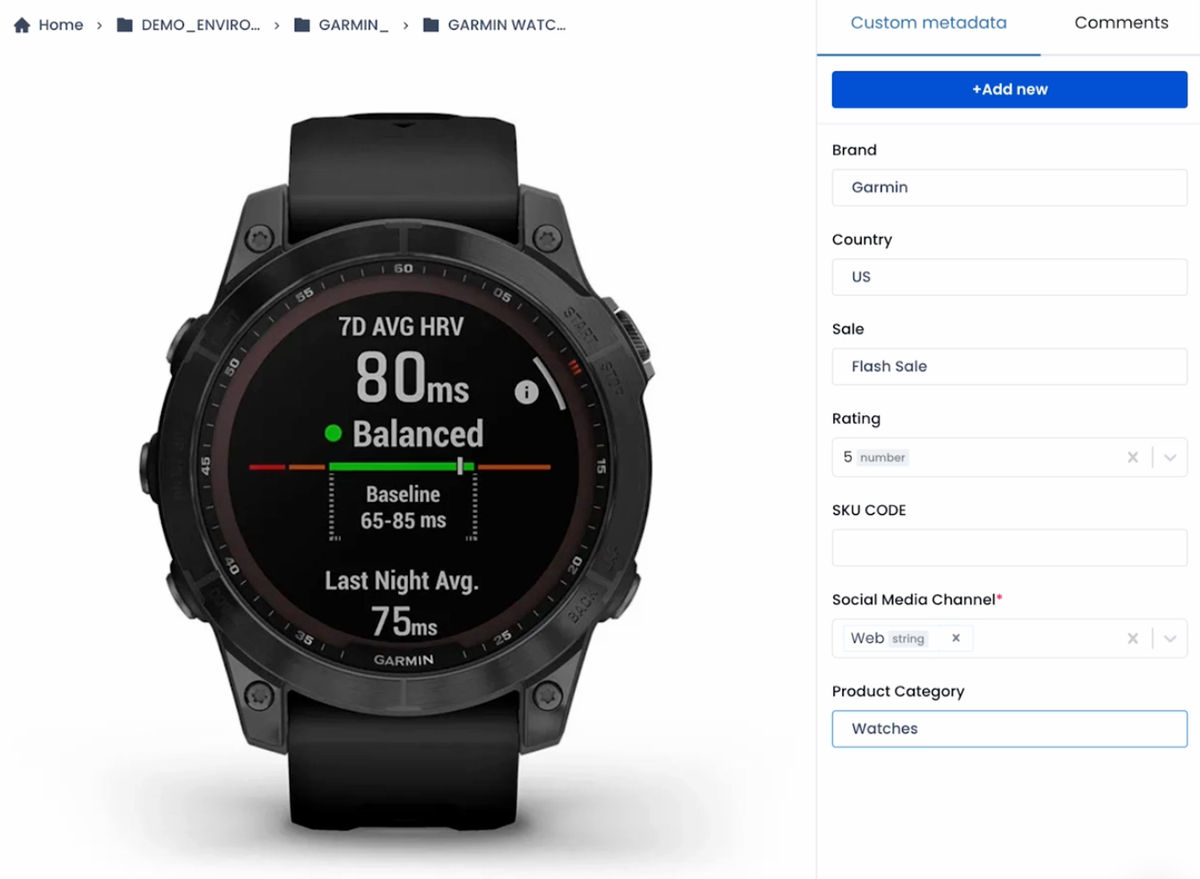
ImageKit DAM allows you to add structured metadata to your assets through the "Custom Metadata" feature.
With this feature, you can define multiple fields of different types, such as Date, Number, Single-select, Multi-select, Free text, and more, and associate them with all the assets in your asset repository.
You can also associate some default values with these fields, set them when uploading assets, or edit these values at any point later. For example, in the image below we have custom metadata fields "Brand", "Country", "Sale", "Rating", and more associated with the image.
Manual and AI tagging in ImageKit DAM
ImageKit provides manual and AI-powered tagging in its digital asset management software.
The process for manual tagging is straightforward. You can add these tags to a single file or multiple files in one go, at the time of upload, or at any time later.
However, the best part is the AI tagging of the assets. ImageKit integrates with leading third-party services, such as AWS Image Rekognition and Google Cloud Vision, to automatically add tags to images uploaded to the DAM. You can trigger these AI tagging services at any time for an asset and set a threshold to the number of tags and the confidence score when adding a tag to ensure that only the right tags get added.
In the example below, we can see that ImageKit used the AI services to add keywords like "Home Decor", "Table", and "Coffee Table" to the image, all of which are very relevant.

You can also turn on AI tagging for all assets uploaded to the DAM by default. With this setting enabled, whenever anyone uploads an image to the DAM, ImageKit will automatically analyze these images using the AI services and add the relevant tags to them.
You can always combine manual and AI tagging for the same asset. You could also use a manual quality check for the tags added by AI to ensure the asset's organization. This process would still be faster than adding all the tags manually.
With automatic AI tagging, asset organization is greatly simplified and consistent and saves your team a lot of manual effort and time to organize the assets correctly.
How custom metadata and AI tagging aid searches in ImageKit DAM
ImageKit's advanced search mode allows you to combine multiple parameters, including inherited metadata, embedded metadata, custom-defined metadata, and all the tags, to find the right assets in one go.
For example, I can use the advanced search to find all images (inherited metadata), created after 1 January 2024 (embedded metadata) (custom metadata)for the Nike brand and a front shot of the shoe (tag or unstructured metadata).

The ability to combine all kinds of metadata to search for the right asset makes life easier for your marketing and creative teams. They don't have to waste hours or go through several folders searching for the right assets when launching campaigns.
Bonus: AI-powered search that doesn't require metadata or tagging
ImageKit also offers text-based and reverse-image AI search to find assets, even if no metadata or tag is associated with them in the DAM.
For example, one could type a query in natural language like a "boy in sneakers" and ImageKit's AI will find all the images that visually match this description, even if their filename, metadata, or tags do not contain any such information.

To give an example of how reverse-image search helps, you could upload an ad banner and use the reverse-image search to find all other ads that look similar to it without having to query for any metadata or tags.
While we do not recommend using this as an absolute substitute for AI tagging or metadata in digital asset management, it is still beneficial when you quickly want to find something visually similar to what you have in mind.
Conclusion
Metadata and Tagging in digital asset management help organize and find digital assets in DAM software. With AI, businesses can automate the process of tagging these assets with the correct information, thereby saving manual efforts, getting more consistent organization, improving searchability, and making workflows more efficient.
ImageKit DAM's custom metadata and AI-powered tagging features unlock the same benefits for marketing and creative teams globally. You can sign up for a Forever Free account today to use the ImageKit DAM and improve how you manage digital assets for your organization.