




Let's take a minute to imagine the daily life of a modern marketer.
Your workday often starts with a burst of emails, a quick scroll through social media feeds, a glance at neverending spreadsheets, and then diving into a messy pool of marketing assets - Campaign banners, emails, video clips, infographics, blog posts, product photos, the list goes on and on.
The frustration is real!
Files are misplaced, versions are confused, and hours are wasted looking for that particular asset that's disappeared into the digital abyss. This disorder isn't just a minor annoyance but a significant bottleneck stifling your creativity and productivity.
This constant juggle to manage marketing assets could lead to missed deadlines, incorrect asset usage, and inconsistent branding and customer messaging.
The solution?
Well, it's time you consider Marketing Asset Management (MAM).
It is your new, incredibly organized personal assistant. This system is designed for marketers to simplify and streamline the management of all marketing materials.
This differs from digital asset management (DAM), a broader tool for managing any digital files across an organization. While DAM is like a massive warehouse storing all kinds of assets, MAM is the specialist team that effectively sorts, organizes, and distributes your marketing assets.
This blog will be your go-to guide to get started and implement marketing asset management for your team.
Let's begin by understanding why MAM is essential for your team.
Benefits of Marketing Asset Management
Yes, Marketing Asset Management (MAM) can help you locate that perfect banner image for your campaign in seconds.
But that's just the tip of the iceberg.
MAM has many abilities to streamline your operations and enhance your team's productivity. And here are four ways it can benefit your marketing team.
1. Increased efficiency in marketing efforts
The time you once spent searching through digital assets can be reduced dramatically with MAM. With an organized system, finding and accessing the necessary assets becomes a swift, intuitive process. Think about it like your local supermarket: when everything is categorized and placed neatly on shelves, you find what you need without breaking a sweat.
Imagine you are putting together a promotional video for a product. With MAM, your video assets from previous shoots are cataloged and labeled properly for easy accessibility. This quick access to the right resources means more time crafting the perfect narrative for your product and less time sifting through the digital clutter.
2. Consistent brand messaging
Consistency in your brand messaging is vital for building a strong brand identity. It's what differentiates your business from competitors and fosters recognition among customers.
Marketing Asset Management (MAM) offers a systematic way to ensure such consistency. By centralizing all marketing assets, MAM ensures everyone on your team is using the most up-to-date assets, thereby presenting a cohesive brand image across all platforms and channels.
For example, if your brand undergoes a logo update, the revised logo can be uploaded onto your MAM system. This ensures that every department uses the new logo in their communications, maintaining consistency in your brand's visual identity.
3. Better collaboration between departments
The marketing department often works closely with other teams, including sales, design, content, and more. Marketing Asset Management (MAM) acts as a bridge that enhances collaboration and streamlines your creative operations.
By serving as a centralized repository for all marketing assets, MAM allows seamless sharing and accessibility of assets among different teams.
Consider your design team just created a stunning infographic for an upcoming campaign. After uploading it to MAM, the infographic becomes accessible to the content team for blog posts, the sales team for client presentations, and the social media team for online promotion.
This shared accessibility fosters collaboration and ensures all departments are aligned in their messaging.
4. Cost savings through asset reuse
An often overlooked but significant benefit of Marketing Asset Management (MAM) is the cost savings it offers through asset reuse.
With all your marketing assets neatly organized in one place, it becomes easier to locate and repurpose existing assets instead of creating new ones from scratch.
Instead of commissioning a new set of blog posts or images every year for a holiday marketing campaign, your team can use MAM to locate suitable assets from previous years, update them as necessary, and reuse them for the current campaign.
This approach saves the time and cost of creating new assets and maximizes the value derived from each asset, leading to more cost-efficient marketing operations.
Key Components of Marketing Asset Management
The impressive benefits of Marketing Asset Management (MAM) aren't magic; they result from well-engineered components working together.
Let's explore these key components that make MAM a powerful marketing tool.
Storage and organization
The backbone of a robust MAM system is its ability to store and systematically organize digital assets securely. But it's not just about storage - it's about the smart organization of these assets as well.

The user-friendly interface helps you create folders and sub-folders to organize your assets in a way that makes the most sense to your workflow. Whether it's by campaign, by date, by asset type, or by team, you can customize the organization strategy to suit your needs. This means you can retrieve a specific asset within moments, saving valuable time.
Metadata Organization and Asset tagging
These are essentially the 'labels' on your assets, making the MAM system searchable. Like adding keywords to a blog post to make it SEO-friendly, each asset in the MAM system is tagged with relevant information—asset type, campaign it's linked to, creation date, etc.
Advanced MAM tools offer different types of tagging, such as manual tagging, metadata-based tagging, content-based AI tagging, etc, to ease the life of a marketer.

When you look for "Summer 2024 ad campaign," the system presents all assets tagged with this term, saving you from manually combing through many files.
Asset Version control
The marketing landscape is dynamic, which means assets often undergo multiple revisions. With the version control feature, every time you upload a revised version of an asset, the system automatically tags it as the most recent version.
This ensures that everyone on your team always works with the latest and most accurate version of an asset. The system also maintains the history of all versions, so you can track the changes made over time, providing a clear audit trail.

For example, if your logo gets a design refresh, the updated version can be uploaded to the MAM system, automatically becoming the go-to version for everyone on the team.
Media collection hub
The MAM system isn't just a storage space—it's also a hub for collecting new media files. From user-generated content to fresh product photographs, the MAM system can aggregate these assets and make them readily available for future use.
It supports ingesting multiple file types and formats, ensuring you can store and manage a wide range of assets, from high-res images to 4K videos.
Consider an Instagram campaign that encourages users to share photos of your products. These images can be seamlessly collected and stored, forming a valuable bank of user-generated content for your future marketing initiatives.
Asset Sharing
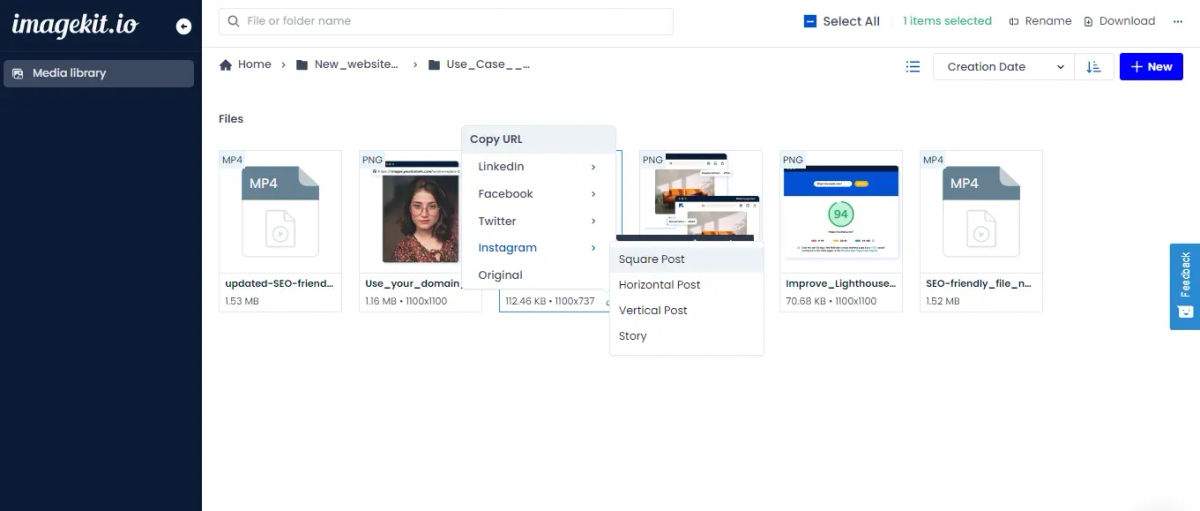
The marketing asset management is a supercharged shared drive. Instead of sending large files over email or using external hard drives, the MAM system allows for quick and easy sharing of assets.
If the social media team needs the latest product images for a new post, they can quickly access and download these from the MAM system, ensuring seamless and efficient collaboration.
User access control
In a diverse team, not everyone needs access to all assets. With user access level control, your MAM system ensures each team member can access only the necessary assets.
You can define who can access what, ensuring each team member sees only the assets relevant to their role.
For example, your social media team might only need access to social media-ready images and not high-resolution print ads. This tailored access promotes efficiency, reduces clutter, and adds a layer of security to your assets.

These components form the foundation of a marketing asset management system, each one designed to address specific challenges in managing marketing assets.
Implementing a Marketing Asset Management System
Having understood the key components of a MAM system, you might now be thinking - "How can I get one working for my business?"
The journey to implementing a MAM system involves a few thoughtful steps.
- Assessment of current asset management practices
Before rolling out a MAM system to your team, take a step back to evaluate your current asset management practices. Identify the types of assets you use regularly, where they're stored, access control, and the challenges involved.
Common pain points might include difficulty finding assets, inconsistent usage of brand materials, or time wasted transferring large files.
For example, if your team spends much time daily searching for assets, you'll want a MAM system with a powerful search feature.
2. Choose a Marketing Asset Management system
The next step is to choose a MAM system that aligns with your needs and goals. You should look for features like secure storage, efficient organization, robust search capabilities, version control, easy sharing, and access control.
If your organization deals with external stakeholders as well, pick a MAM tool like Imagekit that excels at media collection and seamlessly incorporates this content into your asset pool.
3. Integrate with existing systems
Once you've picked a MAM system, the next step is integration. This involves connecting the MAM system with your existing marketing software, such as your content management system (CMS), customer relationship management (CRM) tool, and social media platforms.
A well-integrated MAM system will work seamlessly with your other tools, creating a unified and efficient workflow.
4. Train and onboard users
Finally, make sure your team is well-equipped to use the new system. This involves organizing training sessions to familiarize them with its features and functionalities.
You could run a practical session where users upload an asset, tag it with metadata, and share it with a colleague. Ongoing support and resources will also be helpful to address queries and enhance user proficiency.
You can also consider hiring a Digital Asset Manager to help your team navigate the MAM system.
Best Practices for Marketing Asset Management
While implementing a Marketing Asset Management system can significantly elevate your marketing efforts, maximizing its benefits requires following certain best practices.
These strategies ensure you get the most out of your MAM system.
- Consistent file naming conventions
Consistency is key when it comes to file naming. Developing a clear and logical naming convention for your assets can greatly simplify retrieval.
Use a structured format like "CampaignName_AssetType_Date" (e.g., "SummerSale_Image_2024June").
This way, even if you have thousands of assets, finding the one you need becomes a breeze.
- Regular asset audit and cleanup
Your MAM system is not a set-it-and-forget-it tool. Regularly auditing and cleaning up your assets keeps the system organized and efficient. This could involve archiving old assets, updating outdated ones, or deleting duplicates.
Keeping your asset pool fresh and relevant ensures the system remains a reliable resource for your team.
- Continuous user training
A MAM system is only as effective as its users are proficient.
Regular training sessions and refreshers can help everyone on the team be comfortable using the system and aware of its full capabilities. This might include workshops on new features, Q&A sessions, or even regular tips and tricks sent via email.
You can also consider hiring a Digital Asset Manager to plan and conduct these training sessions.
- Monitor asset usage
Keeping track of how your assets are being used can provide valuable insights. For instance, if certain assets are frequently used, it could indicate their high relevance or effectiveness.
Conversely, rarely used assets might need to be reevaluated. Monitoring usage helps you understand your asset landscape better and make informed decisions.
- Continuous improvement through analytics and data
Finally, leveraging the power of data can help optimize your MAM system. Many systems offer analytics features that provide insights into system usage, user behavior, and asset performance.
Regularly reviewing these data and improving based on the insights can help make your MAM system more tailored to your needs.
Conclusion
Managing marketing assets effectively is no longer just a nice-to-have but a critical need.
From streamlining operations, preserving brand consistency, fostering collaboration, and cutting costs, a well-implemented MAM system can be a game-changer for your marketing team.
But remember, having a MAM system isn't just about housing all your assets in one place. It's about the strategic organization of those assets, the easy retrieval, the seamless sharing, and the smart use of data to improve your asset management continuously.
And what better way to do all this than with ImageKit? With its comprehensive suite of features, ImageKit takes the stress out of managing marketing assets, letting you focus on what really matters – creating compelling, impactful campaigns.
Don't just take our word for it, though. See for yourself how ImageKit can revolutionize your marketing asset management.