








Over 30,000 websites and mobile applications in 100 countries use ImageKit.io to deliver optimized images, JS, CSS, and other static files. The users access these applications from across the globe. It is essential that when an application requests a file, regardless of the location of the user, it downloads super quickly. ImageKit.io uses a global fast CDN along with a network of distributed procession regions. Let’s understand why this is important.
For example, it takes around 50-100ms to transmit data from the US East Coast to the West Coast. The same latency goes beyond 100ms when transferring data across the Pacific Ocean. We can overcome this problem of high latency because of geographical distance by using a Content Delivery Network (CDN). The CDN’s globally distributed network is critical for reducing the latency and speeds up the first meaningful paint for webpages.
However, in the case of image optimization, in general, and with ImageKit.io as well, CDN just “delivers” the static file. The actual processing of images, compression, format conversion, and resizing, happens in some central locations. In ImageKit.io, these are called the core processing servers. Therefore, not just the CDN, but even the core image processing servers should be distributed geographically to bring the delivery time under 50ms for 98% of the requests.
Does ImageKit.io Have A Distributed Core Processing Network?
Yes. As you can imagine, a CDN does not have everything in the cache. Especially the first image request from that particular CDN edge location gets missed from the cache and reaches ImageKit.io’s core image processing server. Also, every time you change ImageKit.io transformation parameters in URL, it’s a new file for the CDN that is not there in the cache.
In scenarios like this, the round trip time could easily add up depending upon the following factors:
1. Distance between your user from the CDN node.
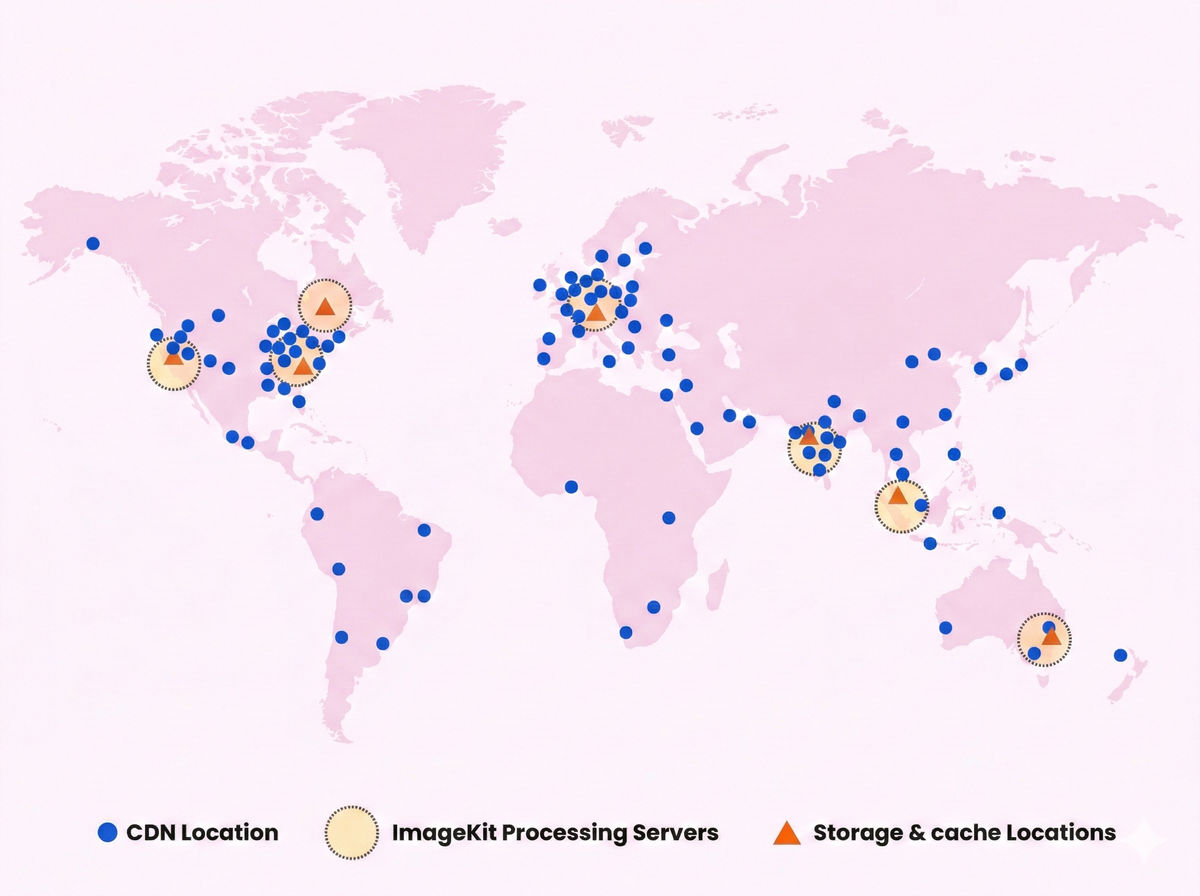
It’s hard to control the location of the end-user. Hence less control over the distance between the user and the CDN node. The only solution is to have a geographically distributed content delivery network (CDN), which makes sure that files are cached and served from the nearest edge location with minimum latency. ImageKit.io uses Amazon CloudFront CDN, which has over 200 POPs strategically spread across the world, and they keep expanding to new locations.
2. Distance between the CDN node and the ImageKit.io processing server.
We can reduce this distance by having our core processing server near the CDN edge. And guess what, we have already optimized this for you. ImageKit.io’s geographically distributed core processing network helps here. The CDN always chooses the nearest ImageKit.io core using latency based DNS resolution. In the future, with core processing servers in more locations, this distance gets reduced further. The way we have our setup, it is relatively easy for us to introduce new processing regions. If you are looking to integrate ImageKit.io, this is an excellent advantage over other image optimization products.
Note: The setup is slightly more optimized if you are using a custom domain name. In a custom CNAME setup, instead of choosing the nearest processing region, CDN directly connects with your selected ImageKit.io processing region (more on this in the following point). The CDN and ImageKit.io core processing origin maintain persistent connection and traffic flows internally through the AWS network. This configuration change results in the shortest round-trip time always, assuming you selected the processing region, which is closest to your origin server.
3. Distance between the ImageKit.io processing server and your actual image origin
When you create an account, you choose a processing region. Choosing the right processing region plays a critical role in the response time for CDN miss requests. You should select a region that is closest to your origin server location.
Note: This is only applicable if you are using plug and play integration with your existing image storage or server. If you are using ImageKit’s media library, then the performance is the same regardless of the core processing region selected.
ImageKit.io Core Processing Infrastructure
ImageKit.io has a distributed core image processing infrastructure across seven different regions in the world. Apart from the actual image processing servers, all the following regions have co-located storage for the media library and cache of image transformations:
- North Virginia (US East)
- North California (US West)
- Frankfurt (EU)
- Mumbai (India)
- Sydney (Australia)
- Singapore
- Canada (ca-central-1)
In-depth Understanding Of How Requests Are Served In ImageKit.io
Before understanding the benefits of a multi-region core processing network, let’s understand how a request flows in ImageKit.io systems.
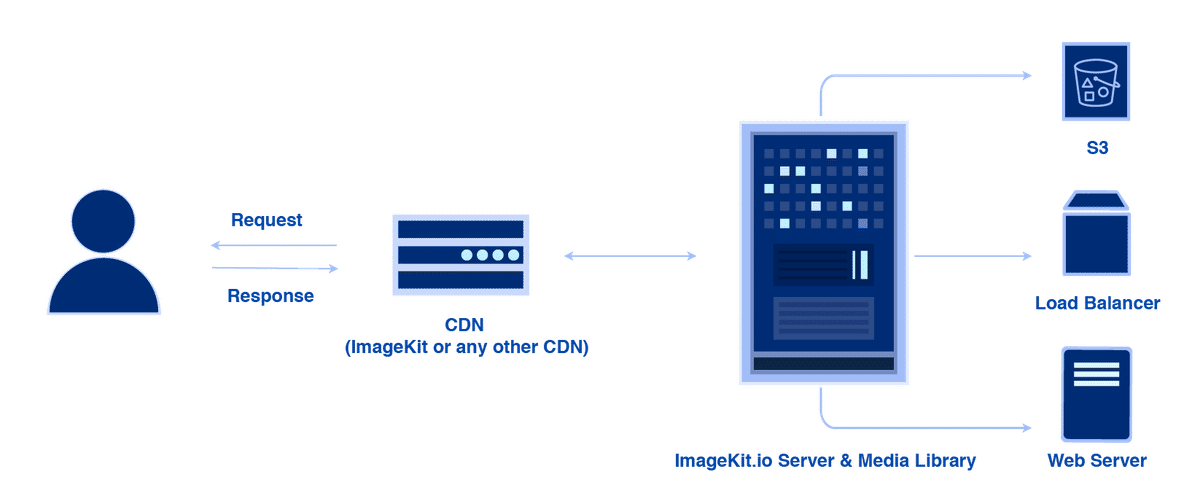
Suppose you request an image with URL https://ik.imagekit.io/your_imagekit_id/example-image.jpg, here is what happens:
- DNS routes the request to the nearest CDN edge location that can best serve the request, typically the nearest POP in terms of latency. That means ik.imagekit.io resolves to an IP address of the CDN edge node which is closest to the user.
- If the file is found in the CDN cache, a response is returned to the user. In over 90% of the cases, the response is returned from the CDN cache. If not, the CDN does the following step.
- The request is sent to the nearest ImageKit.io processing server — Imagekit.Io checks for the file in its internal caches. If the file is found in the cache, the response is returned. The CDN caches this new file from the response and also returns it to the user. If ImageKit’s internal cache doesn’t have the file, then the advantage of having multiple geographically distributed core processing servers comes into the picture. The request is routed internally to your chosen processing region.
- ImageKit.io fetches the original image from your origin (which could be your AWS S3 bucket, a load balancer, or an Nginx web server, or any other type of origin). Then optimizes and transforms that image as per your account’s default settings and the URL parameters, and a response is returned. The file also gets saved in ImageKit.io’s internal cache & CDN cache for future requests.
Advantages Of Multi-Region Core Processing Servers
The main point of having multiple core processing servers is a performance improvement. However, there are many other benefits:
1. Better availability
Images are a critical part of any website, and we understand it. Having multiple servers running in physically different data centers allows us to have multiple failovers in case one region goes down (it could happen, as at the end of the day, hardware can fail anytime). This allows us to provide 99.9% uptime SLA.
2. Reduced latency
Choosing a core image processing region close to your origin will reduce latency for CDN miss requests. This is because it will take less time to download the image from your origin now.
3. Reduced bandwidth cost for your origin
If you are using Amazon S3 bucket as an origin or EC2 (using web server integration) and your region is the same as the ImageKit.io core processing region, you are saving cost because of our multi-region processing network. When data is transferred within the same AWS region, the charges are minimum if not 0.
4. Data Laws in your Country or Region
There might be certain laws or business functions which require you to store your customer data within regional or national boundaries. This is a common practice for a lot of businesses in the EU region or financial applications in all countries. Having a core processing region in your country or region helps in staying compliant with that law even with a third-party service provider like ImageKit.