







Are you among the 50% of marketers wasting time searching for files saved on different drives? Is managing digital assets becoming a hassle for you?With a Digital Asset Management software you can spend less time searching for images, videos, documents or any other marketing collateral. It allows you to store, arrange, retrieve, and distribute digital assets with a click. However, finding free digital asset management software that meets your needs can be daunting.Most free DAM software are open source, and you need a tech-savvy team to customize its features and when you manage to do that integrating the software into your workflow becomes a pain.
This article will help you choose from the free digital asset management software that is not open source.
Challenging the Open-Source DAM Narrative
Open-source DAMs come with their own lists of challenges:
Total Cost of Ownership (TCO)
Open-source DAM software may seem free initially, but comes with hidden costs. You need a technical team to customize and maintain the software. It takes up time, money, and resources you could have spent on other critical business activities.
Customization Challenges
Not every open-source DAM software will work for your organization. It is designed for a wider audience and does not address specific business needs, so you may have difficulty making it part of your workflow. Customization can be costly, time-consuming, and require technical expertise. It also adds another layer of complexity to the already challenging implementation process.
Lack of Comprehensive Support
Open-source DAM software is community-driven, and most support comes from fellow users. However, you will not receive immediate technical support if you encounter issues or bugs. You will need a dedicated team to address any technical problems.
Security Concerns
Due to its open-source nature, the software is vulnerable to security threats. Hackers can access the source code, discover vulnerabilities, and exploit them, putting your digital assets and sensitive data at risk.
Complexity of Integration
Integrating open-source DAM software into your existing workflow is complex. Any errors can lead to data loss or mismanaged workflows. Technical expertise, time, and resources are required to ensure a seamless integration.
Limited Feature Set
Most open-source DAM software has limited features. The lack of advanced capabilities hinders the efficiency of managing digital assets. The software may not be upgraded with new or custom features often. You will have to bear additional development costs for upgrades, which defeats the purpose of using free software.
Scalability Issues
As your business grows, you will need a scalable DAM system to accommodate the increasing volume of digital assets. Open-source software may not be able to scale and support your growing needs.
Lack of Vendor Accountability
A single vendor is not responsible for developing and maintaining open-source products. The lack of accountability can leave outdated features, bugs, and security vulnerabilities unresolved.
Comparing Open-Source DAMs with Free Digital Asset Management Solutions that are not Open-Source
| Open Source DAM | Free DAMs that are not Open-Source |
|---|---|
| No licensing fees, which is good for budget-conscious users | Available at minimal upfront costs |
| Publicly available source code | The source code is not available for easy customization |
| Additional development is needed for custom features | Existing features can be customized for specific business needs |
| It may not be scalable for large asset libraries | Scalable to support growing businesses |
| Provides only community support. You may need to hire technical experts | Comprehensive technical support from the vendor or customer service team |
| Requires in-house security expertise to maintain a secure environment | A secure environment with regular updates and maintenance provided by the vendor |
Exploring Alternative Free Digital Asset Management Software
Several free digital asset management solutions are not open source. Here are seven recommended free DAM software that you can consider:
1. ImageKit
2. Pics.io
3. Air
4. Cloudinary
5. Artwork Flow
6. Tweak
7. Stockpress
ImageKit

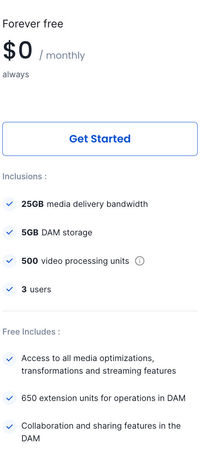
ImageKit is a cloud-based DAM solution with a forever-free option, generous user limits and powerful integration abilities. It’s primary functionality is to provide a central repository to access and efficiently manage digital assets, especially for companies experiencing rapid growth within their marketing and design teams or dealing with large asset volumes.
With ImageKit free DAM solution, the following features are included:
Media Collection: ImageKit's media collection feature enables users to assemble media assets into cohesive groups tailored to specific business requirements, without the need for duplication or relocation of files. Independent of the existing folder structure, this feature allows users to curate collections from resources dispersed across their media asset repository. The advantage? Users can enhance accessibility, visibility, and security of their media operations, simplifying the management and dissemination of marketing collateral to relevant stakeholders
Access Control and Sharing: Access control and sharing functionalities empower users to regulate access to specific media assets, determining who can interact with them and what actions they can undertake. By defining various access levels, the platform ensures that only authorized individuals engage with the content, helping teams strengthen security measures, streamline workflow processes improve collaboration with internal and external teams
Versioning and Commenting: Versioning and commenting functionalities in ImageKit empowers users to monitor alterations made to media assets over time and append comments or annotations to provide contextual information or feedback. These capabilities prove invaluable for collaborative workflows, facilitating efficient review, commentary, and iteration on media assets among team members. Users can bolster communication channels, streamline revision processes, and uphold precision in their creative endeavors by preserving a comprehensive history of asset versions and comments.
Draft Assets: The draft assets feature within ImageKit allows users to refine and review media files before publication, thereby enabling content creators to iterate on designs, videos, or other media assets with ease. By creating drafts, users can experiment with different iterations, refine their work, and ensure that only polished content is shared with the intended audience. This feature caters to the needs of content creators, fostering an environment conducive to creativity and quality assurance.
AI Extensions: ImageKit's AI extensions integrate artificial intelligence capabilities into the platform, enhancing media management. By harnessing AI, users can automate tasks, enhance searchability, and improve the overall efficiency of managing large volumes of media assets, thereby optimizing workflows and maximizing productivity.
Metadata and Media APIs: While built-in functionality within a platform like ImageKit offers users a range of tools and features for managing media assets, APIs provide additional flexibility, customization, and integration capabilities. Metadata APIs in ImageKit empower users to augment media assets with descriptive information, tags, or keywords, facilitating better organization and searchability. Additionally, Media APIs facilitate seamless integration with other systems or applications, enabling users to interact with their media assets programmatically
Powerful Integrations: ImageKit provides an integrated solution comprising a Media Library and AWS CDN. This enables users to effortlessly deliver flawless photos and videos without the need for coding, compatible with any web server, domain name, cloud storage, or CDN.With real-time optimization and manipulation, it simplifies image management across devices. It seamlessly integrates with various cloud storage servers like Amazon S3, Google Cloud Storage, and DigitalOcean Spaces, as well as platforms such as WordPress, Magento, and Shopify. Whether it's external storage or web servers, ImageKit streamlines the process with its extensive compatibility and ease of use, requiring minimal changes to existing infrastructure.
<iframe src="https://app.storylane.io/share/jdytze9ajuzd" width="100%" height="500" frameborder="0" allowfullscreen="">``</iframe>
Pics.io

Pics.io is free DAM software designed to streamline how teams manage, share, and distribute digital assets. It is a cost-effective solution that is ideal for small and medium-sized businesses. Pics.io operates on top of Google Drive and Amazon S3, making these cloud storage solutions secure and scalable for your digital assets. It allows teams can find files faster with its user-friendly interface, advanced search capabilities, and custom metadata fields and enhances collaboration through shared collections, commenting, and approval workflows, ensuring operational efficiency.
Pros
- Highly intuitive interface interface to ease navigation and asset management for users with varying technical proficiency.
- Cloud-based solution enabling easy access on the go.
- Integrates readily with your existing digital ecosystems.
- Allows version control to make the latest updates easily identifiable and accessible.
Cons
- The free trial of Pics.io is available only for seven days. After that, you must upgrade to paid plans for continuous usage.
- Slow loading time for larger files.
Air

Air is a DAM and collaboration software that helps centralize images and design files. It allows marketing teams to collaborate and save time with smart features like automated duplicate detection and image tagging. Air has a user-friendly interface that makes it easy for non-technical team members to use the software. It also has powerful features like bulk editing, sharing, and commenting options to enhance teamwork. The platform is free for teams of 2 and small asset sizes.
Pros
- Asset labeling and AI tagging help teams easily find assets.
- Supports easy asset sharing within and outside of the organization.
- Visual boards for easy workflow management.
Cons
- Does not offer version control.
- Users might struggle with managing documents (Word, .ppt, and PDF files).
Cloudinary

Cloudinary manages images and videos for teams by eliminating complexities. It provides a suite of editing and storage capabilities. Users can save time with tools for resizing, setting quality parameters, altering formats, and cropping. Their DAM tool significantly reduces the time marketing teams allocate to managing their digital assets.
Pros
- AI-powered automatic tagging of assets for easy search.
- Cooperative technical support team with 24/7 availability.
- Offers up to 25 GB storage in a free plan.
Cons
- Limited customization and advanced features in the free plan.
- The software is expensive compared to the features it offers.
Artwork Flow

Artwork Flow is a platform for creative operations and brand asset management. It focuses on streamlining creative process using features like online color picker to extract the color palette from a creative, smart font finder for recognizing fonts in PDFs, and an online measurement scale to size creatives correctly. Contextual search and custom workflows make the platform user-friendly. Features like AI-powered smart tagging and unlimited reviewers help save valuable time and effort for your teams.
Pros
- User-friendly interface for easy use by non-technical team members.
- Integrates with other business systems such as Adobe Creative Cloud and Figma in the free version. Slack and Google Drive Integration is available for free during the trial.
- Enables teams to compare versions and create unlimited variations of each creative.
Cons
- Limited features that do not work properly.
- The file uploading time is too high.
Tweak

Tweak is advanced, free digital asset management software. Marketing teams can use the platform to manage, edit, distribute, and automate brand designs, images, and videos. Up to 5 users can collaborate on a creative to crop, change colors, or add graphics to it.
The platform is designed to supercharge marketing teams, allowing them to organize, share, and modify assets efficiently. They can quickly transform ideas into fully realized campaigns in mere minutes. It ensures brand consistency across all marketing materials with smart templates, approval processes, and customizable access levels.
Pros
- Empowers teams with highly customizable features such as workflow automation and smart templates.
- Allows a Super User to set permissions for editing and collaboration for teams of 5.
- Allows sharing to unlimited users over a password-protected public collection.
Cons
- Limited customization options in the free plan compared to paid plans.
- Customizing assets requires technical and design expertise.
- Only 250 MB storage.
Stockpress

Stockpress offers file management and sharing solutions for marketing teams. It is a cloud-based platform that merges simplicity in file handling with the smart capabilities of digital asset management (DAM). The free plan allows unlimited users and offers 3 GB storage.
Pros
- A simple, straightforward interface makes it easy for all team members to access and use.
- Advanced organizational features such as customizable metadata fields and collections.
- Unlimited users in the free plan provide cost efficiency for growing teams.
Cons
- Does not offer advanced editing options like other DAM software.
- Limited storage space compared to other platforms.
Factors to consider when selecting a DAM solution
Selecting a free Digital Asset Management software requires much consideration. It costs your business time and resources to transfer assets and adapt to a new system. You need to choose the right platform that meets all your team's needs.
Here are some factors to consider when selecting the right DAM solution for your marketing team:
- Scalability: Your DAM system must grow with your business. It must accommodate more users, assets, and storage needs over time.
- Integration Capabilities: Seamless integration with your other business tools and systems (e.g., CRM, marketing automation, social media platforms) is critical for efficiency.
- User-Friendly Interface: An intuitive and easy-to-navigate UI will allow all team members to use the solution.
- Asset Security: Robust security features will protect your sensitive brand assets from unauthorized access or breaches.
- Customization Options: Flexibility in customizing features, workflows, templates, and asset organization will ensure the tool meets your specific business needs.
- Advanced Search and Tagging: Efficient search capabilities and smart tagging save time by helping you quickly locate and organize assets.
- File Support and Conversion: Support for different file types and the ability to convert files into different formats or resolutions allows you to do more.
- Customer Support: Responsive and helpful customer support when you get stuck.
Use the above to make an informed choice and research on the reviews of the platform you plan to invest on.Take a look at our reviews, and start your FOREVER FREE plan TODAY!

Sources:
Source 1
Source 2
Source 3
Source 4
Source 5
Source 6
Source 7