

惯性聚合 高效追踪和阅读你感兴趣的博客、新闻、科技资讯
阅读原文 在惯性聚合中打开

推荐订阅源

Help Net Security
Help Net Security
S
Schneier on Security
Security Latest
Security Latest
C
Cyber Attacks, Cyber Crime and Cyber Security
博客园_首页
K
Kaspersky official blog
B
Blog
雷峰网
雷峰网
MyScale Blog
MyScale Blog
Threat Intelligence Blog | Flashpoint
人人都是产品经理
人人都是产品经理
让小产品的独立变现更简单 - ezindie.com
K
KPMG report finds enterprise disconnect between AI and its ROI | CIO
T
Threatpost
cs.AI updates on arXiv.org
Latest news
Latest news
J
Java Code Geeks
W
WeLiveSecurity
GbyAI
GbyAI
V
Vulnerabilities – Threatpost
S
Secure Thoughts
IT之家
IT之家
奇客Solidot–传递最新科技情报
奇客Solidot–传递最新科技情报
博客园 - 叶小钗
Engineering at Meta
Engineering at Meta
S
Security @ Cisco Blogs
罗磊的独立博客
M
MIT News - Artificial intelligence
Blog — PlanetScale
Blog — PlanetScale
Stack Overflow Blog
Stack Overflow Blog
月光博客
月光博客
P
Proofpoint News Feed
博客园 - 聂微东
云风的 BLOG
云风的 BLOG
N
Netflix TechBlog - Medium
D
DataBreaches.Net
S
SegmentFault 最新的问题
V
Visual Studio Blog
V
V2EX
The Register - Security
N
News | PayPal Newsroom
aimingoo的专栏
aimingoo的专栏
C
Cybersecurity and Infrastructure Security Agency CISA
N
News and Events Feed by Topic
Hacker News: Ask HN
Hacker News: Ask HN
OSCHINA 社区最新新闻
OSCHINA 社区最新新闻
Google DeepMind News
Webroot Blog
Webroot Blog
NISL@THU
NISL@THU
D
Darknet – Hacking Tools, Hacker News & Cyber Security

ImageKit.io Blog

Next.js Image Optimization with ImageKit Use Video as a Background in Your Next.js Project How to Fix Autoplay Video in Next.js How Durian Scaled a Visual-First Retail Experience to 350K Monthly Visitors Online How Matsmart accelerated image delivery across countries with ImageKit AI in Digital Asset Management: From Smart Workflows to Agentic Automation How Joseph Joseph unified and secured global video delivery with ImageKit How Modall powers fast, effortless media delivery across 40+ projects with ImageKit Digital Asset Management (DAM) Trends: 2026 Report How to add a poster image to Video.js player (and automate it) HLS streaming with Video.js + React Building the future of storytelling with fast, AI-powered video delivery How PushOwl delivers 100M+ image-rich notifications seamlessly with ImageKit How Homify delivers millions of interior design images seamlessly with ImageKit Better event discovery with lightning‑fast videos & images Adding video player in React Native Video player in Angular applications Crop and resize videos in React Next.js image and video upload React image and video upload React video optimization How we quadrupled our traffic to 625K monthly page views How Apollo 24|7 boosted performance & reduced costs with ImageKit Simplify your media workflows with ImageKit DAM integrations Extending Lighthouse for custom image and video optimization analysis Brand Asset Management: What is it? How does it work? WordPress Digital Asset Management Guide - Manage your WP media assets better Why Shopify retailers need a digital asset management solution DAM vs. SharePoint: Which is best for you? AI-powered Metadata and Tagging in Digital Asset Management How Hopscotch built India's largest online Kids' fashion brand with ImageKit Dropbox Vs. DAM: Which Is The Right Tool For Digital Asset Management Digital Asset Management for Photographers: A Complete Guide Why digital asset management for agencies is essential Helping both Top and Bottom Line: SaffronStays rapid, profitable growth with ImageKit How KreditBee simplified media experiences with ImageKit Google Drive alternatives for businesses (with fast-growing teams) Node.js image upload ImageKit: The Secret Ingredient in Swiggy’s Expansion Journey Streamlining the Design Approval Process: A Comprehensive Guide AV1 Codec - Complete guide for video application devs PHP image and video upload Angular image & video upload AV1 vs VP9: Which codec should you choose? Adding video player in Next.js React Video Player VP8 vs VP9 - In the context of online video delivery Exploring WebM vs MP4 7 Free Digital Asset Management Software that are not Open-Source Comparing 9 Top Digital Asset Management Tools in the Market What are Brand Standards and Why do they Matter? Boost Sales and Brand Appeal: Essential Tips for eCommerce Image Management Brand Recall: The Strategy to Create Unforgettable Brands How to upload files in HTML? Branding for Small Businesses (2025 Edition) Everything you need to know about VP9 codec Recent updates from ImageKit and what's next Best Ways to Write RFP For Digital Asset Management (+ with free RFP template) What is Brand Dilution? How to Avoid It? Explained with [Examples] The Importance of Brand Identity: Leveraging Digital Asset Management for Impact From Launch to Scale: How to Launch a Brand Campaign Digital Asset Management Requirements - What do You Need to Evaluate and How? Marketing Collateral Management: A Quick End-to-End Guide Video Content Management System: What Is It And How To Choose One? Dropbox vs. Google Drive vs. Onedrive: The Best Cloud Storage Solution How to Build Brand Trust: Get Started In 2025 Google Drive vs. Box: A Detailed Comparison How Digital Asset Management Solutions Help Protect Brand Equity A DAM Solution Can Safeguard Your Digital Intellectual Property - Here’s How WebP Vs. PNG: Which Image Format Should You Use and Why? How to Resize Images in Bootstrap Easily Progressive jpegs (PJPEG): the key to loading images faster on your website Dropbox vs. Google Drive: The Best Cloud Storage For Digital Assets Dropbox Pros & Cons In 2024: An In-Depth Analysis and Why A DAM Solution Stands Out Google Drive Vs OneDrive: The Better Storage Option For Digital Assets Manage your video assets better with video metadata Understanding DAM's Role in Strengthening Brand Identity Digital asset management strategy: What to know before creating one The Ultimate Guide To Marketing Agency Onboarding 6 Solutions To Simplify Large File Sharing Over The Web A Step-by-Step Breakdown of a Video Production Workflow 13 Digital Asset Management Use Cases You Should Know How to Conduct a Brand Audit and Manage Your Brand Assets Costly Consequences of Inconsistent Branding And How DAM Can Help Dynamic Asset Transformation: What It Is, Why You Need It, and How ImageKit Can Help Everything You Need to Know About HTML Video Autoplay How To Select Your DAM Vendor: A Complete Guide How to Boost User Experience with Smart Digital Asset Management React Image Optimization: A Guide for Web Developers Why Should DAM Be A Part Of Your MarTech Stack? Unleashing the Power of Content Repurposing with ImageKit MKV vs MP4: Which Video File Format Is Better for Your Needs? Digital Asset Management For Ecommerce: A Complete Guide How an Image Tagging Software can Transform Your Image Search How to Manage Your Content Lifecycle Effectively M4V vs MP4: Which Video Format Should You Use and Why? Why Every Business Needs An Image Management System All The Questions To Ask During A Dam Demo Which is the Best Image Format for Your Website? Uploading Multiple Files Using JavaScript: A Comprehensive Guide
How SVG Optimization Can Help In Improving Website Speed?
Abhishek Khanna · 2018-05-24 · via ImageKit.io Blog

SVG stands for Scalable Vector Graphics, a vector graphics format based on XML. SVG is a W3C standard, meaning it can be used easily with other open standard languages and technologies including JavaScript, DOM, CSS, and HTML.

Under the hood the SVG image is described by mathematical equations, which implies it can scale infinitely. It uses numbers instead of pixels, meaning scaling involves mathematical operations such as multiplication and division.

According to SitePoint, SVG uses shapes, numbers, and coordinates — rather than a pixel grid — to render graphics in the browser, which makes it resolution-independent and infinitely scalable.

The power of SVG lies in the advantages it provides over its counterparts like JPG, PNG, and GIF.

Scalability

One of the major benefits of SVG is that they are resolution independent. It means that unlike file types such as JPG or PNG, SVG retains the same quality no matter what screen resolution or size they have.

Browsers recalculate the math behind the image, so there is no distortion. So, on a retina display, where a PNG might appear blurry if it’s not large enough, an SVG retains its quality.
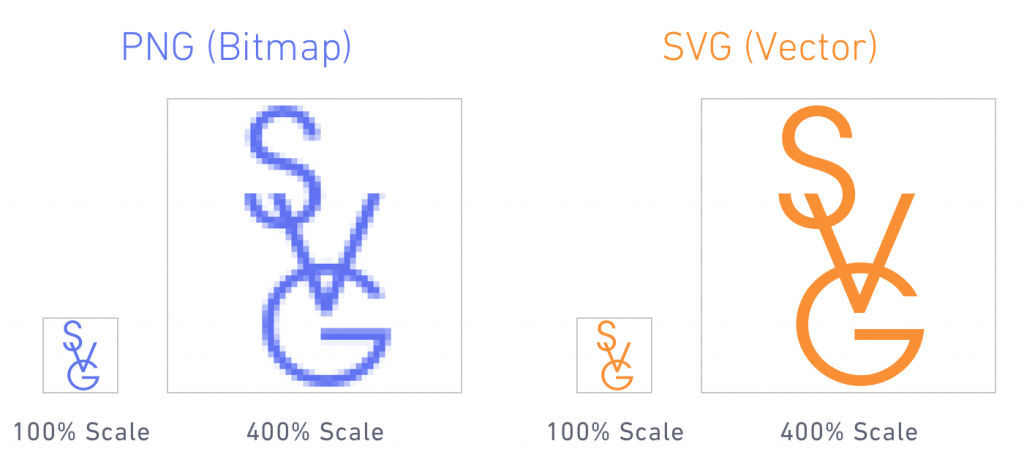
PNG vs SVG - image optimization improving website speed

File Size

SVG images are much lighter than their raster peers because their dimensions are defined by mathematical calculations and not by millions of pixels. They carry a lot of information in a relatively small file size format (compared to the same file size of a raster image format). It's worth bearing in mind, however, that it does depend on the complexity of the shapes used.

On the other hand, raster file sizes are defined by pixels, fixed widths and heights, which make them much heavier while containing less information.

Thus, using optimized SVG's can significantly reduce your page size as well as help the website load faster.


Original SVG File - 527 KB
Optimized SVG File - 264 KB

Improving Website SEO

Using SVG comes with the added advantage of getting better search engine results. Since SVG uses actual text in the formatting, search engines can better read the images.

Other image formats only provide alt information, which limits the SEO. As SVG images are defined in XML text files, keywords and descriptions can be used and more easily recognized by search engines. Google indexes all SVG content, including standalone files and when SVGs are embedded directly in HTML.

Know more about how SVG images impact your search rankings here, and find out how Google and SVG go so well together here.

Using CSS & Javascript for Animations

You can animate SVG using CSS, JavaScript or SMIL, and each of them gives you a different level of control which you can take advantage of for creating all kinds of animations on SVG elements.

Using CSS and Javascript provides more capabilities as you can style properties like stroke color and width, fill color, opacity, and many other in your shapes.

You can learn more about creating SVG animations here while referring to animating SVG with Javascript here.

Similarly, you can check out this example for better clarity on SVG animations.

One of the most important aspects impacting web performance is the size of the used files on a web page.

SVG graphics are routinely smaller file sizes compared to their raster graphics brethren. You can know more about how SVG's are transforming web development here.

WHY OPTIMIZE SVG IMAGES?

The emerging trend of SVG images has shown to provide a significant improvement in website load time. SVG codes generated by designer tools can be full of irrelevant attributes and unnecessary comments, making the resultant file much heavier.

An informative blog by Raygun talks about some of these factors that contribute to making the SVG heavier. Once we remove the unnecessary code, the file size is reduced by a significant amount, which accelerates the website load speed. Not just that, the optimized SVGs provide better SEO results, lower the load time, and continue to scale flawlessly on any device.

You can analyze the differences between an SVG image and ImageKit’s optimized version of a similar image. The two given images look precisely identical and are in the same SVG format.


Original SVG File - 81.6 KB
Optimized SVG File - 46.2 KB

That’s more than 43% size reduction without compromising the quality, dropping down from 81.6 kb to mere 46.2 kb.

You can test this in real time using the original SVG image and compare it with our optimized SVG image.

We have this feature enabled by default to ensure your website loads as quickly as possible. Log in to ImageKit and start delivering optimized images across all platforms, and improve your website's performance.
Don't have an account? No problem, sign up for free now!