


DigitalOcean is a relatively new cloud provider that has democratized and simplified the availability and deployment of cloud applications. DigitalOcean Spaces is one of the several products offered by DigitalOcean. It is an object storage in the cloud that helps you store your files in the cloud and provides an instant, high availability storage that can provide practically infinite scale.
DigitalOcean Spaces is a great, low-cost cloud storage for large objects like high-quality images. Despite that, it has some drawbacks -
- Spaces cannot optimize your images to the correct format like WebP or the even newer AVIF.
- It cannot compress your images and make them suitable for delivery on the web.
- It does not offer real-time image transformations on images, which means you will have to resize the images for every screen size on your own.
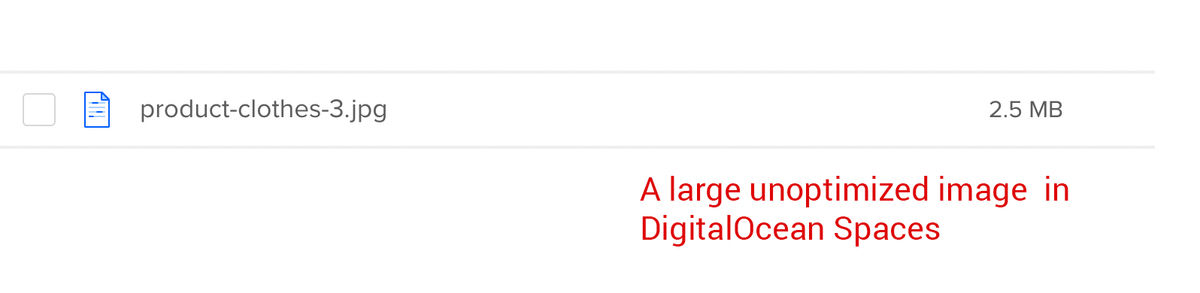
Since image optimization and transformation is essential to delivering a great user experience across devices, one cannot ignore these drawbacks. But, on the other hand, as a business, you might not have time, amongst all the other product features, to dedicate time and resources to image delivery.
This is where a solution like ImageKit comes in. It can integrate with your DigitalOcean Spaces storage and help you deliver perfectly optimized, responsive images across devices. And you can get started for free because ImageKit offers a generous forever free tier to all its users! Read on to see how you can do this.
What is ImageKit?
ImageKit is a cloud-based end-to-end image management and delivery service. It comes with its own storage and delivery CDN (AWS CloudFront), along with more than 50 image and video transformations that can be performed in real-time.
The best part about ImageKit is that it is not necessary to use ImageKit's storage to use its optimization and transformation features. It can be integrated with any external storage, including S3-compatible storage like DigitalOcean Spaces, to help you deliver lighter images in no time.
Over 35,000 developers and 600 companies use ImageKit to deliver billions of optimized images and videos every day. Let’s look at how you can use it with your DigitalOcean Spaces bucket. You can refer to the latest technical documentation of DO Spaces integration here.
Request flow for optimized images in DO Spaces with ImageKit
- After attaching your public or private Spaces storage to ImageKit, access the image in it using the ImageKit URL endpoint.
- If ImageKit has a cached version of its CDN or other internal caches, it delivers the image from there. Such images get delivered in low double-digit milliseconds.
- Suppose ImageKit does not have the optimized and transformed image in its cache. In that case, ImageKit gets the original image from your Spaces attached to ImageKit, does all the processing in real-time, and sends back the right image to the user. This takes about 100-200ms on average, depending on the input image.
- Subsequent requests for the same image get served from ImageKit’s CDN.

Let’s look at the steps you need to follow to optimize and resize the images in your DO Spaces storage via ImageKit.
We have created a new DO spaces storage for this article and uploaded a few images to it. The objects inside the storage are Private, but the steps remain the same even if the objects are Public.
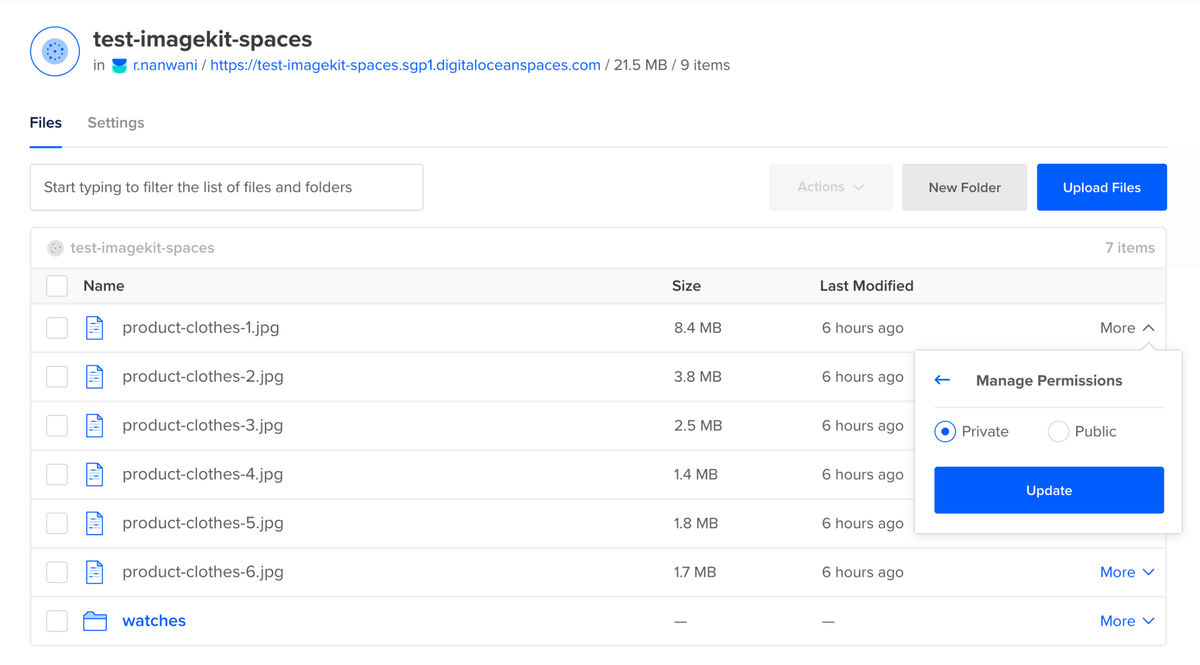
By the end of this article, we would be able to deliver high-quality, responsive images across devices using the original image stored in this storage.
1. Create an ImageKit Account
The first step in this process is to create a free ImageKit account. ImageKit offers a fully-featured, forever free account with 20GB of delivery bandwidth every month. This is usually more than enough for websites up to a few thousand page views in a month.
ImageKit offers seven processing regions across the globe for optimization. You should choose the one that is geographically closest to your Spaces storage location.
2. Creating Access Keys for your DO Spaces storage
Since the images added to our DO Spaces are private, we cannot access them via the object's URL. We need to create a Spaces Access Key in DigitalOcean to be able to access the object.
Note: If the objects in your bucket are public, i.e., you can access them via their URL, you can also use ImageKit's Web Server origin to attach your DO Spaces to ImageKit. Read here
To create an access key, go to the Spaces home page, click on Manage Keys, and then click on Generate New Key.
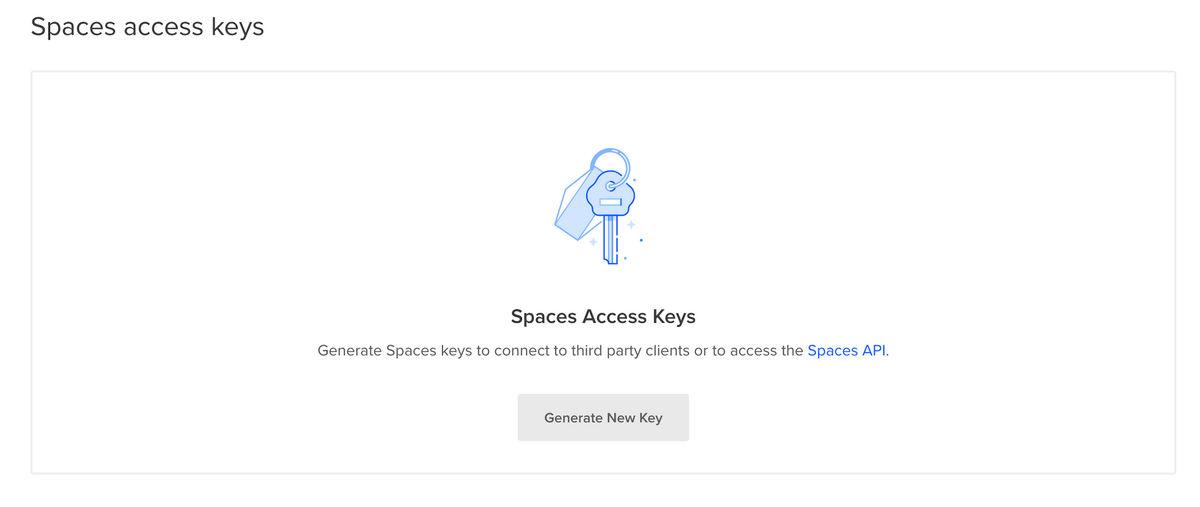
You will need to give it a name, and once generated, you get an Access Key and a Secret Key. This is the only time that the secret will be displayed, so it is best to copy both the keys. We will need them to add this storage to ImageKit. You can also refer to DigitalOcean Space's documentation for doing the same.
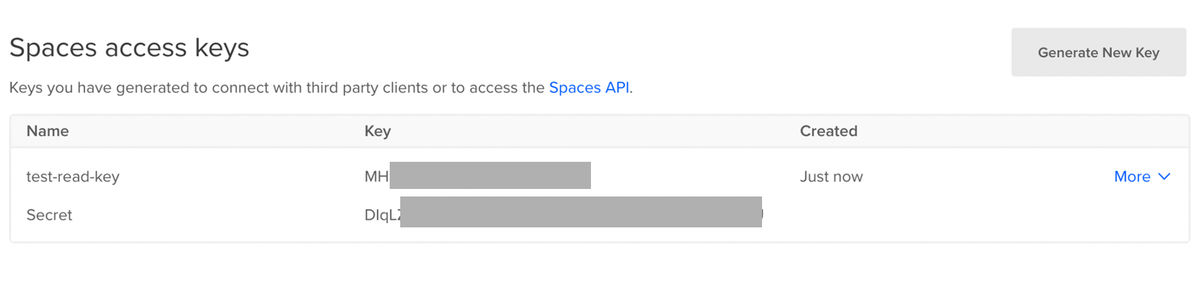
Note: Ideally, every 3rd-party client that accesses your DO Spaces should have a separate key so that you can manage or revoke access to an individual client. So, even if you have an existing key, creating a new key for adding your storage to ImageKit is advisable.
3. Copying your Spaces Endpoint
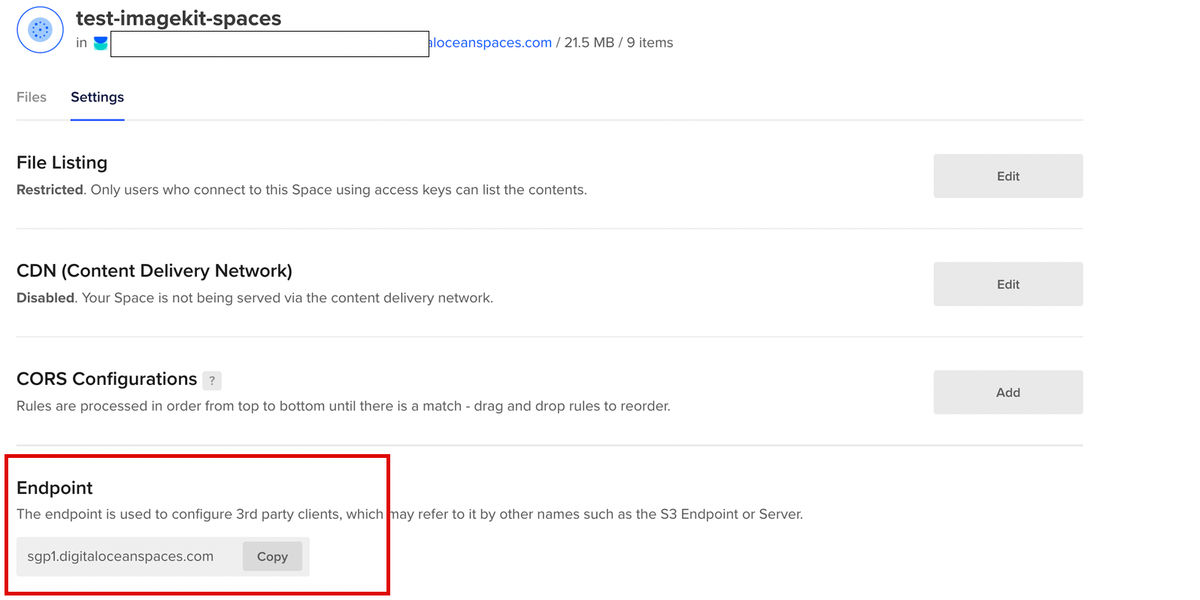
DigitalOcean Spaces is a S3-compatible storage. This means that we can access it just like an AWS S3 storage, with the only difference being the Endpoint you provide to the AWS S3 API. Therefore, apart from the access keys that we created above, to integrate Spaces with ImageKit, you will need to copy the Endpoint for your storage.
You can find the URL Endpoint under the Settings tab of your storage.
4. Attaching your Spaces storage to ImageKit
The next step is to attach your Spaces storage to ImageKit. This will allow ImageKit to access the original images from your storage when needed.
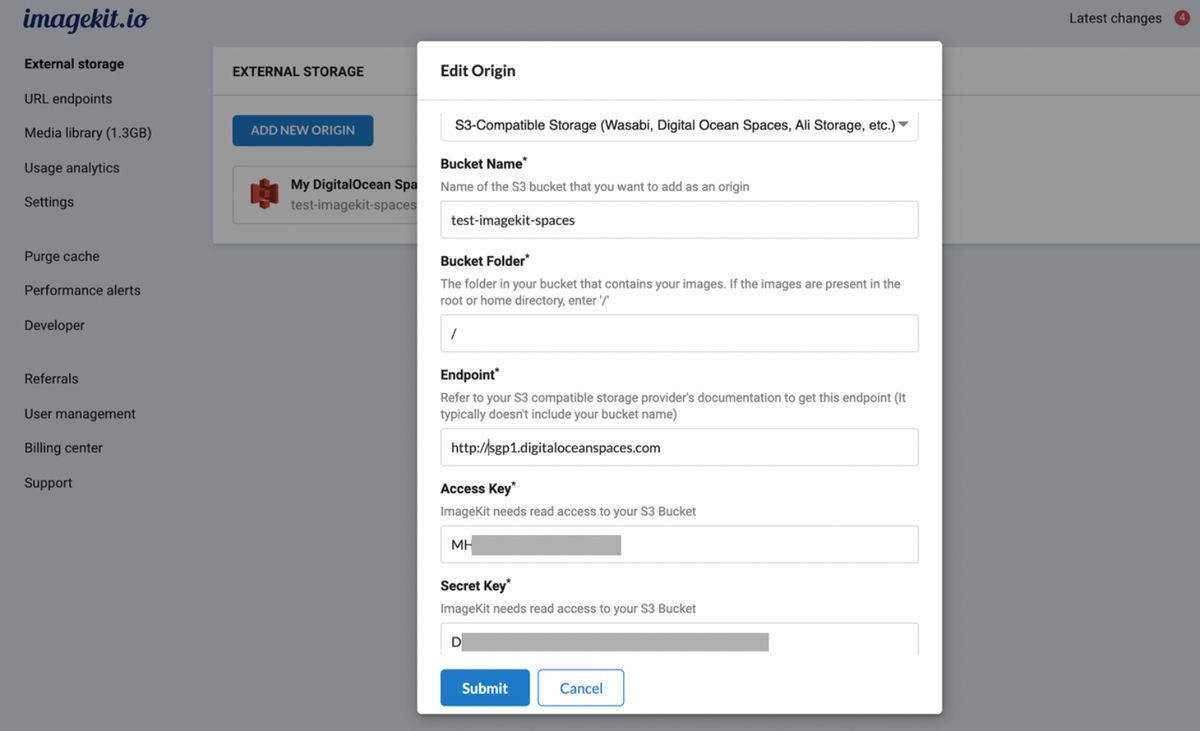
To do this, go to “External Storage” in the ImageKit dashboard and click on the “Add New Origin” button. In the modal that opens up, select the “Origin Type" as “S3- Compatible Storage”.
You can now fill up all the other fields in this modal like the Bucket Name, Bucket Folder (the folder you want to access in the Spaces, we will use / because we want to be able to access the entire bucket. Add the Access Key, Secret Key, and the Endpoint (with http:// prefixed to what you copied in step 3) in the corresponding fields and click on Save.
Now head over to the “URL Endpoints” section in the ImageKit dashboard. Your newly added Spaces origin will appear under the Default URL Endpoint. If not, you can always click on Edit URL Endpoint and the Spaces origin to your ImageKit URL Endpoint.
That’s it! The setup is now complete.
We can start accessing the images in your DO Spaces storage via ImageKit. If you provided access to the entire storage (using Bucket Folder as /), you just need to replace the spaces URL endpoint with the ImageKit URL endpoint.
https://test-imagekit-spaces.sgp1.digitaloceanspaces.com/product-clothes-3.jpgThe DO Spaces object URL
gets changed to
https://ik.imagekit.io/ikmedia/product-clothes-3.jpgURL using ImageKit URL endpoint
Automatic image optimization for Digital Ocean Spaces
ImageKit automatically converts the images to the correct format, like WebP or AVIF (if enabled on your account), and compresses it. The format conversion is done after determining the formats supported in the requesting browser and the original image's content. So you can be assured that ImageKit's automatic optimization will help you serve a correctly optimized image on all devices and browsers.
For example, the original image product-clothes-3.jpg in the storage was 2.5MB in size.
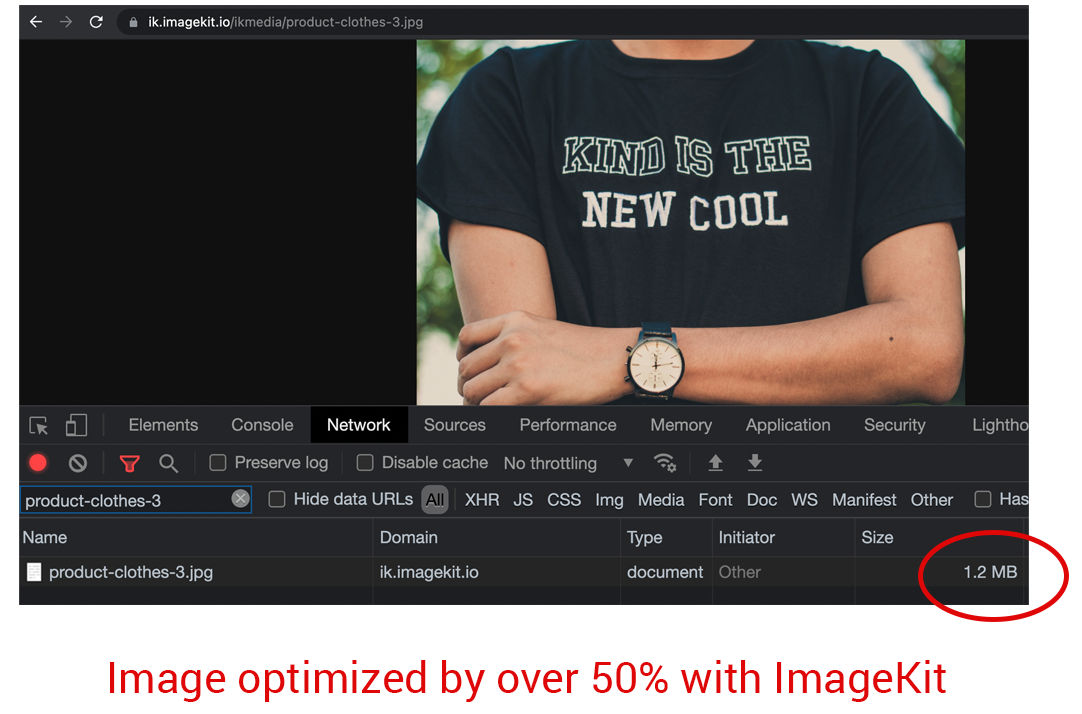
When you access it via ImageKit, the image is converted to WebP on a supported browser, and the size comes down to 1.2MB. That's over a 50% reduction in size without making any other change to the URL!
Real-time image resizing and other transformations for DO Spaces
ImageKit allows you to transform your images in real-time by specifying the right parameters in the URL. For example, if you have to resize the above image to width 300px, you just need to add tr=w-300 as a query parameter in your URL.
https://ik.imagekit.io/ikmedia/product-clothes-3.jpg?tr=w-300
And just like that, you get a 300px wide image in real-time.
Need a 300 x 400 image? It should not be a problem with ImageKit’s resizing parameters.
https://ik.imagekit.io/ikmedia/product-clothes-3.jpg?tr=w-300,h-400
Like the examples above, ImageKit offers over 40 different transformations, from simple cropping and resizing to more complex ones like watermarking, smart crop, blurring, background change, etc. You can use these transformations to deliver responsive images to your users, ensuring excellent performance across devices.
<img srcset="https://ik.imagekit.io/ikmedia/product-clothes-3.jpg?tr=w-300 300w,
	  https://ik.imagekit.io/ikmedia/product-clothes-3.jpg?tr=w-600 600w,
          https://ik.imagekit.io/ikmedia/product-clothes-3.jpg?tr=w-900 900w"
     sizes="(max-width: 480px) 300px, 50vw" />
Example of a responsive image tag
Or get creative and use the text overlays to build rich contextual images and dynamic banners for retargeting your users on social media and email.

Here is a video demonstrating some of the transformations available in ImageKit.
Improving Google Lighthouse score for images in DigitalOcean Spaces
With ImageKit, the images in your storage get automatically optimized to the right format, right compression level, and you get the flexibility to resize and transform them to the exact size needed on your UI. ImageKit also comes integrated with AWS CloudFront CDN, which reduces the load time and improves caching of the images. This helps you resolve any image-related issues thrown up by Lighthouse, PageSpeed, or any other web performance measurement tool.
A better score helps you improve your SEO rankings and the user experience you deliver to your customers.
Get started with ImageKit now!
ImageKit's Forever Free plan comes with all the necessary features for image optimizations and transformations for your DigitalOcean spaces storage. It provides you with 20GB of output bandwidth every month absolutely free.
Sign up now and start delivering perfectly optimized images on your websites and apps.