
惯性聚合 高效追踪和阅读你感兴趣的博客、新闻、科技资讯
阅读原文 在惯性聚合中打开

推荐订阅源

V
Vulnerabilities – Threatpost
V
V2EX
GbyAI
GbyAI
Recent Announcements
Microsoft Security Blog
阮一峰的网络日志
阮一峰的网络日志
Hugging Face - Blog
Hugging Face - Blog
T
Tailwind CSS Blog
Y
Y Combinator Blog
C
Check Point Blog
爱范儿
爱范儿
CTFtime.org: upcoming CTF events
美团技术团队
雷峰网
雷峰网
IT之家
IT之家
WordPress大学
WordPress大学
V
Visual Studio Blog
Microsoft Azure Blog
MyScale Blog
MyScale Blog
N
News and Events Feed by Topic
罗磊的独立博客
S
SegmentFault 最新的问题
S
Security Affairs
aimingoo的专栏
aimingoo的专栏
F
Fortinet All Blogs
K
KPMG report finds enterprise disconnect between AI and its ROI | CIO
Exploit-DB.com RSS Feed
H
Hacker News: Front Page
Google DeepMind News
B
Blog
O
OpenAI News
C
Cisco Blogs
Simon Willison's Weblog
The Last Watchdog
The Last Watchdog
Hacker News: Ask HN
Hacker News: Ask HN
博客园_首页
人人都是产品经理
人人都是产品经理
C
Cybersecurity and Infrastructure Security Agency CISA
Recent Commits to openclaw:main
Help Net Security
Help Net Security
月光博客
月光博客
J
Java Code Geeks
L
LangChain Blog
博客园 - 司徒正美
Stack Overflow Blog
Stack Overflow Blog
Security Archives - TechRepublic
Apple Machine Learning Research
T
The Exploit Database - CXSecurity.com
N
News and Events Feed by Topic
freeCodeCamp Programming Tutorials: Python, JavaScript, Git & More

ImageKit.io Blog

Next.js Image Optimization with ImageKit Use Video as a Background in Your Next.js Project How to Fix Autoplay Video in Next.js How Durian Scaled a Visual-First Retail Experience to 350K Monthly Visitors Online How Matsmart accelerated image delivery across countries with ImageKit AI in Digital Asset Management: From Smart Workflows to Agentic Automation How Joseph Joseph unified and secured global video delivery with ImageKit How Modall powers fast, effortless media delivery across 40+ projects with ImageKit Digital Asset Management (DAM) Trends: 2026 Report How to add a poster image to Video.js player (and automate it) HLS streaming with Video.js + React Building the future of storytelling with fast, AI-powered video delivery How PushOwl delivers 100M+ image-rich notifications seamlessly with ImageKit How Homify delivers millions of interior design images seamlessly with ImageKit Better event discovery with lightning‑fast videos & images Adding video player in React Native Video player in Angular applications Crop and resize videos in React Next.js image and video upload React image and video upload React video optimization How we quadrupled our traffic to 625K monthly page views How Apollo 24|7 boosted performance & reduced costs with ImageKit Simplify your media workflows with ImageKit DAM integrations Extending Lighthouse for custom image and video optimization analysis Brand Asset Management: What is it? How does it work? WordPress Digital Asset Management Guide - Manage your WP media assets better Why Shopify retailers need a digital asset management solution DAM vs. SharePoint: Which is best for you? AI-powered Metadata and Tagging in Digital Asset Management How Hopscotch built India's largest online Kids' fashion brand with ImageKit Dropbox Vs. DAM: Which Is The Right Tool For Digital Asset Management Digital Asset Management for Photographers: A Complete Guide Why digital asset management for agencies is essential Helping both Top and Bottom Line: SaffronStays rapid, profitable growth with ImageKit How KreditBee simplified media experiences with ImageKit Google Drive alternatives for businesses (with fast-growing teams) Node.js image upload ImageKit: The Secret Ingredient in Swiggy’s Expansion Journey Streamlining the Design Approval Process: A Comprehensive Guide AV1 Codec - Complete guide for video application devs PHP image and video upload Angular image & video upload AV1 vs VP9: Which codec should you choose? Adding video player in Next.js React Video Player VP8 vs VP9 - In the context of online video delivery Exploring WebM vs MP4 7 Free Digital Asset Management Software that are not Open-Source Comparing 9 Top Digital Asset Management Tools in the Market What are Brand Standards and Why do they Matter? Boost Sales and Brand Appeal: Essential Tips for eCommerce Image Management Brand Recall: The Strategy to Create Unforgettable Brands How to upload files in HTML? Branding for Small Businesses (2025 Edition) Everything you need to know about VP9 codec Recent updates from ImageKit and what's next Best Ways to Write RFP For Digital Asset Management (+ with free RFP template) What is Brand Dilution? How to Avoid It? Explained with [Examples] The Importance of Brand Identity: Leveraging Digital Asset Management for Impact From Launch to Scale: How to Launch a Brand Campaign Digital Asset Management Requirements - What do You Need to Evaluate and How? Marketing Collateral Management: A Quick End-to-End Guide Video Content Management System: What Is It And How To Choose One? Dropbox vs. Google Drive vs. Onedrive: The Best Cloud Storage Solution How to Build Brand Trust: Get Started In 2025 Google Drive vs. Box: A Detailed Comparison How Digital Asset Management Solutions Help Protect Brand Equity A DAM Solution Can Safeguard Your Digital Intellectual Property - Here’s How WebP Vs. PNG: Which Image Format Should You Use and Why? How to Resize Images in Bootstrap Easily Progressive jpegs (PJPEG): the key to loading images faster on your website Dropbox vs. Google Drive: The Best Cloud Storage For Digital Assets Dropbox Pros & Cons In 2024: An In-Depth Analysis and Why A DAM Solution Stands Out Google Drive Vs OneDrive: The Better Storage Option For Digital Assets Manage your video assets better with video metadata Understanding DAM's Role in Strengthening Brand Identity Digital asset management strategy: What to know before creating one The Ultimate Guide To Marketing Agency Onboarding 6 Solutions To Simplify Large File Sharing Over The Web A Step-by-Step Breakdown of a Video Production Workflow 13 Digital Asset Management Use Cases You Should Know How to Conduct a Brand Audit and Manage Your Brand Assets Costly Consequences of Inconsistent Branding And How DAM Can Help Dynamic Asset Transformation: What It Is, Why You Need It, and How ImageKit Can Help Everything You Need to Know About HTML Video Autoplay How To Select Your DAM Vendor: A Complete Guide How to Boost User Experience with Smart Digital Asset Management React Image Optimization: A Guide for Web Developers Why Should DAM Be A Part Of Your MarTech Stack? Unleashing the Power of Content Repurposing with ImageKit MKV vs MP4: Which Video File Format Is Better for Your Needs? Digital Asset Management For Ecommerce: A Complete Guide How an Image Tagging Software can Transform Your Image Search How to Manage Your Content Lifecycle Effectively M4V vs MP4: Which Video Format Should You Use and Why? Why Every Business Needs An Image Management System All The Questions To Ask During A Dam Demo Which is the Best Image Format for Your Website? Uploading Multiple Files Using JavaScript: A Comprehensive Guide
'Tis The Season For Better Website Performance
Deeksha Bahl · 2019-12-05 · via ImageKit.io Blog

Holiday season 2019 is upon us, and the stage is lit on fire.

But.

Stellar frontend layout, immaculate product placement, aggressive discounts, even the best-designed marketing campaigns will fail you if your website is falling behind in performance standards.

The holiday season is where people loosen up their purse strings and tighten their standards. With increasingly short attention spans and even lower patience thresholds, the bounce rate rises exponentially with each passing second your website takes to load.

Online shopping raked in a whopping $7.4 billion in revenue on just Black Friday ‘19 in the US alone.

Will a lax website cut it anymore?

OPTIMIZE.

Yes, yes, you’ve heard it everywhere. It’s THE buzzword. But have you done it? To what extent?

There is more to optimization than just A/B tests, banner designs, and placements. You need to dive deeper into the workings of your website and plug the holes in your customer experience.

MAKE IT MOBILE

Of the online revenue that came in Black Friday 2019, $2.9 billion came in by transactions made with a smartphone. 61% of all digital retail transactions were made with a smartphone, as were 39% of the ecommerce sales.

What you have to do is optimize your website for mobile users.

AMPs

For better user experience, adopt AMPs or Accelerated Mobile Pages for your website. And though not confirmed, AMPs are supposed to be a factor for Google rankings.

Apart from the SEO benefits AMPs may come with, they come with the advantage of faster webpage load times.

AMP is an open source initiative project aiming to make mobile-friendly pages load even faster, and you can use the AMP plugin to render webpages with optimized HTML doing just that.

You can check this out for more on AMPs.

RESPONSIVE IMAGES

Responsive websites are not enough, the images have to be responsive too.

image result for responsive website and responsive images

Relying on browser-side resizing for responsiveness is a recipe for disaster.

If you’ve not prepared your images for the various viewports, they will be served in their original sizes.

What a colossal waste of bandwidth and time!

Your users don’t have the budget to spend too much of either on you.

A 2120 pixel wide image is needed for a desktop website, but that is a redundant resolution and size for an image that is to be served on a mobile screen.

Add to that, serving it is not only costing your users in bandwidth consumption and page load time, but you too are paying a price on bandwidth costs.

Optimize and resize your images based on the devices they will be viewed from. Check this out to know how to deliver responsive images across the various devices.

IMAGE OPTIMIZATION

Images being one of the heaviest files on your website need special attention. They have the power to affect your website performance dramatically, and unoptimized images do just that.

And when you’re optimizing your images this sale season, with all that is already happening, it is also important to use a tool or service which does the job in real-time.

IMAGE SIZE

The size and hence, the weight of your images has a considerable impact on your website speed and performance. The bigger the image file, the slower your website will be.
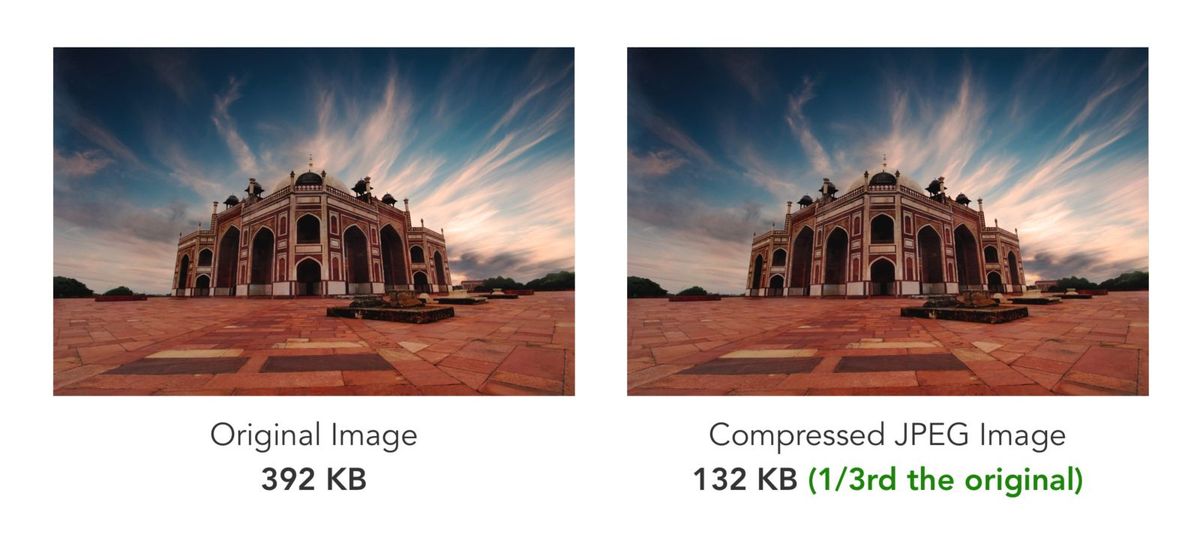
Image compressed using ImageKit here is 1/3rd the original image in size

Optimizing image size is a definite, but there needs to be a balance struck between size and quality. While reducing image size, you need to ensure the image quality has not been compromised.

This holds especially true for ecommerce stores.
A website whose entire business is based on how its products look can not serve low-quality product images.

IMAGE FORMAT

The size has an impact, yes, but so does the format you are serving your images in.

There is no universally correct image format.
Each format has its own nuances and is based on their file type and use case. For example, PNG is best suited for images with transparency, particularly in logos, while JPGs are best suited for photographs.
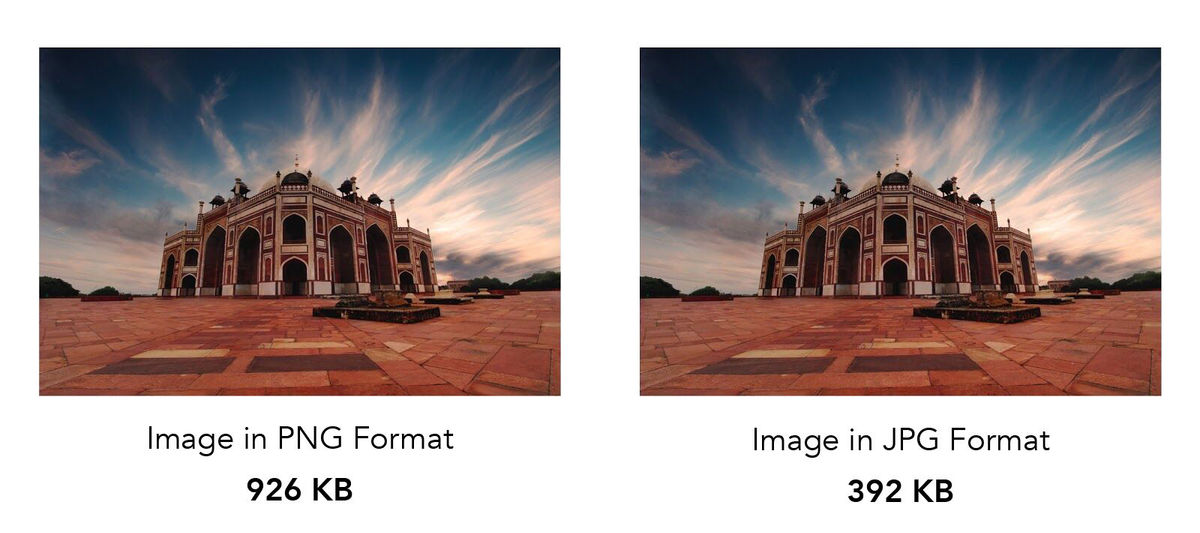
Correct image format selection using ImageKit.io

A heavier image will consume more bandwidth and take longer to load slowing your page speed, hence the importance of choosing the right image format for your images.

Apart from having an effect on the page load speed, the image format also has an impact on the quality of image compression, thus making optimization of image formats a necessary step in your website performance optimization strategy.

LAZY LOADING

Loading all the images on the webpage at the same time will only consume more bandwidth and lower the page load speed.

When loading the page, prioritize content based on its consumption. There is no need to load assets below the page fold at the same time the ones above the fold are being loaded.

Lazy Loading Images on a webpage

The assets above the fold need to be prioritized.

Here is a detailed guide on lazy loading.

SERVER SIDE UP

Being the biggest sale season of the year, it is a given that the traffic on your website is going to be heavy. Heavy might just be an understatement even, especially if you’re an ecommerce store.

For such traffic inflows, you need to ensure your servers are up and running, and capable of handling the load.

Fix any 404 errors and broken links, and minimize the number of page redirects on your website. You don’t want your marketing budget to go to waste especially during the sale season.

ASSET DELIVERY

When talking about hosting and serving website assets, we need to talk about their delivery as well.

A 1-second delay in page response can result in a 7% reduction in conversions. Latency is a conversion killer.
Steps need to be taken to control and minimize the delivery of all website assets, especially images, which prove to be a substantially heavy asset on your webpages.

And with online shopping being the rage, images are the most significant asset, and hence the absolute need to have the best ones on your pages and apps.

The best way to keep latency in check is to use a CDN.

image result for CDN

Cutting down on the distance between the asset server and storage, and the user will not only reduce the time assets take to deliver, but also reduce the load on your servers.

BROWSER CACHING

If we’re talking about reducing latency, it seems necessary to talk about every tool we can leverage for that express purpose. Browser caching is one such vital tool.

Allowing for JS, CSS, and images files to be stored in the local browser cache helps your website load faster on every subsequent visit.

This also allows other pages on your website and app to load faster even on the same visit as files like logos, headers, footers, and other assets that are common across the website have already been cached by the browser when the visitor landed on the website in the first instance.

FINAL THOUGHTS

Website performance affects user experience, and hence, the measure that converts to revenue for you. A relaxed approach towards your page speed will only cost you in conversions, and if the numbers are anything to go by, that’s something you just can not afford this holiday season.

‘Tis the season to pull up your socks and get optimizing.