








Magento is one of the leading open source e-commerce platforms. Most of the retailers build a powerful e-commerce website using super features of the Magento store, features like flexible shopping cart system, SEO optimization, and content management technology.
Also, for an e-commerce website, the page load speed is, and always will be, an important aspect. And if your Magento store has more than a 1000 products, then a delay of even one second may cause a significant loss. You don’t want to lose your potential customers because of the slow loading speed of your store.
Following are some some technical methods which can be implemented in the admin panel to improve page load speed of a Magento store:
Update to the Latest Magento Version
Always check for the updates, and if any are available, update your Magento to the latest version.
Updates always roll out with some new features, improved performance, and bug fixes. To update your store, check the release notes to find the updates. You can easily find it in your admin panel inbox or the navigation bar.
You can also update Magento by using the content manager in the backend. Before running any update, always backup your data. Launch updates on your website during the night hours, or when there is the least traffic on your website, to prevent any technical glitch or confusion.
Enable the Flat Catalog
Magento typically stores catalog data in multiple tables based on the Entity-Attribute-Value (EAV) model. In this model, data is stored in normalized form. Attributes are stored in many tables, usually combining 5 or 6 of them, SQL queries are sometimes long and complex, even if you want to get just one product’s details.
The flat model uses just one table, so it’s not normalized, and uses more database space. It clears the EAV overhead.
To enable flat catalog:
Go to System —> Configuration —> Catalog —> FrontEnd
Choose ‘Yes’ for the "Use Flat Catalog Category" fields.
This will enable the flat catalog for the categories and products in the admin panel of your Magento store.
To learn more, check out Setting Up a Flat Catalog.
Clean Magento Logs
Magento stores the logs of best sellers or frequently read pages for 180 days, and then deletes all the logs from the system. This huge amount of information can increase the load on your database.
Enable the log cleaning in your admin panel. You can also choose the number of days for which logs should be stored.
To do so,
go to Stores —> Configuration —> Advanced —> System —> Log
Assign a value in the ‘Save Log’, enable the log cleaning, and then save the changes.
Merge Javascript and CSS Files
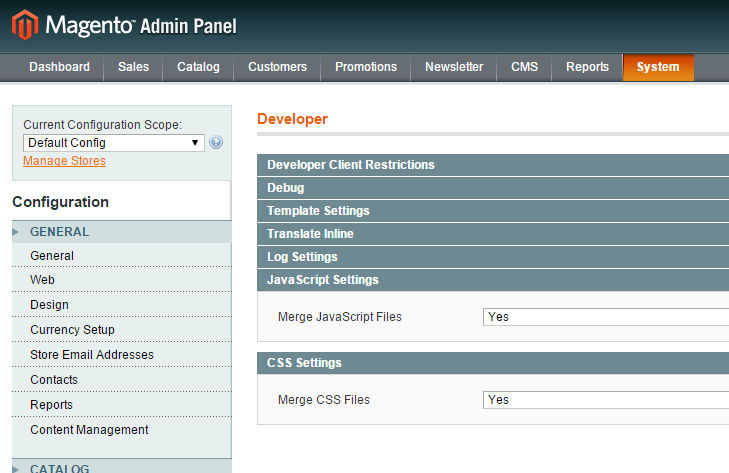
In Magento store, you can merge javascript and CSS files into a compressed file. By doing so, the content can be retrieved by only one HTTP request, thus saving bandwidth and improving website performance. This can be done from Magento admin panel.
To merge the files, go to ‘systems,’ then ‘advanced,’ and then choose ‘developer’. In ‘CSS setting’ and ‘javascript setting’, select ‘yes’ in the ‘merge CSS files’ and ‘merge javascript files’ option. In the end, save changes.
Uninstall Irrelevant Extensions
When you use an extension in your Magento store, it loads more CSS sheets, HTTP requests, and javascript files. Thus, running extensions can also affect your store performance and loading speed. So, only add those extensions which are necessary for your Magento website functionality. You should carefully examine the extensions and modules, and remove the unnecessary extensions.
To disable the modules in your Magento store,
go to Stores —> Configurations —> Advanced
After selecting and disabling the modules, click on ‘Save Config’, and then analyze the change in your site loading speed.
Manually Reindex Data
Indexing is the process of retrieving the data from the database.
Magento needs to reindex the data which keeps changing, like price, cart amount, discounts, etc. Without reindexing, it has to calculate the price of each and every product along with the applied discounts. It can result in the slow loading of prices, thus leading to shopping cart abandonment, a major pain point for e-commerce websites.
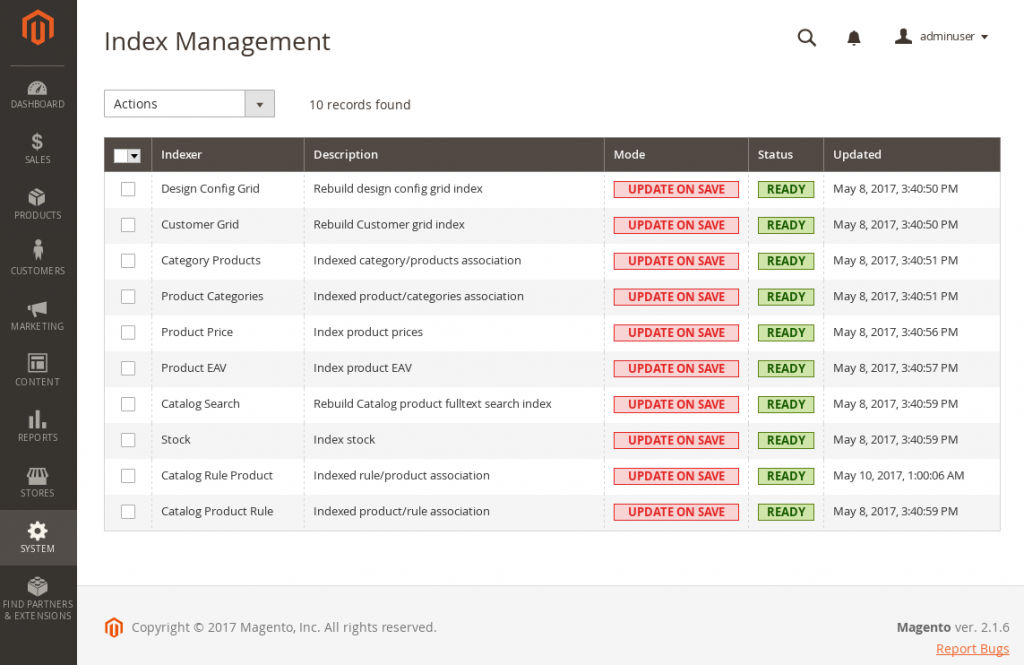
In this case, you can manually reindex the data from Magento admin panel.
Go to Systems —> Index Management —> Reindex Data
Hit the submit button and the reindexing will be done.
Enable Caching
Improve the Magento site speed by using its inbuilt cache management features.
You can manage the options with the following steps
Systems —> Cache Management
Do the changes you want and submit. The preferred cache setting for great results is APC + Varnish + NGINX + Memcache.
What else holds great significance in improving the performance of your Magento store?
Choose a Fast Web Hosting
This is the first step to improve the page load speed of your online website. Choose a fast hosting server before trying any other optimization technique.
Do not opt for shared cheap hosting websites. Always go for a dedicated server. For your Magento store, a good hosting is necessary, one having a high-speed connection, high-security standards, and a quick support in case of any downtime. You should know your hosting needs and your store requirements. Always do a check for uptime guarantees and host reliability.
Set up a Content Delivery Network (CDN)
Why do websites use a CDN?
The main purpose of a Content Delivery Network is to deliver a high-speed browsing experience to your website users, and to improve the page load speed of your website.
A CDN is basically a group of networks present across the globe in different regions catering to the browsing needs of your website users by delivering content from their nearest location. Thus, it helps in improving the page load speed of your Magento store, while also reducing your bandwidth consumption.
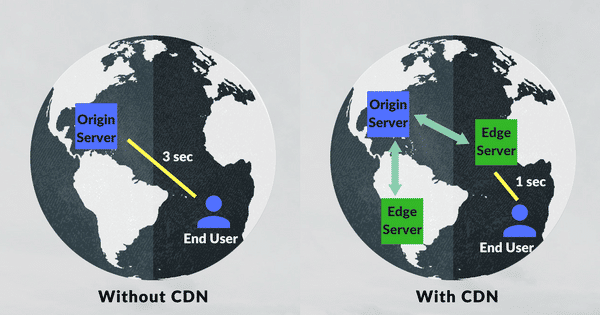
Suppose a user from Berlin accesses your website which is hosted in Dubai, then if a CDN is implemented, the content will be delivered through the CDN server which is present in Berlin itself, rather than delivering it from the main server, the one based in Dubai. It gives a fast browsing experience to your users.
Optimize Images on Your Magento Store
Images are one of the important aspects of a website when it comes to user engagement and website feel. And for an e-commerce website, these images hold much more significance. They can’t sell products without including high-quality product images.
High-quality visuals on your Magento store increase the user engagement rate, and also help in boosting the conversion rate. But on the other hand, heavy images can also slow down your website. Thus, it is necessary to optimize images on Magento store so that you can deliver a faster website with good quality images.
There are a number of ways to optimize the image so your website. You can choose to either compress your images, using tools like Tinypng, before uploading to the store, or optimize images real-time while delivering content with a CDN. You can also use ‘Save for Web’ option in Adobe Photoshop, which can also help compress the size of images.
Magento also provides many extensions to compress and resize images in its Magento Marketplace. The best way is to use real-time image optimization such as ImageKit. ImageKit provides URL-based transformations and optimizes images across all platforms. It takes only 5 minutes to integrate a Magento store to ImageKit.
These tips can help you optimize your Magento store, and improve the page load speed of your website. An optimized online store provides a faster browsing experience to its users, therefore, experiencing a better engagement rate and conversion rate.