


Blog written by Sébastien Stormacq, principal developer advocate, AWS, published April 7, 2026
I’m excited to announce Amazon S3 Files, a new file system that seamlessly connects any AWS compute resource with Amazon Simple Storage Service (Amazon S3). More than a decade ago, as an AWS trainer, I spent countless hours explaining the fundamental differences between object storage and file systems. My favorite analogy was comparing S3 objects to books in a library (you can’t edit a page, you need to replace the whole book) versus files on your computer that you can modify page by page. I drew diagrams, created metaphors, and helped customers understand why they needed different storage types for different workloads. Well, today that distinction becomes a bit more flexible.
With S3 Files, Amazon S3 is the first and only cloud object store that offers fully-featured, high-performance file system access to your data. It makes your buckets accessible as file systems. This means changes to data on the file system are automatically reflected in the S3 bucket and you have fine-grained control over synchronization. S3 Files can be attached to multiple compute resources enabling data sharing across clusters without duplication.
Until now, you had to choose between Amazon S3 cost, durability, and the services that can natively consume data from it or a file system’s interactive capabilities. S3 Files eliminates that tradeoff. S3 becomes the central hub for all your organization’s data. It’s accessible directly from any AWS compute instance, container, or function, whether you’re running production applications, training ML models, or building agentic AI systems.
You can access any general purpose bucket as a native file system on your Amazon Elastic Compute Cloud (Amazon EC2) instances, containers running on Amazon Elastic Container Service (Amazon ECS) or Amazon Elastic Kubernetes Service (Amazon EKS), or AWS Lambda functions. The file system presents S3 objects as files and directories, supporting all Network File System (NFS) v4.1+ operations like creating, reading, updating, and deleting files.
As you work with specific files and directories through the file system, associated file metadata and contents are placed onto the file system’s high-performance storage. By default, files that benefit from low-latency access are stored and served from the high performance storage. For files not stored on high performance storage such as those needing large sequential reads, S3 Files automatically serves those files directly from Amazon S3 to maximize throughput. For byte-range reads, only the requested bytes are transferred, minimizing data movement and costs.
The system also supports intelligent pre-fetching to anticipate your data access needs. You also have fine-grained control over what gets stored on the file system’s high performance storage. You can decide whether to load full file data or metadata only, which means you can optimize for your specific access patterns.
Under the hood, S3 Files uses Amazon Elastic File System (Amazon EFS) and delivers ~1ms latencies for active data. The file system supports concurrent access from multiple compute resources with NFS close-to-open consistency, making it ideal for interactive, shared workloads that mutate data, from agentic AI agents collaborating through file-based tools to ML training pipelines processing datasets.
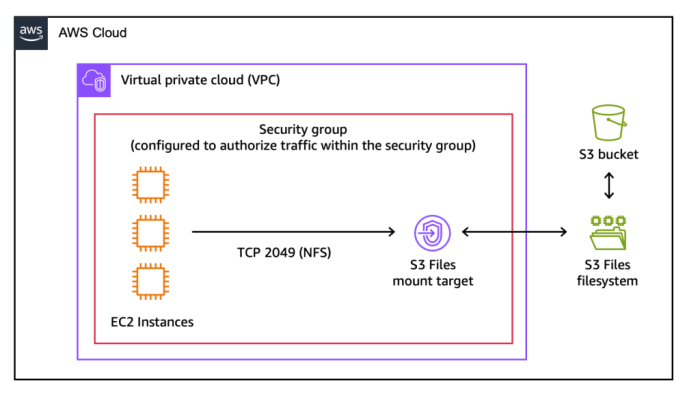
Things to know
Let me share some important technical details that I think you’ll find useful.
Another question I frequently hear in customer conversations is about choosing the right file service for your workloads. Yes, I know what you’re thinking: AWS and its seemingly overlapping services, keeping cloud architects entertained during their architecture review meetings. Let me help demystify this one.
S3 Files works best when you need interactive, shared access to data that lives in Amazon S3 through a high performance file system interface. It’s ideal for workloads where multiple compute resources—whether production applications, agentic AI agents using Python libraries and CLI tools, or machine learning (ML) training pipelines—need to read, write, and mutate data collaboratively. You get shared access across compute clusters without data duplication, sub-millisecond latency, and automatic synchronization with your S3 bucket.
For workloads migrating from on-premises NAS environments, Amazon FSx provides the familiar features and compatibility you need. Amazon FSx is also ideal for high-performance computing (HPC) and GPU cluster storage with Amazon FSx for Lustre. It’s particularly valuable when your applications require specific file system capabilities from Amazon FSx for NetApp ONTAP, Amazon FSx for OpenZFS, or Amazon FSx for Windows File Server.
Pricing and availability
S3 Files is available today in all commercial AWS Regions.
You pay for the portion of data stored in your S3 file system, for small file read and all write operations to the file system, and for S3 requests during data synchronization between the file system and the S3 bucket. The Amazon S3 pricing page has all the details.
From discussions with customers, I believe S3 Files helps simplify cloud architectures by eliminating data silos, synchronization complexity, and manual data movement between objects and files. Whether you’re running production tools that already work with file systems, building agentic AI systems that rely on file-based Python libraries and shell scripts, or preparing datasets for ML training, S3 Files lets these interactive, shared, hierarchical workloads access S3 data directly without choosing between the durability of Amazon S3 and cost benefits and a file system’s interactive capabilities. You can now use Amazon S3 as the place for all your organizations’ data, knowing the data is accessible directly from any AWS compute instance, container, and function.
To learn more and get started, visit the S3 Files documentation.
此内容由惯性聚合(RSS阅读器)自动聚合整理,仅供阅读参考。 原文来自 — 版权归原作者所有。