


…going “Lights Out” improves more than your data center energy costs
It is apparent to most that having your data center go “Lights Out” is another way to improve your data center’s energy efficiency and thus reduce your organization’s data center operating costs. What is less apparent is just how significant those energy savings can be as well as the peripheral benefits going “Lights Out” provides your organization.
A lights out data center can indeed have few if any lights on, but more importantly, it is a climate controlled enclosed computer room that has minimal access to it. Obviously, the more you limit access, the less cooling escapes as doors are opened, and less energy is used to maintain proper temperatures. Other less obvious lights out benefits include improved security, reduction in damaged cabling and equipment, less theft and misappropriations of equipment, lowered insurance costs, quicker response times, and better allocation of your IT talent.
Having worked with hundreds of data centers, we have certainly heard our share of horror stories from data center managers who made the decision to go lights out. Many have made this transition after having experienced downtime and a major loss. One reported losing a rack of servers when an IT Admin unintentionally overloaded an already maxed-out strategic power strip. Another had to deal with accidental damage to fiber optic cables. And another reported drives and memory removed from servers that had been purchased for an install project and misappropriated to another manager’s project. When the day of the install came for this project, resources had been flown but wasted the day locating replacement equipment.
Having a lights out data center doesn’t completely eliminate potential problems like the ones above, but as fewer people need physical access to the computer room, you minimize your exposure. Also, limiting access enabled one Fortune 500 client to go back to their insurance company and successfully negotiate a reduction in their data center related insurance premium.
With remote bios level access to servers, the ability to do remote power “cold boots” and the ability to be notified when environmental thresholds are exceeded, IT Managers have the ability to draw on their best IT resources regardless of their physical location. Today’s remote access hardware is OS independent, and with virtual media enables you to do major software updates and patches remotely.
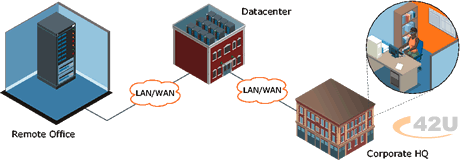
Many data centers are located in major metropolitan areas where IT resources are plentiful, but real estate and cost of power is extremely expensive. Often far less expensive data center real estate and power can be located only a few miles outside of these major cities. Going lights-out adds flexibility to where your IT resources are located and reduces the amount of time they have to be on site.
A major global IT service provider determined that a large percentage of their client’s server issues could be remedied remotely, thus eliminating the need to send out their support staff to isolated client locations. Often a cold boot alone remedied a hung server, but they had a novel approach on those clients’mission critical servers for whom a reboot wouldn’t bring back up the server. They delivered these mission critical with redundant boot drives, so if the server hung and couldn’t be recovered, they could remotely enter the server’s bios to change the boot drive to this secondary drive.
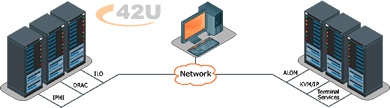
Remote Access Digital KVM over IP products (also known as IP KVM switches) are non-intrusive hardware-based solutions that allow you both in-band and out-of-band access to all servers connected to your KVM switch, or directly connected to the KVM Over IP switch. Utilizing advanced security and regardless of operating system, these Remote Access KVM Over IP products allow you to remotely control all your servers, including pre-boot functions such as editing CMOS settings and power cycling your servers. All of these Remote Access KVM Over IP products allow you access via your internal LAN/WAN, and some allow connectivity via the Internet or dial-in access via ISDN or standard 56K modems.
Data Centers utilize intelligent Remote Power Management strip products in their racks to allow you to securely power cycle and power on/off hung servers or devices from outside your data center, server farm, or remote location. Remote power switches can be configured to allow you to cold cycle power, and some of the newer technologies can even measure power consumption at the outlet, power strip, rack, and even by a row of racks in your data center.
Setting thresholds with environmental monitoring and metering equipment alerts you to potential issues. It helps you gauge how energy efficient your lights out computer room is and take the necessary steps to reduce your power consumption costs.
Lights Out can provide tangible data center energy efficiency savings, improved security, better uptime and IT support, and geographical independence; the key to maximizing benefits is a well thought through and planned out strategy.
此内容由惯性聚合(RSS阅读器)自动聚合整理,仅供阅读参考。 原文来自 — 版权归原作者所有。