




This article is also available in Chinese 简体中文.
This guide introduces BLIP-2 from Salesforce Research that enables a suite of state-of-the-art visual-language models that are now available in 🤗 Transformers. We'll show you how to use it for image captioning, prompted image captioning, visual question-answering, and chat-based prompting.
Recent years have seen rapid advancements in computer vision and natural language processing. Still, many real-world problems are inherently multimodal - they involve several distinct forms of data, such as images and text. Visual-language models face the challenge of combining modalities so that they can open the door to a wide range of applications. Some of the image-to-text tasks that visual language models can tackle include image captioning, image-text retrieval, and visual question answering. Image captioning can aid the visually impaired, create useful product descriptions, identify inappropriate content beyond text, and more. Image-text retrieval can be applied in multimodal search, as well as in applications such as autonomous driving. Visual question-answering can aid in education, enable multimodal chatbots, and assist in various domain-specific information retrieval applications.
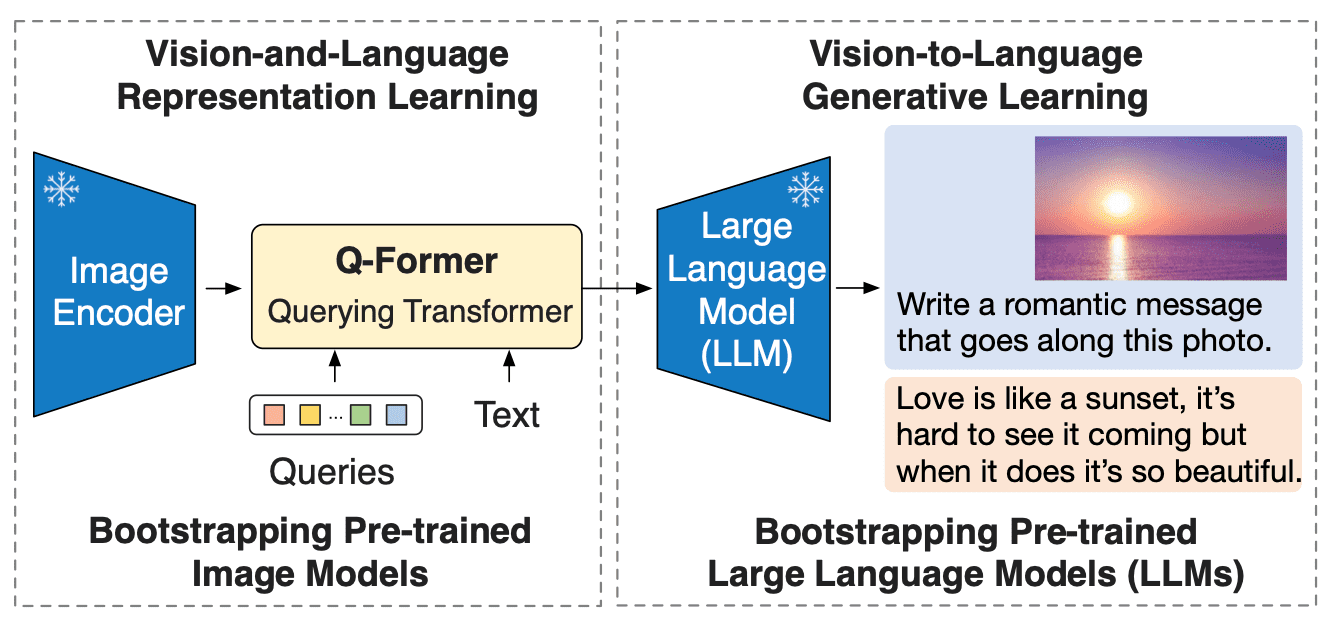
Modern computer vision and natural language models have become more capable; however, they have also significantly grown in size compared to their predecessors. While pre-training a single-modality model is resource-consuming and expensive, the cost of end-to-end vision-and-language pre-training has become increasingly prohibitive. BLIP-2 tackles this challenge by introducing a new visual-language pre-training paradigm that can potentially leverage any combination of pre-trained vision encoder and LLM without having to pre-train the whole architecture end to end. This enables achieving state-of-the-art results on multiple visual-language tasks while significantly reducing the number of trainable parameters and pre-training costs. Moreover, this approach paves the way for a multimodal ChatGPT-like model.
BLIP-2 bridges the modality gap between vision and language models by adding a lightweight Querying Transformer (Q-Former) between an off-the-shelf frozen pre-trained image encoder and a frozen large language model. Q-Former is the only trainable part of BLIP-2; both the image encoder and language model remain frozen.
Q-Former is a transformer model that consists of two submodules that share the same self-attention layers:
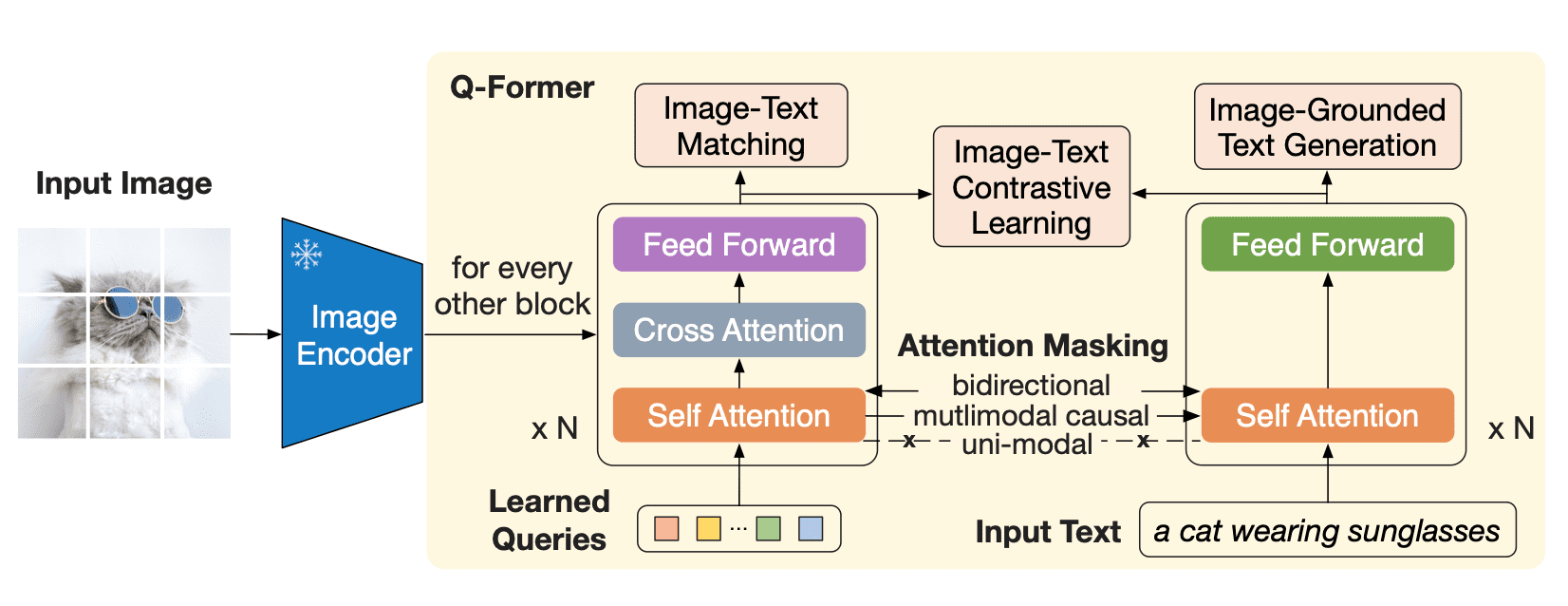
The image transformer extracts a fixed number of output features from the image encoder, independent of input image resolution, and receives learnable query embeddings as input. The queries can additionally interact with the text through the same self-attention layers.
Q-Former is pre-trained in two stages. In the first stage, the image encoder is frozen, and Q-Former is trained with three losses:
In the second pre-training stage, the query embeddings now have the relevant visual information to the text as it has passed through an information bottleneck. These embeddings are now used as a visual prefix to the input to the LLM. This pre-training phase effectively involves an image-ground text generation task using the causal LM loss.
As a visual encoder, BLIP-2 uses ViT, and for an LLM, the paper authors used OPT and Flan T5 models. You can find pre-trained checkpoints for both OPT and Flan T5 on Hugging Face Hub. However, as mentioned before, the introduced pre-training approach allows combining any visual backbone with any LLM.
Using Hugging Face Transformers, you can easily download and run a pre-trained BLIP-2 model on your images. Make sure to use a GPU environment with high RAM if you'd like to follow along with the examples in this blog post.
Let's start by installing Transformers. As this model has been added to Transformers very recently, we need to install Transformers from the source:
pip install git+https://github.com/huggingface/transformers.git
Next, we'll need an input image. Every week The New Yorker runs a cartoon captioning contest among its readers, so let's take one of these cartoons to put BLIP-2 to the test.
import requests
from PIL import Image

url = 'https://media.newyorker.com/cartoons/63dc6847be24a6a76d90eb99/master/w_1160,c_limit/230213_a26611_838.jpg'
image = Image.open(requests.get(url, stream=True).raw).convert('RGB')
display(image.resize((596, 437)))
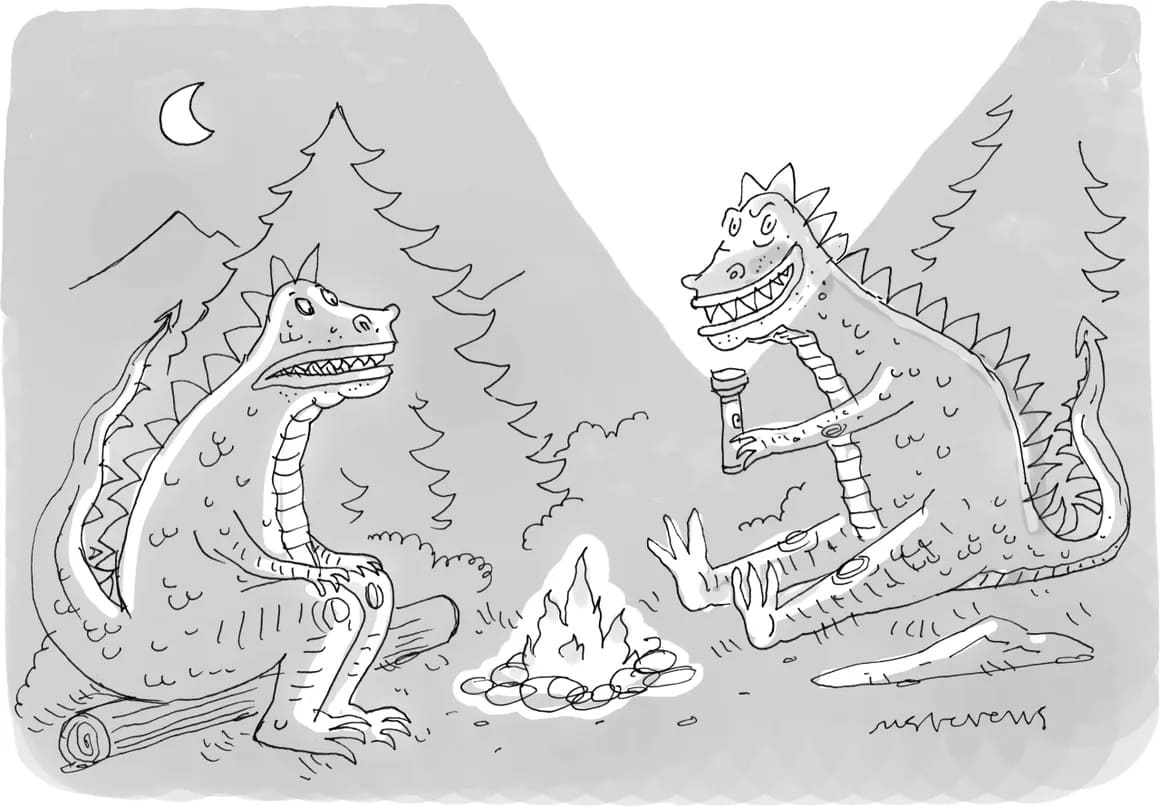
We have an input image. Now we need a pre-trained BLIP-2 model and corresponding preprocessor to prepare the inputs. You can find the list of all available pre-trained checkpoints on Hugging Face Hub. Here, we'll load a BLIP-2 checkpoint that leverages the pre-trained OPT model by Meta AI, which has 2.7 billion parameters.
from transformers import AutoProcessor, Blip2ForConditionalGeneration
import torch

processor = AutoProcessor.from_pretrained("Salesforce/blip2-opt-2.7b")
model = Blip2ForConditionalGeneration.from_pretrained("Salesforce/blip2-opt-2.7b", torch_dtype=torch.float16)
Notice that BLIP-2 is a rare case where you cannot load the model with Auto API (e.g. AutoModelForXXX), and you need to
explicitly use Blip2ForConditionalGeneration. However, you can use AutoProcessor to fetch the appropriate processor
class - Blip2Processor in this case.
Let's use GPU to make text generation faster:
device = "cuda" if torch.cuda.is_available() else "cpu"
model.to(device)
Let's find out if BLIP-2 can caption a New Yorker cartoon in a zero-shot manner. To caption an image, we do not have to provide any text prompt to the model, only the preprocessed input image. Without any text prompt, the model will start generating text from the BOS (beginning-of-sequence) token thus creating a caption.
inputs = processor(image, return_tensors="pt").to(device, torch.float16)

generated_ids = model.generate(**inputs, max_new_tokens=20)
generated_text = processor.batch_decode(generated_ids, skip_special_tokens=True)[0].strip()
print(generated_text)
"two cartoon monsters sitting around a campfire"
This is an impressively accurate description for a model that wasn't trained on New Yorker style cartoons!
We can extend image captioning by providing a text prompt, which the model will continue given the image.
prompt = "this is a cartoon of"

inputs = processor(image, text=prompt, return_tensors="pt").to(device, torch.float16)

generated_ids = model.generate(**inputs, max_new_tokens=20)
generated_text = processor.batch_decode(generated_ids, skip_special_tokens=True)[0].strip()
print(generated_text)
"two monsters sitting around a campfire"
prompt = "they look like they are"

inputs = processor(image, text=prompt, return_tensors="pt").to(device, torch.float16)

generated_ids = model.generate(**inputs, max_new_tokens=20)
generated_text = processor.batch_decode(generated_ids, skip_special_tokens=True)[0].strip()
print(generated_text)
"having a good time"
For visual question answering the prompt has to follow a specific format: "Question: {} Answer:"
prompt = "Question: What is a dinosaur holding? Answer:"

inputs = processor(image, text=prompt, return_tensors="pt").to(device, torch.float16)

generated_ids = model.generate(**inputs, max_new_tokens=10)
generated_text = processor.batch_decode(generated_ids, skip_special_tokens=True)[0].strip()
print(generated_text)
"A torch"
Finally, we can create a ChatGPT-like interface by concatenating each generated response to the conversation. We prompt the model with some text (like "What is a dinosaur holding?"), the model generates an answer for it "a torch"), which we can concatenate to the conversation. Then we do it again, building up the context. However, make sure that the context does not exceed 512 tokens, as this is the context length of the language models used by BLIP-2 (OPT and T5).
context = [
   ("What is a dinosaur holding?", "a torch"),
   ("Where are they?", "In the woods.")
]
question = "What for?"
template = "Question: {} Answer: {}."

prompt = " ".join([template.format(context[i][0], context[i][1]) for i in range(len(context))]) + " Question: " + question + " Answer:"

print(prompt)
Question: What is a dinosaur holding? Answer: a torch. Question: Where are they? Answer: In the woods.. Question: What for? Answer:
inputs = processor(image, text=prompt, return_tensors="pt").to(device, torch.float16)

generated_ids = model.generate(**inputs, max_new_tokens=10)
generated_text = processor.batch_decode(generated_ids, skip_special_tokens=True)[0].strip()
print(generated_text)
To light a fire.
BLIP-2 is a zero-shot visual-language model that can be used for multiple image-to-text tasks with image and image and text prompts. It is an effective and efficient approach that can be applied to image understanding in numerous scenarios, especially when examples are scarce.
The model bridges the gap between vision and natural language modalities by adding a transformer between pre-trained models. The new pre-training paradigm allows this model to keep up with the advances in both individual modalities.
If you'd like to learn how to fine-tune BLIP-2 models for various vision-language tasks, check out LAVIS library by Salesforce that offers comprehensive support for model training.
To see BLIP-2 in action, try its demo on Hugging Face Spaces.
Many thanks to the Salesforce Research team for working on BLIP-2, Niels Rogge for adding BLIP-2 to 🤗 Transformers, and to Omar Sanseviero for reviewing this blog post.
此内容由惯性聚合(RSS阅读器)自动聚合整理,仅供阅读参考。 原文来自 — 版权归原作者所有。