




This article is also available in Chinese 简体中文.
In the ever-evolving landscape of programming and software development, the quest for efficiency and productivity has led to remarkable innovations. One such innovation is the emergence of code generation models such as Codex, StarCoder and Code Llama. These models have demonstrated remarkable capabilities in generating human-like code snippets, thereby showing immense potential as coding assistants.
However, while these pre-trained models can perform impressively across a range of tasks, there's an exciting possibility lying just beyond the horizon: the ability to tailor a code generation model to your specific needs. Think of personalized coding assistants which could be leveraged at an enterprise scale.
In this blog post we show how we created HugCoder 🤗, a code LLM fine-tuned on the code contents from the public repositories of the huggingface GitHub organization. We will discuss our data collection workflow, our training experiments, and some interesting results. This will enable you to create your own personal copilot based on your proprietary codebase. We will leave you with a couple of further extensions of this project for experimentation.
Let’s begin 🚀
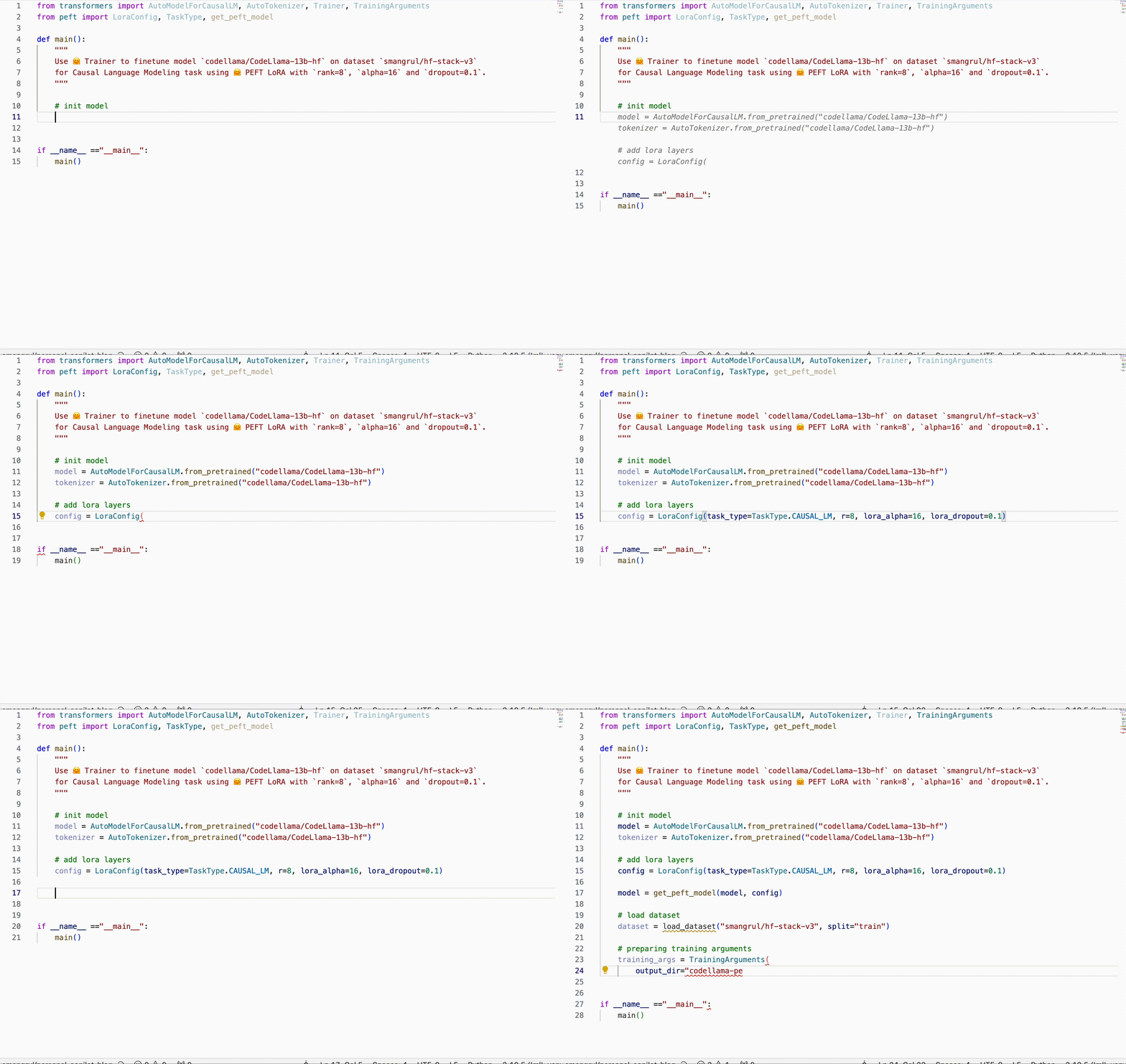
Our desired dataset is conceptually simple, we structured it like so:
| Repository Name | Filepath in the Repository | File Contents |
| --- | --- | --- |
| --- | --- | --- |
Scraping code contents from GitHub is straightforward with the Python GitHub API. However, depending on the number of repositories and the number of code files within a repository, one might easily run into API rate-limiting issues.
To prevent such problems, we decided to clone all the public repositories locally and extract the contents from them instead of through the API. We used the multiprocessing module from Python to download all repos in parallel, as shown in this download script.
A repository can often contain non-code files such as images, presentations and other assets. We’re not interested in scraping them. We created a list of extensions to filter them out. To parse code files other than Jupyter Notebooks, we simply used the "utf-8" encoding. For notebooks, we only considered the code cells.
We also excluded all file paths that were not directly related to code. These include: .git, __pycache__, and xcodeproj.
To keep the serialization of this content relatively memory-friendly, we used chunking and the feather format. Refer to this script for the full implementation.
The final dataset is available on the Hub, and it looks like this:
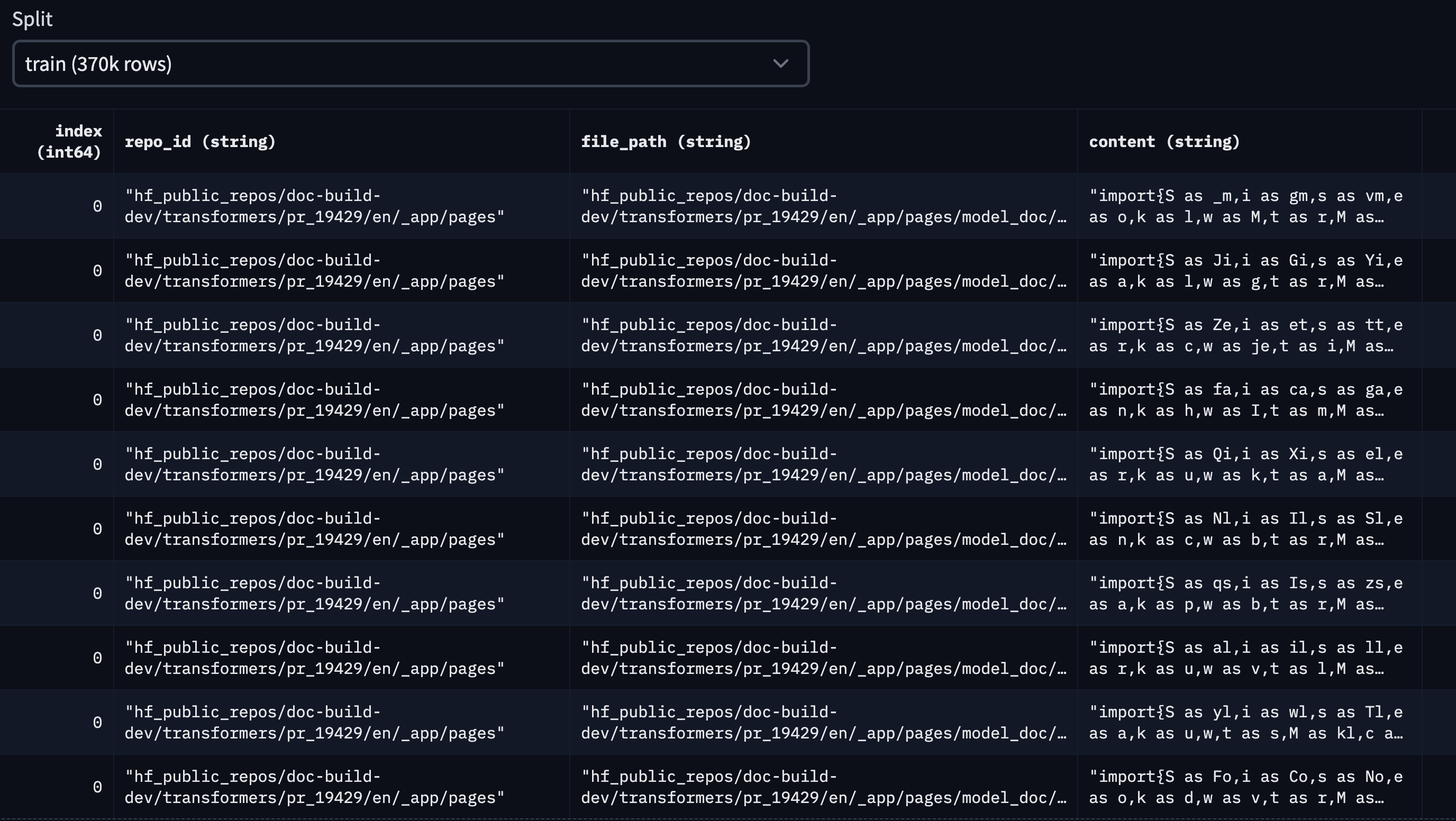
For this blog, we considered the top 10 Hugging Face public repositories, based on stargazers. They are the following:
['transformers', 'pytorch-image-models', 'datasets', 'diffusers', 'peft', 'tokenizers', 'accelerate', 'text-generation-inference', 'chat-ui', 'deep-rl-class']
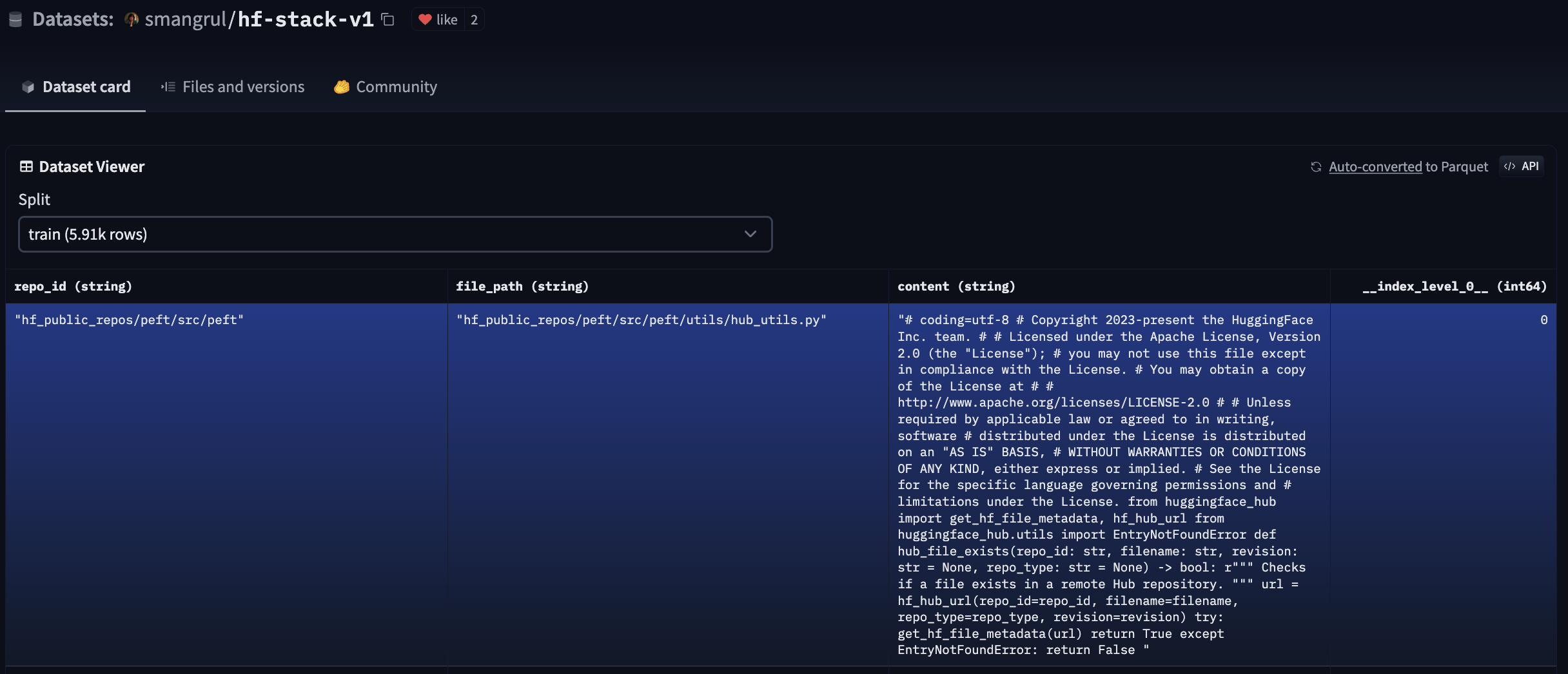
This is the code we used to generate this dataset, and this is the dataset in the Hub. Here is a snapshot of what it looks like:
To reduce the project complexity, we didn’t consider deduplication of the dataset. If you are interested in applying deduplication techniques for a production application, this blog post is an excellent resource about the topic in the context of code LLMs.
In this section, we show how to fine-tune the following models: bigcode/starcoder (15.5B params), bigcode/starcoderbase-1b (1B params), Deci/DeciCoder-1b (1B params). We'll use a single A100 40GB Colab Notebook using 🤗 PEFT (Parameter-Efficient Fine-Tuning) for all the experiments. Additionally, we'll show how to fully finetune the bigcode/starcoder (15.5B params) on a machine with 8 A100 80GB GPUs using 🤗 Accelerate's FSDP integration. The training objective is fill in the middle (FIM), wherein parts of a training sequence are moved to the end, and the reordered sequence is predicted auto-regressively.
Why PEFT? Full fine-tuning is expensive. Let’s have some numbers to put things in perspective:
Minimum GPU memory required for full fine-tuning:
Since the hardware requirements are huge, we'll be using parameter-efficient fine-tuning using QLoRA. Here are the minimal GPU memory requirements for fine-tuning StarCoder using QLoRA:
trainable params: 110,428,160 || all params: 15,627,884,544 || trainable%: 0.7066097761926236
In the above calculations, we didn't consider memory required for intermediate activation checkpointing which is considerably huge. We leverage Flash Attention V2 and Gradient Checkpointing to overcome this issue.
Please refer to the model-memory-usage to easily calculate how much vRAM is needed to train and perform big model inference on a model hosted on the 🤗 Hugging Face Hub.
We will look at how to do full fine-tuning of bigcode/starcoder (15B params) on 8 A100 80GB GPUs using PyTorch Fully Sharded Data Parallel (FSDP) technique. For more information on FSDP, please refer to Fine-tuning Llama 2 70B using PyTorch FSDP and Accelerate Large Model Training using PyTorch Fully Sharded Data Parallel.
Resources
The command to launch training is given at run_fsdp.sh.
accelerate launch --config_file "configs/fsdp_config.yaml"  train.py \
    --model_path "bigcode/starcoder" \
    --dataset_name "smangrul/hf-stack-v1" \
    --subset "data" \
    --data_column "content" \
    --split "train" \
    --seq_length 2048 \
    --max_steps 2000 \
    --batch_size 1 \
    --gradient_accumulation_steps 2 \
    --learning_rate 5e-5 \
    --lr_scheduler_type "cosine" \
    --weight_decay 0.01 \
    --num_warmup_steps 30 \
    --eval_freq 100 \
    --save_freq 500 \
    --log_freq 25 \
    --num_workers 4 \
    --bf16 \
    --no_fp16 \
    --output_dir "starcoder-personal-copilot-A100-40GB-colab" \
    --fim_rate 0.5 \
    --fim_spm_rate 0.5 \
    --use_flash_attn
The total training time was 9 Hours. Taking the cost of $12.00 / hr based on lambdalabs for 8x A100 80GB GPUs, the total cost would be $108.
We will look at how to use QLoRA for fine-tuning bigcode/starcoder (15B params) on a single A100 40GB GPU using 🤗 PEFT. For more information on QLoRA and PEFT methods, please refer to Making LLMs even more accessible with bitsandbytes, 4-bit quantization and QLoRA and 🤗 PEFT: Parameter-Efficient Fine-Tuning of Billion-Scale Models on Low-Resource Hardware.
Resources
The command to launch training is given at run_peft.sh. The total training time was 12.5 Hours. Taking the cost of $1.10 / hr based on lambdalabs, the total cost would be $13.75. That's pretty good 🚀! In terms of cost, it's 7.8X lower than the cost for full fine-tuning.
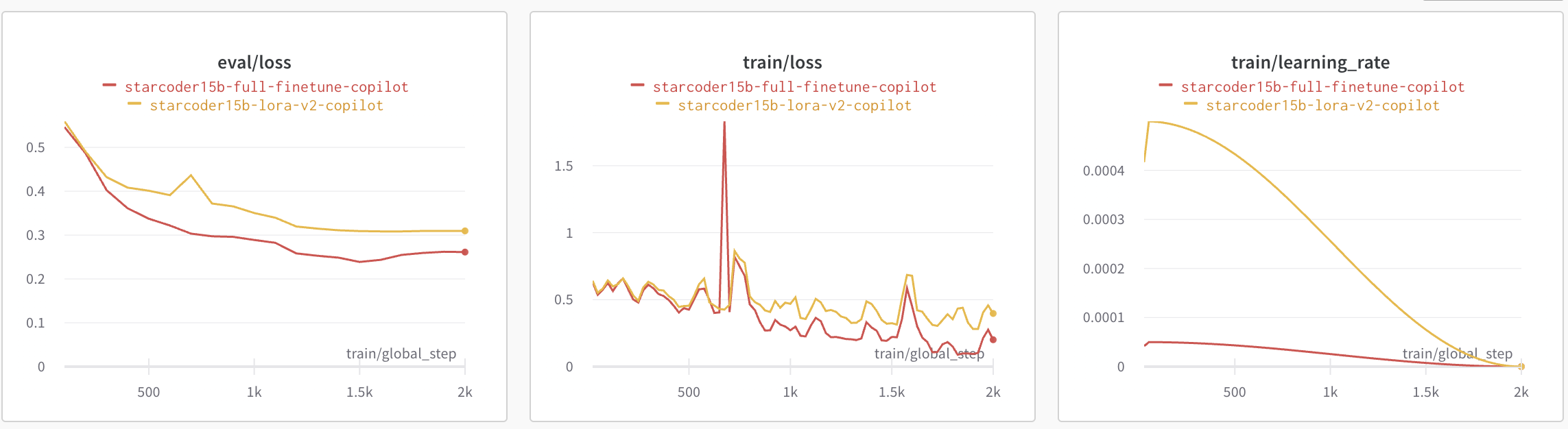
The plot below shows the eval loss, train loss and learning rate scheduler for QLoRA vs full fine-tuning. We observe that full fine-tuning leads to slightly lower loss and converges a bit faster compared to QLoRA. The learning rate for peft fine-tuning is 10X more than that of full fine-tuning.
To make sure that our QLoRA model doesn't lead to catastrophic forgetting, we run the Python Human Eval on it. Below are the results we got. Pass@1 measures the pass rate of completions considering just a single generated code candidate per problem. We can observe that the performance on humaneval-python is comparable between the base bigcode/starcoder (15B params) and the fine-tuned PEFT model smangrul/peft-lora-starcoder15B-v2-personal-copilot-A100-40GB-colab.
| Model | Pass@1 |
| bigcode/starcoder | 33.57 |
| smangrul/peft-lora-starcoder15B-v2-personal-copilot-A100-40GB-colab | 33.37 |
Let's now look at some qualitative samples. In our manual analysis, we noticed that the QLoRA led to slight overfitting and as such we down weigh it by creating new weighted adapter with weight 0.8 via add_weighted_adapter utility of PEFT.
We will look at 2 code infilling examples wherein the task of the model is to fill the part denoted by the <FILL_ME> placeholder. We will consider infilling completions from GitHub Copilot, the QLoRA fine-tuned model and the full fine-tuned model.
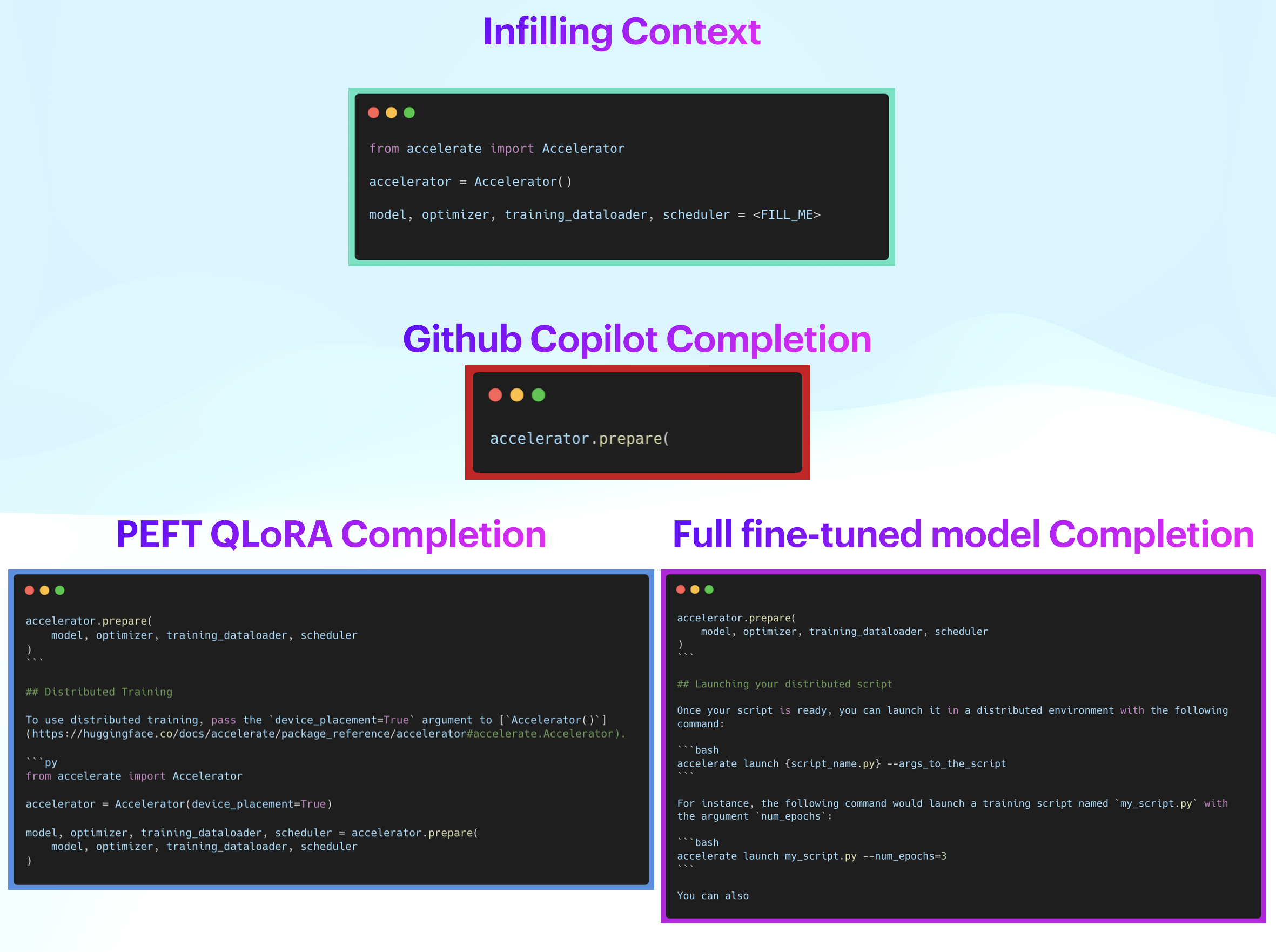 Qualitative Example 1
In the example above, the completion from GitHub Copilot is along the correct lines but doesn't help much. On the other hand, completions from QLoRA and full fine-tuned models are correctly infilling the entire function call with the necessary parameters. However, they are also adding a lot more noise afterwards. This could be controlled with a post-processing step to limit completions to closing brackets or new lines. Note that both QLoRA and full fine-tuned models produce results with similar quality.
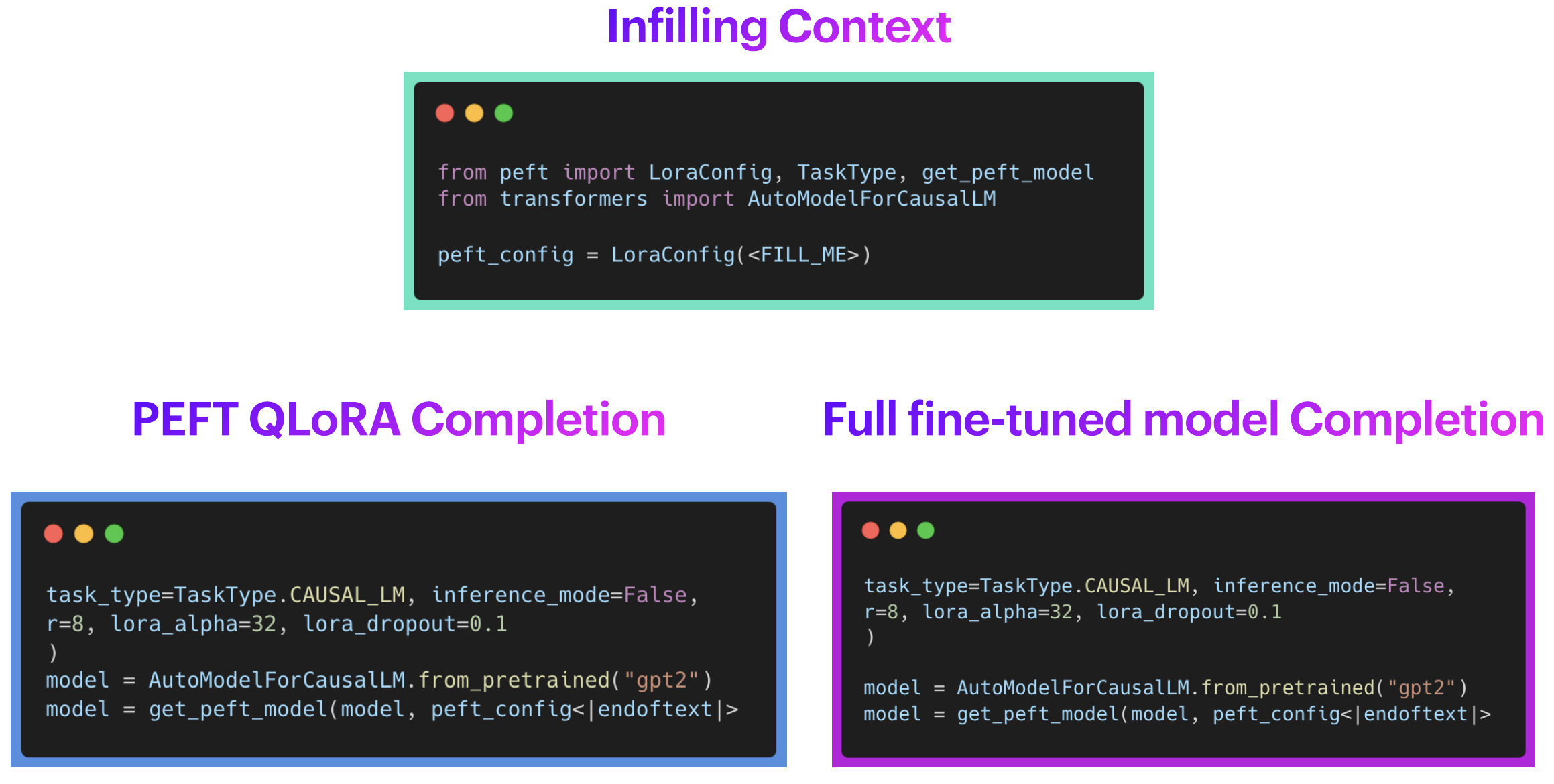 Qualitative Example 2
In the second example above, GitHub Copilot didn't give any completion. This can be due to the fact that 🤗 PEFT is a recent library and not yet part of Copilot's training data, which is exactly the type of problem we are trying to address. On the other hand, completions from QLoRA and full fine-tuned models are correctly infilling the entire function call with the necessary parameters. Again, note that both the QLoRA and the full fine-tuned models are giving generations of similar quality. Inference Code with various examples for full fine-tuned model and peft model are available at Full_Finetuned_StarCoder_Inference.ipynb and PEFT_StarCoder_Inference.ipynb, respectively.
Therefore, we can observe that the generations from both the variants are as per expectations. Awesome! 🚀
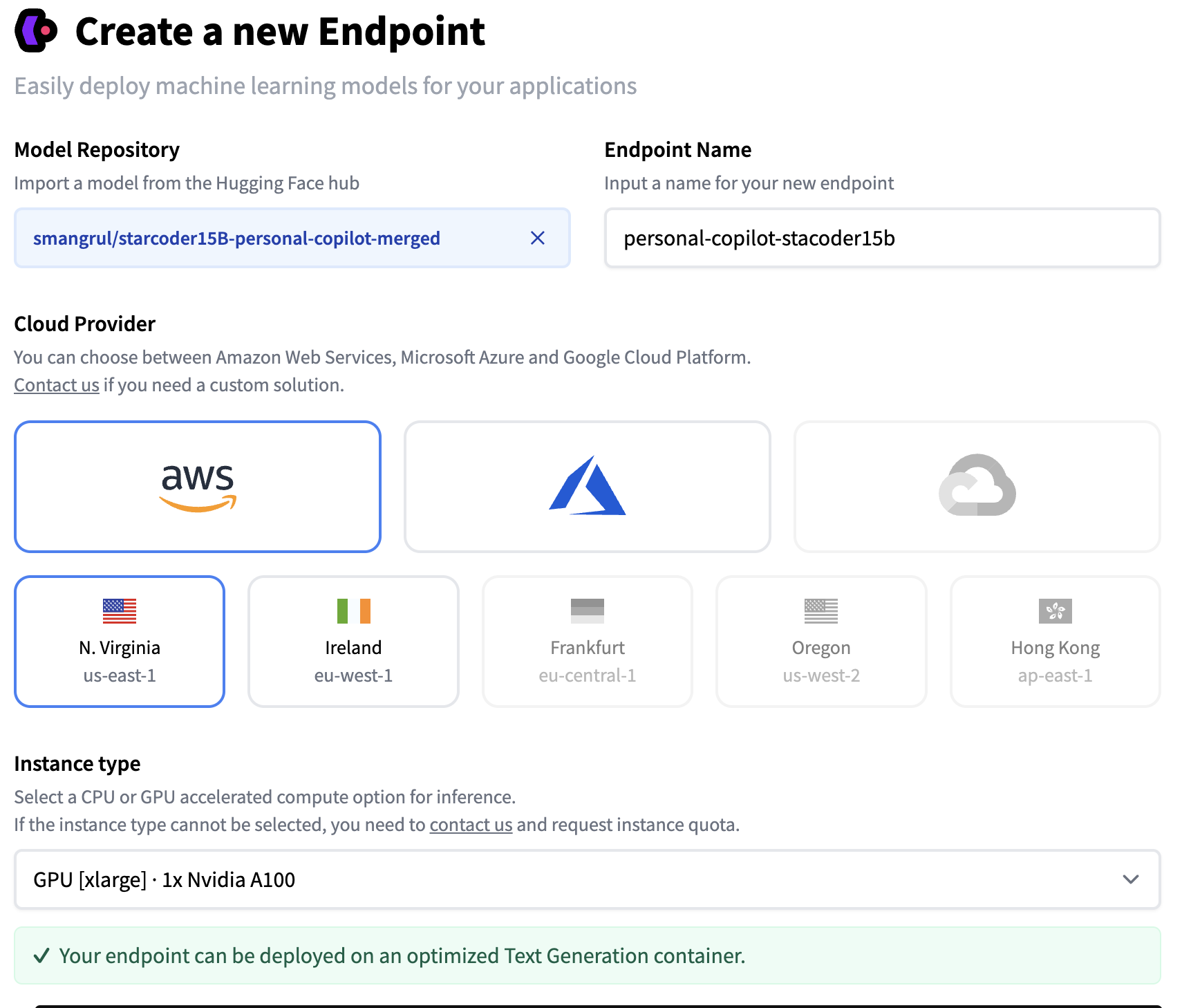
You can easily configure a custom code-completion LLM in VS Code using 🤗 llm-vscode VS Code Extension, together with hosting the model via 🤗 Inference EndPoints. We'll go through the required steps below. You can learn more details about deploying an endpoint in the inference endpoints documentation.
Below are the screenshots with the steps we followed to create our custom Inference Endpoint. We used our QLoRA model, exported as a full-sized merged model that can be easily loaded in transformers.
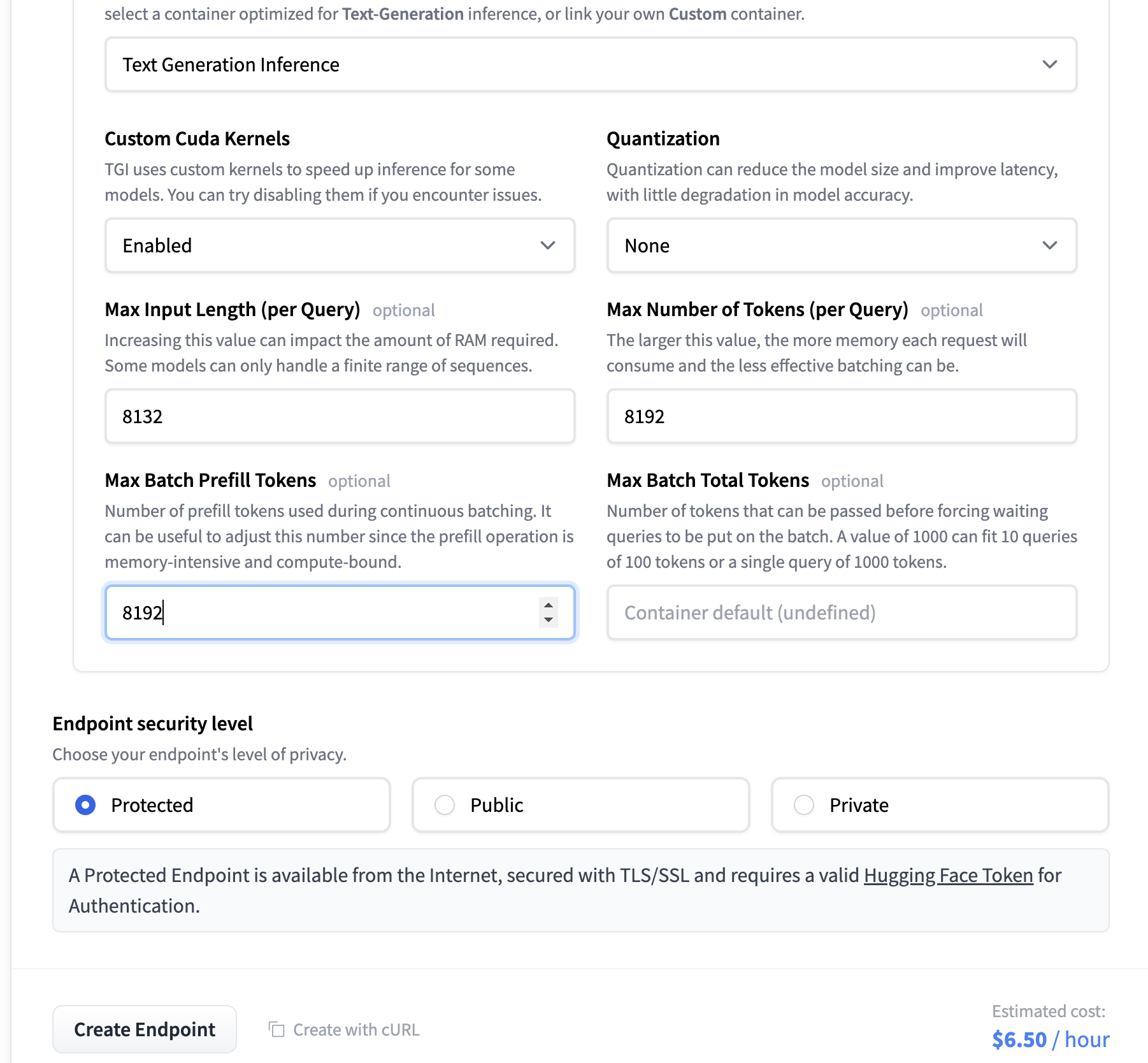
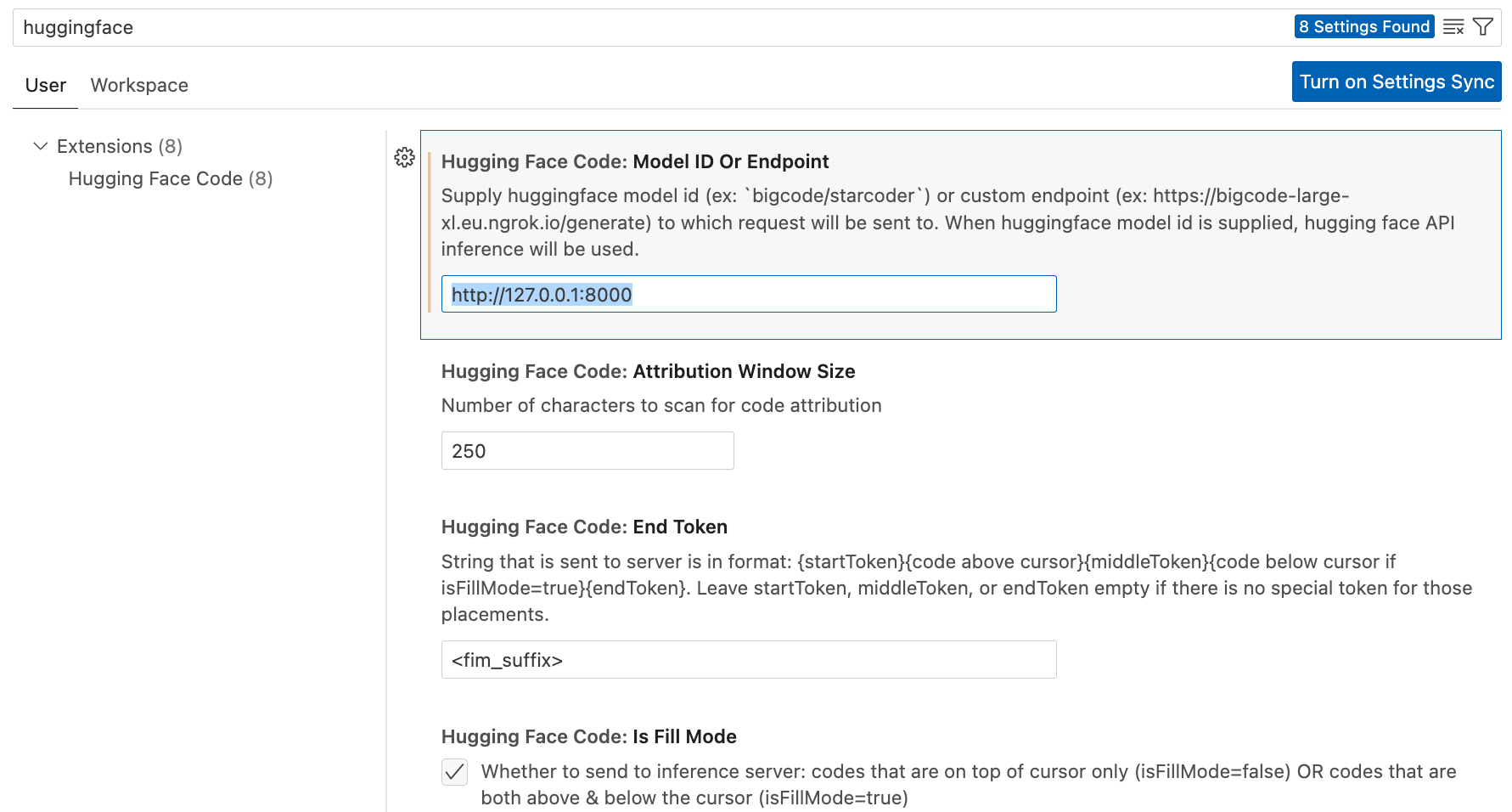
Just follow the installation steps. In the settings, replace the endpoint in the field below, so it points to the HF Inference Endpoint you deployed.
Usage will look like below:
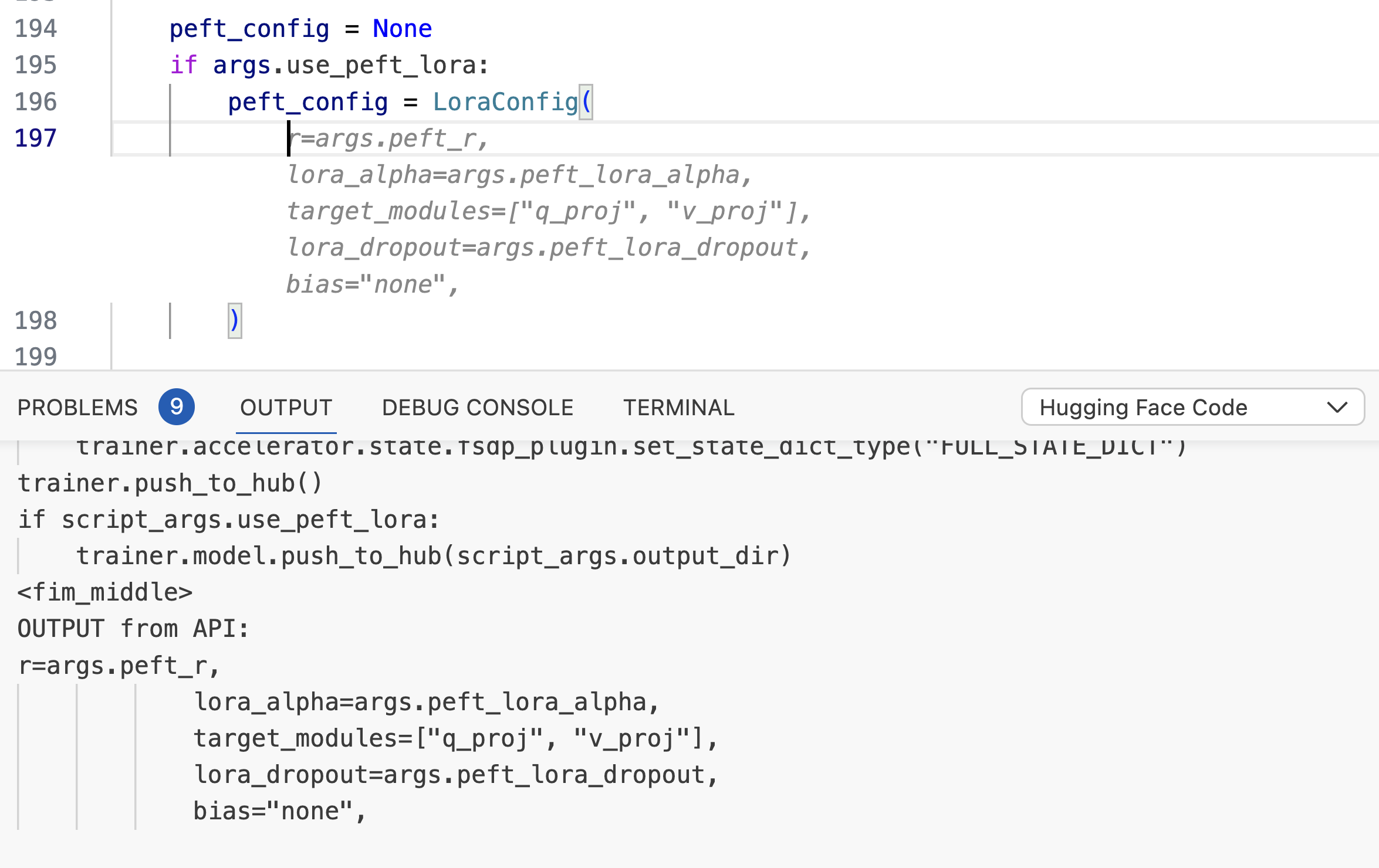
So far, the models we trained were specifically trained as personal co-pilot for code completion tasks. They aren't trained to carry out conversations or for question answering. Octocoder and StarChat are great examples of such models. This section briefly describes how to achieve that.
Resources
LIMA+GUANACO with proper formatting in a ready-to-train format.If you have dabbled with Stable Diffusion models and LoRAs for making your own Dreambooth models, you might be familiar with the concepts of combining different LoRAs with different weights, using a LoRA model with a different base model than the one on which it was trained. In text/code domain, this remains unexplored territory. We carry out experiments in this regard and have observed very promising findings. Are you ready? Let's go! 🚀
PEFT currently supports 3 ways of combining LoRA models, linear, svd and cat. For more details, refer to tuners#peft.LoraModel.add_weighted_adapter.
Our notebook Dance_of_LoRAs.ipynb includes all the inference code and various LoRA loading combinations, like loading the chat assistant on top of starcoder instead of starcodeplus, which is the base model that we fine-tuned.
Here, we will consider 2 abilities (chatting/QA and code-completion) on 2 data distributions (top 10 public hf codebase and generic codebase). That gives us 4 axes on which we'll carry out some qualitative evaluation analyses.
chatting/QA task.
If we disable adapters, we observe that the task fails for both datasets, as the base model (starcoder) is only meant for code completion and not suitable for chatting/question-answering. Enabling copilot adapter performs similar to the disabled case because this LoRA was also specifically fine-tuned for code-completion.
Now, let's enable the assistant adapter.
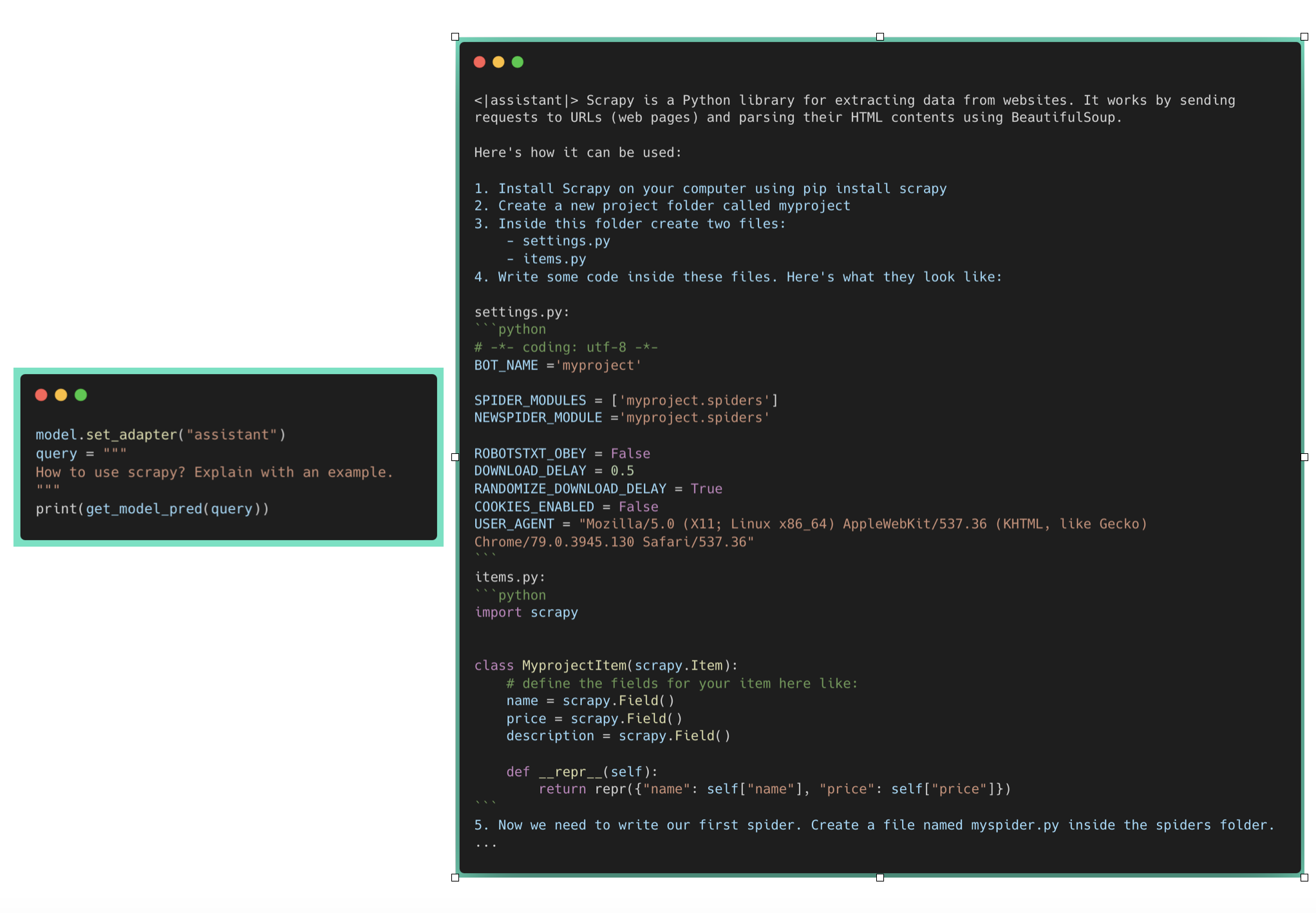 Question Answering based on generic code
 Question Answering based on HF code
We can observe that generic question regarding scrapy is being answered properly. However, it is failing for the HF code related question which wasn't part of its pretraining data.
code-completion task.
On disabling adapters, we observe that the code completion for the generic two-sum works as expected. However, the HF code completion fails with wrong params to LoraConfig, because the base model hasn't seen it in its pretraining data. Enabling assistant performs similar to the disabled case as it was trained on natural language conversations which didn't have any Hugging Face code repos.
Now, let's enable the copilot adapter.
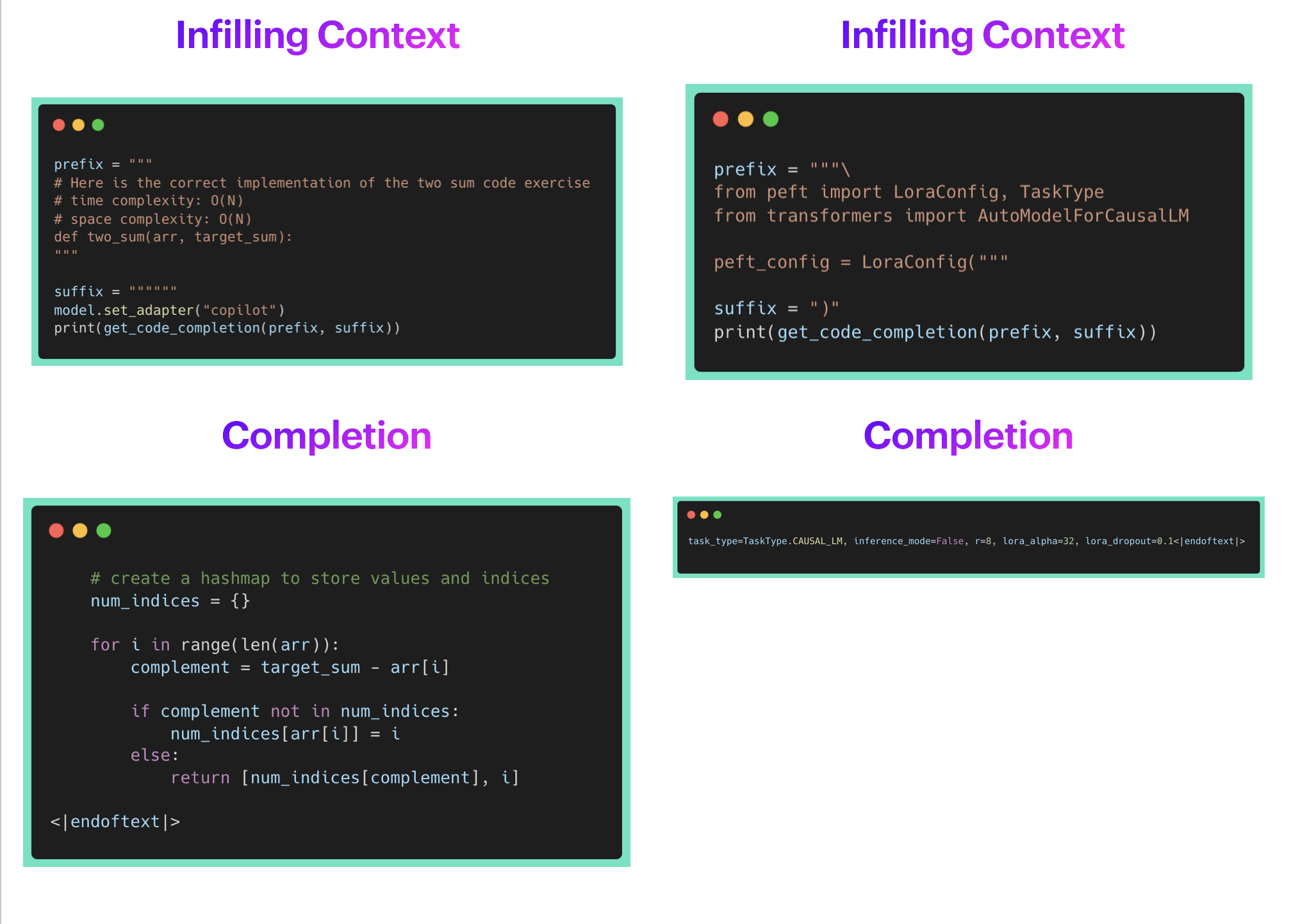
We can observe that the copilot adapter gets it right in both cases. Therefore, it performs as expected for code-completions when working with HF specific codebase as well as generic codebases.
Now, as a user, I want to combine the ability of assistant as well as copilot. This will enable me to use it for code completion while coding in an IDE, and also have it as a chatbot to answer my questions regarding APIs, classes, methods, documentation. It should be able to provide answers to questions like How do I use x, Please write a code snippet for Y on my codebase.
PEFT allows you to do it via add_weighted_adapter. Let's create a new adapter code_buddy with equal weights to assistant and copilot adapters.
 Combining Multiple Adapters
Now, let's see how code_buddy performs on the chatting/question_answering tasks.
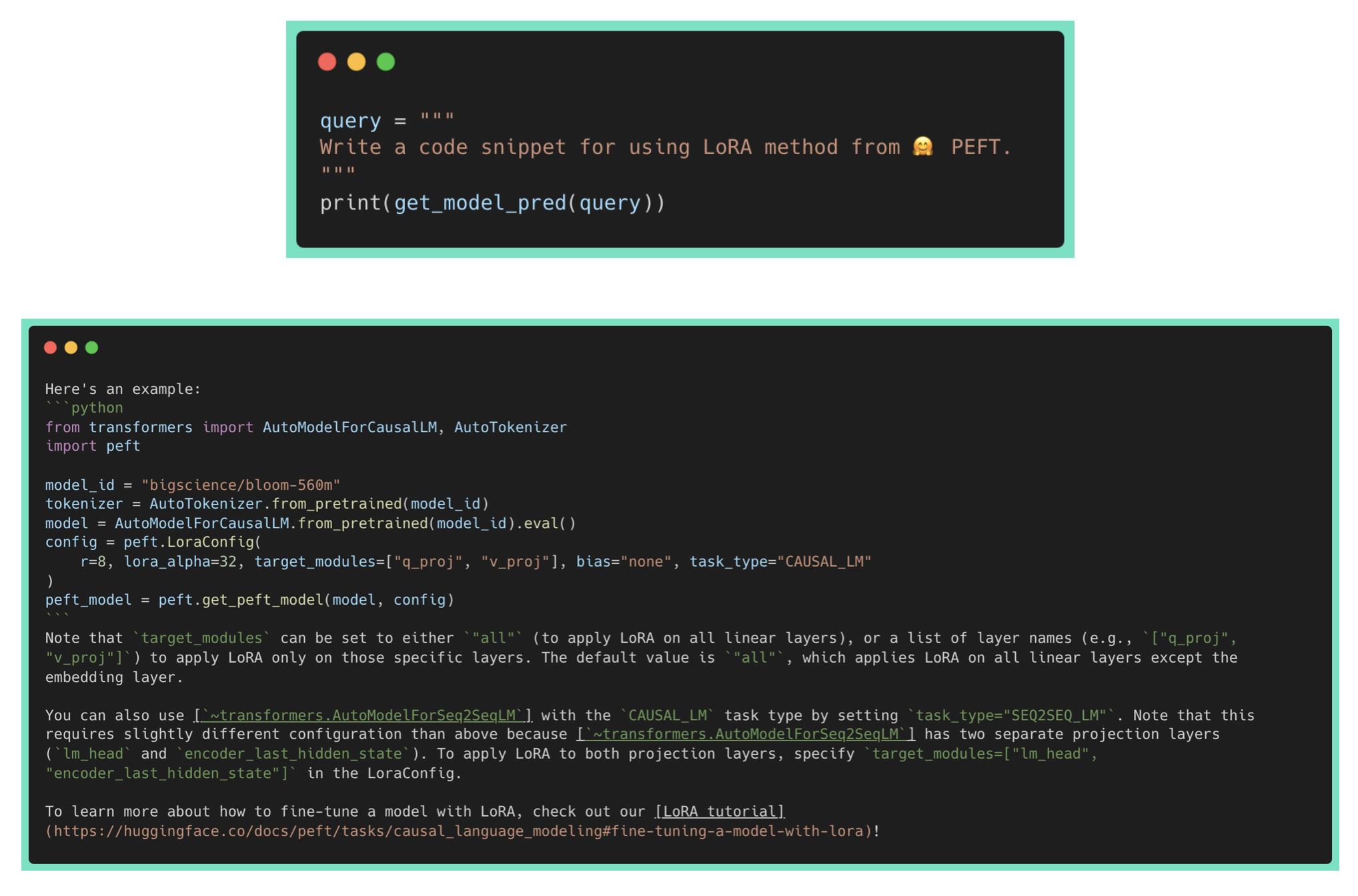
We can observe that code_buddy is performing much better than the assistant or copilot adapters alone! It is able to answer the write a code snippet request to show how to use a specific HF repo API. However, it is also hallucinating the wrong links/explanations, which remains an open challenge for LLMs.
Below is the performance of code_buddy on code completion tasks.
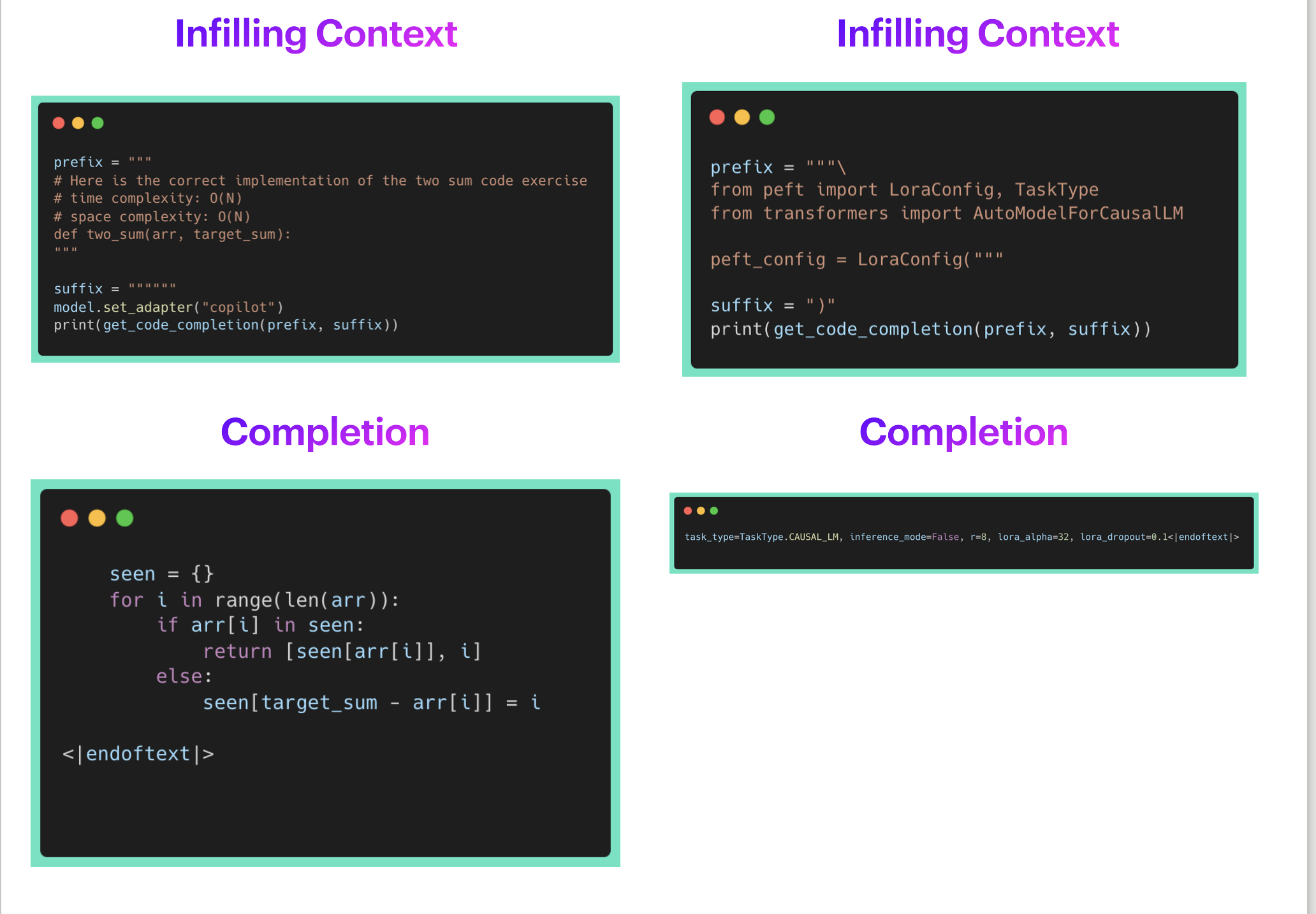
We can observe that code_buddy is performing on par with copilot, which was specifically finetuned for this task.
We can also transfer the LoRA models to different base models.
We will take the hot-off-the-press Octocoder model and apply on it the LoRA we trained above with starcoder base model. Please go through the following notebook PEFT_Personal_Code_CoPilot_Adapter_Transfer_Octocoder.ipynb for the entire code.
Performance on the Code Completion task
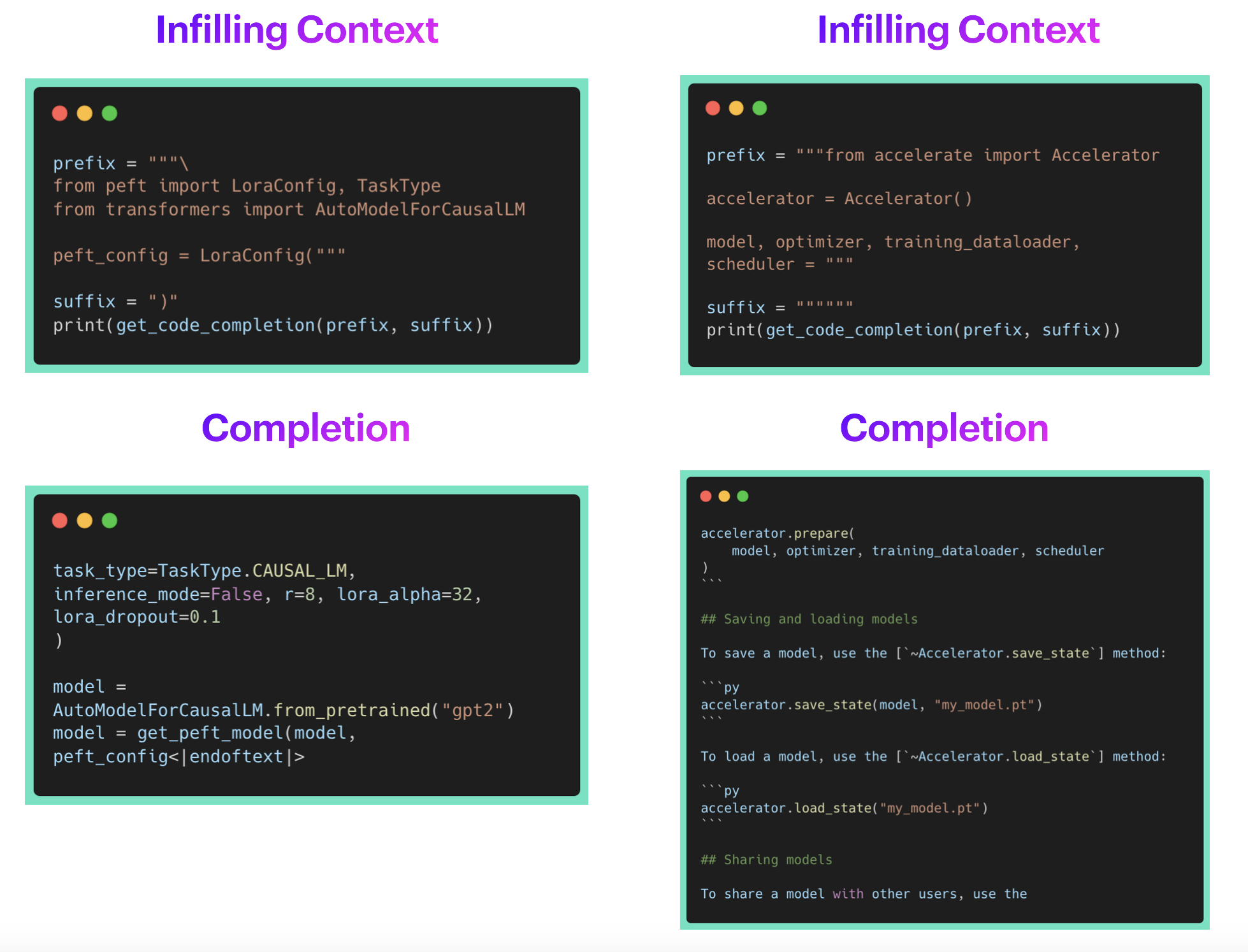
We can observe that octocoder is performing great. It is able to complete HF specific code snippets. It is also able to complete generic code snippets as seen in the notebook.
Performance on the Chatting/QA task
As Octocoder is trained to answer questions and carry out conversations about coding, let's see if it can use our LoRA adapter to answer HF specific questions.
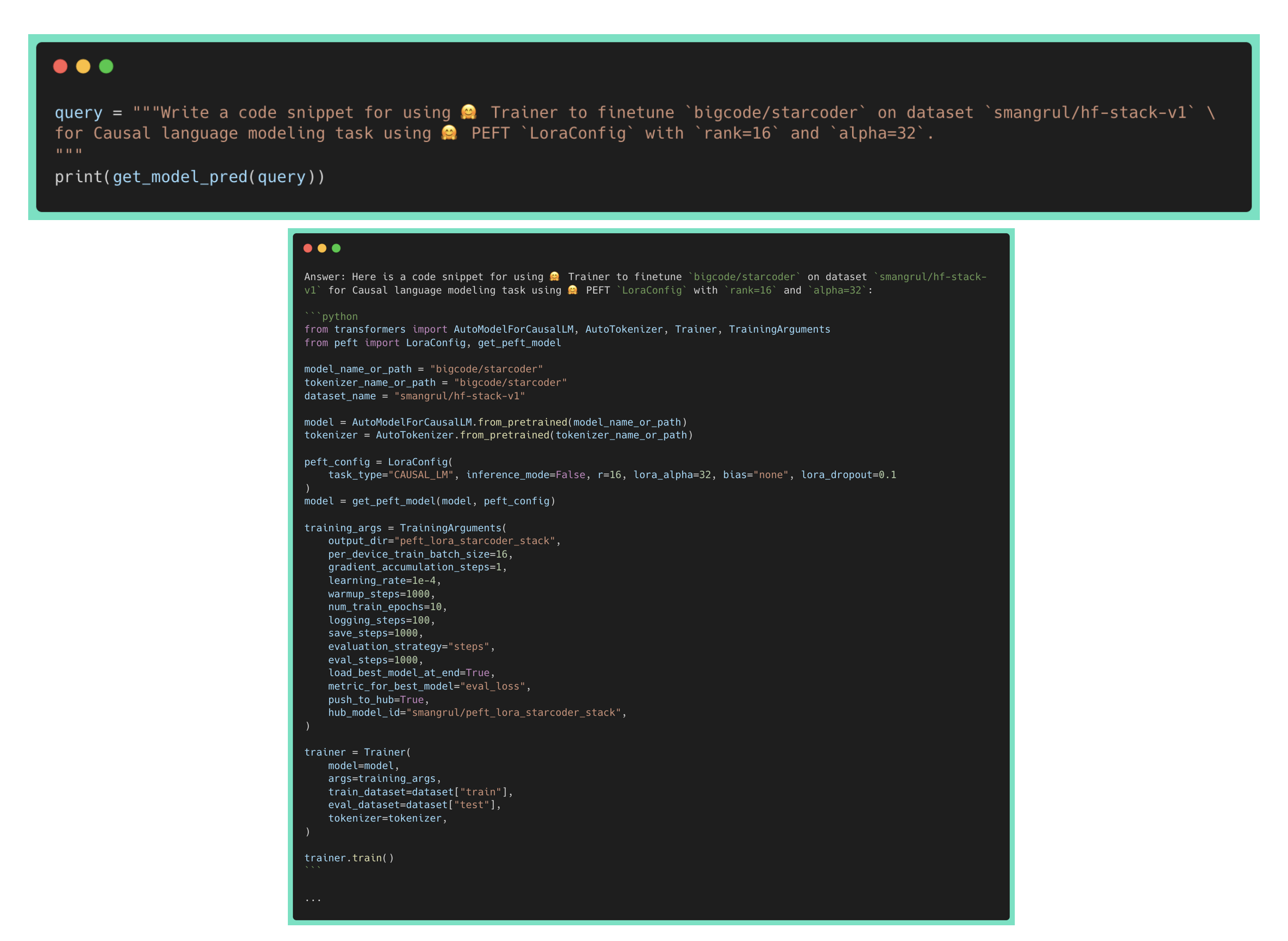
Yay! It correctly answers in detail how to create LoraConfig and related peft model along with correctly using the model name, dataset name as well as param values of LoraConfig. On disabling the adapter, it fails to correctly use the API of LoraConfig or to create a PEFT model, suggesting that it isn't part of the training data of Octocoder.
I know, after all this, you want to finetune starcoder on your codebase and use it locally on your consumer hardware such as Mac laptops with M1 GPUs, windows with RTX 4090/3090 GPUs ... Don't worry, we have got you covered.
We will be using this super cool open source library mlc-llm 🔥. Specifically, we will be using this fork pacman100/mlc-llm which has changes to get it working with the Hugging Face Code Completion extension for VS Code. On my Mac latop with M1 Metal GPU, the 15B model was painfully slow. Hence, we will go small and train a PEFT LoRA version as well as a full finetuned version of bigcode/starcoderbase-1b. The training colab notebooks are linked below:
starcoderbase-1b: linkThe training loss, evaluation loss as well as learning rate schedules are plotted below:
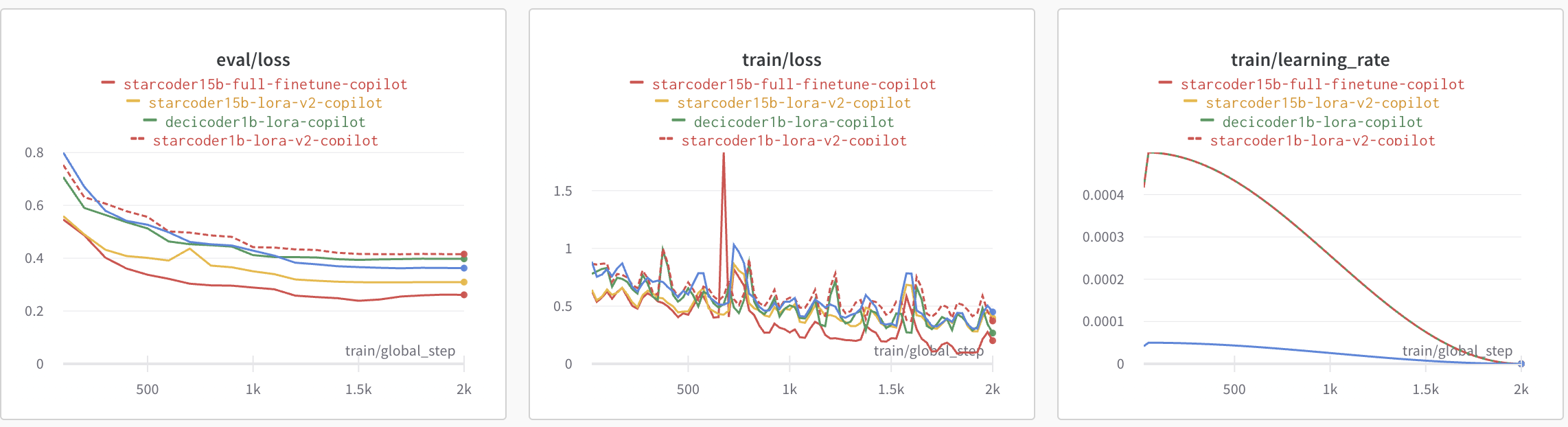
Now, we will look at detailed steps for locally hosting the merged model smangrul/starcoder1B-v2-personal-copilot-merged and using it with 🤗 llm-vscode VS Code Extension.
git clone --recursive https://github.com/pacman100/mlc-llm.git && cd mlc-llm/
pip install --pre --force-reinstall mlc-ai-nightly mlc-chat-nightly -f https://mlc.ai/wheels
cd python
pip uninstall mlc-chat-nightly
pip install -e "."
time python3 -m mlc_llm.build --hf-path smangrul/starcoder1B-v2-personal-copilot-merged --target metal --use-cache=0
dist/starcoder1B-v2-personal-copilot-merged-q4f16_1/params/mlc-chat-config.json:{
"model_lib": "starcoder7B-personal-copilot-merged-q4f16_1",
"local_id": "starcoder7B-personal-copilot-merged-q4f16_1",
"conv_template": "code_gpt",
- "temperature": 0.7,
+ "temperature": 0.2,
- "repetition_penalty": 1.0,
"top_p": 0.95,
- "mean_gen_len": 128,
+ "mean_gen_len": 64,
- "max_gen_len": 512,
+ "max_gen_len": 64,
"shift_fill_factor": 0.3,
"tokenizer_files": [
"tokenizer.json",
"merges.txt",
"vocab.json"
],
"model_category": "gpt_bigcode",
"model_name": "starcoder1B-v2-personal-copilot-merged"
}
python -m mlc_chat.rest --model dist/starcoder1B-v2-personal-copilot-merged-q4f16_1/params --lib-path dist/starcoder1B-v2-personal-copilot-merged-q4f16_1/starcoder1B-v2-personal-copilot-merged-q4f16_1-metal.so
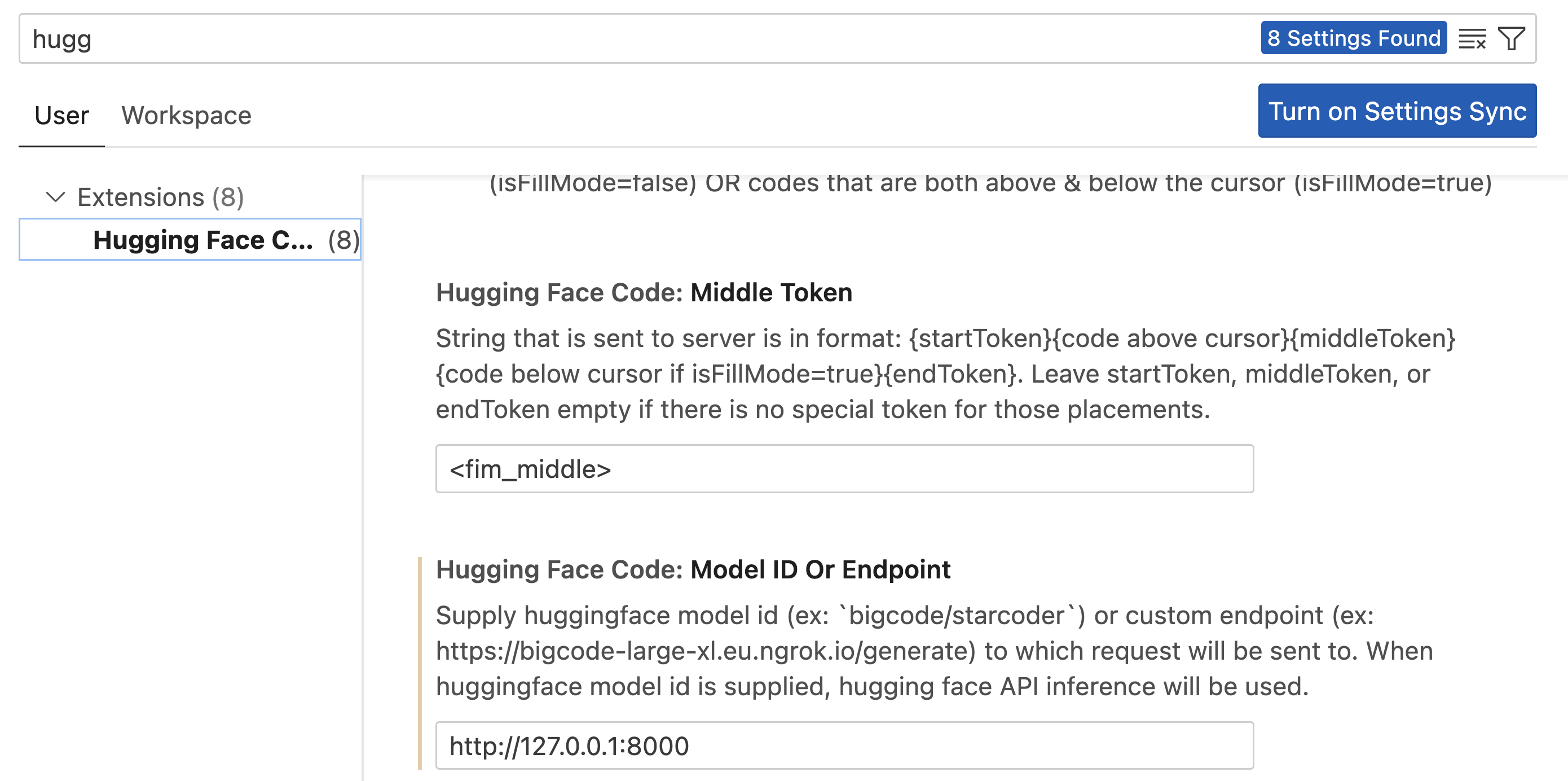
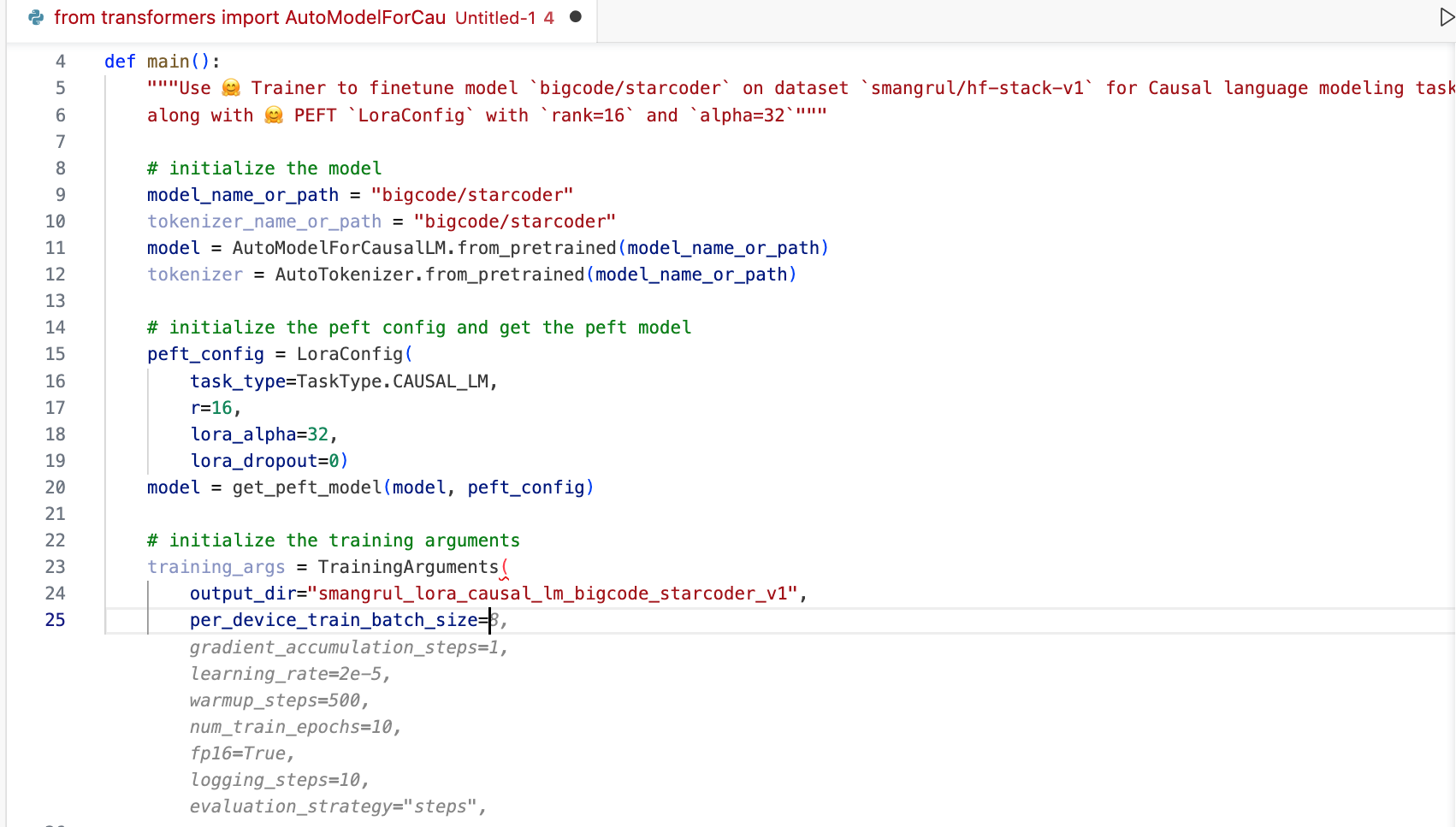
Voila! ⭐️
The demo at the start of this post is this 1B model running locally on my Mac laptop.
In this blog plost, we saw how to finetune starcoder to create a personal co-pilot that knows about our code. We called it 🤗 HugCoder, as we trained it on Hugging Face code :) After looking at the data collection workflow, we compared training using QLoRA vs full fine-tuning. We also experimented by combining different LoRAs, which is still an unexplored technique in the text/code domain. For deployment, we examined remote inference using 🤗 Inference Endpoints, and also showed on-device execution of a smaller model with VS Code and MLC.
Please, let us know if you use these methods for your own codebase!
We would like to thank Pedro Cuenca, Leandro von Werra, Benjamin Bossan, Sylvain Gugger and Loubna Ben Allal for their help with the writing of this blogpost.
此内容由惯性聚合(RSS阅读器)自动聚合整理,仅供阅读参考。 原文来自 — 版权归原作者所有。