



In our previous post, Exploring Quantization Backends in Diffusers, we dived into how various quantization techniques can shrink diffusion models like FLUX.1-dev, making them significantly more accessible for inference without drastically compromising performance. We saw how bitsandbytes, torchao, and others reduce memory footprints for generating images.
Performing inference is cool, but to make these models truly our own, we also need to be able to fine-tune them. Therefore, in this post, we tackle efficient fine-tuning of these models with peak memory use under ~10 GB of VRAM on a single GPU. This post will guide you through fine-tuning FLUX.1-dev using QLoRA with the diffusers library. We'll showcase results from an NVIDIA RTX 4090. We'll also highlight how FP8 training with torchao can further optimize speed on compatible hardware.
torchao We aim to fine-tune black-forest-labs/FLUX.1-dev to adopt the artistic style of Alphonse Mucha, using a small dataset.
The model consists of three main components:
In our QLoRA approach, we focus exclusively on fine-tuning the transformer component. The text encoders and VAE remain frozen throughout training.
We used a diffusers training script (slightly modified from here designed for DreamBooth-style LoRA fine-tuning of FLUX models. Also, a shortened version to reproduce the results in this blogpost (and used in the Google Colab) is available here. Let's examine the crucial parts for QLoRA and memory efficiency:
LoRA (Low-Rank Adaptation) Deep Dive: LoRA makes model training more efficient by keeping track of the weight updates with low-rank matrices. Instead of updating the full weight matrix W W , LoRA learns two smaller matrices A A and B B . The update to the weights for the model is ΔW=BA \Delta W = B A , where A∈Rr×k A \in \mathbb{R}^{r \times k} and B∈Rd×r B \in \mathbb{R}^{d \times r} . The number r r (called rank) is much smaller than the original dimensions, which means less parameters to update. Lastly, α \alpha is a scaling factor for the LoRA activations. This affects how much LoRA affects the updates, and is often set to the same value as the r r or a multiple of it. It helps balance the influence of the pre-trained model and the LoRA adapter. For a general introduction to the concept, check out our previous blog post: Using LoRA for Efficient Stable Diffusion Fine-Tuning.
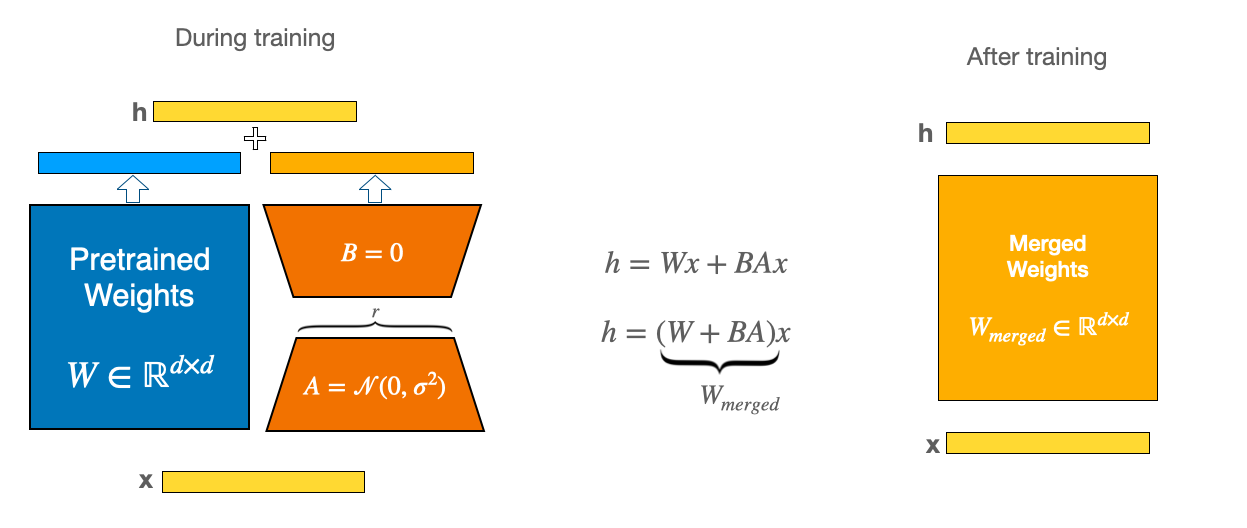
QLoRA: The Efficiency Powerhouse: QLoRA enhances LoRA by first loading the pre-trained base model in a quantized format (typically 4-bit via bitsandbytes), drastically cutting the base model's memory footprint. It then trains LoRA adapters (usually in FP16/BF16) on top of this quantized base. This dramatically lowers the VRAM needed to hold the base model.
For instance, in the DreamBooth training script for HiDream 4-bit quantization with bitsandbytes reduces the peak memory usage of a LoRA fine-tune from ~60GB down to ~37GB with negligible-to-none quality degradation. The very same principle is what we apply here to fine-tune FLUX.1 on a consumer-grade hardware.
8-bit Optimizer (AdamW): Standard AdamW optimizer maintains first and second moment estimates for each parameter in 32-bit (FP32), which consumes a lot of memory. The 8-bit AdamW uses block-wise quantization to store optimizer states in 8-bit precision, while maintaining training stability. This technique can reduce optimizer memory usage by ~75% compared to standard FP32 AdamW. Enabling it in the script is straightforward:
# Check for the --use_8bit_adam flag
if args.use_8bit_adam:
    optimizer_class = bnb.optim.AdamW8bit
else:
    optimizer_class = torch.optim.AdamW

optimizer = optimizer_class(
    params_to_optimize,
    betas=(args.adam_beta1, args.adam_beta2),
    weight_decay=args.adam_weight_decay,
    eps=args.adam_epsilon,
)
Gradient Checkpointing: During forward pass, intermediate activations are typically stored for backward pass gradient computation. Gradient checkpointing trades computation for memory by only storing certain checkpoint activations and recomputing others during backpropagation.
if args.gradient_checkpointing:
    transformer.enable_gradient_checkpointing()
Cache Latents: This optimization technique pre-processes all training images through the VAE encoder before the beginning of the training. It stores the resulting latent representations in memory. During the training, instead of encoding images on-the-fly, the cached latents are directly used. This approach offers two main benefits:
# Cache latents before training if the flag is set
    if args.cache_latents:
        latents_cache = []
        for batch in tqdm(train_dataloader, desc="Caching latents"):
            with torch.no_grad():
                batch["pixel_values"] = batch["pixel_values"].to(
                    accelerator.device, non_blocking=True, dtype=weight_dtype
                )
                latents_cache.append(vae.encode(batch["pixel_values"]).latent_dist)
        # VAE is no longer needed, free up its memory
        del vae
        free_memory()
Setting up 4-bit Quantization (BitsAndBytesConfig):
This section demonstrates the QLoRA configuration for the base model:
# Determine compute dtype based on mixed precision
bnb_4bit_compute_dtype = torch.float32
if args.mixed_precision == "fp16":
    bnb_4bit_compute_dtype = torch.float16
elif args.mixed_precision == "bf16":
    bnb_4bit_compute_dtype = torch.bfloat16

nf4_config = BitsAndBytesConfig(
    load_in_4bit=True,
    bnb_4bit_quant_type="nf4",
    bnb_4bit_compute_dtype=bnb_4bit_compute_dtype,
)

transformer = FluxTransformer2DModel.from_pretrained(
    args.pretrained_model_name_or_path,
    subfolder="transformer",
    quantization_config=nf4_config,
    torch_dtype=bnb_4bit_compute_dtype,
)
# Prepare model for k-bit training
transformer = prepare_model_for_kbit_training(transformer, use_gradient_checkpointing=False)
# Gradient checkpointing is enabled later via transformer.enable_gradient_checkpointing() if arg is set
Defining LoRA Configuration (LoraConfig):
Adapters are added to the quantized transformer:
transformer_lora_config = LoraConfig(
    r=args.rank,
    lora_alpha=args.rank,
    init_lora_weights="gaussian",
    target_modules=["to_k", "to_q", "to_v", "to_out.0"], # FLUX attention blocks
)
transformer.add_adapter(transformer_lora_config)
print(f"trainable params: {transformer.num_parameters(only_trainable=True)} || all params: {transformer.num_parameters()}")
# trainable params: 4,669,440 || all params: 11,906,077,760
Only these LoRA parameters become trainable.
Before we launch the QLoRA fine-tune we can save a huge chunk of VRAM and wall-clock time by caching outputs of text encoders once.
At training time the dataloader simply reads the cached embeddings instead of re-encoding the caption, so the CLIP/T5 encoder never has to sit in GPU memory.
# https://github.com/huggingface/diffusers/blob/main/examples/research_projects/flux_lora_quantization/compute_embeddings.py
import argparse

import pandas as pd
import torch
from datasets import load_dataset
from huggingface_hub.utils import insecure_hashlib
from tqdm.auto import tqdm
from transformers import T5EncoderModel

from diffusers import FluxPipeline


MAX_SEQ_LENGTH = 77
OUTPUT_PATH = "embeddings.parquet"


def generate_image_hash(image):
    return insecure_hashlib.sha256(image.tobytes()).hexdigest()


def load_flux_dev_pipeline():
    id = "black-forest-labs/FLUX.1-dev"
    text_encoder = T5EncoderModel.from_pretrained(id, subfolder="text_encoder_2", load_in_8bit=True, device_map="auto")
    pipeline = FluxPipeline.from_pretrained(
        id, text_encoder_2=text_encoder, transformer=None, vae=None, device_map="balanced"
    )
    return pipeline


@torch.no_grad()
def compute_embeddings(pipeline, prompts, max_sequence_length):
    all_prompt_embeds = []
    all_pooled_prompt_embeds = []
    all_text_ids = []
    for prompt in tqdm(prompts, desc="Encoding prompts."):
        (
            prompt_embeds,
            pooled_prompt_embeds,
            text_ids,
        ) = pipeline.encode_prompt(prompt=prompt, prompt_2=None, max_sequence_length=max_sequence_length)
        all_prompt_embeds.append(prompt_embeds)
        all_pooled_prompt_embeds.append(pooled_prompt_embeds)
        all_text_ids.append(text_ids)

    max_memory = torch.cuda.max_memory_allocated() / 1024 / 1024 / 1024
    print(f"Max memory allocated: {max_memory:.3f} GB")
    return all_prompt_embeds, all_pooled_prompt_embeds, all_text_ids


def run(args):
    dataset = load_dataset("Norod78/Yarn-art-style", split="train")
    image_prompts = {generate_image_hash(sample["image"]): sample["text"] for sample in dataset}
    all_prompts = list(image_prompts.values())
    print(f"{len(all_prompts)=}")

    pipeline = load_flux_dev_pipeline()
    all_prompt_embeds, all_pooled_prompt_embeds, all_text_ids = compute_embeddings(
        pipeline, all_prompts, args.max_sequence_length
    )

    data = []
    for i, (image_hash, _) in enumerate(image_prompts.items()):
        data.append((image_hash, all_prompt_embeds[i], all_pooled_prompt_embeds[i], all_text_ids[i]))
    print(f"{len(data)=}")

    # Create a DataFrame
    embedding_cols = ["prompt_embeds", "pooled_prompt_embeds", "text_ids"]
    df = pd.DataFrame(data, columns=["image_hash"] + embedding_cols)
    print(f"{len(df)=}")

    # Convert embedding lists to arrays (for proper storage in parquet)
    for col in embedding_cols:
        df[col] = df[col].apply(lambda x: x.cpu().numpy().flatten().tolist())

    # Save the dataframe to a parquet file
    df.to_parquet(args.output_path)
    print(f"Data successfully serialized to {args.output_path}")


if __name__ == "__main__":
    parser = argparse.ArgumentParser()
    parser.add_argument(
        "--max_sequence_length",
        type=int,
        default=MAX_SEQ_LENGTH,
        help="Maximum sequence length to use for computing the embeddings. The more the higher computational costs.",
    )
    parser.add_argument("--output_path", type=str, default=OUTPUT_PATH, help="Path to serialize the parquet file.")
    args = parser.parse_args()

    run(args)
python compute_embeddings.py \
  --max_sequence_length 77 \
  --output_path embeddings_alphonse_mucha.parquet
By combining this with cached VAE latents (--cache_latents) you whittle the active model down to just the quantized transformer + LoRA adapters, keeping the whole fine-tune comfortably under 10 GB of GPU memory.
For this demonstration, we leveraged an NVIDIA RTX 4090 (24GB VRAM) to explore its performance. The full training command using accelerate is shown below.
# You need to pre-compute the text embeddings first. See the diffusers repo.
# https://github.com/huggingface/diffusers/tree/main/examples/research_projects/flux_lora_quantization
accelerate launch --config_file=accelerate.yaml \
  train_dreambooth_lora_flux_miniature.py \
  --pretrained_model_name_or_path="black-forest-labs/FLUX.1-dev" \
  --data_df_path="embeddings_alphonse_mucha.parquet" \
  --output_dir="alphonse_mucha_lora_flux_nf4" \
  --mixed_precision="bf16" \
  --use_8bit_adam \
  --weighting_scheme="none" \
  --width=512 \
  --height=768 \
  --train_batch_size=1 \
  --repeats=1 \
  --learning_rate=1e-4 \
  --guidance_scale=1 \
  --report_to="wandb" \
  --gradient_accumulation_steps=4 \
  --gradient_checkpointing \ # can drop checkpointing when HW has more than 16 GB.
  --lr_scheduler="constant" \
  --lr_warmup_steps=0 \
  --cache_latents \
  --rank=4 \
  --max_train_steps=700 \
  --seed="0"
Configuration for RTX 4090:
On our RTX 4090, we used a train_batch_size of 1, gradient_accumulation_steps of 4, mixed_precision="bf16", gradient_checkpointing=True, use_8bit_adam=True, a LoRA rank of 4, and resolution of 512x768. Latents were cached with cache_latents=True.
Memory Footprint (RTX 4090):
Training Time (RTX 4090):
Fine-tuning for 700 steps on the Alphonse Mucha dataset took approximately 41 minutes on the RTX 4090 with train_batch_size of 1 and resolution of 512x768.
Output Quality: The ultimate measure is the generated art. Here are samples from our QLoRA fine-tuned model on the derekl35/alphonse-mucha-style dataset:
This table compares the primary bf16 precision results. The goal of the fine-tuning was to teach the model the distinct style of Alphonse Mucha.
The fine-tuned model nicely captured Mucha's iconic art nouveau style, evident in the decorative motifs and distinct color palette. The QLoRA process maintained excellent fidelity while learning the new style.
The results are nearly identical, showing that QLoRA performs effectively with both fp16 and bf16 mixed precision.
For users with NVIDIA GPUs possessing compute capability 8.9 or greater (such as the H100, RTX 4090), even greater speed efficiencies can be achieved by leveraging FP8 training via the torchao library.
We fine-tuned FLUX.1-dev LoRA on an H100 SXM GPU slightly modifieddiffusers-torchao training scripts. The following command was used:
accelerate launch train_dreambooth_lora_flux.py \
  --pretrained_model_name_or_path=black-forest-labs/FLUX.1-dev \
  --dataset_name=derekl35/alphonse-mucha-style --instance_prompt="a woman, alphonse mucha style" --caption_column="text" \
  --output_dir=alphonse_mucha_fp8_lora_flux \
  --mixed_precision=bf16 --use_8bit_adam \
  --weighting_scheme=none \
  --height=768 --width=512 --train_batch_size=1 --repeats=1 \
  --learning_rate=1e-4 --guidance_scale=1 --report_to=wandb \
  --gradient_accumulation_steps=1 --gradient_checkpointing \
  --lr_scheduler=constant --lr_warmup_steps=0 --rank=4 \
  --max_train_steps=700 --checkpointing_steps=600 --seed=0 \
  --do_fp8_training --push_to_hub
The training run had a peak memory usage of 36.57 GB and completed in approximately 20 minutes.
Qualitative results from this FP8 fine-tuned model are also available:

Key steps to enable FP8 training with torchao involve:
convert_to_float8_training from torchao.float8.module_filter_fn to specify which modules should and should not be converted to FP8.For a more detailed guide and code snippets, please refer to this gist and the diffusers-torchao repository.
After training your LoRA adapters, you have two main approaches for inference.
One approach is to load your trained LoRA adapters on top of the base model.
Benefits of Loading LoRA:
set_adapters() for creative blendingfrom diffusers import FluxPipeline, FluxTransformer2DModel, BitsAndBytesConfig
import torch
ckpt_id = "black-forest-labs/FLUX.1-dev"
pipeline = FluxPipeline.from_pretrained(
ckpt_id, torch_dtype=torch.float16
)
pipeline.load_lora_weights("derekl35/alphonse_mucha_qlora_flux", weight_name="pytorch_lora_weights.safetensors")
pipeline.enable_model_cpu_offload()
image = pipeline(
"a puppy in a pond, alphonse mucha style", num_inference_steps=28, guidance_scale=3.5, height=768, width=512, generator=torch.manual_seed(0)
).images[0]
image.save("alphonse_mucha.png")
For when you want maximum efficiency with a single style, you can merge the LoRA weights into the base model.
Benefits of Merging LoRA:
from diffusers import FluxPipeline, AutoPipelineForText2Image, FluxTransformer2DModel, BitsAndBytesConfig
import torch

ckpt_id = "black-forest-labs/FLUX.1-dev"
pipeline = FluxPipeline.from_pretrained(
    ckpt_id, text_encoder=None, text_encoder_2=None, torch_dtype=torch.float16
)
pipeline.load_lora_weights("derekl35/alphonse_mucha_qlora_flux", weight_name="pytorch_lora_weights.safetensors")
pipeline.fuse_lora()
pipeline.unload_lora_weights()

pipeline.transformer.save_pretrained("fused_transformer")

bnb_4bit_compute_dtype = torch.bfloat16

nf4_config = BitsAndBytesConfig(
    load_in_4bit=True,
    bnb_4bit_quant_type="nf4",
    bnb_4bit_compute_dtype=bnb_4bit_compute_dtype,
)
transformer = FluxTransformer2DModel.from_pretrained(
    "fused_transformer",
    quantization_config=nf4_config,
    torch_dtype=bnb_4bit_compute_dtype,
)

pipeline = AutoPipelineForText2Image.from_pretrained(
    ckpt_id, transformer=transformer, torch_dtype=bnb_4bit_compute_dtype
)
pipeline.enable_model_cpu_offload()

image = pipeline(
    "a puppy in a pond, alphonse mucha style", num_inference_steps=28, guidance_scale=3.5, height=768, width=512, generator=torch.manual_seed(0)
).images[0]
image.save("alphonse_mucha_merged.png")
While we showcased results on an RTX 4090, the same code can be run on more accessible hardware like the T4 GPU available in Google Colab for free.
On a T4, you can expect the fine-tuning process to take significantly longer around 4 hours for the same number of steps. This is a trade-off for accessibility, but it makes custom fine-tuning possible without high-end hardware. Be mindful of usage limits if running on Colab, as a 4-hour training run might push them.
QLoRA, coupled with the diffusers library, significantly democratizes the ability to customize state-of-the-art models like FLUX.1-dev. As demonstrated on an RTX 4090, efficient fine-tuning is well within reach, yielding high-quality stylistic adaptations. Furthermore, for users with the latest NVIDIA hardware, torchao enables even faster training through FP8 precision.
Sharing your fine-tuned LoRA adapters is a fantastic way to contribute to the open-source community. It allows others to easily try out your styles, build on your work, and helps create a vibrant ecosystem of creative AI tools.
If you've trained a LoRA for FLUX.1-dev, we encourage you to share it. The easiest way is to add the --push_to_hub flag to the training script. Alternatively, if you have already trained a model and want to upload it, you can use the following snippet.
# Prereqs:
# - pip install huggingface_hub diffusers
# - Run `huggingface-cli login` (or set HF_TOKEN env-var) once.
# - save model

from huggingface_hub import create_repo, upload_folder

repo_id = "your-username/alphonse_mucha_qlora_flux"
create_repo(repo_id, exist_ok=True)

upload_folder(
    repo_id=repo_id,
    folder_path="alphonse_mucha_qlora_flux",
    commit_message="Add Alphonse Mucha LoRA adapter"
)
Check out our Mucha LoRA and the TorchAO FP8 LoRA. You can find both, plus other adapters, in this collection.
We can't wait to see what you create!
此内容由惯性聚合(RSS阅读器)自动聚合整理,仅供阅读参考。 原文来自 — 版权归原作者所有。