








This article is also available in Chinese 简体中文.
Latent Consistency Models (LCM) are a way to decrease the number of steps required to generate an image with Stable Diffusion (or SDXL) by distilling the original model into another version that requires fewer steps (4 to 8 instead of the original 25 to 50). Distillation is a type of training procedure that attempts to replicate the outputs from a source model using a new one. The distilled model may be designed to be smaller (that’s the case of DistilBERT or the recently-released Distil-Whisper) or, in this case, require fewer steps to run. It’s usually a lengthy and costly process that requires huge amounts of data, patience, and a few GPUs.
Well, that was the status quo before today!
We are delighted to announce a new method that can essentially make Stable Diffusion and SDXL faster, as if they had been distilled using the LCM process! How does it sound to run any SDXL model in about 1 second instead of 7 on a 3090, or 10x faster on Mac? Read on for details!
So, what’s the trick? For latent consistency distillation, each model needs to be distilled separately. The core idea with LCM LoRA is to train just a small number of adapters, known as LoRA layers, instead of the full model. The resulting LoRAs can then be applied to any fine-tuned version of the model without having to distil them separately. If you are itching to see how this looks in practice, just jump to the next section to play with the inference code. If you want to train your own LoRAs, this is the process you’d use:
For more details on the process, please download our paper.
Fast inference of Stable Diffusion and SDXL enables new use-cases and workflows. To name a few:
To gauge the speed difference we are talking about, generating a single 1024x1024 image on an M1 Mac with SDXL (base) takes about a minute. Using the LCM LoRA, we get great results in just ~6s (4 steps). This is an order of magnitude faster, and not having to wait for results is a game-changer. Using a 4090, we get almost instant response (less than 1s). This unlocks the use of SDXL in applications where real-time events are a requirement.
The version of diffusers released today makes it very easy to use LCM LoRAs:
from diffusers import DiffusionPipeline, LCMScheduler
import torch

model_id = "stabilityai/stable-diffusion-xl-base-1.0"
lcm_lora_id = "latent-consistency/lcm-lora-sdxl"

pipe = DiffusionPipeline.from_pretrained(model_id, variant="fp16")

pipe.load_lora_weights(lcm_lora_id)
pipe.scheduler = LCMScheduler.from_config(pipe.scheduler.config)
pipe.to(device="cuda", dtype=torch.float16)

prompt = "close-up photography of old man standing in the rain at night, in a street lit by lamps, leica 35mm summilux"
images = pipe(
    prompt=prompt,
    num_inference_steps=4,
    guidance_scale=1,
).images[0]
Note how the code:
This would result in the following full-resolution image:
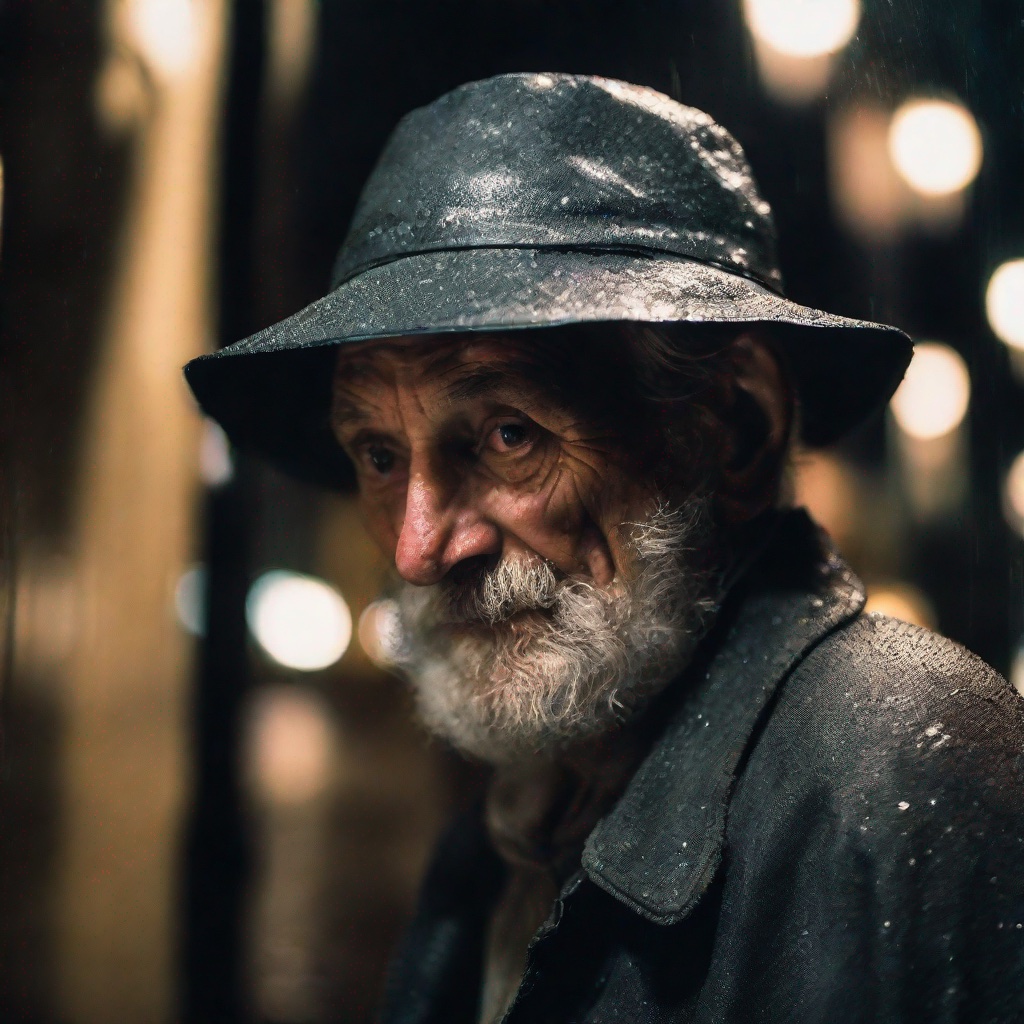
Image generated with SDXL in 4 steps using an LCM LoRA.
Let’s see how the number of steps impacts generation quality. The following code will generate images with 1 to 8 total inference steps:
images = []
for steps in range(8):
    generator = torch.Generator(device=pipe.device).manual_seed(1337)
    image = pipe(
        prompt=prompt,
        num_inference_steps=steps+1,
        guidance_scale=1,
        generator=generator,
    ).images[0]
    images.append(image)
These are the 8 images displayed in a grid:
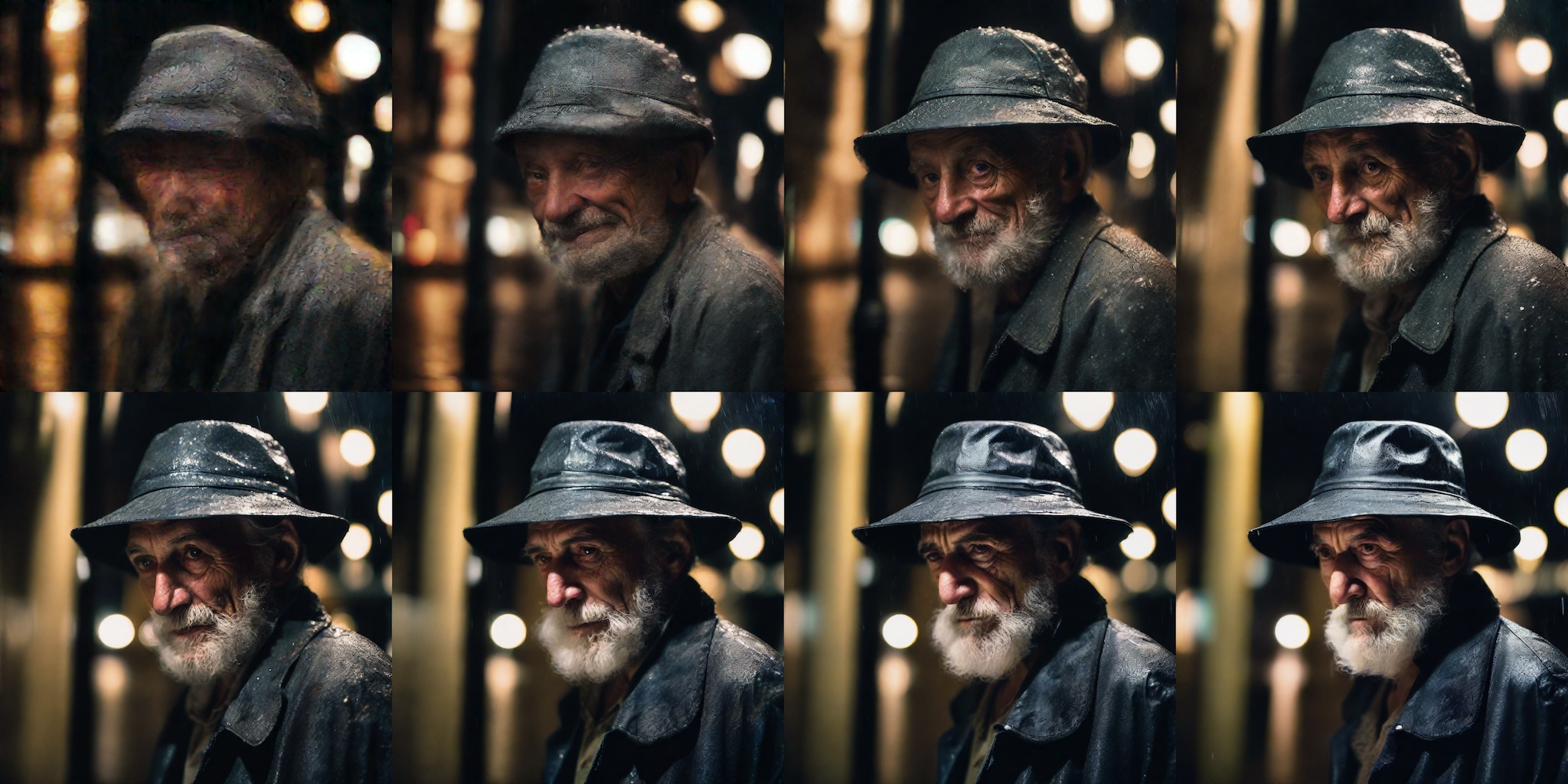
LCM LoRA generations with 1 to 8 steps.
As expected, using just 1 step produces an approximate shape without discernible features and lacking texture. However, results quickly improve, and they are usually very satisfactory in just 4 to 6 steps. Personally, I find the 8-step image in the previous test to be a bit too saturated and “cartoony” for my taste, so I’d probably choose between the ones with 5 and 6 steps in this example. Generation is so fast that you can create a bunch of different variants using just 4 steps, and then select the ones you like and iterate using a couple more steps and refined prompts as necessary.
Note that in the previous examples we used a guidance_scale of 1, which effectively disables it. This works well for most prompts, and it’s fastest, but ignores negative prompts. You can also explore using negative prompts by providing a guidance scale between 1 and 2 – we found that larger values don’t work.
How does this compare against the standard SDXL pipeline, in terms of quality? Let’s see an example!
We can quickly revert our pipeline to a standard SDXL pipeline by unloading the LoRA weights and switching to the default scheduler:
from diffusers import EulerDiscreteScheduler

pipe.unload_lora_weights()
pipe.scheduler = EulerDiscreteScheduler.from_config(pipe.scheduler.config)
Then we can run inference as usual for SDXL. We’ll gather results using varying number of steps:
images = []
for steps in (1, 4, 8, 15, 20, 25, 30, 50):
    generator = torch.Generator(device=pipe.device).manual_seed(1337)
    image = pipe(
        prompt=prompt,
        num_inference_steps=steps,
        generator=generator,
    ).images[0]
    images.append(image)
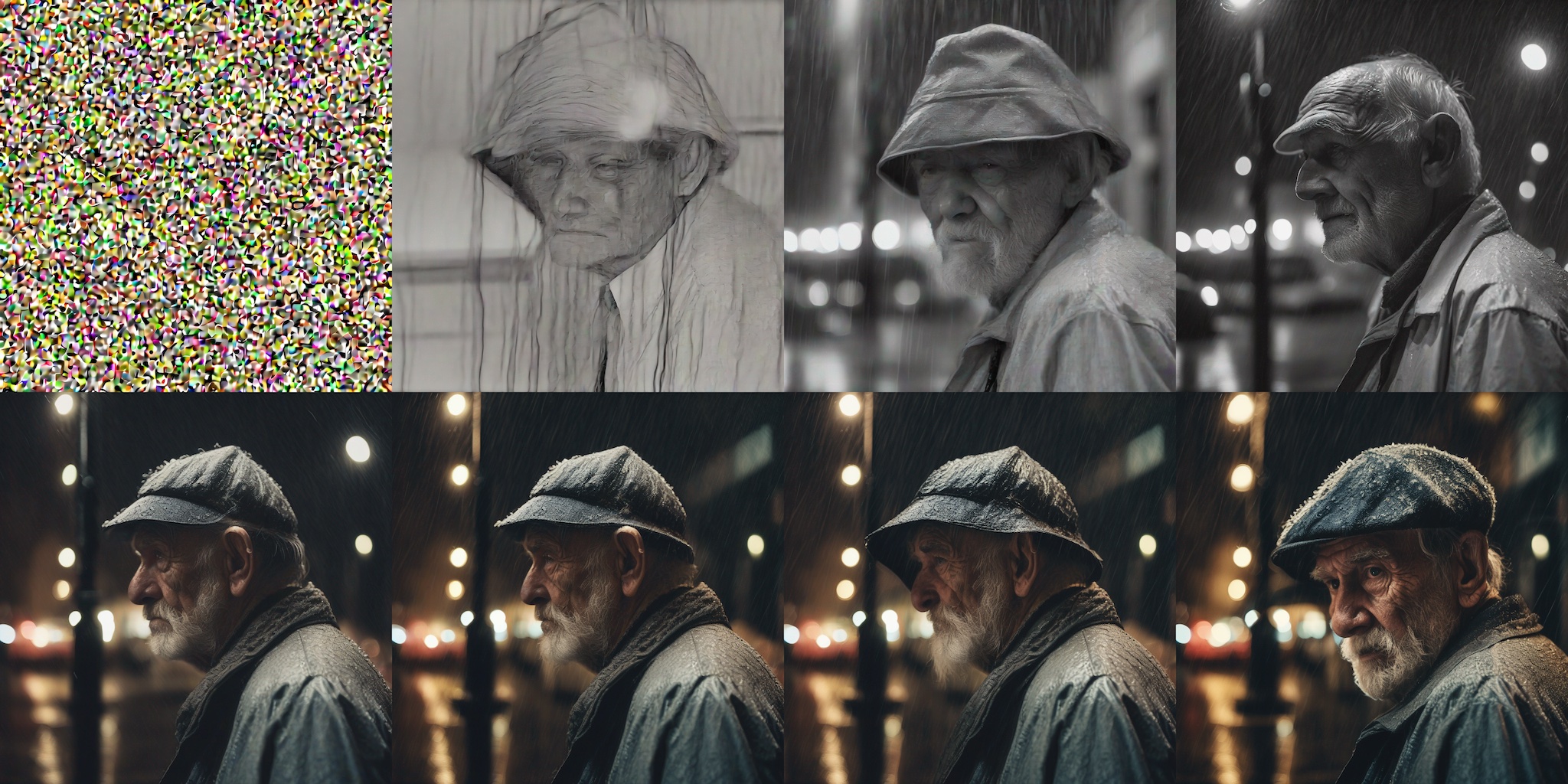
SDXL pipeline results (same prompt and random seed), using 1, 4, 8, 15, 20, 25, 30, and 50 steps.
As you can see, images in this example are pretty much useless until ~20 steps (second row), and quality still increases noticeably with more steps. The details in the final image are amazing, but it took 50 steps to get there.
This technique also works for any other fine-tuned SDXL or Stable Diffusion model. To demonstrate, let's see how to run inference on collage-diffusion, a model fine-tuned from Stable Diffusion v1.5 using Dreambooth.
The code is similar to the one we saw in the previous examples. We load the fine-tuned model, and then the LCM LoRA suitable for Stable Diffusion v1.5.
from diffusers import DiffusionPipeline, LCMScheduler
import torch

model_id = "wavymulder/collage-diffusion"
lcm_lora_id = "latent-consistency/lcm-lora-sdv1-5"

pipe = DiffusionPipeline.from_pretrained(model_id, variant="fp16")
pipe.scheduler = LCMScheduler.from_config(pipe.scheduler.config)
pipe.load_lora_weights(lcm_lora_id)
pipe.to(device="cuda", dtype=torch.float16)

prompt = "collage style kid sits looking at the night sky, full of stars"

generator = torch.Generator(device=pipe.device).manual_seed(1337)
images = pipe(
    prompt=prompt,
    generator=generator,
    negative_prompt=negative_prompt,
    num_inference_steps=4,
    guidance_scale=1,
).images[0]
images

LCM LoRA technique with a Dreambooth Stable Diffusion v1.5 model, allowing 4-step inference.
The integration of LCM in diffusers makes it possible to take advantage of many features and workflows that are part of the diffusers toolbox. For example:
mps support for Macs with Apple Silicon.torch.compile().This section is not meant to be exhaustive, but illustrative of the generation speed we achieve on various computers. Let us stress again how liberating it is to explore image generation so easily.
| Hardware | SDXL LoRA LCM (4 steps) | SDXL standard (25 steps) |
|---|---|---|
| Mac, M1 Max | 6.5s | 64s |
| 2080 Ti | 4.7s | 10.2s |
| 3090 | 1.4s | 7s |
| 4090 | 0.7s | 3.4s |
| T4 (Google Colab Free Tier) | 8.4s | 26.5s |
| A100 (80 GB) | 1.2s | 3.8s |
| Intel i9-10980XE CPU (1/36 cores used) | 29s | 219s |
These tests were run with a batch size of 1 in all cases, using this script by Sayak Paul.
For cards with a lot of capacity, such as A100, performance increases significantly when generating multiple images at once, which is usually the case for production workloads.
Latent Consistency Models LoRAs Collection
latent-consistency/lcm-lora-sdxl. LCM LoRA for SDXL 1.0 base, as seen in the examples above.latent-consistency/lcm-lora-sdv1-5. LCM LoRA for Stable Diffusion 1.5.latent-consistency/lcm-lora-ssd-1b. LCM LoRA for segmind/SSD-1B, a distilled SDXL model that's 50% smaller and 60% faster than the original SDXL.latent-consistency/lcm-sdxl. Full fine-tuned consistency model derived from SDXL 1.0 base.
latent-consistency/lcm-ssd-1b. Full fine-tuned consistency model derived from segmind/SSD-1B.
Using the diffusers + PEFT integration, you can combine LCM LoRAs with regular SDXL LoRAs, giving them the superpower to run LCM inference in only 4 steps.
Here we are going to combine CiroN2022/toy_face LoRA with the LCM LoRA:
from diffusers import DiffusionPipeline, LCMScheduler
import torch

model_id = "stabilityai/stable-diffusion-xl-base-1.0"
lcm_lora_id = "latent-consistency/lcm-lora-sdxl"
pipe = DiffusionPipeline.from_pretrained(model_id, variant="fp16")
pipe.scheduler = LCMScheduler.from_config(pipe.scheduler.config)

pipe.load_lora_weights(lcm_lora_id)
pipe.load_lora_weights("CiroN2022/toy-face", weight_name="toy_face_sdxl.safetensors", adapter_name="toy")

pipe.set_adapters(["lora", "toy"], adapter_weights=[1.0, 0.8])
pipe.to(device="cuda", dtype=torch.float16)

prompt = "a toy_face man"
negative_prompt = "blurry, low quality, render, 3D, oversaturated"
images = pipe(
    prompt=prompt,
    negative_prompt=negative_prompt,
    num_inference_steps=4,
    guidance_scale=0.5,
).images[0]
images

Standard and LCM LoRAs combined for fast (4 step) inference.
Need ideas to explore some LoRAs? Check out our experimental LoRA the Explorer (LCM version) Space to test amazing creations by the community and get inspired!
As part of the diffusers release today, we are providing training and fine-tuning scripts developed in collaboration with the LCM team authors. They allow users to:
For more details, please check the instructions for SDXL or Stable Diffusion in the repo.
We hope these scripts inspire the community to try their own fine-tunes. Please, do let us know if you use them for your projects!
Latent Consistency Models project page, paper.
Demos
Training scripts
The amazing work on Latent Consistency Models was performed by the LCM Team, please make sure to check out their code, report and paper. This project is a collaboration between the diffusers team, the LCM team, and community contributor Daniel Gu. We believe it's a testament to the enabling power of open source AI, the cornerstone that allows researchers, practitioners and tinkerers to explore new ideas and collaborate. We'd also like to thank @madebyollin for their continued contributions to the community, including the float16 autoencoder we use in our training scripts.
此内容由惯性聚合(RSS阅读器)自动聚合整理,仅供阅读参考。 原文来自 — 版权归原作者所有。