
惯性聚合 高效追踪和阅读你感兴趣的博客、新闻、科技资讯
阅读原文 在惯性聚合中打开

推荐订阅源

I
InfoQ
奇客Solidot–传递最新科技情报
奇客Solidot–传递最新科技情报
Apple Machine Learning Research
月光博客
月光博客
B
Blog
罗磊的独立博客
GbyAI
GbyAI
博客园 - 三生石上(FineUI控件)
雷峰网
雷峰网
OSCHINA 社区最新新闻
OSCHINA 社区最新新闻
Microsoft Security Blog
宝玉的分享
宝玉的分享
The GitHub Blog
The GitHub Blog
人人都是产品经理
人人都是产品经理
博客园 - Franky
有赞技术团队
有赞技术团队
WordPress大学
WordPress大学
博客园 - 聂微东
钛媒体:引领未来商业与生活新知
钛媒体:引领未来商业与生活新知
V
Visual Studio Blog
MyScale Blog
MyScale Blog
Google DeepMind News
G
Google Developers Blog
aimingoo的专栏
aimingoo的专栏

Hugging Face - Blog

Waypoint-1.5: Higher-Fidelity Interactive Worlds for Everyday GPUs ALTK‑Evolve: On‑the‑Job Learning for AI Agents Safetensors is Joining the PyTorch Foundation Holo3: Breaking the Computer Use Frontier Any Custom Frontend with Gradio's Backend A New Framework for Evaluating Voice Agents (EVA) Bringing Robotics AI to Embedded Platforms: Dataset Recording, VLA Fine‑Tuning, and On‑Device Optimizations One-Shot Any Web App with Gradio's gr.HTML CUGA on Hugging Face: Democratizing Configurable AI Agents New in llama.cpp: Model Management Building Deep Research: How we Achieved State of the Art OVHcloud on Hugging Face Inference Providers 🔥 20x Faster TRL Fine-tuning with RapidFire AI Building for an Open Future - our new partnership with Google Cloud Aligning to What? Rethinking Agent Generalization in MiniMax M2 Building a Healthcare Robot from Simulation to Deployment with NVIDIA Isaac Sentence Transformers is joining Hugging Face! Unlock the power of images with AI Sheets Supercharge your OCR Pipelines with Open Models Google Cloud C4 Brings a 70% TCO improvement on GPT OSS with Intel and Hugging Face Get your VLM running in 3 simple steps on Intel CPUs Nemotron-Personas-India: Synthesized Data for Sovereign AI Introducing RTEB: A New Standard for Retrieval Evaluation Accelerating Qwen3-8B Agent on Intel® Core™ Ultra with Depth-Pruned Draft Models VibeGame: Exploring Vibe Coding Games Nemotron-Personas-Japan: ソブリン AI のための合成データセット Swift Transformers Reaches 1.0 – and Looks to the Future Smol2Operator: Post-Training GUI Agents for Computer Use SyGra: The One-Stop Framework for Building Data for LLMs and SLMs Gaia2 and ARE: Empowering the community to study agents
Subscribe to Enterprise Hub with your AWS Account
Violette, Simon Brandeis, Jeff Boudier · 2024-05-09 · via Hugging Face - Blog

Back to Articles

You can now upgrade your Hugging Face Organization to Enterprise using your AWS account - get started on the AWS Marketplace.

What is Enterprise Hub?

Enterprise Hub is a premium subscription to upgrade a free Hugging Face organization with advanced security features, access controls, collaboration tools and compute options. With Enterprise Hub, companies can build AI privately and securely within our GDPR compliant and SOC2 Type 2 certified platform. Exclusive features include:

  • Single Sign-On: ensure all members of your organization are employees of your company.
  • Resource Groups: manage teams and projects with granular access controls for repositories.
  • Storage Regions: store company repositories in Europe for GDPR compliance.
  • Audit Logs: access detailed logs of changes to your organization and repositories.
  • Advanced Compute Options: give your team higher quota and access to more powerful GPUs.
  • Private Datasets Viewer: enable the Dataset Viewer on your private datasets for easier collaboration.
  • Train on DGX Cloud: train LLMs without code on NVIDIA H100 GPUs managed by NVIDIA DGX Cloud.
  • Premium Support: get the most out of Enterprise Hub and control your costs with dedicated support.

If you're admin of your organization, you can upgrade it easily with a credit card. But how do you upgrade your organization to Enterprise Hub using your AWS account? We'll walk you through it step by step below.

1. Getting Started

Before you can connect your AWS Account with your Hugging Face account, you need to fulfill the following prerequisites:

  • Have access to an active AWS account with access to subscribe to products on the AWS Marketplace.
  • Create a Hugging Face organization account with a registered and confirmed email. (You cannot connect user accounts)
  • Be a member of the Hugging Face organization you want to connect with the “admin” role.
  • Logged into the Hugging Face Platform.

Once you meet these requirements, you can proceed with connecting your AWS and Hugging Face accounts.

2. Connect your Hugging Face Account with your AWS Account

The first step is to go to the AWS Marketplace offering and subscribe to the Hugging Face Platform. There you open the offer and then click on “View purchase options” at the top right screen.
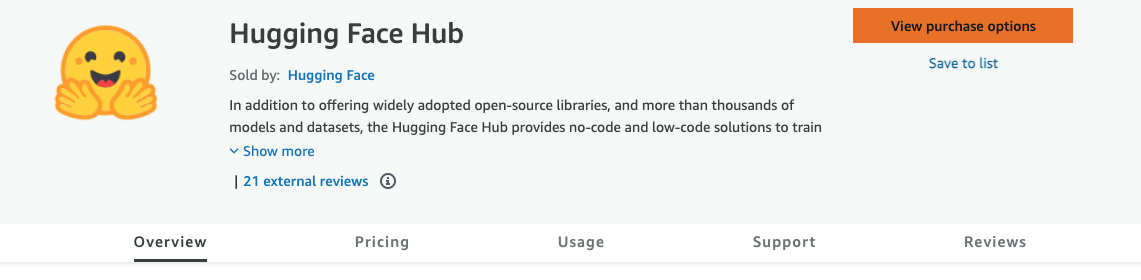
Marketplace Offer

You are now on the “subscribe” page, where you can see the summary of pricing and where you can subscribe. To subscribe to the offer, click “Subscribe”.

Marketplace Subscribe

After you successfully subscribe, you should see a green banner at the top with a button “Set up your account”. You need to click on “Set up your account” to connect your Hugging Face Account with your AWS account.

Marketplace Redirect

After clicking the button, you will be redirected to the Hugging Face Platform, where you can select the Hugging Face organization account you want to link to your AWS account. After selecting your account, click “Submit”
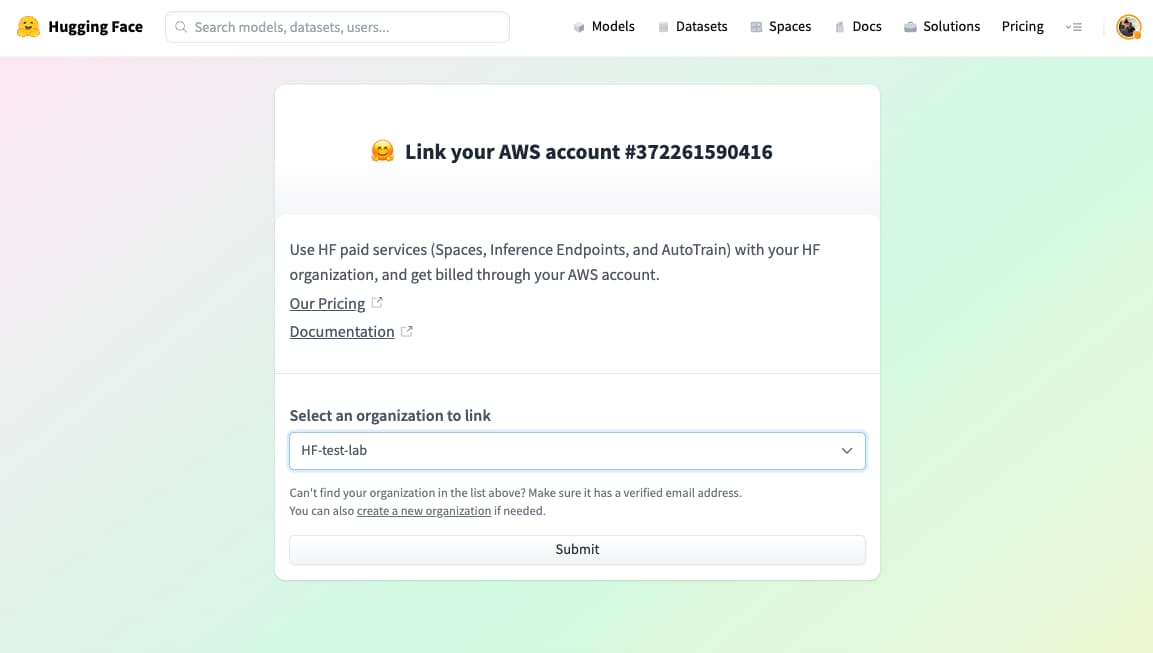
Connect Account

After clicking "Submit", you will be redirected to the Billings settings of the Hugging Face organization, where you can see the current state of your subscription, which should be subscribe-pending.
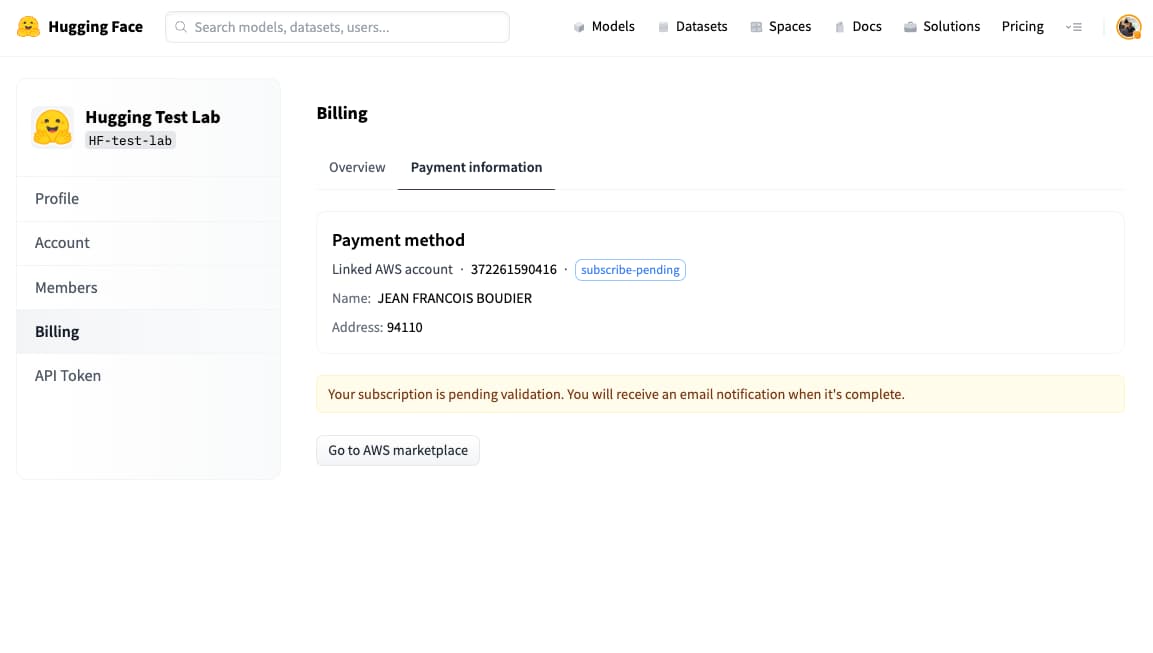
Subscription Pending

After a few minutes, you should receive 2 emails: 1 from AWS confirming your subscription and 1 from Hugging Face, which should look like the image below:
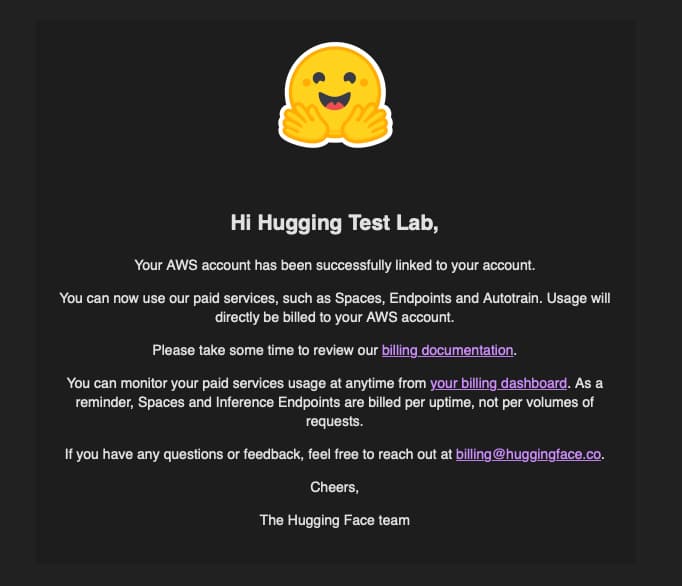
Email confirmation

If you have received this, your AWS Account and Hugging Face organization account are now successfully connected! To confirm it, you can open the Billing settings for your organization account, where you should now see a subscribe-success status.

Subscription Confirmed

3. Activate the Enterprise Hub for your team and unlock new features

If you want to enable the Enterprise Hub and use your organization as a private and safe collaborative platform for your team to build AI with open source, please follow the steps below.

Open the Billing settings for your organization, click on the ‘Enterprise Hub’ Tab, and click on “Subscribe Now”

Subscribe Now

Now select the number of Enterprise Hub seats you are willing to buy for your organization, the billing frequency and click on Checkout.
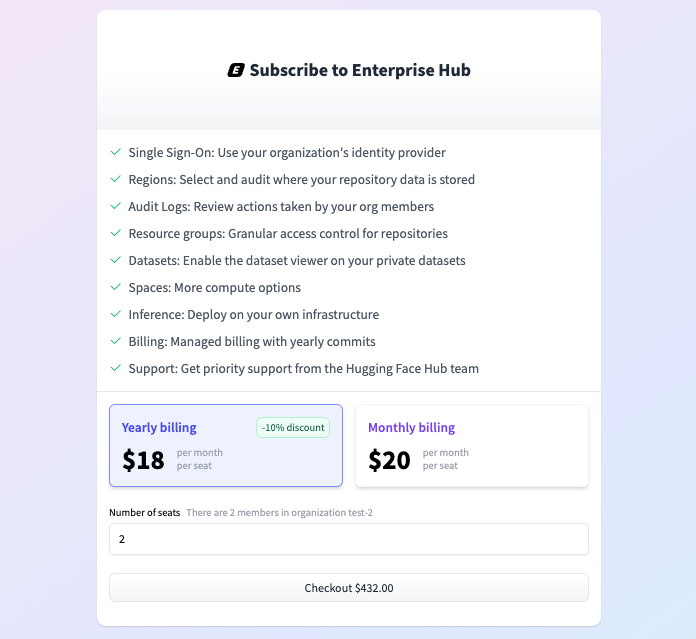
Select Seats

Congratulations! 🥳

Your organization is now upgraded to Enterprise Hub, and its billing is directly managed by your AWS account. All members of your organization can now benefit from the advanced features of Enterprise Hub to build AI privately and securely.

The pricing for Hugging Face Hub through the AWS marketplace offer is identical to the public Hugging Face pricing, but you will be billed through your AWS Account. You can monitor your organization's usage and billing anytime within the Billing section of your organization settings.


Thanks for reading! If you have any questions, please contact us at api-enterprise@huggingface.co.