




TPU training is a useful skill to have: TPU pods are high-performance and extremely scalable, making it easy to train models at any scale from a few tens of millions of parameters up to truly enormous sizes: Google’s PaLM model (over 500 billion parameters!) was trained entirely on TPU pods.
We’ve previously written a tutorial and a Colab example showing small-scale TPU training with TensorFlow and introducing the core concepts you need to understand to get your model working on TPU. This time, we’re going to step that up another level and train a masked language model from scratch using TensorFlow and TPU, including every step from training your tokenizer and preparing your dataset through to the final model training and uploading. This is the kind of task that you’ll probably want a dedicated TPU node (or VM) for, rather than just Colab, and so that’s where we’ll focus.
As in our Colab example, we’re taking advantage of TensorFlow's very clean TPU support via XLA and TPUStrategy. We’ll also be benefiting from the fact that the majority of the TensorFlow models in 🤗 Transformers are fully XLA-compatible. So surprisingly, little work is needed to get them to run on TPU.
Unlike our Colab example, however, this example is designed to be scalable and much closer to a realistic training run -- although we only use a BERT-sized model by default, the code could be expanded to a much larger model and a much more powerful TPU pod slice by changing a few configuration options.
Why are we writing this guide now? After all, 🤗 Transformers has had support for TensorFlow for several years now. But getting those models to train on TPUs has been a major pain point for the community. This is because:
We think XLA is the future: It’s the core compiler for JAX, it has first-class support in TensorFlow, and you can even use it from PyTorch. As such, we’ve made a big push to make our codebase XLA compatible and to remove any other roadblocks standing in the way of XLA and TPU compatibility. This means users should be able to train most of our TensorFlow models on TPUs without hassle.
There’s also another important reason to care about TPU training right now: Recent major advances in LLMs and generative AI have created huge public interest in model training, and so it’s become incredibly hard for most people to get access to state-of-the-art GPUs. Knowing how to train on TPU gives you another path to access ultra-high-performance compute hardware, which is much more dignified than losing a bidding war for the last H100 on eBay and then ugly crying at your desk. You deserve better. And speaking from experience: Once you get comfortable with training on TPU, you might not want to go back.
We’re going to train a RoBERTa (base model) from scratch on the WikiText dataset (v1). As well as training the model, we’re also going to train the tokenizer, tokenize the data and upload it to Google Cloud Storage in TFRecord format, where it’ll be accessible for TPU training. You can find all the code in this directory. If you’re a certain kind of person, you can skip the rest of this blog post and just jump straight to the code. If you stick around, though, we’ll take a deeper look at some of the key ideas in the codebase.
Many of the ideas here were also mentioned in our Colab example, but we wanted to show users a full end-to-end example that puts it all together and shows it in action, rather than just covering concepts at a high level. The following diagram gives you a pictorial overview of the steps involved in training a language model with 🤗 Transformers using TensorFlow and TPUs:

As mentioned, we used the WikiText dataset (v1). You can head over to the dataset page on the Hugging Face Hub to explore the dataset.
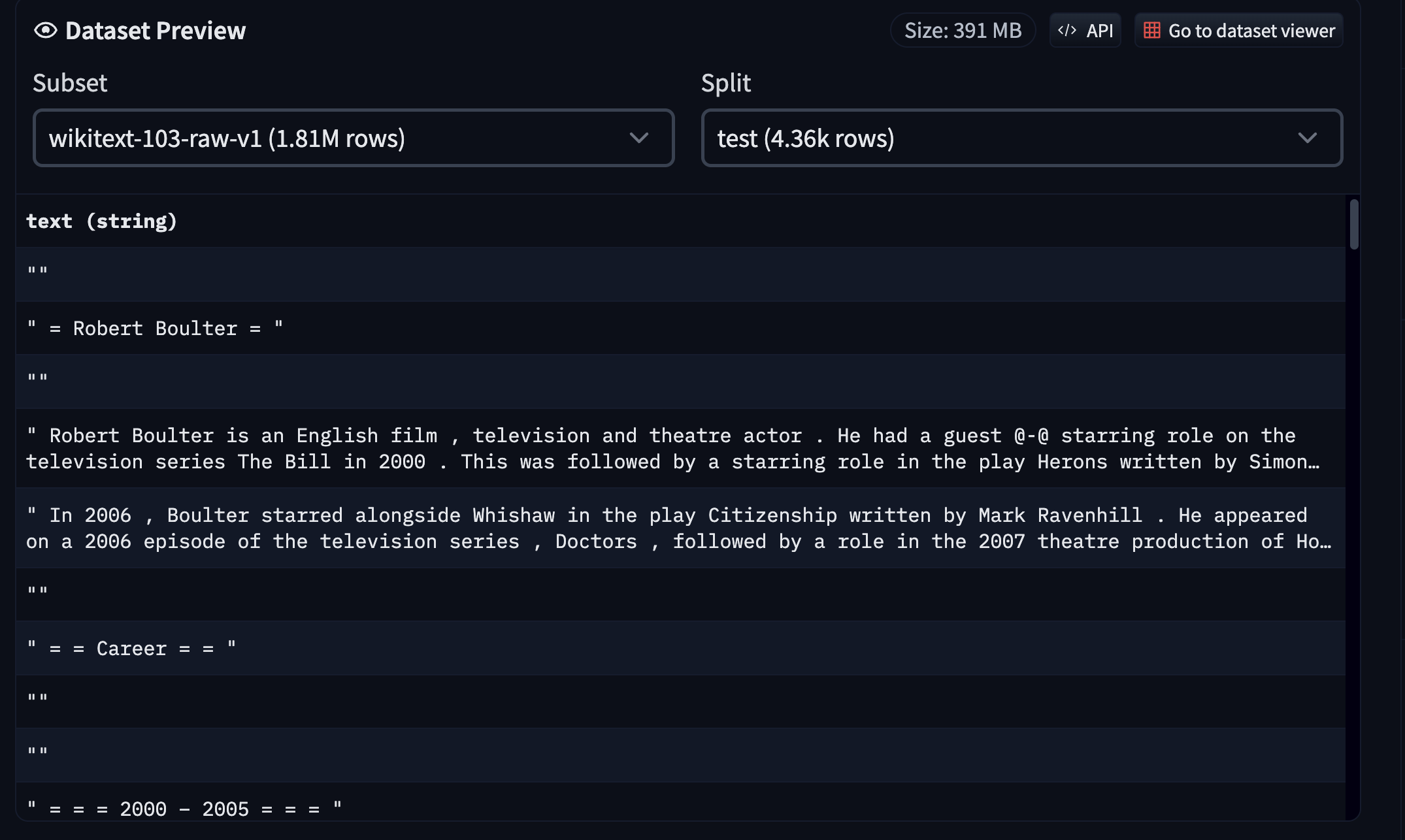
Since the dataset is already available on the Hub in a compatible format, we can easily load and interact with it using 🤗 datasets. However, for this example, since we’re also training a tokenizer from scratch, here’s what we did:
train split of the WikiText using 🤗 datasets.You can find the tokenizer training code here and the tokenizer here. This script also allows you to run it with any compatible dataset from the Hub.
💡 It’s easy to use 🤗 datasets to host your text datasets. Refer to this guide to learn more.
Once the tokenizer is trained, we can use it on all the dataset splits (train, validation, and test in this case) and create TFRecord shards out of them. Having the data splits spread across multiple TFRecord shards helps with massively parallel processing as opposed to having each split in single TFRecord files.
We tokenize the samples individually. We then take a batch of samples, concatenate them together, and split them into several chunks of a fixed size (128 in our case). We follow this strategy rather than tokenizing a batch of samples with a fixed length to avoid aggressively discarding text content (because of truncation).
We then take these tokenized samples in batches and serialize those batches as multiple TFRecord shards, where the total dataset length and individual shard size determine the number of shards. Finally, these shards are pushed to a Google Cloud Storage (GCS) bucket.
If you’re using a TPU node for training, then the data needs to be streamed from a GCS bucket since the node host memory is very small. But for TPU VMs, we can use datasets locally or even attach persistent storage to those VMs. Since TPU nodes are still quite heavily used, we based our example on using a GCS bucket for data storage.
You can see all of this in code in this script. For convenience, we have also hosted the resultant TFRecord shards in this repository on the Hub.
If you’re familiar with using 🤗 Transformers, then you already know the modeling code:
from transformers import AutoConfig, AutoTokenizer, TFAutoModelForMaskedLM

tokenizer = AutoTokenizer.from_pretrained("tf-tpu/unigram-tokenizer-wikitext")

config = AutoConfig.from_pretrained("roberta-base")
config.vocab_size = tokenizer.vocab_size
model = TFAutoModelForMaskedLM.from_config(config)
But since we’re in the TPU territory, we need to perform this initialization under a strategy scope so that it can be distributed across the TPU workers with data-parallel training:
import tensorflow as tf

tpu = tf.distribute.cluster_resolver.TPUClusterResolver(...)
strategy = tf.distribute.TPUStrategy(tpu)

with strategy.scope():
    tokenizer = AutoTokenizer.from_pretrained("tf-tpu/unigram-tokenizer-wikitext")
    config = AutoConfig.from_pretrained("roberta-base")
    config.vocab_size = tokenizer.vocab_size
    model = TFAutoModelForMaskedLM.from_config(config)
Similarly, the optimizer also needs to be initialized under the same strategy scope with which the model is going to be further compiled. Going over the full training code isn’t something we want to do in this post, so we welcome you to read it here. Instead, let’s discuss another key point of — a TensorFlow-native data collator — DataCollatorForLanguageModeling.
DataCollatorForLanguageModeling is responsible for masking randomly selected tokens from the input sequence and preparing the labels. By default, we return the results from these collators as NumPy arrays. However, many collators also support returning these values as TensorFlow tensors if we specify return_tensor="tf". This was crucial for our data pipeline to be compatible with TPU training.
Thankfully, TensorFlow provides seamless support for reading files from a GCS bucket:
training_records = tf.io.gfile.glob(os.path.join(args.train_dataset, "*.tfrecord"))
If args.dataset contains the gs:// identifier, TensorFlow will understand that it needs to look into a GCS bucket. Loading locally is as easy as removing the gs:// identifier. For the rest of the data pipeline-related code, you can refer to this section in the training script.
Once the datasets have been prepared, the model and the optimizer have been initialized, and the model has been compiled, we can do the community’s favorite - model.fit(). For training, we didn’t do extensive hyperparameter tuning. We just trained it for longer with a learning rate of 1e-4. We also leveraged the PushToHubCallback for model checkpointing and syncing them with the Hub. You can find the hyperparameter details and a trained model here: https://huggingface.co/tf-tpu/roberta-base-epochs-500-no-wd.
Once the model is trained, running inference with it is as easy as:
from transformers import pipeline

model_id = "tf-tpu/roberta-base-epochs-500-no-wd"
unmasker = pipeline("fill-mask", model=model_id, framework="tf")
unmasker("Goal of my life is to [MASK].")

[{'score': 0.1003185287117958,
  'token': 52,
  'token_str': 'be',
  'sequence': 'Goal of my life is to be.'},
 {'score': 0.032648514956235886,
  'token': 5,
  'token_str': '',
  'sequence': 'Goal of my life is to .'},
 {'score': 0.02152673341333866,
  'token': 138,
  'token_str': 'work',
  'sequence': 'Goal of my life is to work.'},
 {'score': 0.019547373056411743,
  'token': 984,
  'token_str': 'act',
  'sequence': 'Goal of my life is to act.'},
 {'score': 0.01939118467271328,
  'token': 73,
  'token_str': 'have',
  'sequence': 'Goal of my life is to have.'}]
If there’s one thing we want to emphasize with this example, it’s that TPU training is powerful, scalable and easy. In fact, if you’re already using Transformers models with TF/Keras and streaming data from tf.data, you might be shocked at how little work it takes to move your whole training pipeline to TPU. They have a reputation as somewhat arcane, high-end, complex hardware, but they’re quite approachable, and instantiating a large pod slice is definitely easier than keeping multiple GPU servers in sync!
Diversifying the hardware that state-of-the-art models are trained on is going to be critical in the 2020s, especially if the ongoing GPU shortage continues. We hope that this guide will give you the tools you need to power cutting-edge training runs no matter what circumstances you face.
As the great poet GPT-4 once said:
If you can keep your head when all around you
Are losing theirs to GPU droughts,
And trust your code, while others doubt you,
To train on TPUs, no second thoughts;
If you can learn from errors, and proceed,
And optimize your aim to reach the sky,
Yours is the path to AI mastery,
And you'll prevail, my friend, as time goes by.
Sure, it’s shamelessly ripping off Rudyard Kipling and it has no idea how to pronounce “drought”, but we hope you feel inspired regardless.
此内容由惯性聚合(RSS阅读器)自动聚合整理,仅供阅读参考。 原文来自 — 版权归原作者所有。