




Transform your text into stunning images with ease using Diffusers for Mac, a native app powered by state-of-the-art diffusion models. It leverages a bouquet of SoTA Text-to-Image models contributed by the community to the Hugging Face Hub, and converted to Core ML for blazingly fast performance. Our latest version, 1.1, is now available on the Mac App Store with significant performance upgrades and user-friendly interface tweaks. It's a solid foundation for future feature updates. Plus, the app is fully open source with a permissive license, so you can build on it too! Check out our GitHub repository at https://github.com/huggingface/swift-coreml-diffusers for more information.
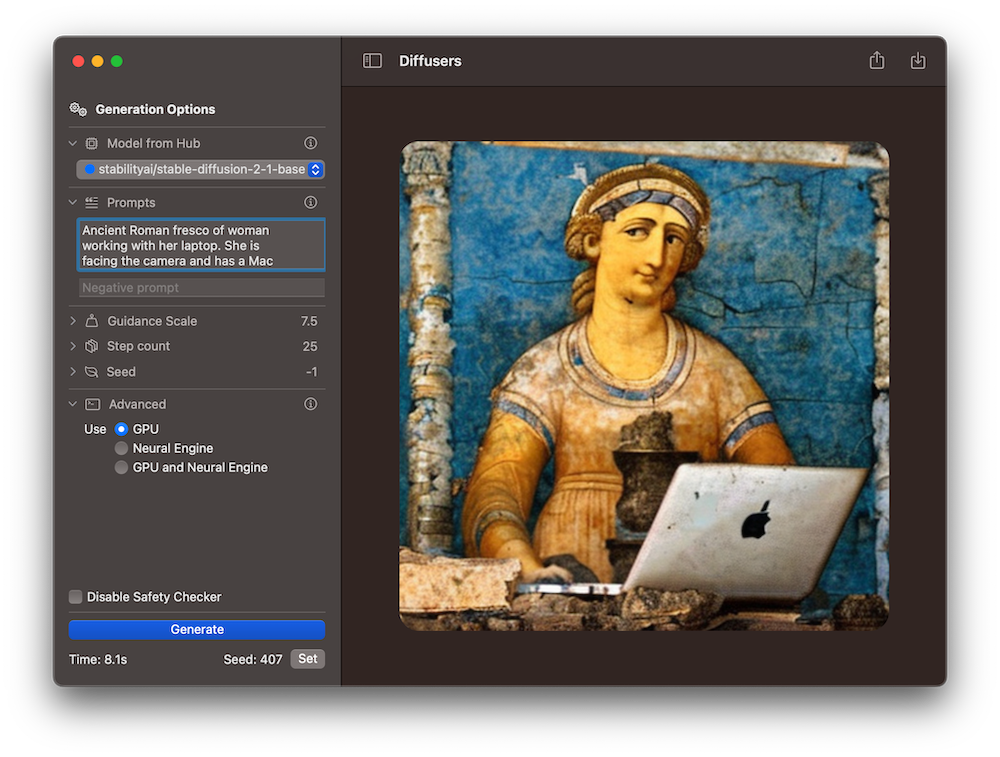
The Diffusers app (App Store, source code) is the Mac counterpart to our 🧨diffusers library. This library is written in Python with PyTorch, and uses a modular design to train and run diffusion models. It supports many different models and tasks, and is highly configurable and well optimized. It runs on Mac, too, using PyTorch's mps accelerator, which is an alternative to cuda on Apple Silicon.
Why would you want to run a native Mac app then? There are many reasons:
mps device cannot use the Neural Engine.TL;DR: Depending on your computer Text-to-Image Generation can be up to twice as fast on Diffusers 1.1. ⚡️
We've done a lot of testing on several Macs to determine the best combinations of compute devices that yield optimum performance. For some computers it's best to use the GPU, while others work better when the Neural Engine, or ANE, is engaged.
Come check out our benchmarks. All the combinations use the CPU in addition to either the GPU or the ANE.
| Model name | Benchmark | M1 8 GB | M1 16 GB | M2 24 GB | M1 Max 64 GB |
|---|---|---|---|---|---|
| Cores (performance/GPU/ANE) | 4/8/16 | 4/8/16 | 4/8/16 | 8/32/16 | |
| Stable Diffusion 1.5 | |||||
| GPU | 32.9 | 32.8 | 21.9 | 9 | |
| ANE | 18.8 | 18.7 | 13.1 | 20.4 | |
| Stable Diffusion 2 Base | |||||
| GPU | 30.2 | 30.2 | 19.4 | 8.3 | |
| ANE | 14.5 | 14.4 | 10.5 | 15.3 | |
| Stable Diffusion 2.1 Base | |||||
| GPU | 29.6 | 29.4 | 19.5 | 8.3 | |
| ANE | 14.3 | 14.3 | 10.5 | 15.3 | |
| OFA-Sys/small-stable-diffusion-v0 | |||||
| GPU | 22.1 | 22.5 | 14.5 | 6.3 | |
| ANE | 12.3 | 12.7 | 9.1 | 13.2 |
We found that the amount of memory does not seem to play a big factor on performance, but the number of CPU and GPU cores does. For example, on a M1 Max laptop, the generation with GPU is a lot faster than with ANE. That's likely because it has 4 times the number of GPU cores (and twice as many CPU performance cores) than the standard M1 processor, for the same amount of neural engine cores. Conversely, the standard M1 processors found in Mac Minis are twice as fast using ANE than GPU. Interestingly, we tested the use of both GPU and ANE accelerators together, and found that it does not improve performance with respect to the best results obtained with just one of them. The cut point seems to be around the hardware characteristics of the M1 Pro chip (8 performance cores, 14 or 16 GPU cores), which we don't have access to at the moment.
🧨Diffusers version 1.1 automatically selects the best accelerator based on the computer where the app runs. Some device configurations, like the "Pro" variants, are not offered by any cloud services we know of, so our heuristics could be improved for them. If you'd like to help us gather data to keep improving the out-of-the-box experience of our app, read on!
We are interested in running more comprehensive performance benchmarks on Mac devices. If you'd like to help, we've created this GitHub issue where you can post your results. We'll use them to optimize performance on an upcoming version of the app. We are particularly interested in M1 Pro, M2 Pro and M2 Max architectures 🤗
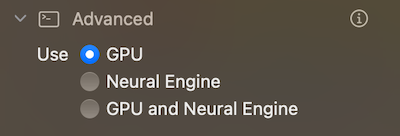
In addition to the performance optimization and fixing a few bugs, we have focused on adding new features while trying to keep the UI as simple and clean as possible. Most of them are obvious (guidance scale, optionally disable the safety checker, allow generations to be canceled). Our favorite ones are the model download indicators, and a shortcut to reuse the seed from a previous generation in order to tweak the generation parameters.
Version 1.1 also includes additional information about what the different generation settings do. We want 🧨Diffusers for Mac to make image generation as approachable as possible to all Mac users, not just technologists.
We believe there's a lot of untapped potential for image generation in the Apple ecosystem. In future updates we want to focus on the following:
There are many more ideas that we are considering. If you'd like to suggest your own, you are most welcome to do so in our GitHub repo.
此内容由惯性聚合(RSS阅读器)自动聚合整理,仅供阅读参考。 原文来自 — 版权归原作者所有。