


In this blog post, we provide a tutorial on how to use a new data augmentation technique for document images, developed in collaboration with Albumentations AI.
Vision Language Models (VLMs) have an immense range of applications, but they often need to be fine-tuned to specific use-cases, particularly for datasets containing document images, i.e., images with high textual content. In these cases, it is crucial for text and image to interact with each other at all stages of model training, and applying augmentation to both modalities ensures this interaction. Essentially, we want a model to learn to read properly, which is challenging in the most common cases where data is missing.
Hence, the need for effective data augmentation techniques for document images became evident when addressing challenges in fine-tuning models with limited datasets. A common concern is that typical image transformations, such as resizing, blurring, or changing background colors, can negatively impact text extraction accuracy.

We recognized the need for data augmentation techniques that preserve the integrity of the text while augmenting the dataset. Such data augmentation can facilitate generation of new documents or modification of existing ones, while preserving their text quality.
To address this need, we introduce a new data augmentation pipeline developed in collaboration with Albumentations AI. This pipeline handles both images and text within them, providing a comprehensive solution for document images. This class of data augmentation is multimodal as it modifies both the image content and the text annotations simultaneously.
As discussed in a previous blog post, our goal is to test the hypothesis that integrating augmentations on both text and images during pretraining of VLMs is effective. Detailed parameters and use case illustrations can be found on the Albumentations AI Documentation. Albumentations AI enables the dynamic design of these augmentations and their integration with other types of augmentations.
To augment document images, we begin by randomly selecting lines within the document. A hyperparameter fraction_range controls the bounding box fraction to be modified.
Next, we apply one of several text augmentation methods to the corresponding lines of text, which are commonly utilized in text generation tasks. These methods include Random Insertion, Deletion, and Swap, and Stopword Replacement.
After modifying the text, we black out parts of the image where the text is inserted and inpaint them, using the original bounding box size as a proxy for the new text's font size. The font size can be specified with the parameter font_size_fraction_range, which determines the range for selecting the font size as a fraction of the bounding box height. Note that the modified text and corresponding bounding box can be retrieved and used for training. This process results in a dataset with semantically similar textual content and visually distorted images.
The library can be used for two main purposes:
Inserting any text on the image: This feature allows you to overlay text on document images, effectively generating synthetic data. By using any random image as a background and rendering completely new text, you can create diverse training samples. A similar technique, called SynthDOG, was introduced in the OCR-free document understanding transformer.
Inserting augmented text on the image: This includes the following text augmentations:
Combining these augmentations with other image transformations from Albumentations allows for simultaneous modification of images and text. You can retrieve the augmented text as well.
Note: The initial version of the data augmentation pipeline presented in this repo, included synonym replacement. It was removed in this version because it caused significant time overhead.
!pip install -U pillow
!pip install albumentations
!pip install nltk
import albumentations as A
import cv2
from matplotlib import pyplot as plt
import json
import nltk

nltk.download('stopwords')
from nltk.corpus import stopwords
def visualize(image):
    plt.figure(figsize=(20, 15))
    plt.axis('off')
    plt.imshow(image)
Note that for this type of augmentation you can use the IDL and PDFA datasets. They provide the bounding boxes of the lines that you want to modify. For this tutorial, we will focus on the sample from IDL dataset.
bgr_image = cv2.imread("examples/original/fkhy0236.tif")
image = cv2.cvtColor(bgr_image, cv2.COLOR_BGR2RGB)

with open("examples/original/fkhy0236.json") as f:
    labels = json.load(f)

font_path = "/usr/share/fonts/truetype/liberation/LiberationSerif-Regular.ttf"

visualize(image)

We need to correctly preprocess the data, as the input format for the bounding boxes is the normalized Pascal VOC. Hence, we build the metadata as follows:
page = labels['pages'][0]

def prepare_metadata(page: dict, image_height: int, image_width: int) -> list:
    metadata = []

    for text, box in zip(page['text'], page['bbox']):
        left, top, width_norm, height_norm = box

        metadata.append({
            "bbox": [left, top, left + width_norm, top + height_norm],
            "text": text
        })

    return metadata

image_height, image_width = image.shape[:2]
metadata = prepare_metadata(page, image_height, image_width)
transform = A.Compose([A.TextImage(font_path=font_path, p=1, augmentations=["swap"], clear_bg=True, font_color = 'red', fraction_range = (0.5,0.8), font_size_fraction_range=(0.8, 0.9))])
transformed = transform(image=image, textimage_metadata=metadata)
visualize(transformed["image"])

transform = A.Compose([A.TextImage(font_path=font_path, p=1, augmentations=["deletion"], clear_bg=True, font_color = 'red', fraction_range = (0.5,0.8), font_size_fraction_range=(0.8, 0.9))])
transformed = transform(image=image, textimage_metadata=metadata)
visualize(transformed['image'])

In random insertion we insert random words or phrases into the text. In this case, we use stop words, common words in a language that are often ignored or filtered out during natural language processing (NLP) tasks because they carry less meaningful information compared to other words. Examples of stop words include "is," "the," "in," "and," "of," etc.
stops = stopwords.words('english')
transform = A.Compose([A.TextImage(font_path=font_path, p=1, augmentations=["insertion"], stopwords = stops, clear_bg=True, font_color = 'red', fraction_range = (0.5,0.8), font_size_fraction_range=(0.8, 0.9))])
transformed = transform(image=image, textimage_metadata=metadata)
visualize(transformed['image'])
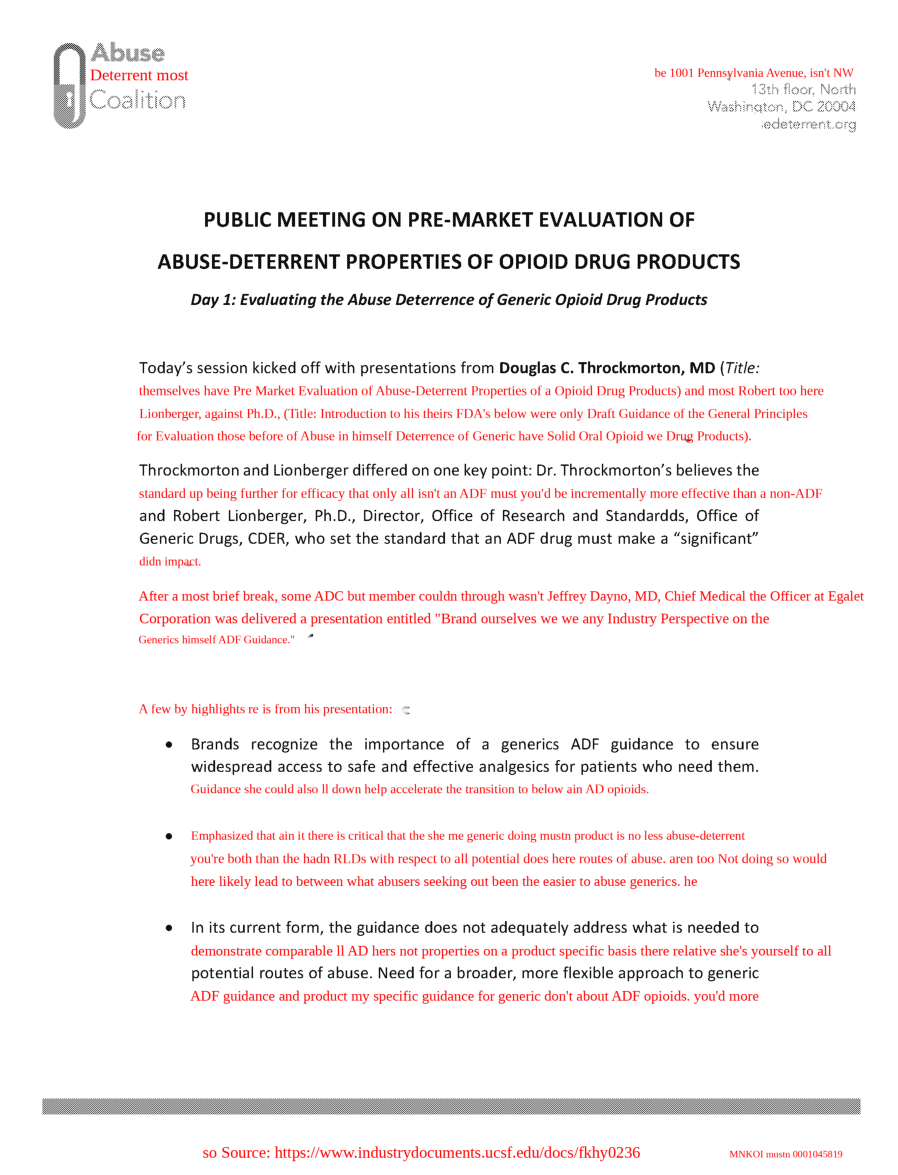
Let's define a complex transformation pipeline using A.Compose, which includes text insertion with specified font properties and stopwords, Planckian jitter, and affine transformations. Firstly, with A.TextImage we insert text into the image using specified font properties, with a clear background and red font color. The fraction and size of the text to be inserted are also specified.
Then with A.PlanckianJitter we alter the color balance of the image. Finally, using A.Affine we apply affine transformations, which can include scaling, rotating, and translating the image.
transform_complex = A.Compose([A.TextImage(font_path=font_path, p=1, augmentations=["insertion"], stopwords = stops, clear_bg=True, font_color = 'red', fraction_range = (0.5,0.8), font_size_fraction_range=(0.8, 0.9)),
                               A.PlanckianJitter(p=1),
                               A.Affine(p=1)
                              ])
transformed = transform_complex(image=image, textimage_metadata=metadata)
visualize(transformed["image"])

To extract the information on the bounding box indices where text was altered, along with the corresponding transformed text data run the following cell. This data can be used effectively for training models to recognize and process text changes in images.
transformed['overlay_data']
[{'bbox_coords': (375, 1149, 2174, 1196),
  'text': "Lionberger, Ph.D., (Title: if Introduction to won i FDA's yourselves Draft Guidance once of the wasn't General Principles",
  'original_text': "Lionberger, Ph.D., (Title: Introduction to FDA's Draft Guidance of the General Principles",
  'bbox_index': 12,
  'font_color': 'red'},
 {'bbox_coords': (373, 1677, 2174, 1724),
  'text': "After off needn't were a brief break, ADC member mustn Jeffrey that Dayno, MD, Chief Medical Officer for at their Egalet",
  'original_text': 'After a brief break, ADC member Jeffrey Dayno, MD, Chief Medical Officer at Egalet',
  'bbox_index': 19,
  'font_color': 'red'},
 {'bbox_coords': (525, 2109, 2172, 2156),
  'text': 'll Brands recognize the has importance and of a generics ADF guidance to ensure which after',
  'original_text': 'Brands recognize the importance of a generics ADF guidance to ensure',
  'bbox_index': 23,
  'font_color': 'red'}]
This augmentation method can be extended to the generation of synthetic data, as it enables the rendering of text on any background or template.
template = cv2.imread('template.png')
image_template = cv2.cvtColor(template, cv2.COLOR_BGR2RGB)
transform = A.Compose([A.TextImage(font_path=font_path, p=1, clear_bg=True, font_color = 'red', font_size_fraction_range=(0.5, 0.7))])

metadata = [{
    "bbox": [0.1, 0.4, 0.5, 0.48],
    "text": "Some smart text goes here.",
}, {
    "bbox": [0.1, 0.5, 0.5, 0.58],
    "text": "Hope you find it helpful.",
}]

transformed = transform(image=image_template, textimage_metadata=metadata)
visualize(transformed['image'])

In collaboration with Albumentations AI, we introduced TextImage Augmentation, a multimodal technique that modifies document images along with the text. By combining text augmentations such as Random Insertion, Deletion, Swap, and Stopword Replacement with image modifications, this pipeline allows for the generation of diverse training samples.
For detailed parameters and use case illustrations, refer to the Albumentations AI Documentation. We hope you find these augmentations useful for enhancing your document image processing workflows.
@inproceedings{kim2022ocr,
  title={Ocr-free document understanding transformer},
  author={Kim, Geewook and Hong, Teakgyu and Yim, Moonbin and Nam, JeongYeon and Park, Jinyoung and Yim, Jinyeong and Hwang, Wonseok and Yun, Sangdoo and Han, Dongyoon and Park, Seunghyun},
  booktitle={European Conference on Computer Vision},
  pages={498--517},
  year={2022},
  organization={Springer}
}
此内容由惯性聚合(RSS阅读器)自动聚合整理,仅供阅读参考。 原文来自 — 版权归原作者所有。