



This article is also available in Chinese 简体中文.
We’re happy to announce that SpeechT5 is now available in 🤗 Transformers, an open-source library that offers easy-to-use implementations of state-of-the-art machine learning models.
SpeechT5 was originally described in the paper SpeechT5: Unified-Modal Encoder-Decoder Pre-Training for Spoken Language Processing by Microsoft Research Asia. The official checkpoints published by the paper’s authors are available on the Hugging Face Hub.
If you want to jump right in, here are some demos on Spaces:
SpeechT5 is not one, not two, but three kinds of speech models in one architecture.
It can do:
The main idea behind SpeechT5 is to pre-train a single model on a mixture of text-to-speech, speech-to-text, text-to-text, and speech-to-speech data. This way, the model learns from text and speech at the same time. The result of this pre-training approach is a model that has a unified space of hidden representations shared by both text and speech.
At the heart of SpeechT5 is a regular Transformer encoder-decoder model. Just like any other Transformer, the encoder-decoder network models a sequence-to-sequence transformation using hidden representations. This Transformer backbone is the same for all SpeechT5 tasks.
To make it possible for the same Transformer to deal with both text and speech data, so-called pre-nets and post-nets were added. It is the job of the pre-net to convert the input text or speech into the hidden representations used by the Transformer. The post-net takes the outputs from the Transformer and turns them into text or speech again.
A figure illustrating SpeechT5’s architecture is depicted below (taken from the original paper).
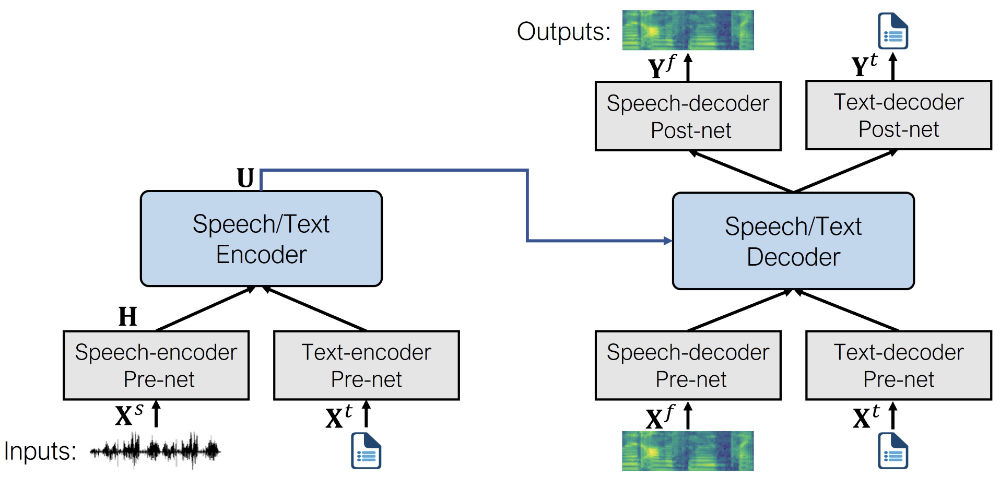
During pre-training, all of the pre-nets and post-nets are used simultaneously. After pre-training, the entire encoder-decoder backbone is fine-tuned on a single task. Such a fine-tuned model only uses the pre-nets and post-nets specific to the given task. For example, to use SpeechT5 for text-to-speech, you’d swap in the text encoder pre-net for the text inputs and the speech decoder pre and post-nets for the speech outputs.
Note: Even though the fine-tuned models start out using the same set of weights from the shared pre-trained model, the final versions are all quite different in the end. You can’t take a fine-tuned ASR model and swap out the pre-nets and post-net to get a working TTS model, for example. SpeechT5 is flexible, but not that flexible.
SpeechT5 is the first text-to-speech model we’ve added to 🤗 Transformers, and we plan to add more TTS models in the near future.
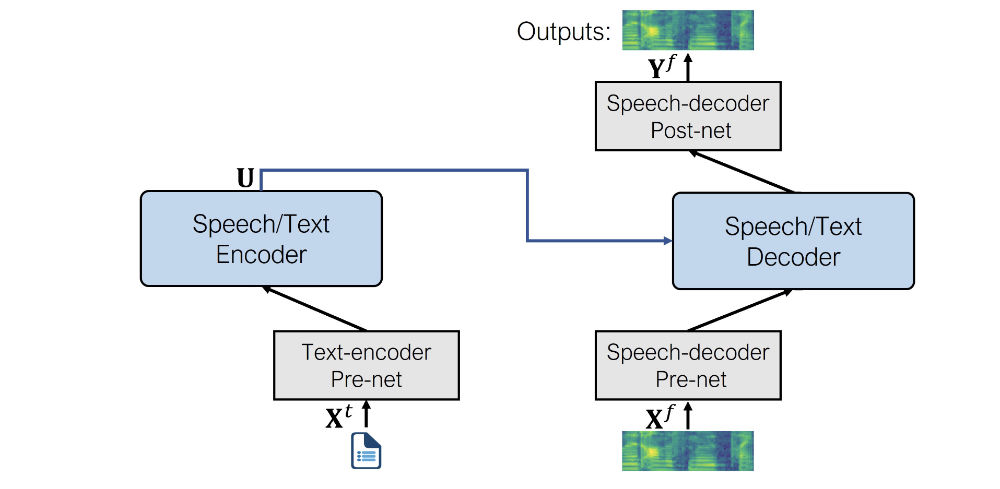
For the TTS task, the model uses the following pre-nets and post-nets:
Text encoder pre-net. A text embedding layer that maps text tokens to the hidden representations that the encoder expects. Similar to what happens in an NLP model such as BERT.
Speech decoder pre-net. This takes a log mel spectrogram as input and uses a sequence of linear layers to compress the spectrogram into hidden representations. This design is taken from the Tacotron 2 TTS model.
Speech decoder post-net. This predicts a residual to add to the output spectrogram and is used to refine the results, also from Tacotron 2.
The architecture of the fine-tuned model looks like the following.
Here is a complete example of how to use the SpeechT5 text-to-speech model to synthesize speech. You can also follow along in this interactive Colab notebook.
SpeechT5 is not available in the latest release of Transformers yet, so you'll have to install it from GitHub. Also install the additional dependency sentencepiece and then restart your runtime.
pip install git+https://github.com/huggingface/transformers.git
pip install sentencepiece
First, we load the fine-tuned model from the Hub, along with the processor object used for tokenization and feature extraction. The class we’ll use is SpeechT5ForTextToSpeech.
from transformers import SpeechT5Processor, SpeechT5ForTextToSpeech

processor = SpeechT5Processor.from_pretrained("microsoft/speecht5_tts")
model = SpeechT5ForTextToSpeech.from_pretrained("microsoft/speecht5_tts")
Next, tokenize the input text.
inputs = processor(text="Don't count the days, make the days count.", return_tensors="pt")
The SpeechT5 TTS model is not limited to creating speech for a single speaker. Instead, it uses so-called speaker embeddings that capture a particular speaker’s voice characteristics. We’ll load such a speaker embedding from a dataset on the Hub.
from datasets import load_dataset
embeddings_dataset = load_dataset("Matthijs/cmu-arctic-xvectors", split="validation")

import torch
speaker_embeddings = torch.tensor(embeddings_dataset[7306]["xvector"]).unsqueeze(0)
The speaker embedding is a tensor of shape (1, 512). This particular speaker embedding describes a female voice. The embeddings were obtained from the CMU ARCTIC dataset using this script, but any X-Vector embedding should work.
Now we can tell the model to generate the speech, given the input tokens and the speaker embedding.
spectrogram = model.generate_speech(inputs["input_ids"], speaker_embeddings)
This outputs a tensor of shape (140, 80) containing a log mel spectrogram. The first dimension is the sequence length, and it may vary between runs as the speech decoder pre-net always applies dropout to the input sequence. This adds a bit of random variability to the generated speech.
To convert the predicted log mel spectrogram into an actual speech waveform, we need a vocoder. In theory, you can use any vocoder that works on 80-bin mel spectrograms, but for convenience, we’ve provided one in Transformers based on HiFi-GAN. The weights for this vocoder, as well as the weights for the fine-tuned TTS model, were kindly provided by the original authors of SpeechT5.
Loading the vocoder is as easy as any other 🤗 Transformers model.
from transformers import SpeechT5HifiGan
vocoder = SpeechT5HifiGan.from_pretrained("microsoft/speecht5_hifigan")
To make audio from the spectrogram, do the following:
with torch.no_grad():
    speech = vocoder(spectrogram)
We’ve also provided a shortcut so you don’t need the intermediate step of making the spectrogram. When you pass the vocoder object into generate_speech, it directly outputs the speech waveform.
speech = model.generate_speech(inputs["input_ids"], speaker_embeddings, vocoder=vocoder)
And finally, save the speech waveform to a file. The sample rate used by SpeechT5 is always 16 kHz.
import soundfile as sf
sf.write("tts_example.wav", speech.numpy(), samplerate=16000)
The output sounds like this (download audio):
That’s it for the TTS model! The key to making this sound good is to use the right speaker embeddings.
You can play with an interactive demo on Spaces.
💡 Interested in learning how to fine-tune SpeechT5 TTS on your own dataset or language? Check out this Colab notebook with a detailed walk-through of the process.
Conceptually, doing speech-to-speech modeling with SpeechT5 is the same as text-to-speech. Simply swap out the text encoder pre-net for the speech encoder pre-net. The rest of the model stays the same.
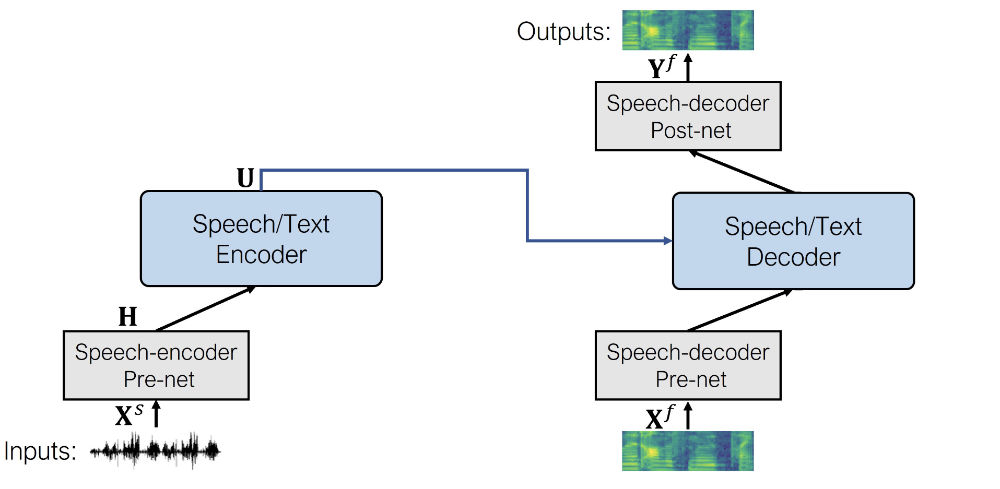
The speech encoder pre-net is the same as the feature encoding module from wav2vec 2.0. It consists of convolution layers that downsample the input waveform into a sequence of audio frame representations.
As an example of a speech-to-speech task, the authors of SpeechT5 provide a fine-tuned checkpoint for doing voice conversion. To use this, first load the model from the Hub. Note that the model class now is SpeechT5ForSpeechToSpeech.
from transformers import SpeechT5Processor, SpeechT5ForSpeechToSpeech

processor = SpeechT5Processor.from_pretrained("microsoft/speecht5_vc")
model = SpeechT5ForSpeechToSpeech.from_pretrained("microsoft/speecht5_vc")
We will need some speech audio to use as input. For the purpose of this example, we’ll load the audio from a small speech dataset on the Hub. You can also load your own speech waveforms, as long as they are mono and use a sampling rate of 16 kHz. The samples from the dataset we’re using here are already in this format.
from datasets import load_dataset
dataset = load_dataset("hf-internal-testing/librispeech_asr_demo", "clean", split="validation")
dataset = dataset.sort("id")
example = dataset[40]
Next, preprocess the audio to put it in the format that the model expects.
sampling_rate = dataset.features["audio"].sampling_rate
inputs = processor(audio=example["audio"]["array"], sampling_rate=sampling_rate, return_tensors="pt")
As with the TTS model, we’ll need speaker embeddings. These describe what the target voice sounds like.
import torch
embeddings_dataset = load_dataset("Matthijs/cmu-arctic-xvectors", split="validation")
speaker_embeddings = torch.tensor(embeddings_dataset[7306]["xvector"]).unsqueeze(0)
We also need to load the vocoder to turn the generated spectrograms into an audio waveform. Let’s use the same vocoder as with the TTS model.
from transformers import SpeechT5HifiGan
vocoder = SpeechT5HifiGan.from_pretrained("microsoft/speecht5_hifigan")
Now we can perform the speech conversion by calling the model’s generate_speech method.
speech = model.generate_speech(inputs["input_values"], speaker_embeddings, vocoder=vocoder)

import soundfile as sf
sf.write("speech_converted.wav", speech.numpy(), samplerate=16000)
Changing to a different voice is as easy as loading a new speaker embedding. You could even make an embedding from your own voice!
The original input (download):
The converted voice (download):
Note that the converted audio in this example cuts off before the end of the sentence. This might be due to the pause between the two sentences, causing SpeechT5 to (wrongly) predict that the end of the sequence has been reached. Try it with another example, you’ll find that often the conversion is correct but sometimes it stops prematurely.
You can play with an interactive demo here. 🔥
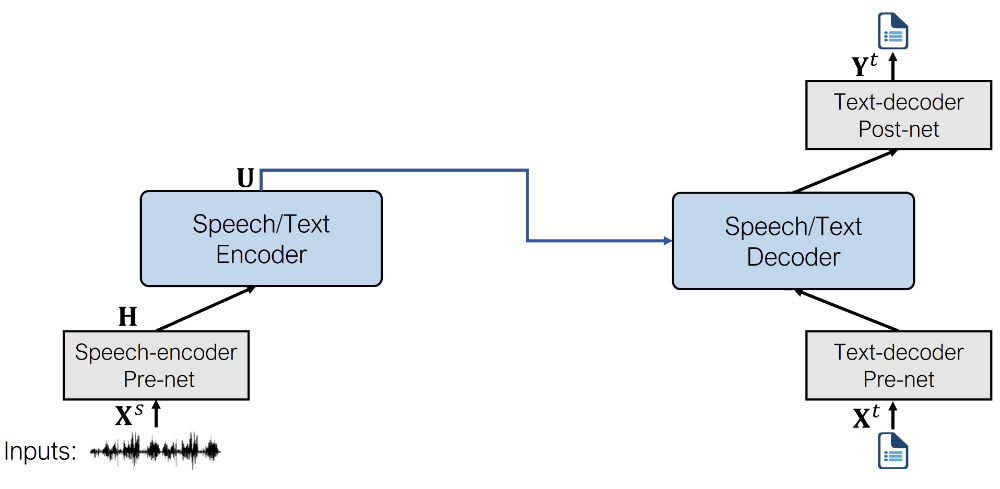
The ASR model uses the following pre-nets and post-net:
Speech encoder pre-net. This is the same pre-net used by the speech-to-speech model and consists of the CNN feature encoder layers from wav2vec 2.0.
Text decoder pre-net. Similar to the encoder pre-net used by the TTS model, this maps text tokens into the hidden representations using an embedding layer. (During pre-training, these embeddings are shared between the text encoder and decoder pre-nets.)
Text decoder post-net. This is the simplest of them all and consists of a single linear layer that projects the hidden representations to probabilities over the vocabulary.
The architecture of the fine-tuned model looks like the following.
If you’ve tried any of the other 🤗 Transformers speech recognition models before, you’ll find SpeechT5 just as easy to use. The quickest way to get started is by using a pipeline.
from transformers import pipeline
generator = pipeline(task="automatic-speech-recognition", model="microsoft/speecht5_asr")
As speech audio, we’ll use the same input as in the previous section, but any audio file will work, as the pipeline automatically converts the audio into the correct format.
from datasets import load_dataset
dataset = load_dataset("hf-internal-testing/librispeech_asr_demo", "clean", split="validation")
dataset = dataset.sort("id")
example = dataset[40]
Now we can ask the pipeline to process the speech and generate a text transcription.
transcription = generator(example["audio"]["array"])
Printing the transcription gives:
a man said to the universe sir i exist
That sounds exactly right! The tokenizer used by SpeechT5 is very basic and works on the character level. The ASR model will therefore not output any punctuation or capitalization.
Of course it’s also possible to use the model class directly. First, load the fine-tuned model and the processor object. The class is now SpeechT5ForSpeechToText.
from transformers import SpeechT5Processor, SpeechT5ForSpeechToText

processor = SpeechT5Processor.from_pretrained("microsoft/speecht5_asr")
model = SpeechT5ForSpeechToText.from_pretrained("microsoft/speecht5_asr")
Preprocess the speech input:
sampling_rate = dataset.features["audio"].sampling_rate
inputs = processor(audio=example["audio"]["array"], sampling_rate=sampling_rate, return_tensors="pt")
Finally, tell the model to generate text tokens from the speech input, and then use the processor’s decoding function to turn these tokens into actual text.
predicted_ids = model.generate(**inputs, max_length=100)
transcription = processor.batch_decode(predicted_ids, skip_special_tokens=True)
Play with an interactive demo for the speech-to-text task.
SpeechT5 is an interesting model because — unlike most other models — it allows you to perform multiple tasks with the same architecture. Only the pre-nets and post-nets change. By pre-training the model on these combined tasks, it becomes more capable at doing each of the individual tasks when fine-tuned.
We have only included checkpoints for the speech recognition (ASR), speech synthesis (TTS), and voice conversion tasks but the paper also mentions the model was successfully used for speech translation, speech enhancement, and speaker identification. It’s very versatile!
此内容由惯性聚合(RSS阅读器)自动聚合整理,仅供阅读参考。 原文来自 — 版权归原作者所有。