


As more code generation models become publicly available, it is now possible to do text-to-web and even text-to-app in ways that we couldn't imagine before.
This tutorial presents a direct approach to AI web content generation by streaming and rendering the content all in one go.
Try the live demo here! → Webapp Factory
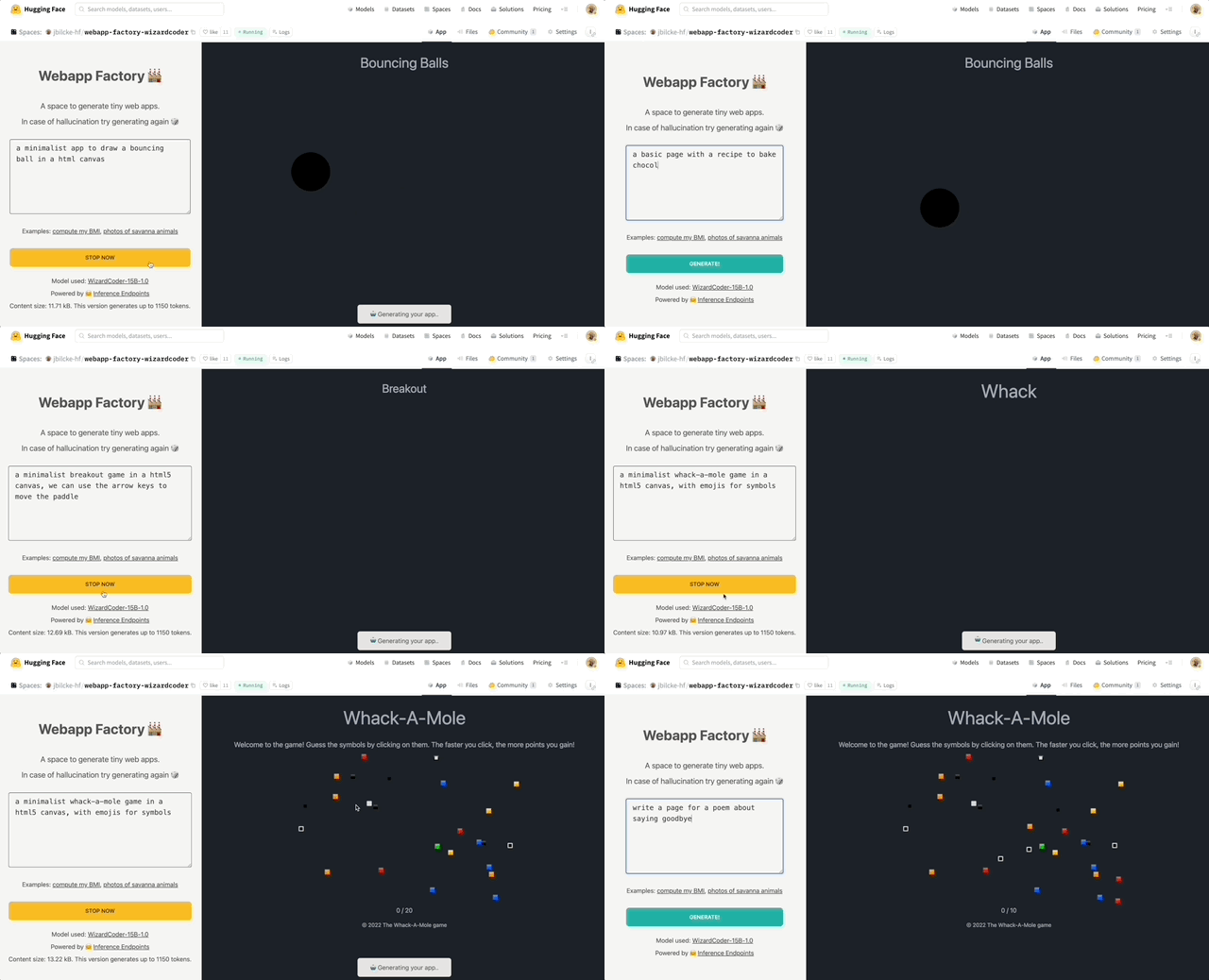
While we usually think of Python for everything related to AI and ML, the web development community relies heavily on JavaScript and Node.
Here are some ways you can use large language models on this platform.
Various approaches exist to run LLMs in Javascript, from using ONNX to converting code to WASM and calling external processes written in other languages.
Some of those techniques are now available as ready-to-use NPM libraries:
However, running large language models in such an environment can be pretty resource-intensive, especially if you are not able to use hardware acceleration.
Today, various cloud providers propose commercial APIs to use language models. Here is the current Hugging Face offering:
The free Inference API to allow anyone to use small to medium-sized models from the community.
The more advanced and production-ready Inference Endpoints API for those who require larger models or custom inference code.
These two APIs can be used from Node using the Hugging Face Inference API library on NPM.
💡 Top performing models generally require a lot of memory (32 Gb, 64 Gb or more) and hardware acceleration to get good latency (see the benchmarks). But we are also seeing a trend of models shrinking in size while keeping relatively good results on some tasks, with requirements as low as 16 Gb or even 8 Gb of memory.
We are going to use NodeJS to create our generative AI web server.
The model will be WizardCoder-15B running on the Inference Endpoints API, but feel free to try with another model and stack.
If you are interested in other solutions, here are some pointers to alternative implementations:
First, we need to setup a new Node project (you can clone this template if you want to).
git clone https://github.com/jbilcke-hf/template-node-express tutorial
cd tutorial
nvm use
npm install
Then, we can install the Hugging Face Inference client:
npm install @huggingface/inference
And set it up in `src/index.mts``:
import { HfInference } from '@huggingface/inference'

// to keep your API token secure, in production you should use something like:
// const hfi = new HfInference(process.env.HF_API_TOKEN)
const hfi = new HfInference('** YOUR TOKEN **')
💡 Note: If you don't want to pay for an Endpoint instance to do this tutorial, you can skip this step and look at this free Inference API example instead. Please, note that this will only work with smaller models, which may not be as powerful.
To deploy a new Endpoint you can go to the Endpoint creation page.
You will have to select WizardCoder in the Model Repository dropdown and make sure that a GPU instance large enough is selected:

Once your endpoint is created, you can copy the URL from this page:

Configure the client to use it:
const hf = hfi.endpoint('** URL TO YOUR ENDPOINT **')
You can now tell the inference client to use our private endpoint and call our model:
const { generated_text } = await hf.textGeneration({
  inputs: 'a simple "hello world" html page: <html><body>'
});
It's now time to return some HTML to the web client when they visit a URL, say /app.
We will create and endpoint with Express.js to stream the results from the Hugging Face Inference API.
import express from 'express'

import { HfInference } from '@huggingface/inference'

const hfi = new HfInference('** YOUR TOKEN **')
const hf = hfi.endpoint('** URL TO YOUR ENDPOINT **')

const app = express()
As we do not have any UI for the moment, the interface will be a simple URL parameter for the prompt:
app.get('/', async (req, res) => {

  // send the beginning of the page to the browser (the rest will be generated by the AI)
  res.write('<html><head></head><body>')

  const inputs = `# Task
Generate ${req.query.prompt}
# Out
<html><head></head><body>`

  for await (const output of hf.textGenerationStream({
    inputs,
    parameters: {
      max_new_tokens: 1000,
      return_full_text: false,
    }
  })) {
    // stream the result to the browser
    res.write(output.token.text)

    // also print to the console for debugging
    process.stdout.write(output.token.text)
  }

  req.end()
})

app.listen(3000, () => { console.log('server started') })
Start your web server:
npm run start
and open https://localhost:3000?prompt=some%20prompt. You should see some primitive HTML content after a few moments.
Each language model reacts differently to prompting. For WizardCoder, simple instructions often work best:
const inputs = `# Task
Generate ${req.query.prompt}
# Orders
Write application logic inside a JS <script></script> tag.
Use a central layout to wrap everything in a <div class="flex flex-col items-center">
# Out
<html><head></head><body>`
Tailwind is a popular CSS framework for styling content, and WizardCoder is good at it out of the box.
This allows code generation to create styles on the go without having to generate a stylesheet at the beginning or the end of the page (which would make the page feel stuck).
To improve results, we can also guide the model by showing the way (<body class="p-4 md:p-8">).
const inputs = `# Task
Generate ${req.query.prompt}
# Orders
You must use TailwindCSS utility classes (Tailwind is already injected in the page).
Write application logic inside a JS <script></script> tag.
Use a central layout to wrap everything in a <div class="flex flex-col items-center'>
# Out
<html><head></head><body class="p-4 md:p-8">`
It can be difficult to reliably prevent hallucinations and failures (such as parroting back the whole instructions, or writing “lorem ipsum” placeholder text) on light models dedicated to code generation, compared to larger general-purpose models, but we can try to mitigate it.
You can try to use an imperative tone and repeat the instructions. An efficient way can also be to show the way by giving a part of the output in English:
const inputs = `# Task
Generate ${req.query.prompt}
# Orders
Never repeat these instructions, instead write the final code!
You must use TailwindCSS utility classes (Tailwind is already injected in the page)!
Write application logic inside a JS <script></script> tag!
This is not a demo app, so you MUST use English, no Latin! Write in English!
Use a central layout to wrap everything in a <div class="flex flex-col items-center">
# Out
<html><head><title>App</title></head><body class="p-4 md:p-8">`
We now have a system that can generate HTML, CSS and JS code, but it is prone to hallucinating broken URLs when asked to produce images.
Luckily, we have a lot of options to choose from when it comes to image generation models!
→ The fastest way to get started is to call a Stable Diffusion model using our free Inference API with one of the public models available on the hub:
app.get('/image', async (req, res) => {
  const blob = await hf.textToImage({
    inputs: `${req.query.caption}`,
    model: 'stabilityai/stable-diffusion-2-1'
  })
  const buffer = Buffer.from(await blob.arrayBuffer())
  res.setHeader('Content-Type', blob.type)
  res.setHeader('Content-Length', buffer.length)
  res.end(buffer)
})
Adding the following line to the prompt was enough to instruct WizardCoder to use our new /image endpoint! (you may have to tweak it for other models):
To generate images from captions call the /image API: <img src="/image?caption=photo of something in some place" />
You can also try to be more specific, for example:
Only generate a few images and use descriptive photo captions with at least 10 words!

Alpine.js is a minimalist framework that allows us to create interactive UIs without any setup, build pipeline, JSX processing etc.
Everything is done within the page, making it a great candidate to create the UI of a quick demo.
Here is a static HTML page that you can put in /public/index.html:
<html>
  <head>
    <title>Tutorial</title>
    <script defer src="https://cdn.jsdelivr.net/npm/alpinejs@3.x.x/dist/cdn.min.js"></script>
    <script src="https://cdn.tailwindcss.com"></script>
  </head>
  <body>
    <div class="flex flex-col space-y-3 p-8" x-data="{ draft: '', prompt: '' }">
      <textarea
          name="draft"
          x-model="draft"
          rows="3"
          placeholder="Type something.."
          class="font-mono"
         ></textarea>
      <button
        class="bg-green-300 rounded p-3"
        @click="prompt = draft">Generate</button>
      <iframe :src="`/app?prompt=${prompt}`"></iframe>
    </div>
  </body>
</html>
To make this work, you will have to make some changes:
...

// going to localhost:3000 will load the file from /public/index.html
app.use(express.static('public'))

// we changed this from '/' to '/app'
app.get('/app', async (req, res) => {
   ...
So far we have been generating full sequences of Tailwind utility classes, which are great to give freedom of design to the language model.
But this approach is also very verbose, consuming a large part of our token quota.
To make the output more dense we can use Daisy UI, a Tailwind plugin which organizes Tailwind utility classes into a design system. The idea is to use shorthand class names for components and utility classes for the rest.
Some language models may not have inner knowledge of Daisy UI as it is a niche library, in that case we can add an API documentation to the prompt:
# DaisyUI docs
## To create a nice layout, wrap each article in:
<article class="prose"></article>
## Use appropriate CSS classes
<button class="btn ..">
<table class="table ..">
<footer class="footer ..">
The final demo Space includes a more complete example of user interface.
Here are some ideas to further extend on this concept:

此内容由惯性聚合(RSS阅读器)自动聚合整理,仅供阅读参考。 原文来自 — 版权归原作者所有。