










This article is also available in Chinese 简体中文.
Code Llama is a family of state-of-the-art, open-access versions of Llama 2 specialized on code tasks, and we’re excited to release integration in the Hugging Face ecosystem! Code Llama has been released with the same permissive community license as Llama 2 and is available for commercial use.
Today, we’re excited to release:
Code LLMs are an exciting development for software engineers because they can boost productivity through code completion in IDEs, take care of repetitive or annoying tasks like writing docstrings, or create unit tests.
The Code Llama release introduces a family of models of 7, 13, and 34 billion parameters. The base models are initialized from Llama 2 and then trained on 500 billion tokens of code data. Meta fine-tuned those base models for two different flavors: a Python specialist (100 billion additional tokens) and an instruction fine-tuned version, which can understand natural language instructions.
The models show state-of-the-art performance in Python, C++, Java, PHP, C#, TypeScript, and Bash. The 7B and 13B base and instruct variants support infilling based on surrounding content, making them ideal for use as code assistants.
Code Llama was trained on a 16k context window. In addition, the three model variants had additional long-context fine-tuning, allowing them to manage a context window of up to 100,000 tokens.
Increasing Llama 2’s 4k context window to Code Llama’s 16k (that can extrapolate up to 100k) was possible due to recent developments in RoPE scaling. The community found that Llama’s position embeddings can be interpolated linearly or in the frequency domain, which eases the transition to a larger context window through fine-tuning. In the case of Code Llama, the frequency domain scaling is done with a slack: the fine-tuning length is a fraction of the scaled pretrained length, giving the model powerful extrapolation capabilities.
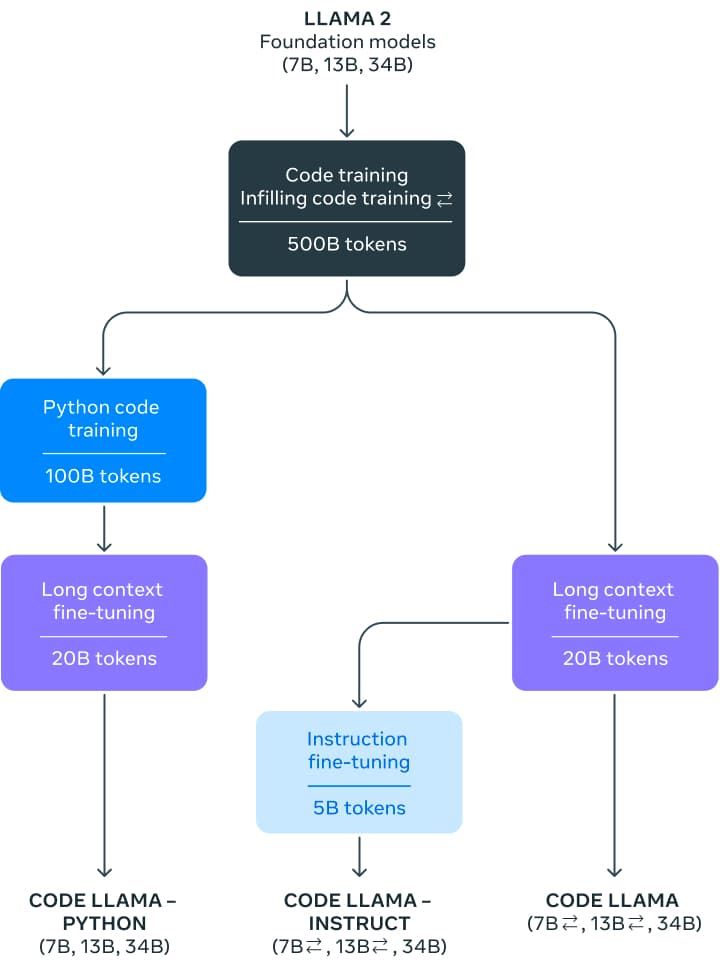
All models were initially trained with 500 billion tokens on a near-deduplicated dataset of publicly available code. The dataset also contains some natural language datasets, such as discussions about code and code snippets. Unfortunately, there is not more information about the dataset.
For the instruction model, they used two datasets: the instruction tuning dataset collected for Llama 2 Chat and a self-instruct dataset. The self-instruct dataset was created by using Llama 2 to create interview programming questions and then using Code Llama to generate unit tests and solutions, which are later evaluated by executing the tests.
Code Llama is available in the Hugging Face ecosystem, starting with transformers version 4.33.
You can easily try the Code Llama Model (13 billion parameters!) in this Space or in the playground embedded below:
Under the hood, this playground uses Hugging Face's Text Generation Inference, the same technology that powers HuggingChat, and we'll share more in the following sections.
If you want to try out the bigger instruct-tuned 34B model, it is now available on HuggingChat! You can try it out here: hf.co/chat. Make sure to specify the Code Llama model. You can also check this chat-based demo and duplicate it for your use – it's self-contained, so you can examine the source code and adapt it as you wish!
Starting with transformers 4.33, you can use Code Llama and leverage all the tools within the HF ecosystem, such as:
safetensors)bitsandbytes (4-bit quantization) and PEFT (parameter efficient fine-tuning)!pip install --upgrade transformers
When using models like Code Llama, it's important to take a look at the data types of the models.
float32): PyTorch convention on model initialization is to load models in float32, no matter with which precision the model weights were stored. transformers also follows this convention for consistency with PyTorch.bfloat16): Code Llama was trained with this precision, so we recommend using it for further training or fine-tuning.float16): We recommend running inference using this precision, as it's usually faster than bfloat16, and evaluation metrics show no discernible degradation with respect to bfloat16. You can also run inference using bfloat16, and we recommend you check inference results with both float16 and bfloat16 after fine-tuning.As mentioned above, transformers loads weights using float32 (no matter with which precision the models are stored), so it's important to specify the desired dtype when loading the models. If you want to fine-tune Code Llama, it's recommended to use bfloat16, as using float16 can lead to overflows and NaNs. If you run inference, we recommend using float16 because bfloat16 can be slower.
The 7B and 13B models can be used for text/code completion or infilling. The following code snippet uses the pipeline interface to demonstrate text completion. It runs on the free tier of Colab, as long as you select a GPU runtime.
from transformers import AutoTokenizer
import transformers
import torch

tokenizer = AutoTokenizer.from_pretrained("codellama/CodeLlama-7b-hf")
pipeline = transformers.pipeline(
    "text-generation",
    model="codellama/CodeLlama-7b-hf",
    torch_dtype=torch.float16,
    device_map="auto",
)

sequences = pipeline(
    'def fibonacci(',
    do_sample=True,
    temperature=0.2,
    top_p=0.9,
    num_return_sequences=1,
    eos_token_id=tokenizer.eos_token_id,
    max_length=100,
)
for seq in sequences:
    print(f"Result: {seq['generated_text']}")
This may produce output like the following:
Result: def fibonacci(n):
    if n == 0:
        return 0
    elif n == 1:
        return 1
    else:
        return fibonacci(n-1) + fibonacci(n-2)

def fibonacci_memo(n, memo={}):
    if n == 0:
        return 0
    elif n == 1:
        return
Code Llama is specialized in code understanding, but it's a language model in its own right. You can use the same generation strategy to autocomplete comments or general text.
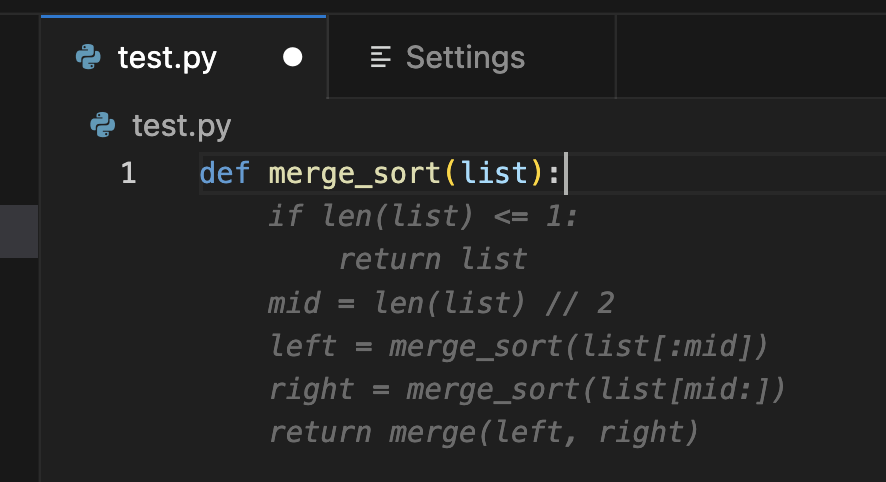
This is a specialized task particular to code models. The model is trained to generate the code (including comments) that best matches an existing prefix and suffix. This is the strategy typically used by code assistants: they are asked to fill the current cursor position, considering the contents that appear before and after it.
This task is available in the base and instruction variants of the 7B and 13B models. It is not available for any of the 34B models or the Python versions.
To use this feature successfully, you need to pay close attention to the format used to train the model for this task, as it uses special separators to identify the different parts of the prompt. Fortunately, transformers' CodeLlamaTokenizer makes this very easy, as demonstrated below:
from transformers import AutoTokenizer, AutoModelForCausalLM
import transformers
import torch

model_id = "codellama/CodeLlama-7b-hf"
tokenizer = AutoTokenizer.from_pretrained(model_id)
model = AutoModelForCausalLM.from_pretrained(
    model_id,
    torch_dtype=torch.float16
).to("cuda")

prompt = '''def remove_non_ascii(s: str) -> str:
    """ <FILL_ME>
    return result
'''

input_ids = tokenizer(prompt, return_tensors="pt")["input_ids"].to("cuda")
output = model.generate(
    input_ids,
    max_new_tokens=200,
)
output = output[0].to("cpu")

filling = tokenizer.decode(output[input_ids.shape[1]:], skip_special_tokens=True)
print(prompt.replace("<FILL_ME>", filling))
def remove_non_ascii(s: str) -> str:
    """ Remove non-ASCII characters from a string.

    Args:
        s: The string to remove non-ASCII characters from.

    Returns:
        The string with non-ASCII characters removed.
    """
    result = ""
    for c in s:
        if ord(c) < 128:
            result += c
    return result
Under the hood, the tokenizer automatically splits by <FILL_ME> to create a formatted input string that follows the original training pattern. This is more robust than preparing the pattern yourself: it avoids pitfalls, such as token glueing, that are very hard to debug.
The base model can be used for both completion and infilling, as described. The Code Llama release also includes an instruction fine-tuned model that can be used in conversational interfaces.
To prepare inputs for this task we have to use a prompt template like the one described in our Llama 2 blog post, which we reproduce again here:
<s>[INST] <<SYS>>
{{ system_prompt }}
<</SYS>>

{{ user_msg_1 }} [/INST] {{ model_answer_1 }} </s><s>[INST] {{ user_msg_2 }} [/INST]
Note that the system prompt is optional - the model will work without it, but you can use it to further configure its behavior or style. For example, if you'd always like to get answers in JavaScript, you could state that here. After the system prompt, you need to provide all the previous interactions in the conversation: what was asked by the user and what was answered by the model. As in the infilling case, you need to pay attention to the delimiters used. The final component of the input must always be a new user instruction, which will be the signal for the model to provide an answer.
The following code snippets demonstrate how the template works in practice.
user = 'In Bash, how do I list all text files in the current directory (excluding subdirectories) that have been modified in the last month?'

prompt = f"<s>[INST] {user.strip()} [/INST]"
inputs = tokenizer(prompt, return_tensors="pt", add_special_tokens=False).to("cuda")
system = "Provide answers in JavaScript"
user = "Write a function that computes the set of sums of all contiguous sublists of a given list."

prompt = f"<s>[INST] <<SYS>>\\n{system}\\n<</SYS>>\\n\\n{user}[/INST]"
inputs = tokenizer(prompt, return_tensors="pt", add_special_tokens=False).to("cuda")
The process is the same as in Llama 2. We haven’t used loops or generalized this example code for maximum clarity:
system = "System prompt"
user_1 = "user_prompt_1"
answer_1 = "answer_1"
user_2 = "user_prompt_2"
answer_2 = "answer_2"
user_3 = "user_prompt_3"

prompt  = f"<<SYS>>\n{system}\n<</SYS>>\n\n{user_1}"
prompt  = f"<s>[INST] {prompt.strip()} [/INST] {answer_1.strip()} </s>"
prompt += f"<s>[INST] {user_2.strip()} [/INST] {answer_2.strip()} </s>"
prompt += f"<s>[INST] {user_3.strip()} [/INST]"

inputs = tokenizer(prompt, return_tensors="pt", add_special_tokens=False).to("cuda")
Integration of Code Llama in Transformers means that you get immediate support for advanced features like 4-bit loading. This allows you to run the big 32B parameter models on consumer GPUs like nvidia 3090 cards!
Here's how you can run inference in 4-bit mode:
from transformers import AutoTokenizer, AutoModelForCausalLM, BitsAndBytesConfig
import torch

model_id = "codellama/CodeLlama-34b-hf"
quantization_config = BitsAndBytesConfig(
   load_in_4bit=True,
   bnb_4bit_compute_dtype=torch.float16
)

tokenizer = AutoTokenizer.from_pretrained(model_id)
model = AutoModelForCausalLM.from_pretrained(
    model_id,
    quantization_config=quantization_config,
    device_map="auto",
)

prompt = 'def remove_non_ascii(s: str) -> str:\n    """ '
inputs = tokenizer(prompt, return_tensors="pt").to("cuda")

output = model.generate(
    inputs["input_ids"],
    max_new_tokens=200,
    do_sample=True,
    top_p=0.9,
    temperature=0.1,
)
output = output[0].to("cpu")
print(tokenizer.decode(output))
Text Generation Inference is a production-ready inference container developed by Hugging Face to enable easy deployment of large language models. It has features such as continuous batching, token streaming, tensor parallelism for fast inference on multiple GPUs, and production-ready logging and tracing.
You can try out Text Generation Inference on your own infrastructure, or you can use Hugging Face's Inference Endpoints. To deploy a Codellama 2 model, go to the model page and click on the Deploy -> Inference Endpoints widget.
bitsandbytes quantization enabled or "GPU [2xlarge] - 2x Nvidia A100"Note: You might need to request a quota upgrade via email to api-enterprise@huggingface.co to access A100s
You can learn more on how to Deploy LLMs with Hugging Face Inference Endpoints in our blog. The blog includes information about supported hyperparameters and how to stream your response using Python and Javascript.
HF Code Autocomplete is a VS Code extension for testing open source code completion models. The extension was developed as part of StarCoder project and was updated to support the medium-sized base model, Code Llama 13B. Find more here on how to install and run the extension with Code Llama.
Language models for code are typically benchmarked on datasets such as HumanEval. It consists of programming challenges where the model is presented with a function signature and a docstring and is tasked to complete the function body. The proposed solution is then verified by running a set of predefined unit tests. Finally, a pass rate is reported which describes how many solutions passed all tests. The pass@1 rate describes how often the model generates a passing solution when having one shot whereas pass@10 describes how often at least one solution passes out of 10 proposed candidates.
While HumanEval is a Python benchmark there have been significant efforts to translate it to more programming languages and thus enable a more holistic evaluation. One such approach is MultiPL-E which translates HumanEval to over a dozen languages. We are hosting a multilingual code leaderboard based on it to allow the community to compare models across different languages to evaluate which model fits their use-case best.
| Model | License | Dataset known | Commercial use? | Pretraining length [tokens] | Python | JavaScript | Leaderboard Avg Score |
|---|---|---|---|---|---|---|---|
| CodeLlaMa-34B | Llama 2 license | ❌ | ✅ | 2,500B | 45.11 | 41.66 | 33.89 |
| CodeLlaMa-13B | Llama 2 license | ❌ | ✅ | 2,500B | 35.07 | 38.26 | 28.35 |
| CodeLlaMa-7B | Llama 2 license | ❌ | ✅ | 2,500B | 29.98 | 31.8 | 24.36 |
| CodeLlaMa-34B-Python | Llama 2 license | ❌ | ✅ | 2,620B | 53.29 | 44.72 | 33.87 |
| CodeLlaMa-13B-Python | Llama 2 license | ❌ | ✅ | 2,620B | 42.89 | 40.66 | 28.67 |
| CodeLlaMa-7B-Python | Llama 2 license | ❌ | ✅ | 2,620B | 40.48 | 36.34 | 23.5 |
| CodeLlaMa-34B-Instruct | Llama 2 license | ❌ | ✅ | 2,620B | 50.79 | 45.85 | 35.09 |
| CodeLlaMa-13B-Instruct | Llama 2 license | ❌ | ✅ | 2,620B | 50.6 | 40.91 | 31.29 |
| CodeLlaMa-7B-Instruct | Llama 2 license | ❌ | ✅ | 2,620B | 45.65 | 33.11 | 26.45 |
| StarCoder-15B | BigCode-OpenRail-M | ✅ | ✅ | 1,035B | 33.57 | 30.79 | 22.74 |
| StarCoderBase-15B | BigCode-OpenRail-M | ✅ | ✅ | 1,000B | 30.35 | 31.7 | 22.4 |
| WizardCoder-15B | BigCode-OpenRail-M | ❌ | ✅ | 1,035B | 58.12 | 41.91 | 32.07 |
| OctoCoder-15B | BigCode-OpenRail-M | ✅ | ✅ | 1,000B | 45.3 | 32.8 | 24.01 |
| CodeGeeX-2-6B | CodeGeeX License | ❌ | ❌ | 2,000B | 33.49 | 29.9 | 21.23 |
| CodeGen-2.5-7B-Mono | Apache-2.0 | ✅ | ✅ | 1400B | 45.65 | 23.22 | 12.1 |
| CodeGen-2.5-7B-Multi | Apache-2.0 | ✅ | ✅ | 1400B | 28.7 | 26.27 | 20.04 |
Note: The scores presented in the table above were sourced from our code leaderboard at the time of publication. Scores change as new models are released, because models are compared against one another. For more details, please refer to the leaderboard.
此内容由惯性聚合(RSS阅读器)自动聚合整理,仅供阅读参考。 原文来自 — 版权归原作者所有。