




This article is also available in Chinese 简体中文.
This blog post was written on April 2024 and provides a great introduction to internals of vision language models, an overview of existing suite of vision language models and how to fine-tune them. We have written an April 2025 update, with more capabilities and more models. Make sure to check it out after reading this one!
Vision language models are models that can learn simultaneously from images and texts to tackle many tasks, from visual question answering to image captioning. In this post, we go through the main building blocks of vision language models: have an overview, grasp how they work, figure out how to find the right model, how to use them for inference and how to easily fine-tune them with the new version of trl released today!
Vision language models are broadly defined as multimodal models that can learn from images and text. They are a type of generative models that take image and text inputs, and generate text outputs. Large vision language models have good zero-shot capabilities, generalize well, and can work with many types of images, including documents, web pages, and more. The use cases include chatting about images, image recognition via instructions, visual question answering, document understanding, image captioning, and others. Some vision language models can also capture spatial properties in an image. These models can output bounding boxes or segmentation masks when prompted to detect or segment a particular subject, or they can localize different entities or answer questions about their relative or absolute positions. There’s a lot of diversity within the existing set of large vision language models, the data they were trained on, how they encode images, and, thus, their capabilities.
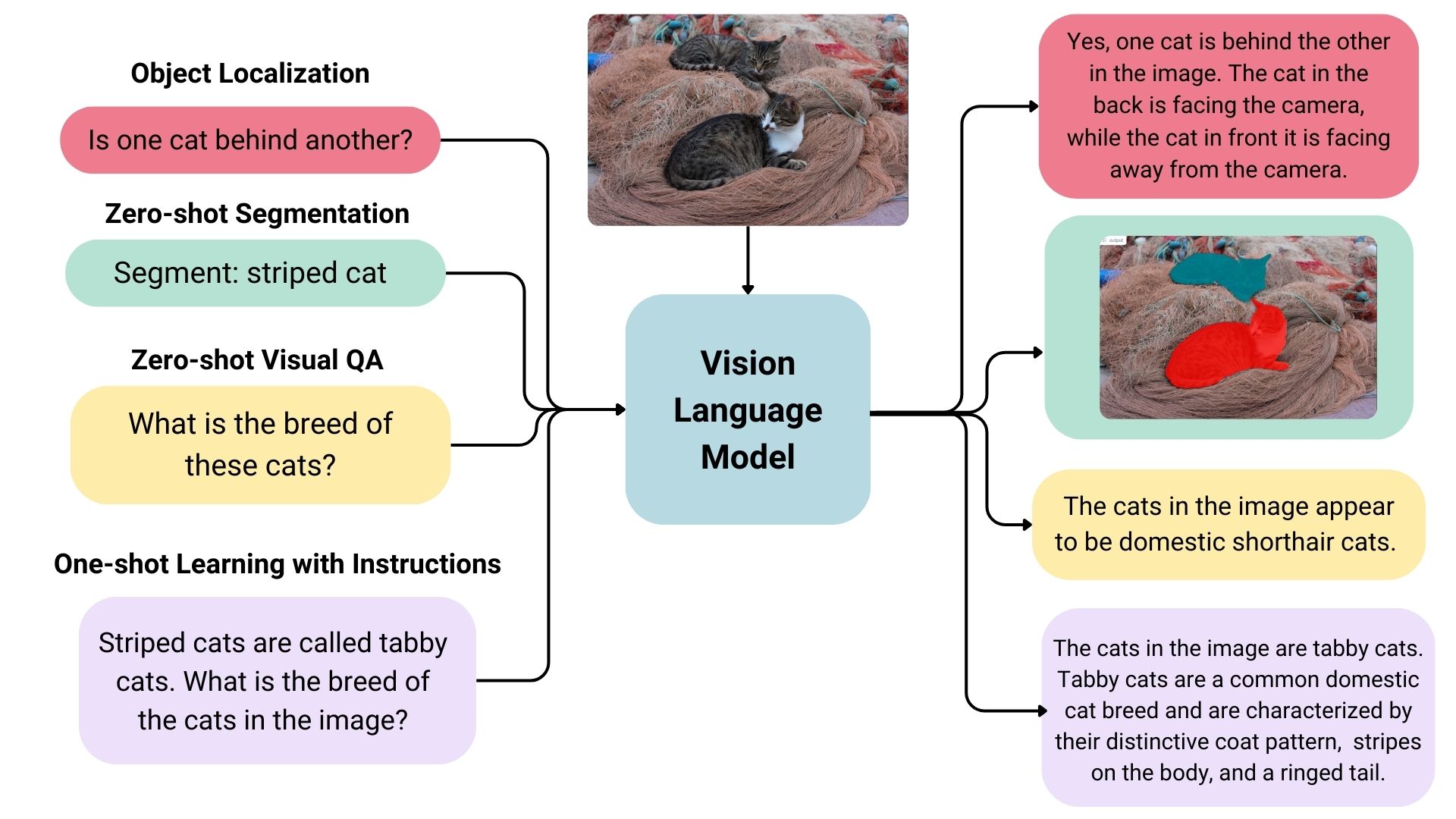
There are many open vision language models on the Hugging Face Hub. Some of the most prominent ones are shown in the table below.
There are many ways to select the most appropriate model for your use case.
Vision Arena is a leaderboard solely based on anonymous voting of model outputs and is updated continuously. In this arena, the users enter an image and a prompt, and outputs from two different models are sampled anonymously, then the user can pick their preferred output. This way, the leaderboard is constructed solely based on human preferences.
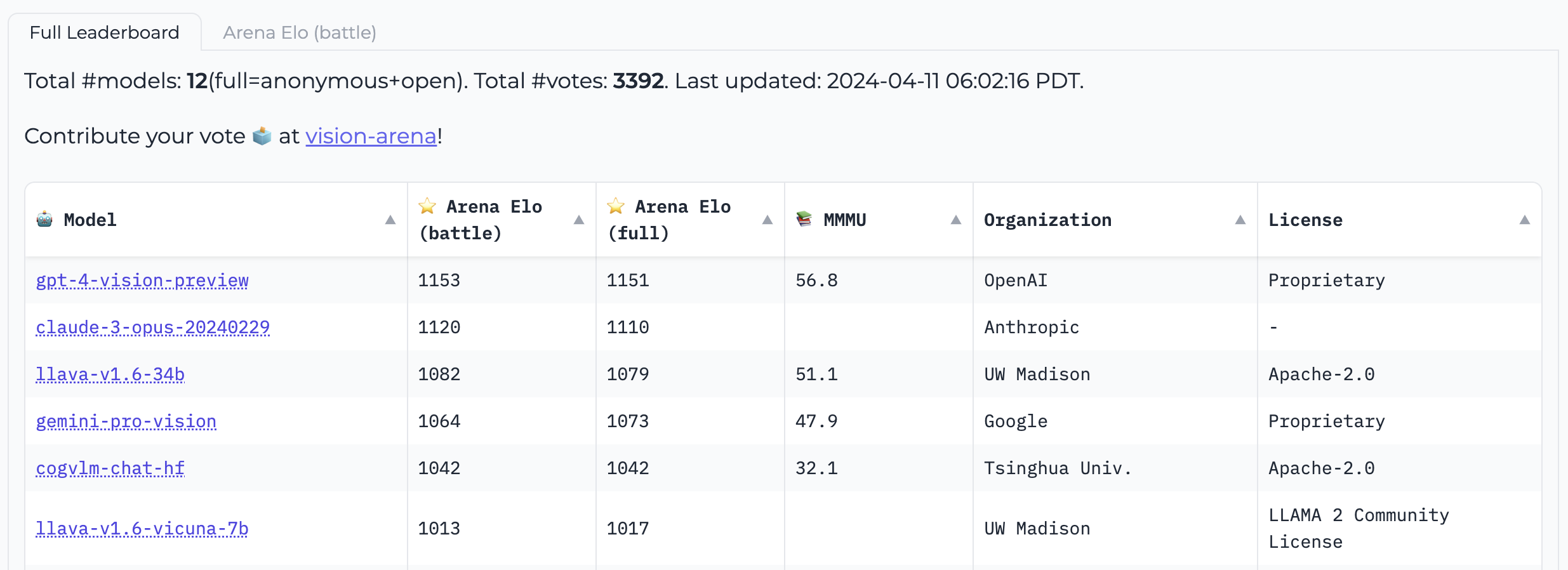 Vision Arena
Open VLM Leaderboard, is another leaderboard where various vision language models are ranked according to these metrics and average scores. You can also filter models according to model sizes, proprietary or open-source licenses, and rank for different metrics.
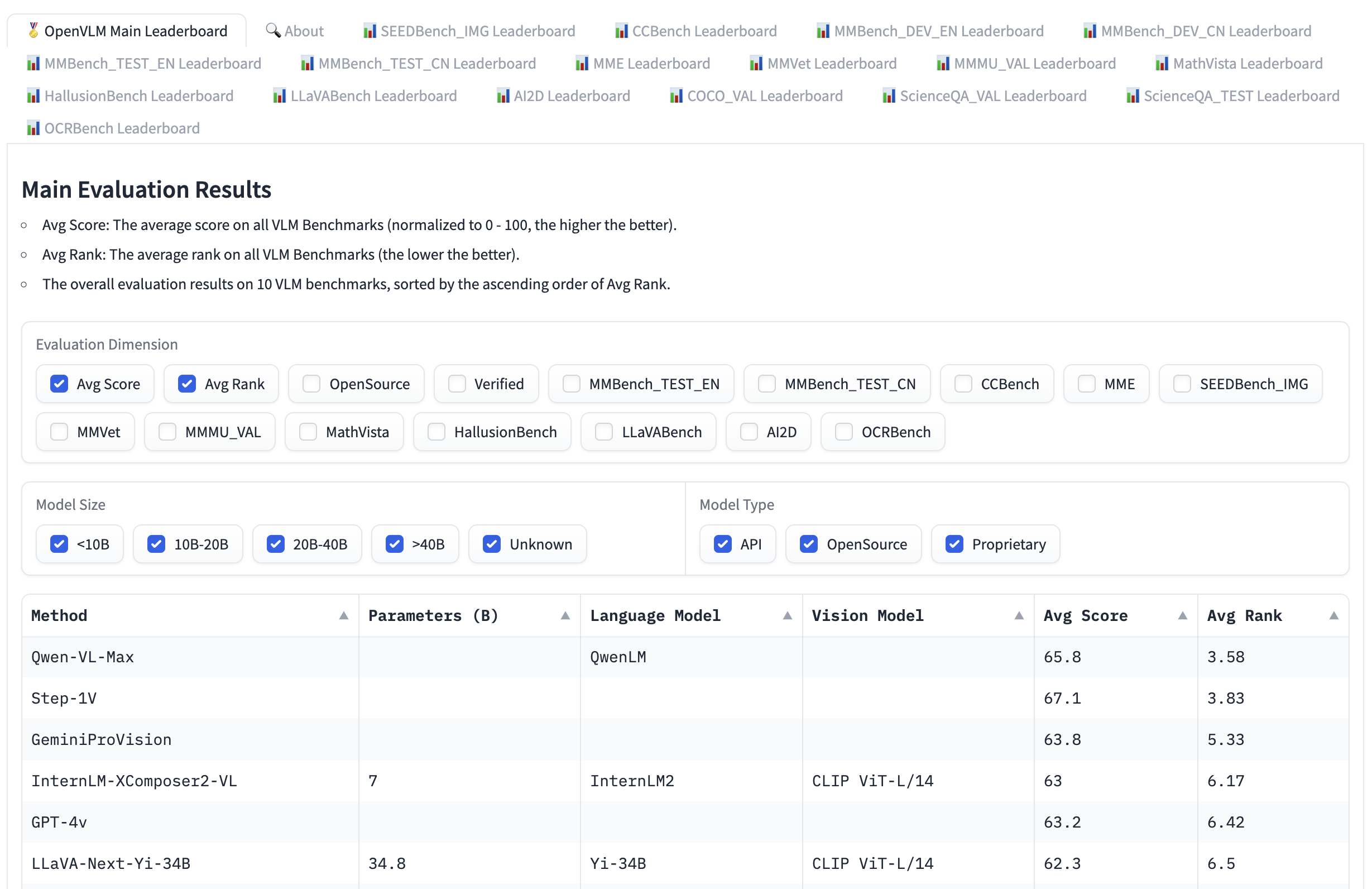 Open VLM Leaderboard
VLMEvalKit is a toolkit to run benchmarks on a vision language models that powers the Open VLM Leaderboard. Another evaluation suite is LMMS-Eval, which provides a standard command line interface to evaluate Hugging Face models of your choice with datasets hosted on the Hugging Face Hub, like below:
accelerate launch --num_processes=8 -m lmms_eval --model llava --model_args pretrained="liuhaotian/llava-v1.5-7b" --tasks mme,mmbench_en --batch_size 1 --log_samples --log_samples_suffix llava_v1.5_mme_mmbenchen --output_path ./logs/
Both the Vision Arena and the Open VLM Leaderbard are limited to the models that are submitted to them, and require updates to add new models. If you want to find additional models, you can browse the Hub for models under the task image-text-to-text.
There are different benchmarks to evaluate vision language models that you may come across in the leaderboards. We will go through a few of them.
A Massive Multi-discipline Multimodal Understanding and Reasoning Benchmark for Expert AGI (MMMU) is the most comprehensive benchmark to evaluate vision language models. It contains 11.5K multimodal challenges that require college-level subject knowledge and reasoning across different disciplines such as arts and engineering.
MMBench is an evaluation benchmark that consists of 3000 single-choice questions over 20 different skills, including OCR, object localization and more. The paper also introduces an evaluation strategy called CircularEval, where the answer choices of a question are shuffled in different combinations, and the model is expected to give the right answer at every turn. There are other more specific benchmarks across different domains, including MathVista (visual mathematical reasoning), AI2D (diagram understanding), ScienceQA (Science Question Answering) and OCRBench (document understanding).
There are various ways to pretrain a vision language model. The main trick is to unify the image and text representation and feed it to a text decoder for generation. The most common and prominent models often consist of an image encoder, an embedding projector to align image and text representations (often a dense neural network) and a text decoder stacked in this order. As for the training parts, different models have been following different approaches.
For instance, LLaVA consists of a CLIP image encoder, a multimodal projector and a Vicuna text decoder. The authors fed a dataset of images and captions to GPT-4 and generated questions related to the caption and the image. The authors have frozen the image encoder and text decoder and have only trained the multimodal projector to align the image and text features by feeding the model images and generated questions and comparing the model output to the ground truth captions. After the projector pretraining, they keep the image encoder frozen, unfreeze the text decoder, and train the projector with the decoder. This way of pre-training and fine-tuning is the most common way of training vision language models.
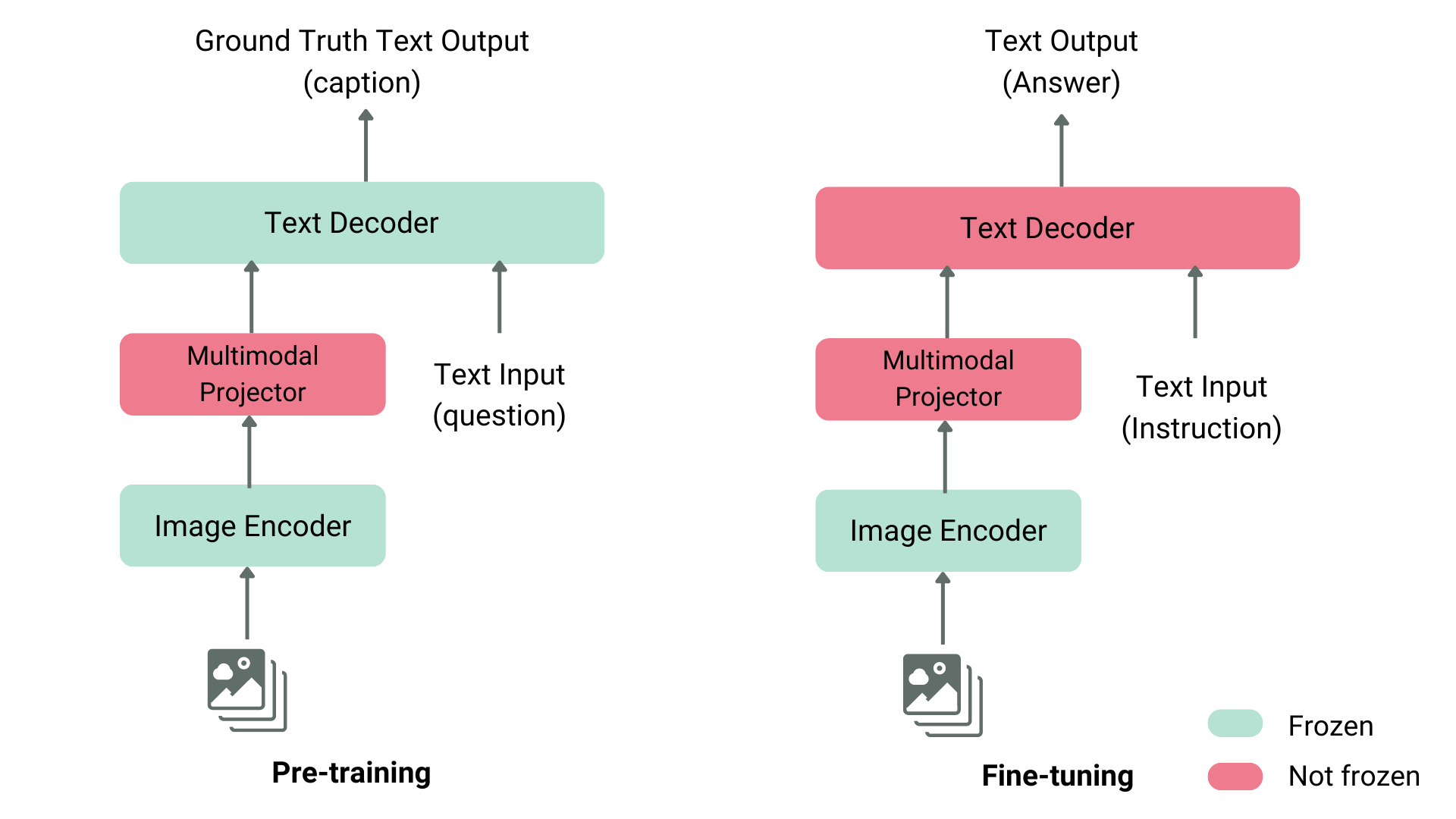
Structure of a Typical Vision Language Model
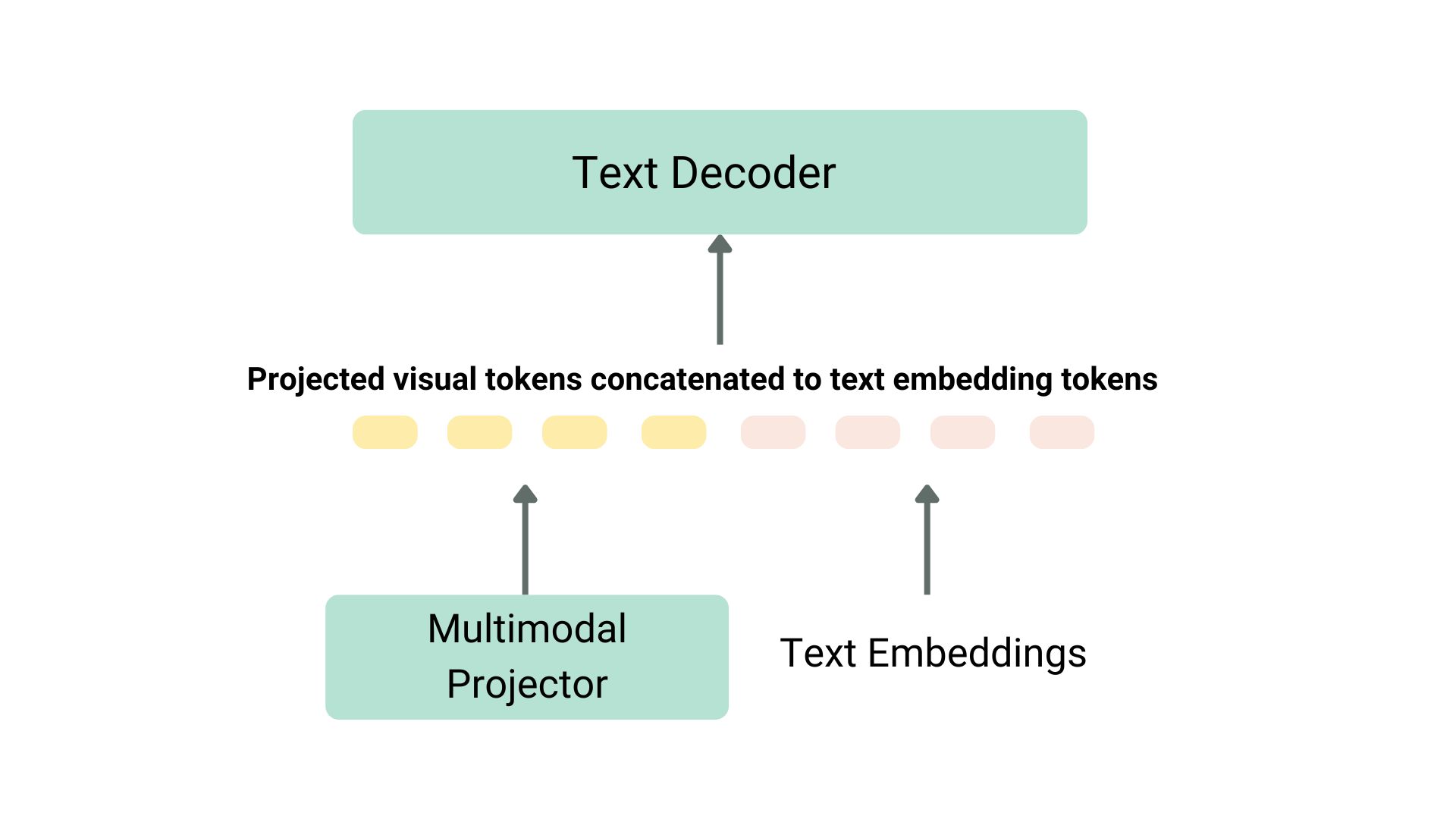
Projection and text embeddings are concatenated
Another example is KOSMOS-2, where the authors chose to fully train the model end-to-end, which is computationally expensive compared to LLaVA-like pre-training. The authors later did language-only instruction fine-tuning to align the model. Fuyu-8B, as another example, doesn’t even have an image encoder. Instead, image patches are directly fed to a projection layer and then the sequence goes through an auto-regressive decoder.
Most of the time, you don’t need to pre-train a vision language model, as you can either use one of the existing ones or fine-tune them on your own use case. We will go through how to use these models using transformers and fine-tune using SFTTrainer.
You can infer with Llava using the LlavaNext model as shown below.
Let’s initialize the model and the processor first.
from transformers import LlavaNextProcessor, LlavaNextForConditionalGeneration
import torch

device = torch.device('cuda' if torch.cuda.is_available() else 'cpu')
processor = LlavaNextProcessor.from_pretrained("llava-hf/llava-v1.6-mistral-7b-hf")
model = LlavaNextForConditionalGeneration.from_pretrained(
    "llava-hf/llava-v1.6-mistral-7b-hf",
    torch_dtype=torch.float16,
    low_cpu_mem_usage=True
)
model.to(device)
We now pass the image and the text prompt to the processor, and then pass the processed inputs to the generate. Note that each model uses its own prompt template, be careful to use the right one to avoid performance degradation.
from PIL import Image
import requests

url = "https://github.com/haotian-liu/LLaVA/blob/1a91fc274d7c35a9b50b3cb29c4247ae5837ce39/images/llava_v1_5_radar.jpg?raw=true"
image = Image.open(requests.get(url, stream=True).raw)
prompt = "[INST] <image>\nWhat is shown in this image? [/INST]"

inputs = processor(prompt, image, return_tensors="pt").to(device)
output = model.generate(**inputs, max_new_tokens=100)
Call decode to decode the output tokens.
print(processor.decode(output[0], skip_special_tokens=True))
We are excited to announce that TRL’s SFTTrainer now includes experimental support for Vision Language Models! We provide an example here of how to perform SFT on a Llava 1.5 VLM using the llava-instruct dataset which contains 260k image-conversation pairs.
The dataset contains user-assistant interactions formatted as a sequence of messages. For example, each conversation is paired with an image that the user asks questions about.
To use the experimental VLM training support, you must install the latest version of TRL, with pip install -U trl.
The full example script can be found here.
from trl.commands.cli_utils import SftScriptArguments, TrlParser

parser = TrlParser((SftScriptArguments, TrainingArguments))
args, training_args = parser.parse_args_and_config()
Initialize the chat template for instruction fine-tuning.
LLAVA_CHAT_TEMPLATE = """A chat between a curious user and an artificial intelligence assistant. The assistant gives helpful, detailed, and polite answers to the user's questions. {% for message in messages %}{% if message['role'] == 'user' %}USER: {% else %}ASSISTANT: {% endif %}{% for item in message['content'] %}{% if item['type'] == 'text' %}{{ item['text'] }}{% elif item['type'] == 'image' %}<image>{% endif %}{% endfor %}{% if message['role'] == 'user' %} {% else %}{{eos_token}}{% endif %}{% endfor %}"""
We will now initialize our model and tokenizer.
from transformers import AutoTokenizer, AutoProcessor, TrainingArguments, LlavaForConditionalGeneration
import torch

model_id = "llava-hf/llava-1.5-7b-hf"
tokenizer = AutoTokenizer.from_pretrained(model_id)
tokenizer.chat_template = LLAVA_CHAT_TEMPLATE
processor = AutoProcessor.from_pretrained(model_id)
processor.tokenizer = tokenizer

model = LlavaForConditionalGeneration.from_pretrained(model_id, torch_dtype=torch.float16)
Let’s create a data collator to combine text and image pairs.
class LLavaDataCollator:
    def __init__(self, processor):
        self.processor = processor

    def __call__(self, examples):
        texts = []
        images = []
        for example in examples:
            messages = example["messages"]
            text = self.processor.tokenizer.apply_chat_template(
                messages, tokenize=False, add_generation_prompt=False
            )
            texts.append(text)
            images.append(example["images"][0])

        batch = self.processor(texts, images, return_tensors="pt", padding=True)

        labels = batch["input_ids"].clone()
        if self.processor.tokenizer.pad_token_id is not None:
            labels[labels == self.processor.tokenizer.pad_token_id] = -100
        batch["labels"] = labels

        return batch

data_collator = LLavaDataCollator(processor)
Load our dataset.
from datasets import load_dataset

raw_datasets = load_dataset("HuggingFaceH4/llava-instruct-mix-vsft")
train_dataset = raw_datasets["train"]
eval_dataset = raw_datasets["test"]
Initialize the SFTTrainer, passing in the model, the dataset splits, PEFT configuration and data collator and call train(). To push our final checkpoint to the Hub, call push_to_hub().
from trl import SFTTrainer

trainer = SFTTrainer(
    model=model,
    args=training_args,
    train_dataset=train_dataset,
    eval_dataset=eval_dataset,
    dataset_text_field="text",  # need a dummy field
    tokenizer=tokenizer,
    data_collator=data_collator,
    dataset_kwargs={"skip_prepare_dataset": True},
)

trainer.train()
Save the model and push to the Hugging Face Hub.
trainer.save_model(training_args.output_dir)
trainer.push_to_hub()
You can find the trained model here.
You can try the model we just trained directly in our VLM playground below ⬇️
Acknowledgements
We would like to thank Pedro Cuenca, Lewis Tunstall, Kashif Rasul and Omar Sanseviero for their reviews and suggestions on this blog post.
此内容由惯性聚合(RSS阅读器)自动聚合整理,仅供阅读参考。 原文来自 — 版权归原作者所有。