


惯性聚合 高效追踪和阅读你感兴趣的博客、新闻、科技资讯
阅读原文 在惯性聚合中打开

推荐订阅源

cs.CV updates on arXiv.org
小众软件
小众软件
博客园_首页
博客园 - 聂微东
V
V2EX
WordPress大学
WordPress大学
freeCodeCamp Programming Tutorials: Python, JavaScript, Git & More
OSCHINA 社区最新新闻
OSCHINA 社区最新新闻
罗磊的独立博客
酷 壳 – CoolShell
酷 壳 – CoolShell
博客园 - 司徒正美
博客园 - 三生石上(FineUI控件)
奇客Solidot–传递最新科技情报
奇客Solidot–传递最新科技情报
S
SegmentFault 最新的问题
J
Java Code Geeks
Last Week in AI
Last Week in AI
The Cloudflare Blog
月光博客
月光博客
雷峰网
雷峰网
宝玉的分享
宝玉的分享
钛媒体:引领未来商业与生活新知
钛媒体:引领未来商业与生活新知
Hugging Face - Blog
Hugging Face - Blog
让小产品的独立变现更简单 - ezindie.com
有赞技术团队
有赞技术团队
人人都是产品经理
人人都是产品经理
博客园 - Franky
腾讯CDC
Jina AI
Jina AI
博客园 - 叶小钗
大猫的无限游戏
大猫的无限游戏
阮一峰的网络日志
阮一峰的网络日志
量子位
爱范儿
爱范儿
美团技术团队
T
Tailwind CSS Blog
博客园 - 【当耐特】
D
Docker
IT之家
IT之家
V
Visual Studio Blog
P
Proofpoint News Feed
L
LangChain Blog
Engineering at Meta
Engineering at Meta
C
Check Point Blog
G
Google Developers Blog
Google DeepMind News
云风的 BLOG
云风的 BLOG
Cyber Security Advisories - MS-ISAC
Microsoft Azure Blog
B
Blog RSS Feed
Recorded Future
Recorded Future

Hugging Face - Blog

Waypoint-1.5: Higher-Fidelity Interactive Worlds for Everyday GPUs ALTK‑Evolve: On‑the‑Job Learning for AI Agents Safetensors is Joining the PyTorch Foundation Holo3: Breaking the Computer Use Frontier Any Custom Frontend with Gradio's Backend A New Framework for Evaluating Voice Agents (EVA) Bringing Robotics AI to Embedded Platforms: Dataset Recording, VLA Fine‑Tuning, and On‑Device Optimizations One-Shot Any Web App with Gradio's gr.HTML CUGA on Hugging Face: Democratizing Configurable AI Agents New in llama.cpp: Model Management Building Deep Research: How we Achieved State of the Art OVHcloud on Hugging Face Inference Providers 🔥 20x Faster TRL Fine-tuning with RapidFire AI Building for an Open Future - our new partnership with Google Cloud Aligning to What? Rethinking Agent Generalization in MiniMax M2 Building a Healthcare Robot from Simulation to Deployment with NVIDIA Isaac Sentence Transformers is joining Hugging Face! Unlock the power of images with AI Sheets Supercharge your OCR Pipelines with Open Models Google Cloud C4 Brings a 70% TCO improvement on GPT OSS with Intel and Hugging Face Get your VLM running in 3 simple steps on Intel CPUs Nemotron-Personas-India: Synthesized Data for Sovereign AI Introducing RTEB: A New Standard for Retrieval Evaluation Accelerating Qwen3-8B Agent on Intel® Core™ Ultra with Depth-Pruned Draft Models VibeGame: Exploring Vibe Coding Games Nemotron-Personas-Japan: ソブリン AI のための合成データセット Swift Transformers Reaches 1.0 – and Looks to the Future Smol2Operator: Post-Training GUI Agents for Computer Use SyGra: The One-Stop Framework for Building Data for LLMs and SLMs Gaia2 and ARE: Empowering the community to study agents Scaleway on Hugging Face Inference Providers 🔥 Democratizing AI Safety with RiskRubric.ai Public AI on Hugging Face Inference Providers 🔥 `LeRobotDataset:v3.0`: Bringing large-scale datasets to `lerobot` Visible Watermarking with Gradio Introducing the Palmyra-mini family: Powerful, lightweight, and ready to reason! Tricks from OpenAI gpt-oss YOU 🫵 can use with transformers Fine-tune Any LLM from the Hugging Face Hub with Together AI Jupyter Agents: training LLMs to reason with notebooks mmBERT: ModernBERT goes Multilingual Welcome EmbeddingGemma, Google's new efficient embedding model SAIR: Accelerating Pharma R&D with AI-Powered Structural Intelligence Make your ZeroGPU Spaces go brrr with ahead-of-time compilation NVIDIA Releases 6 Million Multi-Lingual Reasoning Dataset Generate Images with Claude and Hugging Face From Zero to GPU: A Guide to Building and Scaling Production-Ready CUDA Kernels MCP for Research: How to Connect AI to Research Tools Kimina-Prover-RL Arm & ExecuTorch 0.7: Bringing Generative AI to the masses Neural Super Sampling is here! TextQuests: How Good are LLMs at Text-Based Video Games? 🇵🇭 FilBench - Can LLMs Understand and Generate Filipino? Introducing AI Sheets: a tool to work with datasets using open AI models! Accelerate ND-Parallel: A guide to Efficient Multi-GPU Training Vision Language Model Alignment in TRL ⚡️ Welcome GPT OSS, the new open-source model family from OpenAI! Measuring Open-Source Llama Nemotron Models on DeepResearch Bench 📚 3LM: A Benchmark for Arabic LLMs in STEM and Code Implementing MCP Servers in Python: An AI Shopping Assistant with Gradio Introducing Trackio: A Lightweight Experiment Tracking Library from Hugging Face Say hello to `hf`: a faster, friendlier Hugging Face CLI ✨ Parquet Content-Defined Chunking TimeScope: How Long Can Your Video Large Multimodal Model Go? Fast LoRA inference for Flux with Diffusers and PEFT Accelerate a World of LLMs on Hugging Face with NVIDIA NIM Arc Virtual Cell Challenge: A Primer Consilium: When Multiple LLMs Collaborate Back to The Future: Evaluating AI Agents on Predicting Future Events Five Big Improvements to Gradio MCP Servers Ettin Suite: SoTA Paired Encoders and Decoders Migrating the Hub from Git LFS to Xet Kimina-Prover: Applying Test-time RL Search on Large Formal Reasoning Models Asynchronous Robot Inference: Decoupling Action Prediction and Execution ScreenEnv: Deploy your full stack Desktop Agent Building the Hugging Face MCP Server Reachy Mini - The Open-Source Robot for Today's and Tomorrow's AI Builders Creating custom kernels for the AMD MI300 Upskill your LLMs With Gradio MCP Servers SmolLM3: smol, multilingual, long-context reasoner Three Mighty Alerts Supporting Hugging Face’s Production Infrastructure Efficient MultiModal Data Pipeline Announcing NeurIPS 2025 E2LM Competition: Early Training Evaluation of Language Models Training and Finetuning Sparse Embedding Models with Sentence Transformers Welcome the NVIDIA Llama Nemotron Nano VLM to Hugging Face Hub Gemma 3n fully available in the open-source ecosystem! Transformers backend integration in SGLang (LoRA) Fine-Tuning FLUX.1-dev on Consumer Hardware Groq on Hugging Face Inference Providers 🔥 How Long Prompts Block Other Requests - Optimizing LLM Performance Learn the Hugging Face Kernel Hub in 5 Minutes Convert Transformers to ONNX with Hugging Face Optimum Intel and Hugging Face Partner to Democratize Machine Learning Hardware Acceleration Director of Machine Learning Insights [Part 3: Finance Edition] The Annotated Diffusion Model Deep Q-Learning with Space Invaders Graphcore and Hugging Face Launch New Lineup of IPU-Ready Transformers Introducing Pull Requests and Discussions 🥳 Efficient Table Pre-training without Real Data: An Introduction to TAPEX An Introduction to Q-Learning Part 2/2 How Sempre Health is leveraging the Expert Acceleration Program to accelerate their ML roadmap
Total noob’s intro to Hugging Face Transformers
Andrew Jardine · 2024-03-22 · via Hugging Face - Blog

Back to Articles

Andrew Jardine's avatar

This article is also available in Chinese 简体中文.

Welcome to "A Total Noob’s Introduction to Hugging Face Transformers," a guide designed specifically for those looking to understand the bare basics of using open-source ML. Our goal is to demystify what Hugging Face Transformers is and how it works, not to turn you into a machine learning practitioner, but to enable better understanding of and collaboration with those who are. That being said, the best way to learn is by doing, so we'll walk through a simple worked example of running Microsoft’s Phi-2 LLM in a notebook on a Hugging Face space.

You might wonder, with the abundance of tutorials on Hugging Face already available, why create another? The answer lies in accessibility: most existing resources assume some technical background, including Python proficiency, which can prevent non-technical individuals from grasping ML fundamentals. As someone who came from the business side of AI, I recognize that the learning curve presents a barrier and wanted to offer a more approachable path for like-minded learners.

Therefore, this guide is tailored for a non-technical audience keen to better understand open-source machine learning without having to learn Python from scratch. We assume no prior knowledge and will explain concepts from the ground up to ensure clarity. If you're an engineer, you’ll find this guide a bit basic, but for beginners, it's an ideal starting point.

Let’s get stuck in… but first some context.

What is Hugging Face Transformers?

Hugging Face Transformers is an open-source Python library that provides access to thousands of pre-trained Transformers models for natural language processing (NLP), computer vision, audio tasks, and more. It simplifies the process of implementing Transformer models by abstracting away the complexity of training or deploying models in lower level ML frameworks like PyTorch, TensorFlow and JAX.

What is a library?

A library is just a collection of reusable pieces of code that can be integrated into projects to implement functionality more efficiently without the need to write your own code from scratch.

Notably, the Transformers library provides re-usable code for implementing models in common frameworks like PyTorch, TensorFlow and JAX. This re-usable code can be accessed by calling upon functions (also known as methods) within the library.

What is the Hugging Face Hub?

The Hugging Face Hub is a collaboration platform that hosts a huge collection of open-source models and datasets for machine learning, think of it being like Github for ML. The hub facilitates sharing and collaborating by making it easy for you to discover, learn, and interact with useful ML assets from the open-source community. The hub integrates with, and is used in conjunction with the Transformers library, as models deployed using the Transformers library are downloaded from the hub.

What are Hugging Face Spaces?

Spaces from Hugging Face is a service available on the Hugging Face Hub that provides an easy to use GUI for building and deploying web hosted ML demos and apps. The service allows you to quickly build ML demos, upload your own apps to be hosted, or even select a number of pre-configured ML applications to deploy instantly.

In the tutorial we’ll be deploying one of the pre-configured ML applications, a JupyterLab notebook, by selecting the corresponding docker container.

What is a notebook?

Notebooks are interactive applications that allow you to write and share live executable code interwoven with complementary narrative text. Notebooks are especially useful for Data Scientists and Machine Learning Engineers as they allow you to experiment with code in realtime and easily review and share the results.
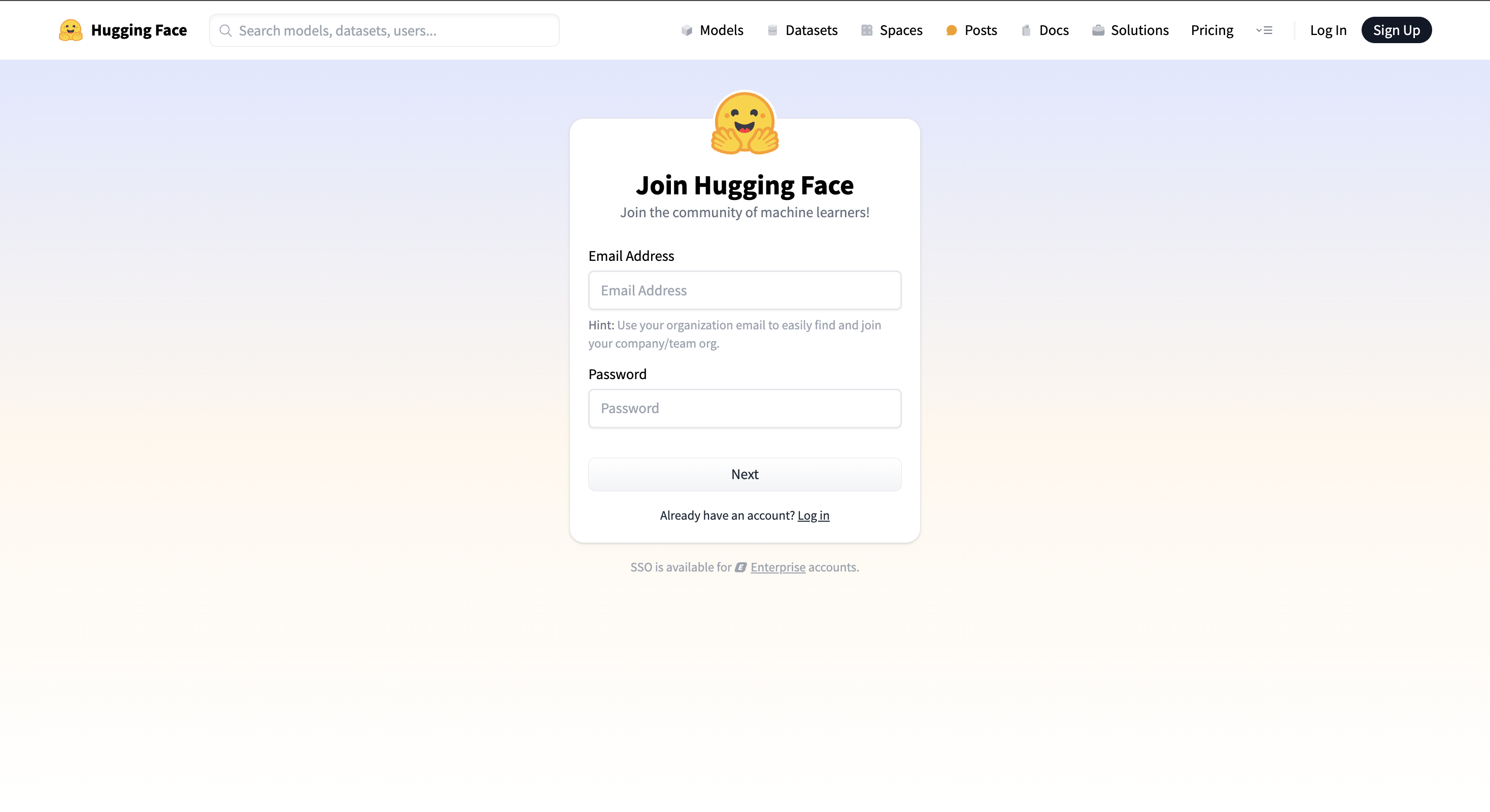
  1. Create a Hugging Face account
  • Go to hf.co, click “Sign Up” and create an account if you don’t already have one


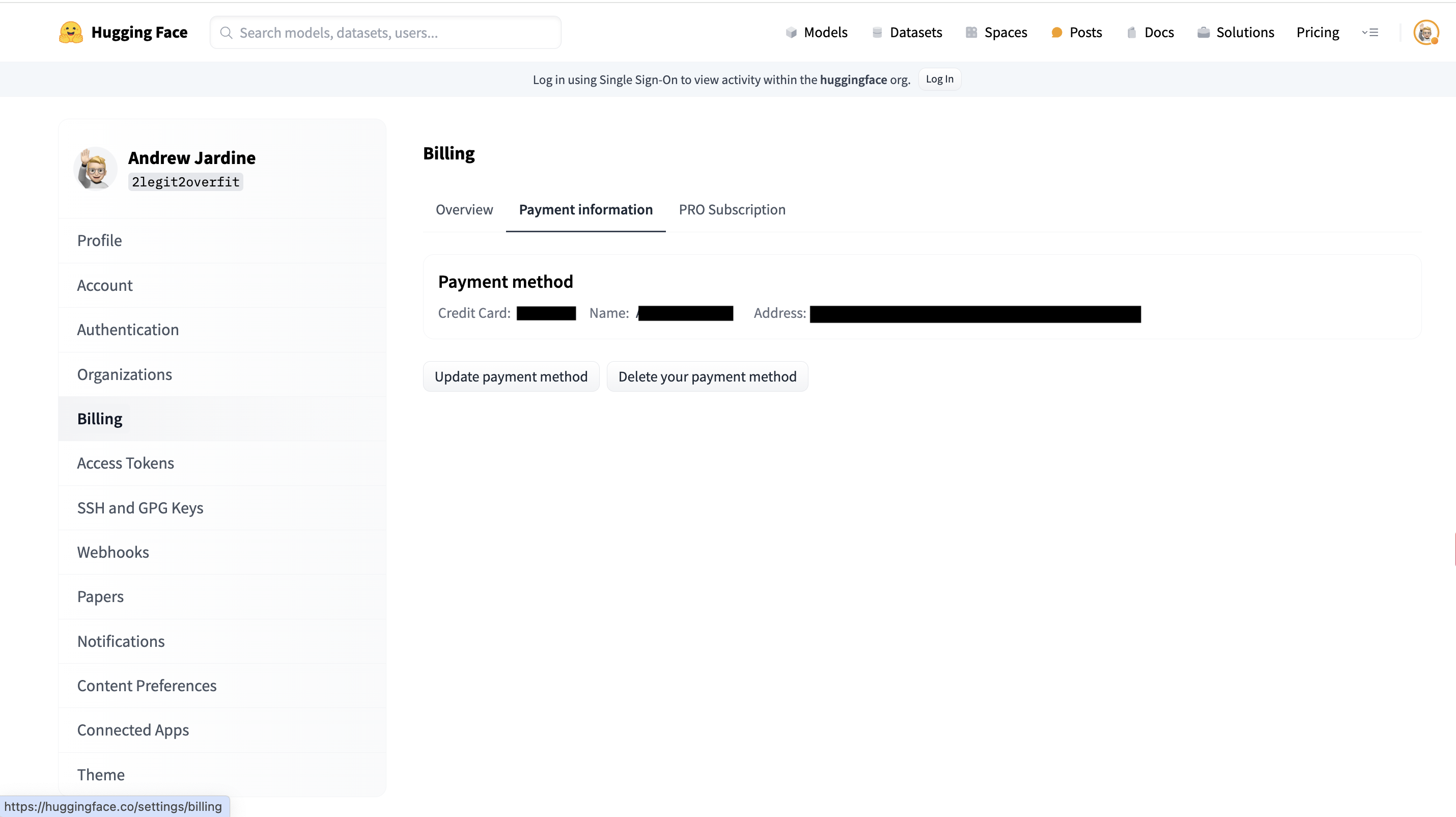
  1. Add your billing information
  • Within your HF account go to Settings > Billing, add your credit card to the payment information section


Why do we need your credit card?

In order to run most LLMs you'll need a GPU, which unfortunately aren’t free, you can however rent these from Hugging Face. Don’t worry, it shouldn’t cost you much. The GPU required for this tutorial, an NVIDIA A10G, only costs a couple of dollars per hour.
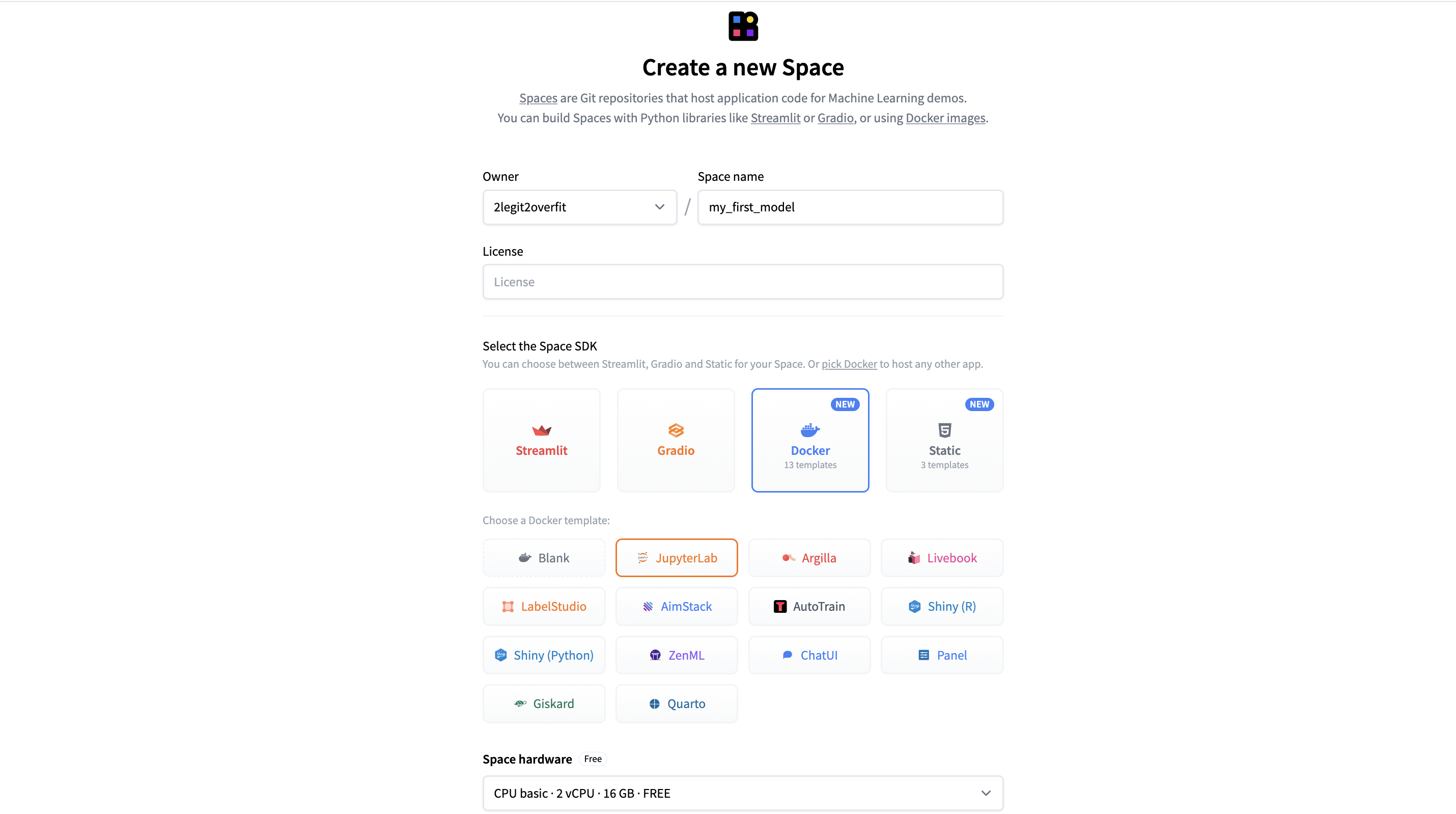
  1. Create a Space to host your notebook
  • On hf.co go to Spaces > Create New


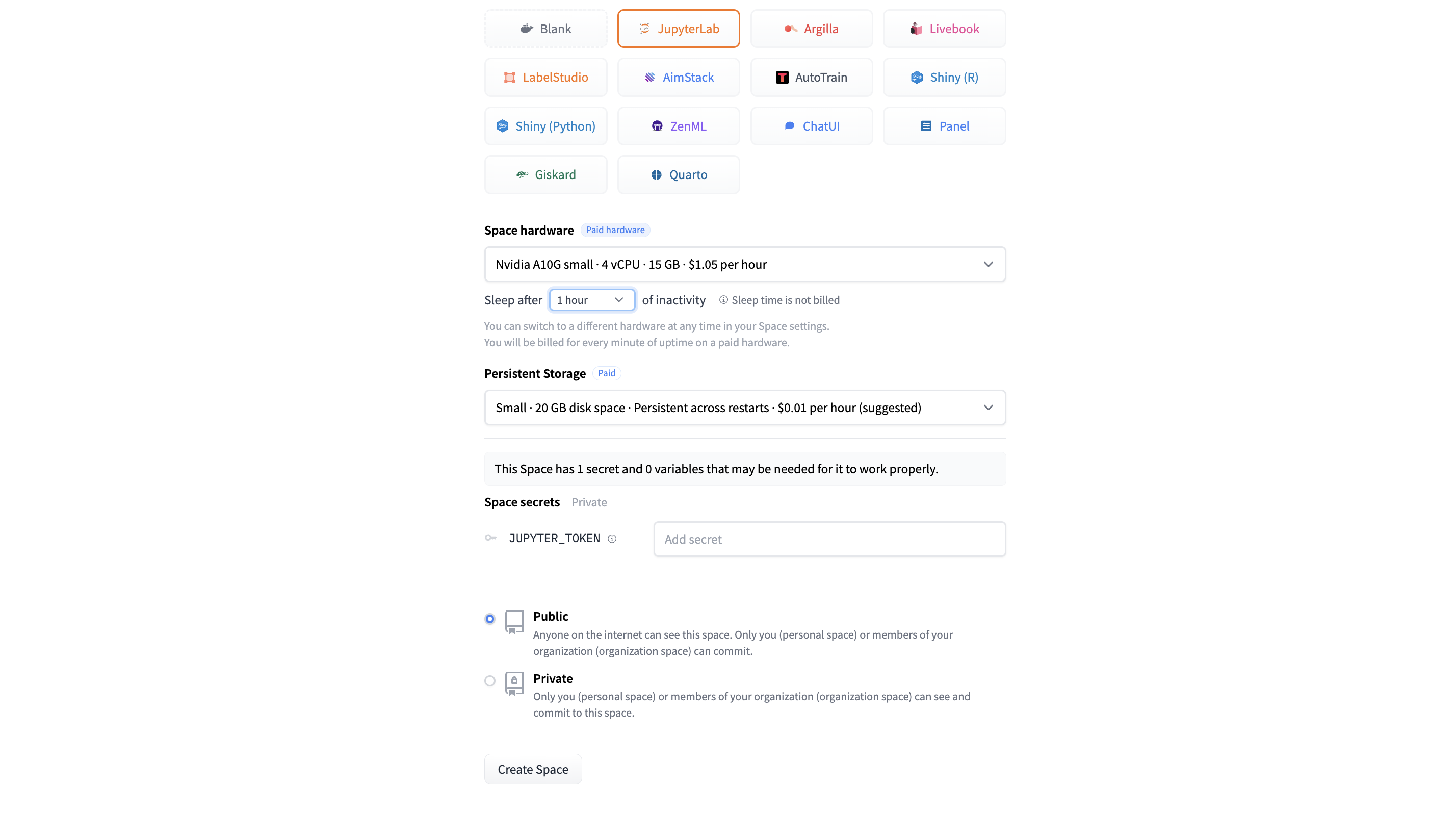
  1. Configure your Space
  • Set your preferred space name
  • Select Docker > JupyterLab to select the pre-configured notebook app
  • Select Space Hardware as “Nvidia A10G Small”
  • Everything else can be left as default
  • Select “Create Space”

What is a docker template?

A Docker template is a predefined blueprint for a software environment that includes the necessary software and configurations, enabling developers to easily and rapidly deploy applications in a consistent and isolated way.

Why do I need to select a GPU Space Hardware?

By default, our Space comes with a complimentary CPU, which is fine for some applications. However, the many computations required by LLMs benefit significantly from being run in parallel to improve speed, which is something GPUs are great at.

It's also important to choose a GPU with enough memory to store the model and providing spare working memory. In our case, an A10G Small with 24GB is enough for Phi-2.
  1. Login to JupyterLab
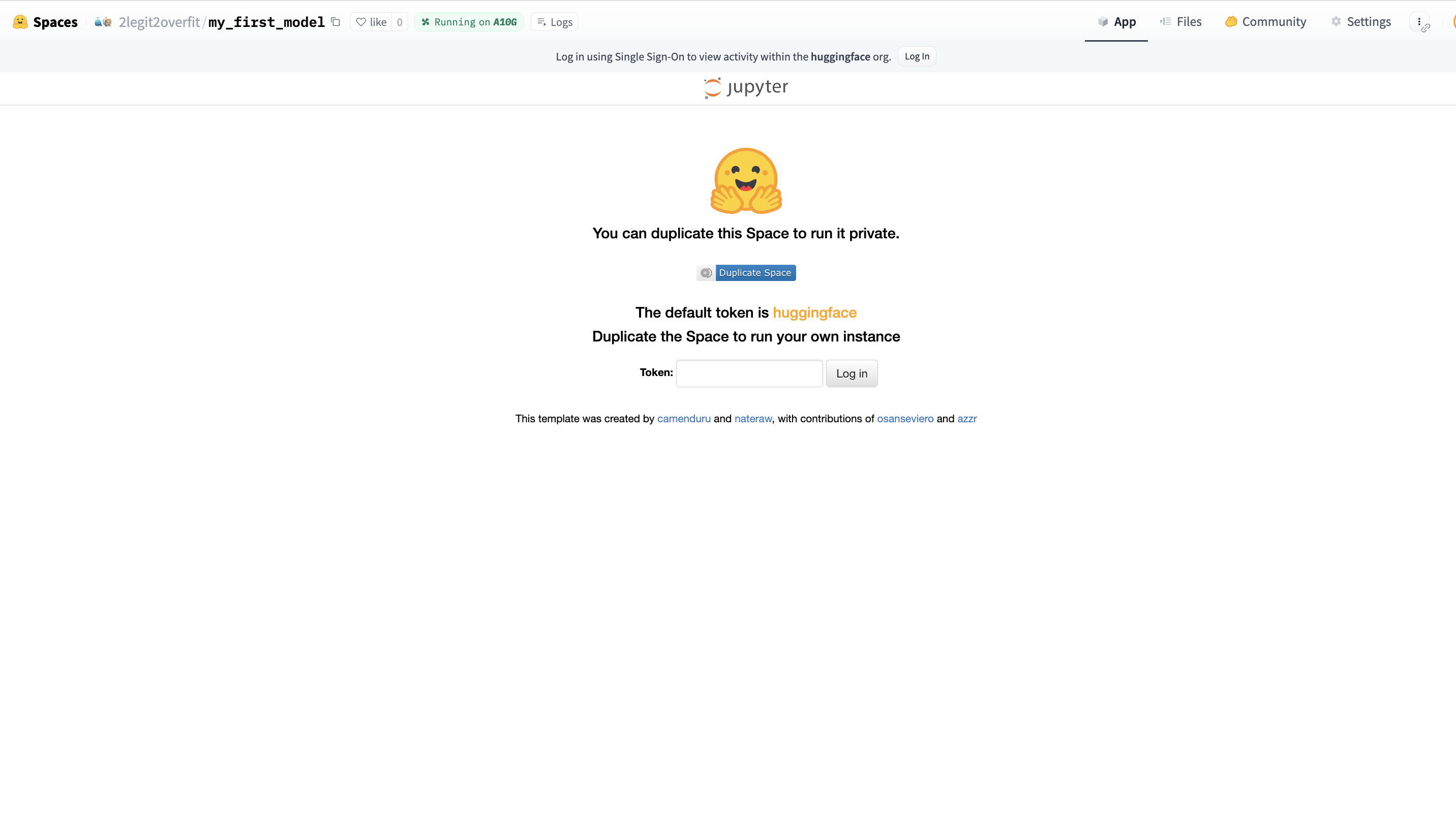
  • After the Space has finished building, you will see a log in screen. If you left the token as default in the template, you can log in with “huggingface”. Otherwise, just use the token you set


  1. Create a new notebook
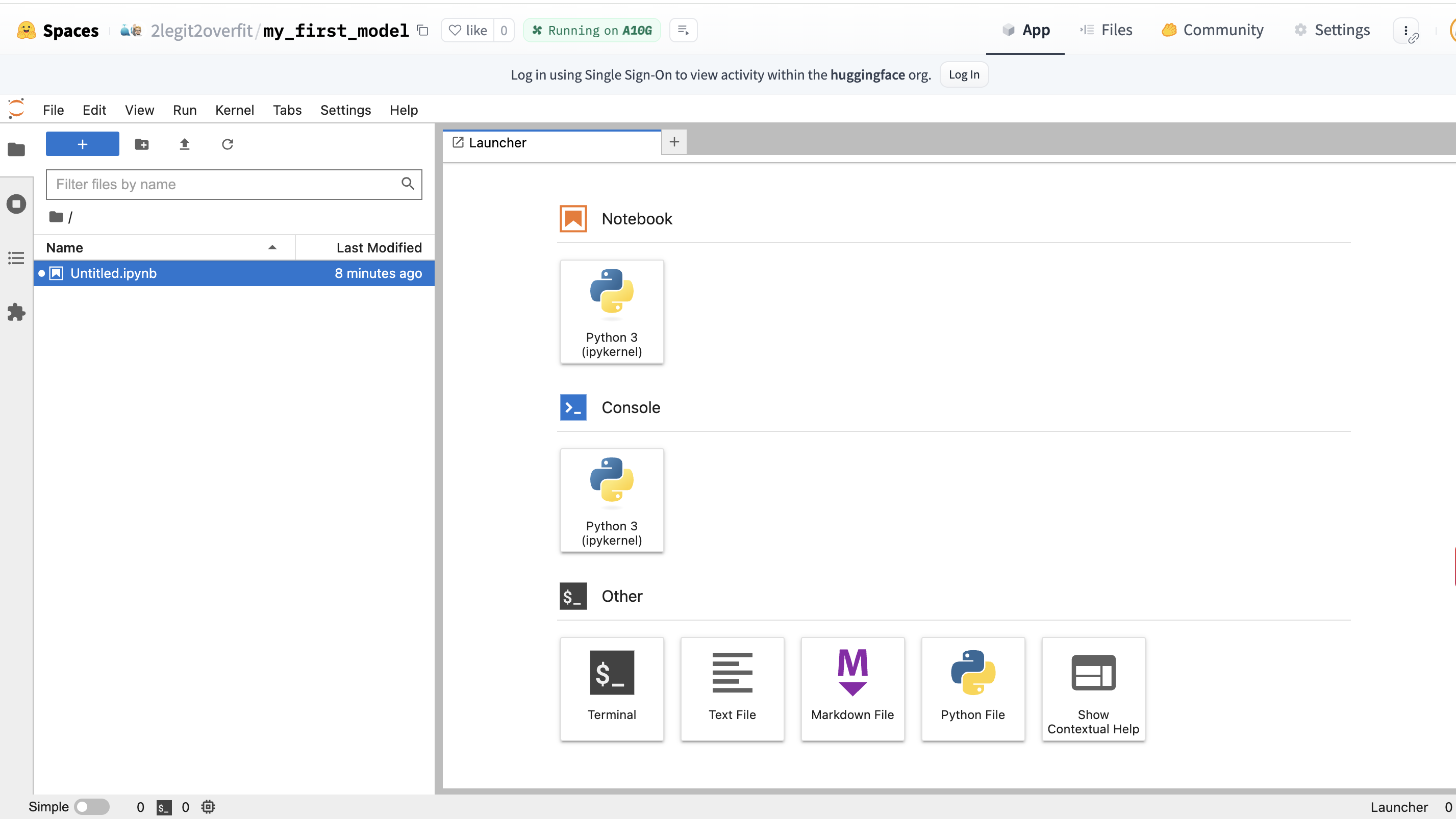
  • Within the “Launcher” tab, select the top “Python 3” square under the “Notebook” heading, this will create a new notebook environment that has Python already installed


  1. Install required packages
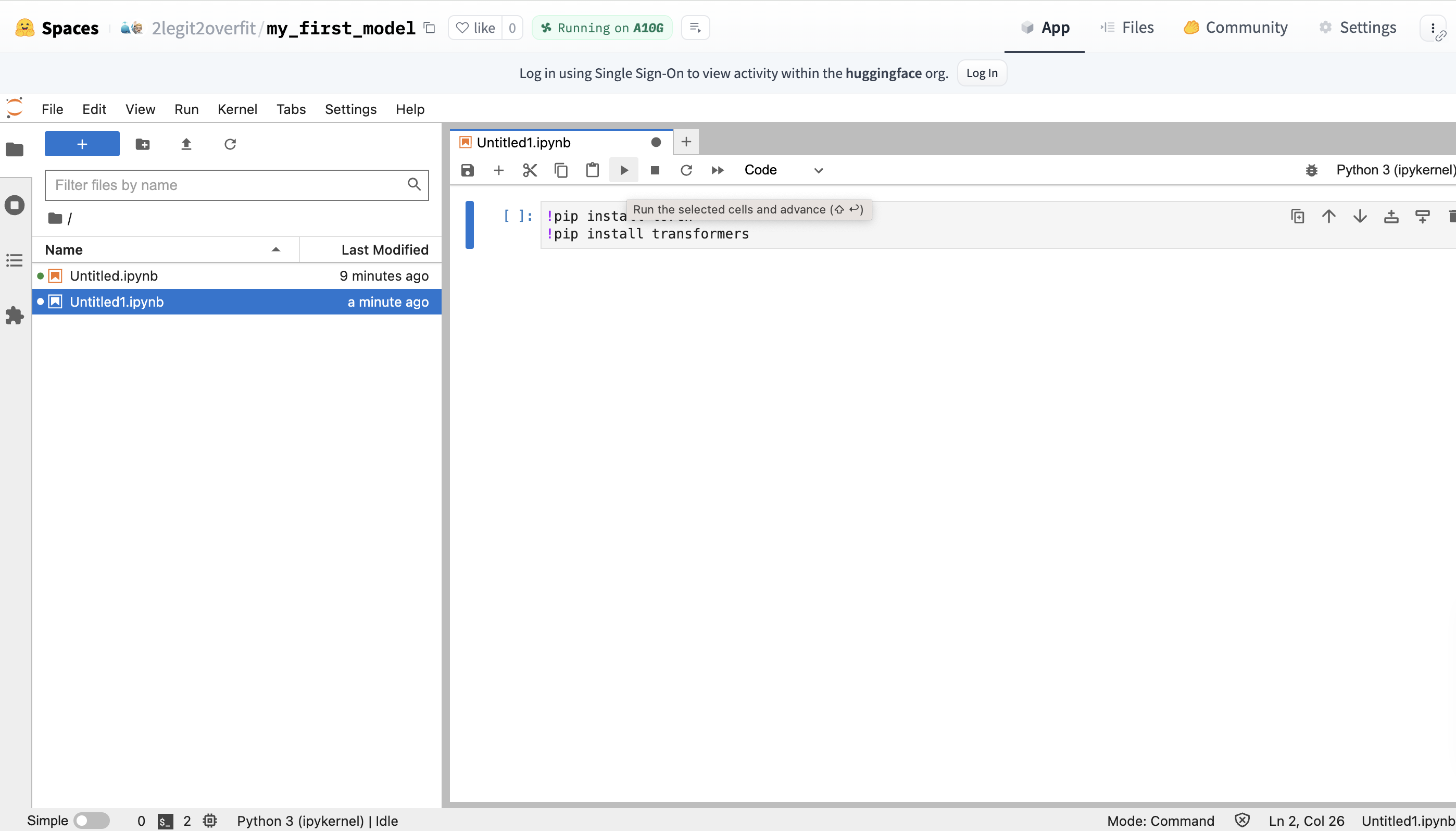
  • In your new notebook you’ll need to install the PyTorch and Transformers libraries, as they do not come pre-installed in the environment .
  • This can be done by entering the !pip command + library name in your notebook. Click the play button to execute the code and watch as the libraries are installed (Alternatively: Hit CMD + Return / CTRL + Enter)
!pip install torch
!pip install transformers

What is !pip install?

!pip is a command that installs Python packages from the Python Package Index (PyPI) a web repository of libraries available for use in a Python environment. It allows us to extend the functionality of Python applications by incorporating a wide range of third-party add-ons.

If we are using Transformers, why do we need Pytorch too?

Hugging Face is a library that is built on top of other frameworks like Pytorch, Tensorflow and JAX. In this case we are using Transformers with Pytorch and so need to install it to access it’s functionality.

  1. Import the AutoTokenizer and AutoModelForCausalLM classes from Transformers
  • Enter the following code on a new line and run it
from transformers import AutoTokenizer, AutoModelForCausalLM

What is a Class?

Think of Classes as code recipes for creating these things called Objects. They are useful because they allow us to save Objects with a combination of properties and functions. This in turn simplifies coding as all of the information and operations needed for particular topics are accessible from the same place. We’ll be using these Classes to create two Objects: a model and a tokenizer Object.

Why do I need to import the Class again after installing Transformers?

Although Transformers is already installed, the specific Classes within Transformers are not automatically available for use in your environment. Python requires us to explicitly import individual Classes as it helps avoid naming conflicts and ensures that only the necessary parts of a library are loaded into your current working context.

  1. Define which model you want to run
  • To detail the model you want to download and run from the Hugging Face Hub, you need to specify the name of the model repo in your code
  • We do this by setting a variable equal to the model name, in this case we decide to call the variable model_id
  • We’ll use Microsoft's Phi-2, a small but surprisingly capable model which can be found at https://huggingface.co/microsoft/phi-2. Note: Phi-2 is a base not an instruction tuned model and so will respond unusually if you try to use it for chat
model_id = "microsoft/phi-2"

What is an instruction tuned model?

An instruction-tuned language model is a type of model that has been further trained from its base version to understand and respond to commands or prompts given by a user, improving its ability to follow instructions. Base models are able to autocomplete text, but often don’t respond to commands in a useful way. We'll see this later when we try to prompt Phi.

  1. Create a model object and load the model
  • To load the model from the Hugging Face Hub into our local environment we need to instantiate the model object. We do this by passing the “model_id” which we defined in the last step into the argument of the “.from_pretrained” method on the AutoModelForCausalLM Class.
  • Run your code and grab a drink, the model may take a few minutes to download
model = AutoModelForCausalLM.from_pretrained(model_id)

What is an argument?

An argument is input information that is passed to a function in order for it to compute an output. We pass an argument into a function by placing it between the function brackets. In this case the model ID is the sole argument, although functions can have multiple arguments, or none.

What is a Method?

A Method is another name for a function that specifically uses information from a particular Object or Class. In this case the .from_pretrained method uses information from the Class and the model_id to create a new model object.

  1. Create a tokenizer object and load the tokenizer
  • To load the tokenizer you now need to create a tokenizer object. To do this again pass the model_id as an argument into the .from_pretrained method on the AutoTokenizer Class.
  • Note there are some additional arguments, for the purposes of this example they aren’t important to understand so we won’t explain them.
tokenizer = AutoTokenizer.from_pretrained(model_id, add_eos_token=True, padding_side='left')

What is a tokenizer?

A tokenizer is a tool that splits sentences into smaller pieces of text (tokens) and assigns each token a numeric value called an input id. This is needed because our model only understands numbers, so we first must convert (a.k.a encode) the text into a format the model can understand. Each model has it’s own tokenizer vocabulary, it’s important to use the same tokenizer that the model was trained on or it will misinterpret the text.

  1. Create the inputs for the model to process
  • Define a new variable input_text that will take the prompt you want to give the model. In this case I asked "Who are you?" but you can choose whatever you prefer.
  • Pass the new variable as an argument to the tokenizer object to create the input_ids
  • Pass a second argument to the tokenizer object, return_tensors="pt", this ensures the token_id is represented as the correct kind of vector for the model version we are using (i.e. in Pytorch not Tensorflow)
input_text = "Who are you?"
input_ids = tokenizer(input_text, return_tensors="pt")
  1. Run generation and decode the output
  • Now the input in the right format we need to pass it into the model, we do this by calling the .generate method on the model object passing the input_ids as an argument and assigning it to a new variable outputs. We also set a second argument max_new_tokens equal to 100, this limts the number of tokens the model will generate.
  • The outputs are not human readable yet, to return them to text we must decode the output. We can do this with the .decode method and saving that to the variable decoded_outputs
  • Finally, passing the decoded_output variable into the print function allows us to see the model output in our notebook.
  • Optional: Pass the outputs variable into the print function to see how they compare to the decoded outputs
outputs = model.generate(input_ids["input_ids"], max_new_tokens=100)
decoded_outputs = tokenizer.decode(outputs[0])
print(decoded_outputs)

Why do I need to decode?

Models only understand numbers, so when we provided our input_ids as vectors it returned an output in the same format. To return those outputs to text we need to reverse the initial encoding we did using the tokenizer.

Why does the output read like a story?

Remember that Phi-2 is a base model that hasn't been instruction tuned for conversational uses, as such it's effectively a massive auto-complete model. Based on your input it is predicting what it thinks is most likely to come next based on all the web pages, books and other content it has seen previously.

Congratulations, you've run inference on your very first LLM!

I hope that working through this example helped you to better understand the world of open-source ML. If you want to continue your ML learning journey, I recommend the recent Hugging Face course we released in partnership with DeepLearning AI.