InertiaRSS Track and read blogs, news, and tech you care about
Read Original Open in InertiaRSS

Recommended Feeds

D
Docker
MongoDB | Blog
MongoDB | Blog
freeCodeCamp Programming Tutorials: Python, JavaScript, Git & More
Vercel News
Vercel News
钛媒体:引领未来商业与生活新知
钛媒体:引领未来商业与生活新知
Engineering at Meta
Engineering at Meta
Microsoft Azure Blog
S
SegmentFault 最新的问题
大猫的无限游戏
大猫的无限游戏
The GitHub Blog
The GitHub Blog
A
About on SuperTechFans
L
LangChain Blog
Hugging Face - Blog
Hugging Face - Blog
T
The Blog of Author Tim Ferriss
阮一峰的网络日志
阮一峰的网络日志
博客园 - 三生石上(FineUI控件)
OSCHINA 社区最新新闻
OSCHINA 社区最新新闻
Google DeepMind News
小众软件
小众软件
The Cloudflare Blog

Hugging Face - Blog

Waypoint-1.5: Higher-Fidelity Interactive Worlds for Everyday GPUs ALTK‑Evolve: On‑the‑Job Learning for AI Agents Safetensors is Joining the PyTorch Foundation Holo3: Breaking the Computer Use Frontier Any Custom Frontend with Gradio's Backend A New Framework for Evaluating Voice Agents (EVA) Bringing Robotics AI to Embedded Platforms: Dataset Recording, VLA Fine‑Tuning, and On‑Device Optimizations One-Shot Any Web App with Gradio's gr.HTML CUGA on Hugging Face: Democratizing Configurable AI Agents New in llama.cpp: Model Management Building Deep Research: How we Achieved State of the Art OVHcloud on Hugging Face Inference Providers 🔥 20x Faster TRL Fine-tuning with RapidFire AI Building for an Open Future - our new partnership with Google Cloud Aligning to What? Rethinking Agent Generalization in MiniMax M2 Building a Healthcare Robot from Simulation to Deployment with NVIDIA Isaac Sentence Transformers is joining Hugging Face! Unlock the power of images with AI Sheets Supercharge your OCR Pipelines with Open Models Google Cloud C4 Brings a 70% TCO improvement on GPT OSS with Intel and Hugging Face Get your VLM running in 3 simple steps on Intel CPUs Nemotron-Personas-India: Synthesized Data for Sovereign AI Introducing RTEB: A New Standard for Retrieval Evaluation Accelerating Qwen3-8B Agent on Intel® Core™ Ultra with Depth-Pruned Draft Models VibeGame: Exploring Vibe Coding Games Nemotron-Personas-Japan: ソブリン AI のための合成データセット Swift Transformers Reaches 1.0 – and Looks to the Future Smol2Operator: Post-Training GUI Agents for Computer Use SyGra: The One-Stop Framework for Building Data for LLMs and SLMs Gaia2 and ARE: Empowering the community to study agents Scaleway on Hugging Face Inference Providers 🔥 Democratizing AI Safety with RiskRubric.ai Public AI on Hugging Face Inference Providers 🔥 `LeRobotDataset:v3.0`: Bringing large-scale datasets to `lerobot` Visible Watermarking with Gradio Introducing the Palmyra-mini family: Powerful, lightweight, and ready to reason! Tricks from OpenAI gpt-oss YOU 🫵 can use with transformers Fine-tune Any LLM from the Hugging Face Hub with Together AI Jupyter Agents: training LLMs to reason with notebooks mmBERT: ModernBERT goes Multilingual Welcome EmbeddingGemma, Google's new efficient embedding model SAIR: Accelerating Pharma R&D with AI-Powered Structural Intelligence Make your ZeroGPU Spaces go brrr with ahead-of-time compilation NVIDIA Releases 6 Million Multi-Lingual Reasoning Dataset Generate Images with Claude and Hugging Face From Zero to GPU: A Guide to Building and Scaling Production-Ready CUDA Kernels MCP for Research: How to Connect AI to Research Tools Kimina-Prover-RL Arm & ExecuTorch 0.7: Bringing Generative AI to the masses Neural Super Sampling is here!
How to Install and Use the Hugging Face Unity API
Dylan Ebert · 2023-05-01 · via Hugging Face - Blog

Back to Articles

Dylan Ebert's avatar

This article is also available in Chinese 简体中文.

The Hugging Face Unity API is an easy-to-use integration of the Hugging Face Inference API, allowing developers to access and use Hugging Face AI models in their Unity projects. In this blog post, we'll walk through the steps to install and use the Hugging Face Unity API.

Installation

  1. Open your Unity project
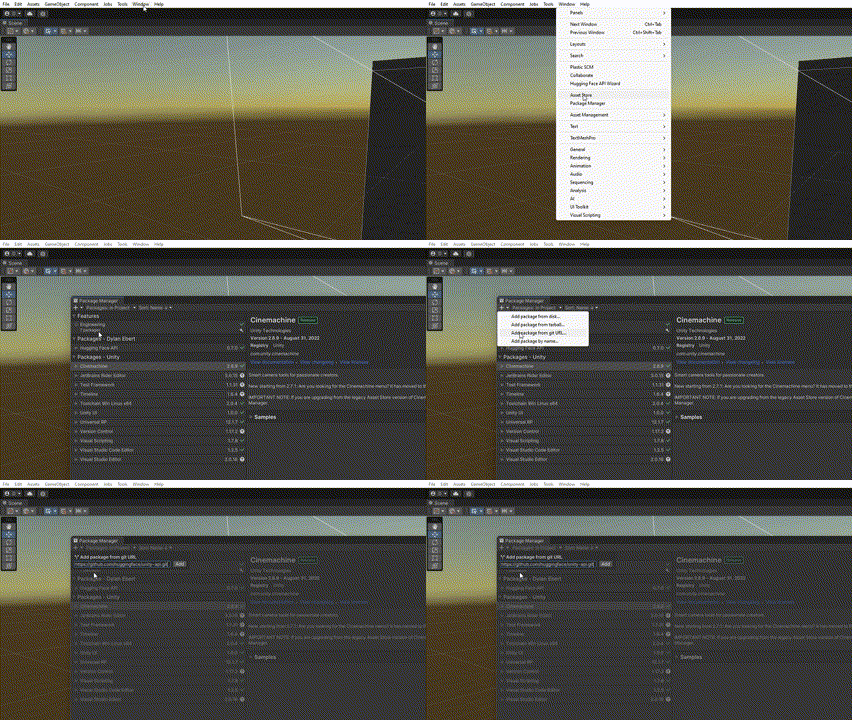
  2. Go to Window -> Package Manager
  3. Click + and select Add Package from git URL
  4. Enter https://github.com/huggingface/unity-api.git
  5. Once installed, the Unity API wizard should pop up. If not, go to Window -> Hugging Face API Wizard
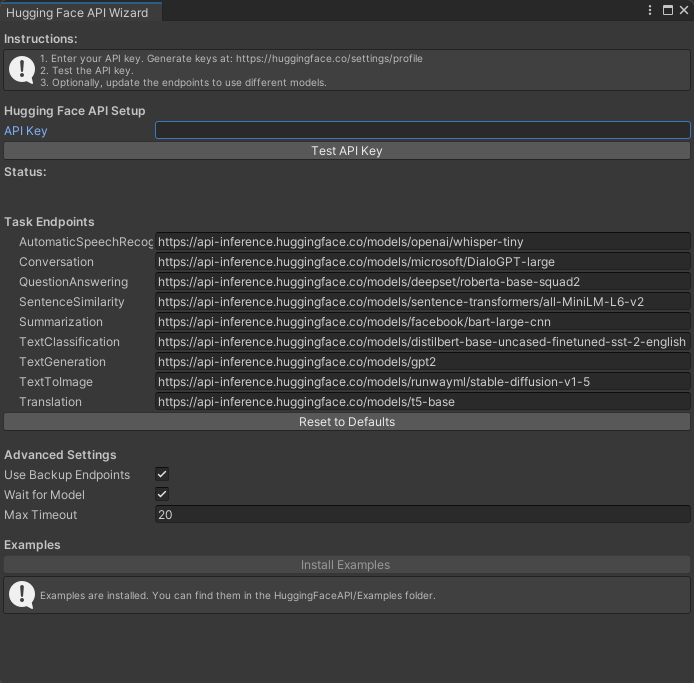
  1. Enter your API key. Your API key can be created in your Hugging Face account settings.
  2. Test the API key by clicking Test API key in the API Wizard.
  3. Optionally, change the model endpoints to change which model to use. The model endpoint for any model that supports the inference API can be found by going to the model on the Hugging Face website, clicking Deploy -> Inference API, and copying the url from the API_URL field.
  4. Configure advanced settings if desired. For up-to-date information, visit the project repository at https://github.com/huggingface/unity-api
  5. To see examples of how to use the API, click Install Examples. You can now close the API Wizard.
Now that the API is set up, you can make calls from your scripts to the API. Let's look at an example of performing a Sentence Similarity task:

using HuggingFace.API;

/* other code */

// Make a call to the API
void Query() {
    string inputText = "I'm on my way to the forest.";
    string[] candidates = {
        "The player is going to the city",
        "The player is going to the wilderness",
        "The player is wandering aimlessly"
    };
    HuggingFaceAPI.SentenceSimilarity(inputText, OnSuccess, OnError, candidates);
}

// If successful, handle the result
void OnSuccess(float[] result) {
    foreach(float value in result) {
        Debug.Log(value);
    }
}

// Otherwise, handle the error
void OnError(string error) {
    Debug.LogError(error);
}

/* other code */

Supported Tasks and Custom Models

The Hugging Face Unity API also currently supports the following tasks:

Use the corresponding methods provided by the HuggingFaceAPI class to perform these tasks.

To use your own custom model hosted on Hugging Face, change the model endpoint in the API Wizard.

Usage Tips

  1. Keep in mind that the API makes calls asynchronously, and returns a response or error via callbacks.
  2. Address slow response times or performance issues by changing model endpoints to lower resource models.

Conclusion

The Hugging Face Unity API offers a simple way to integrate AI models into your Unity projects. We hope you found this tutorial helpful. If you have any questions or would like to get more involved in using Hugging Face for Games, join the Hugging Face Discord!