


Compute resources are expensive. One of the most common missed opportunities in enterprise infrastructure is not fully leveraging the hardware that is already in the rack. Getting the most out of your investment requires careful mapping of what your hardware is actually capable of and what your software platform can take advantage of, and that alignment doesn’t always happen automatically.
VMware Cloud Foundation 9.1 makes one of those alignments easier than you might think. If you’re running modern Intel Xeon processors, you likely already have Intel® QAT (QuickAssist Technology) built right into the chip. VCF 9.1 now knows how to take advantage of this technology in our favor. Specifically, it offloads encrypted vMotion operations to QAT, freeing up CPU cores that previously had no choice but to handle that work themselves.
vMotion encryption has been around since vSphere 6.5, and the default behavior for VMs is what we call “opportunistic.” Think of it this way: whenever your VMs move between ESX hosts running 6.5 or later, vSphere automatically tries to encrypt that migration traffic. No extra configuration needed. Hopefully you are no longer running vSphere 6.5 in your environment, as you are missing out a lot of great features.
Based on telemetry, over 99% of vMotion operations today are encrypted. So practically speaking, every time you vMotion a VM, you’re doing cryptographic work. And up until now, that work was landing squarely on the CPU.
It is worth noting that encryption and decryption do consume additional host CPU cycles. Depending on your environment, this can affect application performance during the migration, extend migration windows for VMs with large memory footprints, and give administrators pause when considering whether to mandate encryption across the entire data center.
Intel® QAT is a hardware accelerator that’s built directly into modern Intel processors. And here’s the key thing: it’s purpose-built for exactly the kind of cryptographic heavy lifting that encrypted vMotion requires.
With VCF 9.1, we’re now able to offload vMotion encryption to QAT. So instead of the CPU doing all that work, here’s what the flow looks like now:
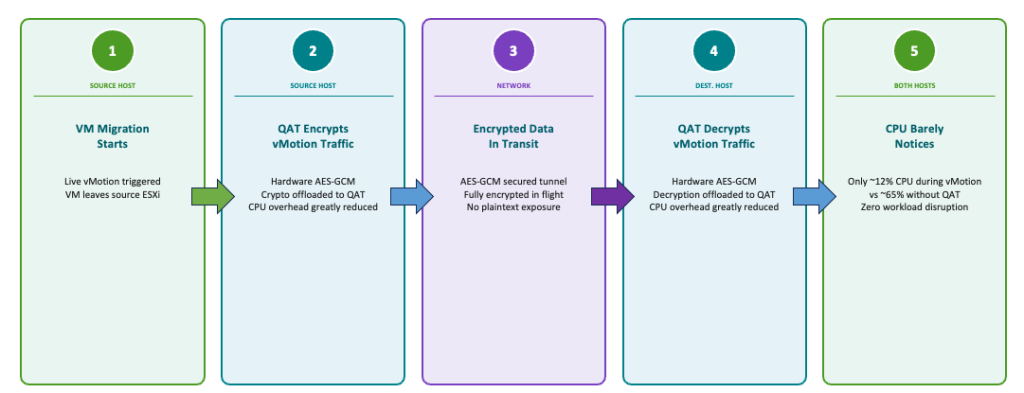
That’s a meaningful shift. You’re moving the heavy lifting to dedicated silicon that exists specifically for this purpose, and returning those CPU cores back to your actual workloads.
Reclaim CPU cores. This one is straightforward. Less CPU overhead for infrastructure operations means more headroom for applications. Think some VDI workloads running on the same cluster, or a latency-sensitive database that doesn’t love noisy neighbors. Every core helps.
Better consolidation and resource management. Less per-host overhead means you can push consolidation ratios a bit further, or simply right-size your cluster without leaving so much headroom for infrastructure tasks. Easy enough to justify when the hardware is already there.
CPUs are one of the most expensive resources in a private cloud, especially in the era of resource-heavy modern apps and production AI. Encrypted vMotion with Intel® QAT helps improve data center economics and operational speed, while maintaining zero-trust data security during live migrations.
This is where it’s important to look at what’s in your servers. QAT offload works with Intel processors that have integrated QAT support, and the good news is most modern Intel Xeon deployments qualify:
If you’re running any of these generations of the Intel Xeon family today, you already have the hardware, and VCF 9.1 can fully take advantage of the additional resources.
This feature is a great example of where VCF is heading. Our vision is to build a platform that’s ready for next-generation hardware and the resource demands that come with it, and let’s be honest, the rise of Gen AI workloads is making everyone rethink how efficiently they’re using their infrastructure.
Leveraging built-in accelerators like Intel QAT at the infrastructure layer means you don’t have to engineer around it. The platform does the work transparently, and your teams stay focused on what matters. And the best part is that this feature is enabled by default in VCF 9.1 on supported hardware, so it is ready to start saving CPU resources on day 1.
If you’re on VCF 9.1 with compatible Intel hardware, this feature is a great way to maximize your hardware investment. Free up host CPU cores for your enterprise and AI workloads; they’ll thank you for it. If you are not on VCF 9.1 yet, this should give yet another reason to upgrade sooner rather than later.
VCF 9.1 represents a significant step forward in making the private cloud platform more secure, resilient, and flexible. Check out “What’s New in Platform Security in VCF 9.1” on YouTube for a comprehensive dive into the latest security capabilities, and stay tuned for more blogs on specific capabilities.
Talk to your account team about VCF 9.1 today.
Subscribe to get the latest posts sent to your email.
此内容由惯性聚合(RSS阅读器)自动聚合整理,仅供阅读参考。 原文来自 — 版权归原作者所有。