


惯性聚合 高效追踪和阅读你感兴趣的博客、新闻、科技资讯
阅读原文 在惯性聚合中打开

推荐订阅源

L
LINUX DO - 最新话题
C
Cyber Attacks, Cyber Crime and Cyber Security
G
GRAHAM CLULEY
T
Tenable Blog
T
Threatpost
C
CXSECURITY Database RSS Feed - CXSecurity.com
I
Intezer
cs.CL updates on arXiv.org
D
Darknet – Hacking Tools, Hacker News & Cyber Security
K
Kaspersky official blog
Security Latest
Security Latest
P
Privacy & Cybersecurity Law Blog
Google Online Security Blog
SecWiki News
SecWiki News
P
Palo Alto Networks Blog
TaoSecurity Blog
TaoSecurity Blog
Webroot Blog
Webroot Blog
Spread Privacy
Spread Privacy
O
OpenAI News
The Last Watchdog
The Last Watchdog
P
Proofpoint News Feed
C
Check Point Blog
cs.CV updates on arXiv.org
人人都是产品经理
人人都是产品经理
S
Security @ Cisco Blogs
Scott Helme
Scott Helme
OSCHINA 社区最新新闻
OSCHINA 社区最新新闻
cs.AI updates on arXiv.org
月光博客
月光博客
S
Securelist
酷 壳 – CoolShell
酷 壳 – CoolShell
V
V2EX
T
Troy Hunt's Blog
W
WeLiveSecurity
GbyAI
GbyAI
N
News | PayPal Newsroom
Y
Y Combinator Blog
C
Cisco Blogs
H
Help Net Security
The GitHub Blog
The GitHub Blog
Threat Intelligence Blog | Flashpoint
博客园 - 【当耐特】
Jina AI
Jina AI
MongoDB | Blog
MongoDB | Blog
P
Proofpoint News Feed
让小产品的独立变现更简单 - ezindie.com
CTFtime.org: upcoming CTF events
云风的 BLOG
云风的 BLOG
小众软件
小众软件
N
News and Events Feed by Topic

Samsung Global Newsroom

[Video] Where Robotics Meets Precision: Samsung Displays Shape KUKA’s Immersive Showroom [Interview] Where Sound Meets Design — Redefining the Audio Experience With Music Studio Samsung and MUNCH Museum Bring Rarely Seen Masterpieces to Samsung Art Store Samsung Electronics Vietnam Becomes First Company in Vietnam To Purchase Renewable Electricity Through DPPA – Samsung Global Newsroom Samsung Highlights Vision for AI-Powered Connected Care at VivaTech 2026 [Infographic] Exploring the 2026 Samsung Odyssey G8 & G7 Models at a Glance: From the Industry-First 6K to OLED Samsung Electronics and LG Uplus Collaborate on ISAC Technology for 6G Samsung Electronics Begins Shipment of Industry-First HBM4E Samples Samsung and Massachusetts General Hospital Launch Joint Study To Investigate GLP-1 Treatment Monitoring With Galaxy Watch [Interview] The Future of Screen Experiences, Part ①: Inside Samsung’s Micro RGB TV, Setting a New Standard for Next-Generation Displays Samsung TV Plus Brings Monthly SM K-Pop Concert Series to Fans at Home [Infographic] Samsung AI Appliances Deliver Inclusive Experiences Through Enhanced Accessibility Features Traveling With Peace of Mind: Why Samsung Care+ Is Your Essential Summer Holiday Companion Samsung and Google Give First Look at New Intelligent Eyewear Samsung Launches Next-Gen Odyssey Gaming and ViewFinity Monitors, Including Industry’s First 6K Gaming Monitor Samsung Art Store Welcomes the Wonderful World of the Moomins in New Global Collaboration Samsung Presents AI-Powered Screen Innovations at Australian Tech Summit 2026 Samsung Launches Samsung AI Week 2026 for AI-Powered Living Samsung Adopts New EU Code of Conduct for Energy Smart Appliances Samsung To Launch 2026 Bespoke AI Laundry Combo, Advancing All-in-One Comfort Lifestyle Samsung Solve for Tomorrow Wins Merit Award at 2026 Global Views ESG Corporate Sustainability Awards – Samsung Global Newsroom Samsung Launches One UI 9 Beta for Galaxy S26 Series Users Samsung Expands AI Capabilities of Bespoke AI Refrigerator Family Hub With Major Updates [Interview] When a Washer Becomes Furniture: Meet the Designers Behind the Red Dot Design Award 2026 [Video] How Samsung’s Spatial Signage Transforms the Attraction Queue Into an Immersive Safari Experience at Everland [Interview] From TV to a Work of Art: Samsung’s Design Innovation at the Red Dot Design Award 2026 [Interview] Make Every Moment Cinematic: How Cinematic LUT Transforms Video on the Galaxy S26 Series Samsung Announces World-First Breakthrough in Fainting Prediction With Galaxy Watch Samsung and Qualcomm Achieve Industry-First Power Class 1 Validation for 5G Fixed Wireless Access on Virtualized RAN Samsung’s One UI 8.5 Official Rollout Starts May 6 Samsung Electronics Announces New Leadership at the Visual Display Business Samsung Electronics Announces First Quarter 2026 Results Stedelijk Museum Amsterdam Brings Modern European Art to Samsung Art Store Samsung Wins Two ‘Best of the Best’ Honors at the Red Dot Design Award Samsung Galaxy’s Ocean Mode and Coral Reef Initiative Receive International Recognition and Awards [Video] Inside a Seamless Luxury Stay at The Apurva Kempinski Bali With Samsung Hospitality TVs [Photo] Inside Samsung’s ‘Design Is an Act of Love’ Exhibition at Milan Design Week 2026 Samsung and POSTECH Publish 2D/3D Switchable Display Research in Nature Meet the Generation17 Young Leaders: The Story of Brigitta Gunawan Samsung Art Store Launches Tamara de Lempicka Collection Amid Art Deco Revival Samsung Expands Kitchen Portfolio With Intelligent Performance and Refined Design Samsung SmartThings Expands Seamless Integration With IKEA Matter Devices Samsung Unveils ‘Design Is an Act of Love’ Exhibition at Milan Design Week 2026 Samsung Launches ‘Raise the Bar’ Campaign With Joe Cole To Upgrade UK Pubs’ TV Experience – Samsung Global Newsroom Samsung Receives Four Accolades at Prestigious Edison Awards 2026 Faster, Real-Time: Enhanced ‘Audio Eraser’ With the Galaxy S26 Series Samsung Elevates Experiences To Care for Users and Their Families With SmartThings Update Samsung Electronics Showcases 2026 AI-Powered TV Innovations Ahead of Market Launch at European Tech Seminar [Editorial] How APV Is Elevating Mobile Video to Professional Standards Samsung Art Store Introduces Maria Prymachenko Collection to Global Audiences – Samsung Global Newsroom Samsung and DOMINNICO Expand Collaboration With Fashion-Tech Capsule Collection – Samsung Global Newsroom Samsung Introduces 14-Meter Onyx Cinema LED Display at CinemaCon 2026 [User Guide] Galaxy A57 5G and Galaxy A37 5G: Bringing Latest Innovation Within Reach Samsung Recognized by Circana for Fastest Growth in Mexico’s Fitness Tracker Market – Samsung Global Newsroom Polish Runners Tackle Death Valley With Galaxy Watch Ultra – Samsung Global Newsroom [Video] Discover Your Ideal Bespoke AI Laundry Appliance Setup [Interview] Scenes of Memory and Modern Life: Sun Yitian x Samsung Art Store [Interview] How Jacob Kiplimo’s Galaxy Watch Turns Data Into World-Record Performance Samsung Continues Expanding One UI 8.5 Beta Program to More Galaxy Devices [Interview] Framing Space Through the Human Experience: Michael Najjar x Samsung Art Store [Interview] Beyond the Shot: How the APV Codec Powers the Full Mobile Video Experience on Galaxy S26 Ultra [Interview] ‘Bixby Will Be Your Go-To Starting Point for Every Samsung Device’ — Meet Jisun Pa ... [Video] Samsung Transforms Berlin Planetarium With Immersive LED Installation Samsung Receives New TÜV Rheinland Certifications for 2026 Micro RGB, OLED, Mini LED, Soundbars and More Samsung Galaxy XR Evolves Work in the AI Era With New Enterprise Capabilities and Everyday Features Samsung Electronics Announces Earnings Guidance for First Quarter 2026 Samsung Launches Competition Searching for Oldest TVs in Use in the Nordics – Samsung Global Newsroom A New Era of Sports Broadcasting: Galaxy S26 Ultra Unlocks New Perspectives, Bringing Cameras Inside the A ... [Video] Samsung Spatial Signage: How To Make Your Brand Stand Out in Crowded Spaces Samsung Retains No. 1 Position in Global Gaming Monitor Market for Seventh Year [Video] Samsung Color E-Paper: A Smarter Alternative to Traditional Posters Samsung Study Highlights Rising Privacy Concerns in Public Smartphone Use – Samsung Global Newsroom [Photo] Inside Samsung OLED FC: Elite Gamers Compete Live on Advanced OLED Displays at Samsung KX Samsung Electronics Holds Its Top Position in European Microwave Market for 11th Consecutive Year [Interview] Inside Spatial Signage: How Samsung Brought Glasses-Free 3D Displays to Life Samsung Powers ‘BTS WORLD TOUR ‘ARIRANG’’ With Galaxy Art Basel Hong Kong 2026: Samsung Brings Art Into Everyday Life Turning Your Travel Moments Into Lasting Memories ②: San Francisco With Galaxy AI [Video] Samsung Brings Classical Melodies to Galaxy S26 Ringtones [Video] Samsung Hotel TV: Personalized In-Room Experiences Made Simple Samsung Takes Its Browser Beyond Mobile, Extending Agentic AI Across Devices Samsung Unveils Galaxy A57 5G and Galaxy A37 5G, Packing Pro-Level Features at Awesome Price Samsung Knox Now Protects Displays With Industry-Recognized CC Certification [Editorial] Samsung TV Plus and the New Era of TV Viewing Samsung Showcases Expanded HVAC Portfolio at MCE 2026 Samsung Art Store Adds Art Basel Hong Kong 2026 Collection Samsung Recognized Among Fast Company’s Most Innovative Companies of 2026 – Samsung Global Newsroom [World Water Day] Samsung’s Promise of Water for All [Video] Turning Your Travel Moments Into Lasting Memories ①: San Francisco With Galaxy S26 Ultra Galaxy S26 Ultra Powers Lollapalooza Brazil 2026 – Samsung Global Newsroom GDC 2026: How Samsung and Global Game Studios Are Redefining the Game Experience From Day One to Years Later: Samsung Care+ Offers Comprehensive Protection for Galaxy Users Samsung Retains No. 1 Position in Global Commercial Displays Market for 17th Consecutive Year Samsung Celebrates Two Decades of TV Innovation and Industry Leadership at BAFTA – Samsung Global Newsroom Samsung and AMD Expand Strategic Collaboration on Next-Generation AI Memory Solutions Samsung Addresses SME Cyber Risks With Galaxy S26 Ultra Enterprise Edition – Samsung Global Newsroom Samsung Introduces Color E-Paper at Renowned Buenos Aires Restaurant Tegui Barra – Samsung Global Newsroom Samsung To Present ‘Design Is an Act of Love’ Exhibition at Milan Design Week 2026 Samsung Art Store Partners With San Francisco Museum of Modern Art To Bring Modern Masters to Homes Worldwide Samsung Unveils HBM4E, Showcasing Comprehensive AI Solutions, NVIDIA Partnership and Vision at NVIDIA GTC 2026
Galaxy Book6 Enterprise Edition Extends Connected Galaxy Experience to Enterprise IT Environments, Powered by Intel® Core™ Ultra Processors With Intel vPro®
Samsung Newsroom · 2026-04-30 · via Samsung Global Newsroom

Samsung Electronics today introduced Galaxy Book6 Enterprise Edition, the first Galaxy Book designed specifically for an enterprise environment. Powered by the latest Intel® Core™ Ultra Series 3 processors with Intel vPro®,1 Galaxy Book6 Enterprise Edition combines the reliable performance, security and manageability required for modern enterprise environments.

“Galaxy Book6 Enterprise Edition marks an important step in expanding the Galaxy Book series into enterprise computing,” said Andrew Chun, CVP & Head of B2B NPC Group, Mobile eXperience (MX) Business at Samsung Electronics. “We’re excited to bring the connected Galaxy experience to enterprise IT environments to help enable seamless workflows across devices and businesses.”
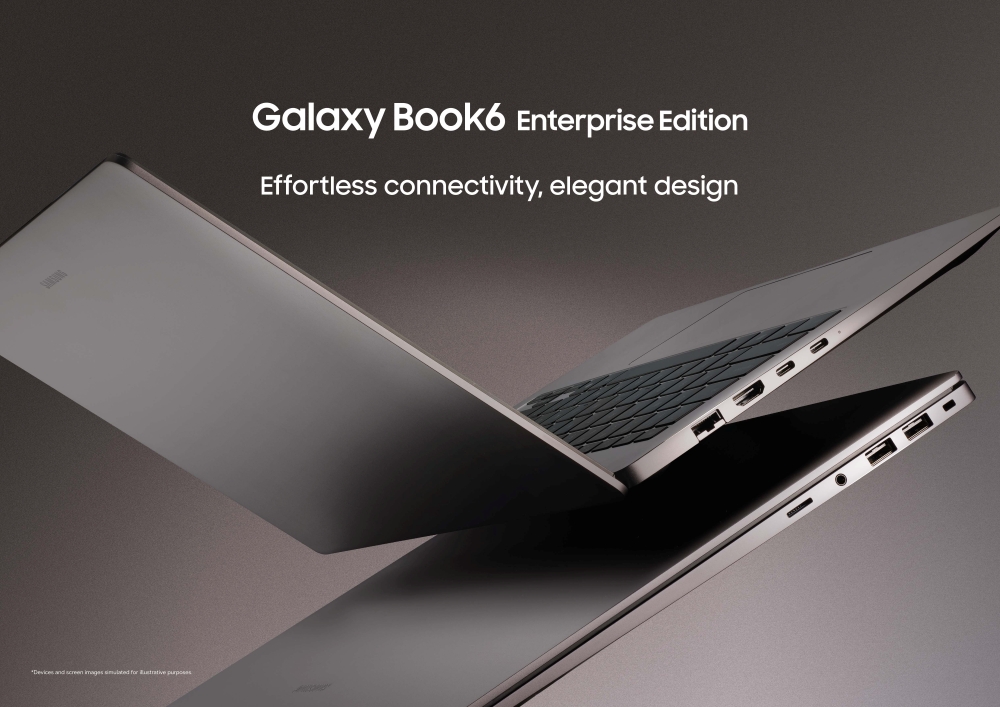
Samsung Electronics today introduced Galaxy Book6 Enterprise Edition.

Purpose‑Built for Enterprise Environments

Galaxy Book6 Enterprise Edition is designed to simplify enterprise device deployment and configuration, helping organizations maintain consistent device settings across their PC environments and streamline device provisioning.

Devices can be prepared in advance with enterprise configuration options that include:

  • Custom OS imaging
  • BIOS configuration and logo customization
  • Asset tagging for effortless management
  • Windows Autopilot

This enables systems to be ready for immediate use while helping organizations maintain standardized configurations across their device fleets.

Enterprise‑Grade Security

Galaxy Book6 Enterprise Edition is engineered to give organizations confidence at every stage of the device lifecycle, with security being a foundational element to safeguard data and maintain system integrity.

It integrates hardware‑level protections, platform security and standardized configurations that help maintain control. This includes secure biometric authentication with a built-in fingerprint sensor and IR camera, enabling fast, password-free sign-in via Windows Hello for enhanced privacy protection and seamless access.

Galaxy Book6 Enterprise Edition also aligns with security requirements for PC platforms by National Institute of Standards and Technology (NIST) for platform integrity and firmware resilience. A discrete Trusted Platform Module (dTPM) provides cryptographic functions, such as creating and storing cryptographic keys, to further enhance security on all levels ㅡ including both hardware and software. With Samsung Knox underpinning these protections, Galaxy Book6 Enterprise Edition takes a multi-layered approach to security and privacy, helping protect devices against cyber threats while maintaining the integrity of sensitive data.

Productivity Powered by Galaxy AI

Galaxy Book6 Enterprise Edition enhances productivity with advanced performance and AI capabilities. Equipped with an NPU2 capable of up to 49 TOPS, it enables efficient AI processing and seamless multitasking for demanding workloads. Finally, it brings the connected Galaxy experience into enterprise environments by extending workflows across devices.

Integrated Galaxy AI3 features help streamline everyday workflows with the following features:

  • AI Select:4 supports quick translation and contextual recognition directly from the screen.
  • Note Assist:5 helps summarize meeting notes and share key information across teams.
  • AI Cut Out: helps prepare high-quality images for various uses.
  • Intelligent Search:6 enables users to simply describe the content, helping them find files more efficiently.

These features further enhance productivity through seamless connectivity across Galaxy devices:

  • Quick Share: enables fast file transfer between Galaxy devices.
  • Multi Control:7 allows users to control multiple devices using a single keyboard and mouse.
  • Nearby Devices:8 easily finds connectable Galaxy devices and connects with drag and drop to enable a range of connected experiences.
  • Second Screen:9 offers users an additional display using Galaxy Tab.
  • Storage Share:10 lets users instantly view photos, videos and files from their Galaxy Book on a Galaxy phone and vice versa, without file transfer.
  • Link to Windows:11 extends the user’s Galaxy phone screen to their PC for a more comfortable and productive experience.
  • Samsung Find: utilizes the active SmartThings Find network of 300 million-strong to help users find their Galaxy Book — even when it’s powered off.
Galaxy Book6 Enterprise Edition brings the connected Galaxy experience into enterprise environments with Galaxy AI.

Designed for Work

Galaxy Book6 Enterprise Edition features a slim and balanced design built for modern business environments. It features a refined hinge structure, slim bezels and a clean keyboard layout that come together to create a professional design suited for everyday work.

Available in Mocha Gray with a thin 14.9 mm chassis, Galaxy Book6 Enterprise Edition comes in 14‑inch and 16‑inch models to support different work styles ranging from mobile professionals to office-based teams. It also supports battery life capable of up to 24 hours of video playback12 and fast charging that restores up to one‑third of the battery in around 30 minutes, enabling longer periods of uninterrupted work. Lastly, both the 14-inch and 16‑inch models improve usability with a Pro Keyboard with backlight, while the 16-inch model includes an additional numeric keypad that enhances productivity.
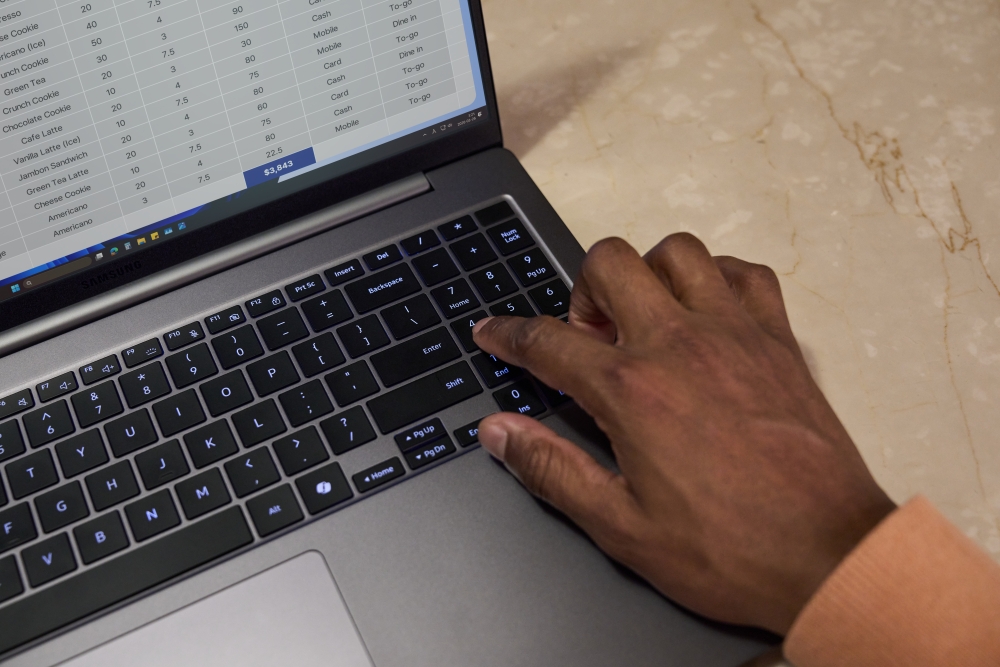
Galaxy Book6 Enterprise Edition is available in Mocha Gray.

Availability

Galaxy Book6 Enterprise Edition will be available in select markets starting in April 2026. 

For more information about the Galaxy Book6 Enterprise Edition, please visit: Samsung Global Newsroom or Samsung.com.

Galaxy Book6 Enterprise Edition (16-inch)
Dimensions*357.0 x 248.0 x 14.9 mm
*Accuracy of numbers may vary depending on measurements used. 
Weight* 1.74 kg
*Weight may vary by market. 
OS Windows 11 Pro 
*Edition version and availability timing may vary depending on model and/or market. 
Display 16.0″ IPS WUXGA (1920×1200), 350nits
*Measured diagonally as a full rectangle without accounting for the rounded corners. Actual viewable area is less due to the rounded corners. 
Processor* 

NPU*

Graphics*

Up to Intel® Core™ Ultra 7 Processor (Series 3)
*Specifications may vary depending on model and/or market. 
Intel AI Boost, Max 49 TOPS
*NPU performance may vary by processor. 
Intel® Graphics
*Specifications may vary depending on model and/or market. 
Network* Bluetooth® v5.4 / Wi-Fi 6E
*Wi-Fi 6E availability may vary due to OS version, market, location, network conditions and other factors. Actual speed may vary by market, carrier and user environment. Wi-Fi 6E wireless network routers required and sold separately. 
Color Mocha Gray 
Memory*
 

Storage

Camera

16/32GB (LPDDR5X)
*Availability may vary by model. 
256/512GB/1TB SSD (PCle), Expansion Slot
*Availability may vary by model and/or market 
**Actual storage space availability may vary depending on pre-installed software and by market, file size and format. 
FHD (1080p) IR Camera (Windows Hello facial recognition)
Microphone/Speaker Internal Dual Array Digital Microphones / Stereo speaker (2Wx2), Dolby Atmos®
Keyboard* Numpad, Backlit keyboard *One Tone
*Keyboard layout may vary by market. 
Trackpad Clickpad
Battery* 61.2Wh (Typical)
*Typical value of battery capacity tested under third-party laboratory conditions. Typical value is the estimated average value considering the deviation in battery capacity among the battery samples tested under IEC 61960 standard. Actual battery life may vary depending on network environment, usage patterns and other factors. 
Charging* 45W USB Type-C Adapter
*The inbox charger and data cable are USB Type-C. 
Port* USB-C(2), USB-A(2), HDMI, microSD, Universal Audio Jack, RJ45, S Security Slot
*Actual speed of USB may vary depending on user environment. 
​ Galaxy Book6 Enterprise Edition (14-inch)
Dimensions*313.4 x 221.1 x 14.9 mm
*Accuracy of numbers may vary depending on measurements used. 
Weight* 1.43 kg
*Weight may vary by market. 
OS Windows 11 Pro 
*Edition version and availability timing may vary depending on model and/or market. 
Display

Processor

NPU

Graphics 

14.0″ IPS WUXGA (1920×1200), 350nits
*Measured diagonally as a full rectangle without accounting for the rounded corners. Actual viewable area is less due to the rounded corners. 
Up to Intel® Core™ Ultra 7 vPro® Processor (Series 3)
*Specifications may vary depending on model and/or market. 
Intel AI Boost, Max 49 TOPS
*NPU performance may vary by processor. 
Intel® Graphics 
*Specifications may vary depending on model and/or market. 
Network Bluetooth® v6.0 / Wi-Fi 7 or Bluetooth® v5.4 / Wi-Fi 6E
*Actual speed may vary depending on market, carrier and user environment. Wi-Fi 6E availability may vary due to OS version, market, location, network conditions and other factors. Wi-Fi 6E wireless network routers required and sold separately. 
Color Mocha Gray 
Memory 

Storage

Camera

16/32GB (LPDDR5X)
*Availability may vary by model. 
256/512GB/1TB SSD (PCle), Expansion Slot
*Availability may vary by model and/or market
**Actual storage space availability may vary depending on pre-installed software and by market, file size and format. 
FHD (1080p) IR Camera (Windows Hello facial recognition)
Microphone/SpeakerInternal Dual Array Digital Microphones / Stereo speaker (2Wx2), Dolby Atmos
Keyboard Pro keyboard, Backlit keyboard *One Tone
*Keyboard layout may vary by market. 
Trackpad Clickpad 
Battery* 61.2Wh (Typical)
*Typical value of battery capacity tested under third-party laboratory conditions. Typical value is the estimated average value considering the deviation in battery capacity among the battery samples tested under IEC 61960 standard. Actual battery life may vary depending on network environment, usage patterns and other factors. 
Charging* 45W USB Type-C Adapter 
*The inbox charger and data cable are USB Type-C. 
Port* Thunderbolt™4 or USB Type-C(2), USB Type-A(2), HDMI, microSD, Universal Audio Jack, RJ45, Security Slot
*Actual speed of USB may vary depending on user environment. 

  1. The Intel vPro® platform is only available for the 14-inch model of the Galaxy Book6 Enterprise Edition. ↩︎
  2. CPU and GPU specifications may vary depending on model, country or region. ↩︎
  3. Galaxy AI basic features provided by Samsung are free. Future releases may include enhanced features or new services that are offered on a paid basis. Different terms may apply for AI features provided by third parties. Galaxy AI basic features are those services listed under “Advanced intelligence” in the current Samsung Services Terms and Conditions. ↩︎
  4. Requires an internet connection. Service availability may vary by country, language or device model. Availability of supported languages may vary. Certain languages may require language pack download. AI Select download and installation may be required when launching the app for the first time. ↩︎
  5. Summary for Note Assist requires a network connection and Samsung Account login. Service availability may vary by language. Summary feature for Note Assist is activated when a certain number of characters is met and is under the character limit. Audio files must be under 3 hours in duration to be processed. Accuracy of results is not guaranteed. ↩︎
  6. Service availability may vary by country, region or language. Certain languages may not be available. ↩︎
  7. Each device must be registered with a single Samsung Account and connected to the same Wi-Fi network. Multi Control requires updated Galaxy phones and tablets with One UI 5.1.1 or above and Galaxy Book series devices released in 2021 or later with Samsung Settings v1.5 (Intel) or Samsung Settings v3.3 (Arm) and 2024 TVs or 2024 Smart monitors. Some functions (such as Copy & Paste or Drag & Drop) may not be available when using certain device models and apps. Feature availability may vary by region (e.g. not provided in the People’s Republic of China). ↩︎
  8. To use Nearby Devices, certain conditions must be met. Feature availability: Phone, tablet or PC must be signed in to the same Samsung account and must have both Wi-Fi and Bluetooth turned on. Galaxy phones and tablets require One UI 7 or higher. Galaxy Books with Nearby Devices require the app to be installed from the Microsoft Store and the following software versions are also required: Samsung Settings 6.0 or higher (Arm), Samsung Continuity Service 1.13 or higher. Discoverable devices: Devices that meet these conditions will appear when the Nearby Devices button is tapped in the quick panel: Galaxy phones and tablets: Must be signed in to the same Samsung account and Bluetooth must be turned on. One UI 7 or higher is required to use all features. Limited features are available if phone or tablet has One UI 4.1.1 or higher and Continuity Service 1.2.27 or higher. Galaxy Book must be signed in to the same Samsung account and Bluetooth must be turned on and requires Samsung Settings 6.0 or higher (Arm), Samsung Continuity Service 1.13 or higher. Samsung TVs and Smart monitors and projectors must be turned on and must have connected to this phone/tablet at least once using Smart View or DeX. Only TVs released in 2016 or later are supported. Not discoverable on Galaxy Books. Galaxy Buds, watches, fitness bands and rings must be paired with this device using Bluetooth. Bluetooth must be turned on. Galaxy Buds must be removed from case or case must be opened. Galaxy Watch4 and above are supported. Watches, bands and rings aren’t discoverable on Galaxy Books or tablet. ↩︎
  9. For a better experience, both devices must be signed in to the same Samsung account. Galaxy Tab S10 Ultra and Galaxy Book5 Pro sold separately. Available on select Samsung Galaxy Tab models only, including Galaxy Tab S10+, Tab S10 Ultra, Tab S9, Tab S9+, Tab S9 Ultra, Tab S9 FE, Tab S9 FE+, Tab S8, Tab S8+, Tab S8 Ultra and Tab Active4 Pro with One UI 3.1 or later versions installed. Available on Samsung Galaxy Book series devices with Windows 10 2004 OS or later version installed. Some additional functions are supported only on Samsung Galaxy Book series devices. Some apps may not support this feature for content protection purposes. ↩︎
  10. Each device must be signed in to same Samsung account and must have both Wi-Fi and Bluetooth turned on. Requires updated Galaxy phones and tablets with One UI 7 or higher and kernel version 5.15 or higher and Galaxy Book2 or later (Intel) and Galaxy Book4 or later (Arm) and Samsung Smart TV models including U8000 and above released after 2025. Feature availability may vary by region and device model. ↩︎
  11. Users must link their Samsung Galaxy device to their Windows PC through ‘Link to Windows’ on the phone and Microsoft Phone Link Apps on PC and follow the set-up prompts, including being signed into the same Microsoft account. ‘Link to Windows’ is preloaded on select Galaxy devices. PC (Microsoft Phone Link App) requires Windows 10 or above. Microsoft Phone Link recommends Samsung Galaxy device to be on the same Wi-Fi network as the PC. Some mobile apps may restrict content to be shared on other screens or may require a touchscreen. ↩︎
  12. Typical value of battery capacity tested under third-party laboratory conditions. Typical value is the estimated average value considering the deviation in battery capacity among battery samples tested under the IEC 61960 standard. Actual battery life may vary depending on network environment, usage patterns and other factors. ↩︎