



惯性聚合 高效追踪和阅读你感兴趣的博客、新闻、科技资讯
阅读原文 在惯性聚合中打开

推荐订阅源

IT之家
IT之家
Microsoft Azure Blog
人人都是产品经理
人人都是产品经理
博客园 - 聂微东
博客园_首页
阮一峰的网络日志
阮一峰的网络日志
V
V2EX
小众软件
小众软件
F
Fortinet All Blogs
Microsoft Security Blog
奇客Solidot–传递最新科技情报
奇客Solidot–传递最新科技情报
H
Hackread – Cybersecurity News, Data Breaches, AI and More
量子位
Google DeepMind News
Jina AI
Jina AI
让小产品的独立变现更简单 - ezindie.com
aimingoo的专栏
aimingoo的专栏
B
Blog RSS Feed
Cyber Security Advisories - MS-ISAC
宝玉的分享
宝玉的分享
有赞技术团队
有赞技术团队
J
Java Code Geeks
WordPress大学
WordPress大学
The Cloudflare Blog

Samsung Global Newsroom

[Video] Where Robotics Meets Precision: Samsung Displays Shape KUKA’s Immersive Showroom [Interview] Where Sound Meets Design — Redefining the Audio Experience With Music Studio Samsung and MUNCH Museum Bring Rarely Seen Masterpieces to Samsung Art Store Samsung Electronics Vietnam Becomes First Company in Vietnam To Purchase Renewable Electricity Through DPPA – Samsung Global Newsroom Samsung Highlights Vision for AI-Powered Connected Care at VivaTech 2026 [Infographic] Exploring the 2026 Samsung Odyssey G8 & G7 Models at a Glance: From the Industry-First 6K to OLED Samsung Electronics and LG Uplus Collaborate on ISAC Technology for 6G Samsung Electronics Begins Shipment of Industry-First HBM4E Samples Samsung and Massachusetts General Hospital Launch Joint Study To Investigate GLP-1 Treatment Monitoring With Galaxy Watch [Interview] The Future of Screen Experiences, Part ①: Inside Samsung’s Micro RGB TV, Setting a New Standard for Next-Generation Displays Samsung TV Plus Brings Monthly SM K-Pop Concert Series to Fans at Home [Infographic] Samsung AI Appliances Deliver Inclusive Experiences Through Enhanced Accessibility Features Traveling With Peace of Mind: Why Samsung Care+ Is Your Essential Summer Holiday Companion Samsung and Google Give First Look at New Intelligent Eyewear Samsung Launches Next-Gen Odyssey Gaming and ViewFinity Monitors, Including Industry’s First 6K Gaming Monitor Samsung Art Store Welcomes the Wonderful World of the Moomins in New Global Collaboration Samsung Presents AI-Powered Screen Innovations at Australian Tech Summit 2026 Samsung Launches Samsung AI Week 2026 for AI-Powered Living Samsung Adopts New EU Code of Conduct for Energy Smart Appliances Samsung To Launch 2026 Bespoke AI Laundry Combo, Advancing All-in-One Comfort Lifestyle Samsung Solve for Tomorrow Wins Merit Award at 2026 Global Views ESG Corporate Sustainability Awards – Samsung Global Newsroom Samsung Launches One UI 9 Beta for Galaxy S26 Series Users Samsung Expands AI Capabilities of Bespoke AI Refrigerator Family Hub With Major Updates [Interview] When a Washer Becomes Furniture: Meet the Designers Behind the Red Dot Design Award 2026 [Video] How Samsung’s Spatial Signage Transforms the Attraction Queue Into an Immersive Safari Experience at Everland [Interview] From TV to a Work of Art: Samsung’s Design Innovation at the Red Dot Design Award 2026 [Interview] Make Every Moment Cinematic: How Cinematic LUT Transforms Video on the Galaxy S26 Series Samsung Announces World-First Breakthrough in Fainting Prediction With Galaxy Watch Samsung and Qualcomm Achieve Industry-First Power Class 1 Validation for 5G Fixed Wireless Access on Virtualized RAN Samsung’s One UI 8.5 Official Rollout Starts May 6
Turning Your Travel Moments Into Lasting Memories ②: San ...
Samsung Newsroom · 2026-03-27 · via Samsung Global Newsroom

After Part 1 captured San Francisco’s diverse scenery using the Galaxy S26 Ultra camera, this installment turns to what comes next. With advanced AI, Galaxy S26 Ultra edits photos to match user intent and reimagine them as new forms of content.

Samsung Newsroom explored how Galaxy S26 Ultra’s AI features enhance travel moments while testing them on location in the city.

[Photo Assist]

Restore and Refine With a Single Prompt

When traveling, it’s easy to reach for the fork before snapping a photo. At a café in San Francisco, a cake had already been partially eaten — but with Galaxy S26 Ultra, even that missed moment was easily resolved.

By simply typing, “Make it look uneaten,” Photo Assist restored the cake to its original form.

▲ Before-and-after comparison of a partially eaten cake edited using Photo Assist

Reimagine Any Scene After the Shot

Capturing the perfect shot while traveling isn’t always easy. Moments when the scenery, subject and timing align are rare.

Using Photo Assist, a photo of San Francisco’s streets was combined with an image of a passing tram, creating a seamless result — as if taken in a single moment.

▲ Before-and-after comparison of a street scene combined with a tram using Photo Assist

Another notable feature is the ability to change the time of day. After uploading a daytime photo of San Francisco’s harbor and entering prompts such as “Make it look like sunset” or “Turn it into a night scene,” Galaxy AI adjusted the sky and lighting to recreate the scene at a different time of day.
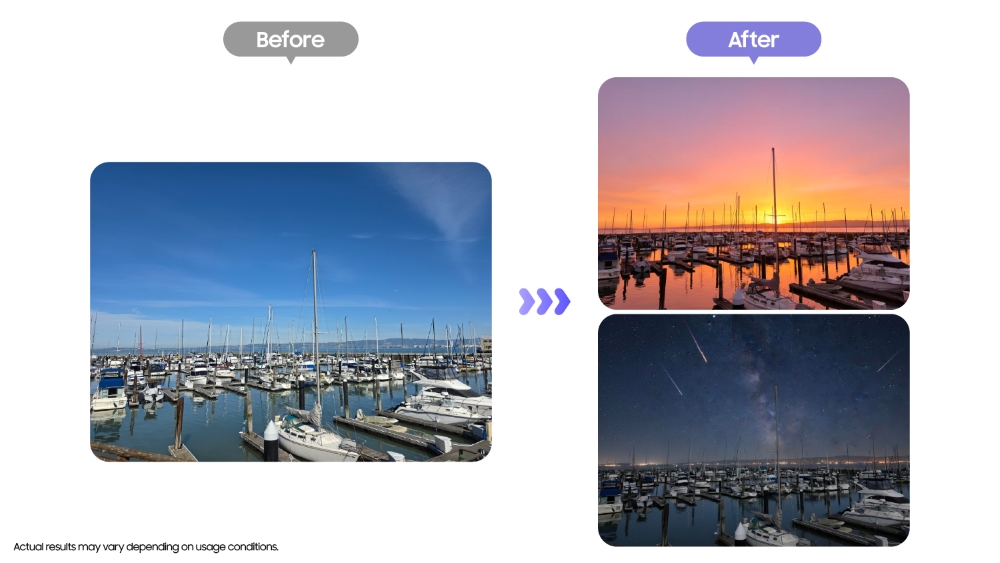
Before-and-after comparison of a daytime harbor scene transformed into sunset and nighttime scenes using Photo Assist
▲ Before-and-after comparison of a daytime harbor scene transformed into sunset and nighttime scenes using Photo Assist

[Creative Studio]

Turn Photos Into Artistic Creations

After capturing a scene of sea lions at Pier 39 — one of San Francisco’s iconic landmarks — the photo was imported into Creative Studio. Selecting the Oil painting style, Galaxy AI analyzed the image’s texture and colors, transforming it into an oil painting-style image.

▲ Before-and-after comparison of a sea lion scene at Pier 39 rendered in an oil painting style using Creative Studio

The result is reimagined with a different aesthetic, making it feel like an entirely new piece.

Creative Studio on Galaxy S26 Ultra transforms travel photos into a range of styles, helping users preserve memories through fresh perspectives.
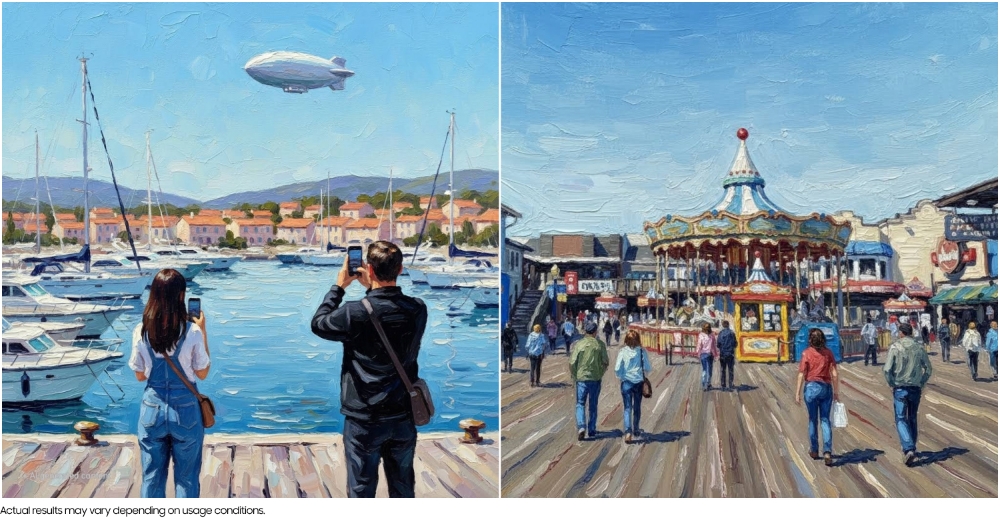
Oil painting-style image of a San Francisco scene generated using Creative Studio
▲ Oil painting-style image of a San Francisco scene generated using Creative Studio

Create Custom Stickers With Ease

Custom stickers were also created using a photo of sea lions. After launching Creative Studio, selecting an image and choosing a style, tapping “Generate” produced a character sticker that captured the sea lions’ distinctive features.

Users can generate images repeatedly until they achieve the desired result, then choose from seven themes — such as “A slice of Life,” “School days” or “Today’s vibe” — to save the sticker as a themed set.

▲ Sea lion stickers designed using Creative Studio

These stickers can be used not only to decorate photos, but also across text-based apps including messaging and notes.

With Creative Studio, users can transform everyday photos into personalized content, sharing memories in new ways — whether among friends and family or on social media.

Capturing moments in San Francisco with Galaxy S26 Ultra and enhancing them with Galaxy AI made travel memories richer than ever. From shooting and editing to sharing, the entire process comes together seamlessly in a single device.