





The Tactacam Reveal Pro 3.0 is a well-rounded cell-connected camera that balances advanced features, image quality, and affordable data plans. Out of all the cameras I tested this year, the Pro 3.0 had the fewest false triggers—images with no animals, usually triggered by moving branches or light—of the crop. This can be a big deal if you aren’t paying for an unlimited data plan, as a few days worth of empty images can quickly eat up your quota. Proper camera placement matters, too, but I tested the Pro 3.0 side-by-side with several other cameras and it somehow avoided false triggering when others did. The camera allows you to micro-adjust the trigger sensitivity on a scale of 1 to 10 which I think helped me dial it in for the locations I deployed it.
The Reveal Pro 3 shoots 4K images and 1080p video, with the option to use a flash or no-glow IR (to avoid spooking animals) for nighttime captures. On paper, the image resolution isn’t the highest of the cameras I tested, but the images are plenty sharp for my purposes and they keep file sizes low for faster transmission. I also found the video quality excellent, and was surprised to see them pop up in the app’s gallery almost as quickly as photos. (Images send automatically, but you have to request videos and there’s a $5 charge for up to 50 videos a month.)
You can power the camera with 12 AA batteries, the lithium battery cartridge, or, if you need to be sure your Pro 3.0 will last for months without attention, the battery belt. The hybrid media storage solution is also a plus by giving you reliable internal memory as well as an optional SD card slot to expand the camera’s capacity when you need to.
The camera has a 2-inch LCD screen for easy field setup, but everything can also be controlled remotely via the app which is intuitive and free from the bugs that seem to plague many trail camera apps. There are a ton of settings you can tweak in most trail cameras, so I appreciate that the Reveal app generally explains each setting so you know what you’re adjusting
On top of the hardware and subscription, I generally recommend Tactacam gear because of the brand’s accessible and knowledgeable customer service. I try to make sure everything is working properly before lugging cameras into the woods, but more than once I’ve had questions while placing their cameras and been able to pick up the phone and get answers from an employee who knows the product line well. And if there’s an actual problem, the Reveal Pro 3.0 comes with a 1-year warranty from when you first activate it.
If you want a live feed, the Tactacam Reveal Ultra camera is a slightly more expensive option that features streaming and GPS security to guard against thieves, among other improvements. For most hunters, though, the Reveal Pro 3.0 has everything you need and the price jump is significant.


There are two significant recurring costs with a cellular trail camera: the data plan and batteries. Connected cameras can chew through batteries, which can add up especially since you’ll want to use more-expensive lithium batteries if you can. SEMHUA’s 4G Solar Trail Camera comes with rechargeable batteries and a solar panel, which allows the camera to run indefinitely given adequate sun exposure.
The camera itself has a fast trigger and 2K photo and video that can be saved to an SD card or to cloud storage for an additional cost. The app, which is a little clunky and can be confusing due to some quirky menus and word choices, works with images that show up quickly and reliably.
Notably, even though this is a 4G cellular connected camera, you can still use the camera to record to the SD card if you decide not to pay for one of the data plans. This is another sneaky way this camera provides solid value for its low price point.
Advertisement - Continue Reading Below

One thing I’ve learned over the years: Most trail camera buyers don’t need all the latest and greatest features unless they’re upgrading with a specific purpose in mind. Buying last year’s cameras, which are often steeply discounted when new models come out (usually mid- to late-summer) can lead you to great gear and save you a lot of money.
Case in point: Moultrie now sells a two-pack of last season’s Edge 2 trail cameras for less than one of its new Edge 3 cameras. Now the Edge 3 is a great camera and a solid upgrade with improved image resolution, AI, and GPS security. But if you don’t absolutely need those features, the Edge 2 deal is hard to ignore.
The Edge 2 shoots crisp, 36 megapixel images, is easy to set up, and has a fair $12.99-per-month data plan that includes unlimited images and 50 videos. The app is also one of the more intuitive options out there, and lets you control camera settings remotely.
There’s no SD card slot which eliminates a major source of hardware/software issues with trail cameras. It can still be used without a cell connection—you’ll just need to move the camera to an area with a connection to get the images to load in the app.
The Edge 2 can be powered by AA batteries, sold-separate battery packs, and optional solar panels. Even though it’s no longer Moultrie’s top-of-the-line camera, it’s still a plug and play solution that’s better than most of the other cameras on the shelf.

Ring and other doorbell cameras have popularized live security cameras, but to date, little of that tech has transferred into trail cameras since doorbell cameras usually use Wi-Fi, while trail cameras utilize paid data plans with data caps and there isn’t (yet) a ton of demand for the feature.
Still, whether you’re monitoring an elk wallow or observing a part of your property, having the live feature of Spartan’s GoLive Trail Camera can be useful and worth the higher price tag on this camera. .
Imagine your phone buzzes with the Spartan app alerting you with a picture of a big bull. You flip on the live stream mode and get to watch (and listen to) the bull in action instead of just hoping for more photos. In the case of catching a potential intruder, you can see them almost instantly to identify if they’re a threat.
The camera itself takes solid images and videos with a half-second trigger speed. Despite occasionally live streaming during my testing, I got great battery life out of the camera compared to others I’ve tested and still had more than 50 percent after two months in place.
The biggest downsides are cost—both the upfront cost of the camera and the data plans are higher than average, making it pricey to try and run a fleet of these cameras year-round.
Advertisement - Continue Reading Below

While megapixels don’t usually matter as much to hunters and wildlife watchers like they do for professional photographers, it’s nice to have a clean, crisp image when you finally get that capture you’ve been waiting for. And it can be essential for serious hunters monitoring a hunting property to identify specific trophy animals. Moultrie’s Edge cameras have always had higher-than-average megapixel counts, but the new Edge 3 camera pushes up to the 40 megapixels, which is practically unheard of in a trail camera.
Now keep in mind, 40 megapixels here is not the same as a 40 megapixel image from a high-end DSLR camera, so don’t expect a National Geographic-quality photo. Its image files are generally larger than what I’ve received from other cameras, but they still need to be compressed to send quickly over data networks and are a fraction of the size of those you’d get from a professional camera with the same megapixel count. The end result is a sharp, clear photo, but still one shot for practical hunting/nature-watching purposes, not fine art photography.
There are a few more nice-to-have upgrades from previous Edge cameras such as automatic GPS tracking (you used to have to mark your camera location manually) and buck-detecting AI that turns on video when the camera recognizes antlers in the frame.
As I said when I recommended the Edge 2, this is a top-of-the-line camera for hunters looking to upgrade. Most hunters can get by with a cheaper, less powerful camera. If image quality is your primary concern, though, I wouldn’t hesitate to spend the money for the extra detail.

The Defend by Reveal 360 is not your traditional trail camera—it’s closer to a home security camera that’s adapted for remote locations. Ring and other doorbell cameras usually rely on your home Wi-Fi for connectivity which makes them impractical once you get more than about 50 yards from your router. The Defend 360 uses cellular networks instead, meaning you can place it anywhere you get a halfway decent signal.
Combined with LTE connectivity and solar panel recharging, it’s superior to hunting-oriented trail cameras for monitoring off-grid locations like cabins, gates, and job sites where WiFi and power aren’t available.
In the field, the Defend 360’s biggest advantage is that motion capability. Most trail cams are fixed in place, but this one adds remote pan-and-tilt control, allowing you to reposition the camera from your phone and cover a much larger area. Its 355-degree pan and 75-degree tilt effectively eliminate blind spots when combined with the wide-angle lens.
Like a regular trail camera, motion detection triggers still images by default which conserves battery and data. A 1080p live view can be activated on demand when you need a closer live look. That approach makes sense for remote monitoring, though it feels different if you’re used to continuous video feeds from home security cameras.
A rechargeable battery and included solar panel allow for long-term deployment with minimal maintenance, and the built-in LTE connection means it works virtually anywhere with signal.
Setup is straightforward through Tactacam’s app, and the camera automatically connects to the strongest available carrier via eSIM. (Some cameras only use one specific carrier so you have to choose wisely at the time of purchase.) You can definitely use it to get additional coverage in an area for hunting or wildlife monitoring, but even if you’re already a Reveal by Tactacam user, you’ll need to download a separate app for the Defend 360. While it’s a bit of a hassle that Defend and Reveal cameras use separate apps, you can use the same account for both.
Because it tries to conserve power, the Defend 360 is more photo-first than traditional security cameras which often run on grid power, and live view sessions can take a few seconds to start. How bad the lag is will depend on the quality of your wireless network connection. Night footage is serviceable but not amazing, and like most cellular cameras, it requires a subscription plan to unlock full functionality. Still, if your goal is reliable, wide-area monitoring in remote locations, the Defend 360 delivers better coverage and control than standard trail cameras if you’re using a trail camera for security.
| Exterior Color | Gray |
| Image Resolution | 4K stills |
| Video Resolution | 1080p |
| Trigger speed | Not listed |
| Memory | Internal (8GB) + cloud storage |
| Warranty | 1 year from activation |
Advertisement - Continue Reading Below

One of the sneaky expenses and hassles of trail cameras is power. Alkaline batteries don’t perform well in cold temps and with devices such as these and the preferred lithium batteries are pricey. To make things worse, cellular connection and the latest features conspire to suck them dry faster than ever. Solar is a smart way to harness freely available power, but I’ve tested a lot of solar trail cameras and few have lasted a full year and even fewer have reliably powered their units. I’ve used aftermarket solar panels successfully, but it requires bigger, pricier panels and they’re not exactly inconspicuous.
Covert’s Interceptor Solar is one of the few that’s delivered on the promise of ditching the batteries for good. As a backup, there’s a tray for 8 AA batteries which I loaded with Energizer Lithiums, but I tested running the camera for a week without them and had no loss of power with the internal battery in the solar panel.
The solar is also really well-integrated into the camera, making for a surprisingly compact unit. Most trail camera-plus-solar combos take up a ton of room in your pack and stick out on a tree. If you need to orient the panel differently than the camera, however, there is an option to detach the panel and extend it with a cable and strap it separately.
| Exterior Color | Green |
| Image Resolution | 32 megapixels |
| Video Resolution | 2k |
| Trigger speed | 0.4s |
| Memory | SD card |
| Warranty | 2 years |
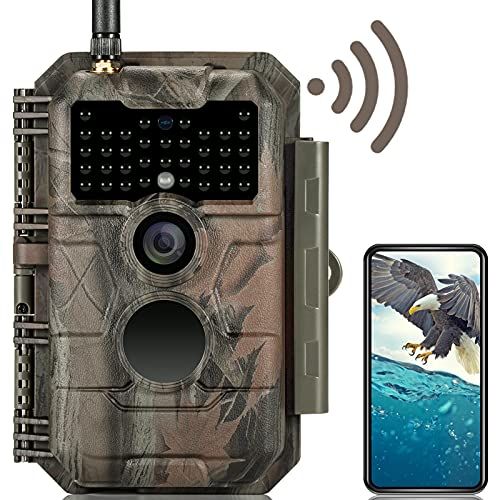
Bluetooth and/or Wi-Fi connectivity is becoming more common in trail cameras and can be more convenient than pulling SD cards or reviewing images on a small digital screen inside the trail camera. It makes sense—your $1,000 smartphone screen is going to be clearer than any trail cam display.
I have used this trail camera from GardePro and found it most useful close to home, where we often set up yard cameras to see who is coming through at night and causing trouble. Often I can simply cue up the app from inside the house or on the deck, wake up the camera via low-power Bluetooth that's always on, then connect via Wi-Fi to download any new pictures (usually in a couple minutes at most). All without ever touching the camera or SD cards.
For cameras I place farther afield (say, in my hunting zones), I don’t often use the wireless connectivity even if the camera has it. There are several steps to connecting and downloading to the phone, which all take time. Plus, every trail camera app I’ve ever used has had quirks.
In the field, I’d rather swap memory cards or even download manually to my phone using a USB card reader. That said, this feature is a huge convenience if you hate messing with cards or have trouble reviewing images on small screens. I found that the Wi-Fi antenna on this Garde model allows for fast transfer speeds and connects from distances over 50 feet.

Justin Park is a working journalist with more than 20 years experience covering politics, environmental issues, hunting and outdoors, sports, and fitness for newspapers, magazines, and digital-first outlets. Since earning his M.S. in New Media from Syracuse University's Newhouse School in 2008, he's also applied his storytelling skills to video, producing, shooting, and editing for PBS, USA Today, Reebok, and more. He received the 2016 Associated Press Sports Editors' Investigative Award as part of a team covering the Rio Olympics for USA Today Sports.
Jamie, Senior Reviews Editor, joined the Hearst Enthusiast Group in 2021. She has covered technology and consumer lifestyle gadgets since 1995—and shared her expertise in print, digital, and in broadcast originating the role of The Gizmo Girl for ESPN’s Cold Pizza. She has written about, tested, and reviewed everything from turkey fryers to high-definition TVs. Her byline has appeared in TWICE, Sound & Vision, Consumer Reports, and many others. In her free time, Jamie is in a yoga class, searching for the perfect matcha latte, or walking the boards.
此内容由惯性聚合(RSS阅读器)自动聚合整理,仅供阅读参考。 原文来自 — 版权归原作者所有。