


惯性聚合 高效追踪和阅读你感兴趣的博客、新闻、科技资讯
阅读原文 在惯性聚合中打开

推荐订阅源

S
Securelist
Schneier on Security
Cloudbric
Cloudbric
S
Security @ Cisco Blogs
Webroot Blog
Webroot Blog
Attack and Defense Labs
G
GRAHAM CLULEY
cs.CL updates on arXiv.org
S
Schneier on Security
cs.AI updates on arXiv.org
Latest news
Latest news
C
CXSECURITY Database RSS Feed - CXSecurity.com
D
Darknet – Hacking Tools, Hacker News & Cyber Security
H
Heimdal Security Blog
I
Intezer
GbyAI
GbyAI
T
The Blog of Author Tim Ferriss
罗磊的独立博客
O
OpenAI News
D
Docker
Cisco Talos Blog
Cisco Talos Blog
S
Secure Thoughts
S
Security Affairs
CTFtime.org: upcoming CTF events
钛媒体:引领未来商业与生活新知
钛媒体:引领未来商业与生活新知
The Last Watchdog
The Last Watchdog
L
LINUX DO - 热门话题
AI
AI
B
Blog
C
Cybersecurity and Infrastructure Security Agency CISA
让小产品的独立变现更简单 - ezindie.com
H
Help Net Security
爱范儿
爱范儿
博客园 - 司徒正美
Scott Helme
Scott Helme
博客园_首页
Recent Commits to openclaw:main
Blog — PlanetScale
Blog — PlanetScale
Simon Willison's Weblog
Google DeepMind News
N
News and Events Feed by Topic
A
About on SuperTechFans
T
Threat Research - Cisco Blogs
P
Proofpoint News Feed
Y
Y Combinator Blog
C
CERT Recently Published Vulnerability Notes
T
Tenable Blog
cs.CV updates on arXiv.org
V
V2EX - 技术
The Register - Security

Blog

This year we celebrate a decade of Ubuntu Server support on the s390x architecture: marking a long-standing collaboration between Canonical and IBM that began at LinuxCon 2015. The first release happened on April 21, 2016, bringing Ubuntu 16.04 LTS (Xenial Xerus) to IBM Z and IBM LinuxONE platforms.  A first for Ubuntu on IBM That […] AI at the edge: simplifying infrastructure with Cisco and Canonical | Canonical The next era of telco clouds: get open infrastructure choice with Sylva and Canonical Kubernetes | Canonical What is RDMA over Converged Ethernet (RoCE)? | Canonical Beyond tokens per watt – using Ubuntu 26.04 LTS for AI Beyond tokens per watt – using Ubuntu 26.04 LTS for AI | Canonical RISC-V profiles – why is RVA23 significant? | Canonical AI with AMD ROCm on Ubuntu: your questions answered | Canonical When distributed workloads stall because nodes cannot exchange small messages quickly and consistently, the network is the limiting factor. How do you solve that problem? InfiniBand offers one solution. InfiniBand is an interconnect, meaning the end-to-end communication system that links compute, storage, and accelerator nodes. It is impl […] Microsoft has announced the preview of Azure Cobalt 200, its second-generation custom Arm silicon. Learn how Ubuntu and Ubuntu Pro support these new VMs from day one, offering seamless deployment, long-term security maintenance, and Kernel Livepatch without requiring engineering or platform changes […] How Canonical Support solves hard Linux performance bugs  – even in 12-year old code | Canonical Securing AI agent workflows on Ubuntu with the new NVIDIA OpenShell snap | Canonical Canonical announces optimized Ubuntu images for TPU virtual machines by Google Cloud | Canonical VMware hypervisor deployment using MAAS | Canonical Migrating from Apache Spark 3 to Spark 4 | Canonical Introducing Workshop: launch sandboxed development environments on Ubuntu with a single command | Canonical Run agentic workloads on Arm and Ubuntu | Canonical Decoding design: How design and engineering thrive together in open source | Canonical Developing web apps with local LLM inference | Canonical A local privilege escalation (LPE) security vulnerability in the Linux kernel, codename “PinTheft,” was publicly disclosed on May 19, 2026. The vulnerability was fixed in the mainline Linux kernel tree. A proof-of-concept exploit was published along with public disclosure. This has been assigned the CVE ID CVE-2026-43494; other discoverin […] Canonical has announced the general availability of Managed Kubeflow on the Microsoft Azure Marketplace. This fully managed MLOps platform allows enterprise AI teams to deploy a production-ready environment in under an hour, eliminating infrastructure maintenance. […] A look into Ubuntu Core 26: Cloud-powered edge computing with AWS IoT Greengrass and Azure IoT Edge | Canonical CVE-2026-46333 (ssh-keysign-pwn) Linux kernel vulnerability mitigations | Canonical Finding the blind spot: How Canonical hunts logic flaws with AI | Canonical A local privilege escalation (LPE) vulnerability affecting the Linux kernel has been publicly disclosed on May 13, 2026. The vulnerability does not have a CVE ID published, but is referred to as “Fragnesia.” The vulnerability affects multiple Linux distributions, including all Ubuntu releases. The affected components are the Linux kernel […] Rethinking BYOD security: protecting data without trusting devices | Canonical Two local privilege escalation (LPE) vulnerabilities affecting the Linux kernel have been publicly disclosed on May 7, 2026. The vulnerabilities have been assigned the IDs CVE-2026-43284 and CVE-2026-43500 and are referred to as “Dirty Frag.” The affected components are Linux kernel modules. The first vulnerability impacts the modules tha […] Three weeks to go: A sneak peek of the Ubuntu Summit 26.04 experience | Canonical How to use Ubuntu on Windows | Canonical A local privilege escalation (LPE) vulnerability affecting the Linux kernel has been publicly disclosed on April 29, 2026. The vulnerability has been assigned CVE ID CVE-2026-31431 and is referred to as Copy Fail. The affected component is a kernel module that provides hardware-accelerated cryptographic functions: algif_aead. The vulnerab […] Run NVIDIA Nemotron 3 Nano Omni locally in a single command | Canonical Why Web Engineering is great | Canonical Ubuntu 16.04 LTS (Xenial Xerus) reached the end of its five-year Expanded Security Maintenance (ESM) window in April 2026. If you are still running 16.04, it is critical to address your support status to ensure continued security and compliance. Your support options Now that 16.04 is in its Legacy phase, you have two primary paths: […] Understanding disaggregated GenAI model serving with llm-d | Canonical From Jammy to Resolute: how Ubuntu’s toolchains have evolved | Canonical Hybrid search and reranking: a deeper look at RAG | Canonical Canonical expands Ubuntu support to next-generation MediaTek Genio 520 and 720 platforms | Canonical In this article, Keirthana TS, a Senior Technical Author at Canonical, breaks down what leadership means to her and how she understood the power of intentional leadership through her journey at Canonical. […] Ubuntu Pro comes to Nutanix bare-metal Kubernetes | Canonical RISC-V 101 – what is it and what does it mean for Canonical? | Canonical Ubuntu Summit 26.04 is coming: Save the date and share your story! | Canonical How to manage Ubuntu fleets using on-premises Active Directory and ADSys | Canonical Simplify bare metal operations for sovereign clouds | Canonical How to Harden Ubuntu SSH: From static keys to cloud identity | Canonical The “scanner report has to be green” trap | Canonical Modern Linux identity management: from local auth to the cloud with Ubuntu | Canonical Canonical welcomes NVIDIA’s donation of the GPU DRA driver to CNCF | Canonical Hot code burns: the supply chain case for letting your containers cool before you ship | Canonical
A look into Ubuntu Core 26: Deploying AI models on Renesas RZ/V series for production | Canonical
Gabriel Aguiar Noury · 2026-06-04 · via Blog

Welcome to this blog series which explores innovative uses of Ubuntu Core. Throughout this series, Canonical’s Engineers will show what you can build with our releases, highlighting the features and tools available to you.

In this blog, Asa Mirzaieva, engineer from the Silicon Alliances team, will show you how to deploy optimised AI models on Renesas RZ/V series hardware using the Dynamically Reconfigurable Processor for AI (DRP-AI). 

Deploying AI models for edge inference on specialized MPUs is particularly useful for developers looking to balance high performance with extremely low power consumption. Coupled with Ubuntu Core’s architecture, developers have an end-to-end infrastructure for managing a secure, modular deployment.

By the end of this blog, you’ll know how to package, load, and run AI inference models on Renesas DRP-AI using snaps.

AI inference on Renesas DRP-AI

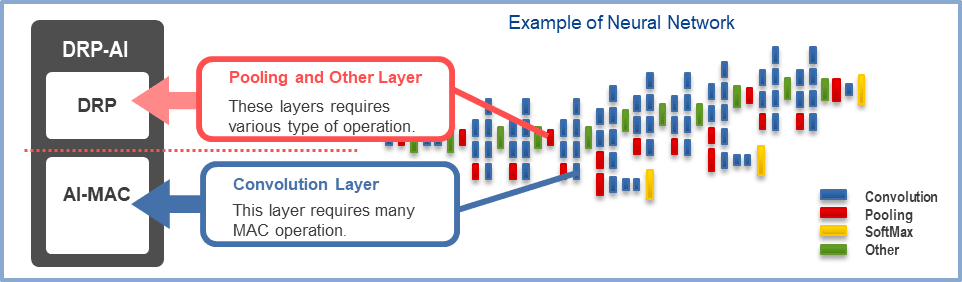
If you aren’t familiar with Renesas’ RZ/V series, the main takeaway is that these microprocessors feature a dedicated AI accelerator called DRP-AI. This dynamically reconfigurable processor accelerates the heavy lifting of neural network inference, such as feature extraction and classification, while maintaining exceptional power efficiency. To fully understand how this acceleration is achieved, we must look at how DRP-AI dynamically reconfigures its internal dataflow to match the network architecture, contrasting sharply with traditional sequential CPU processing.
Packaging and Deploying Edge AI with Ubuntu Core

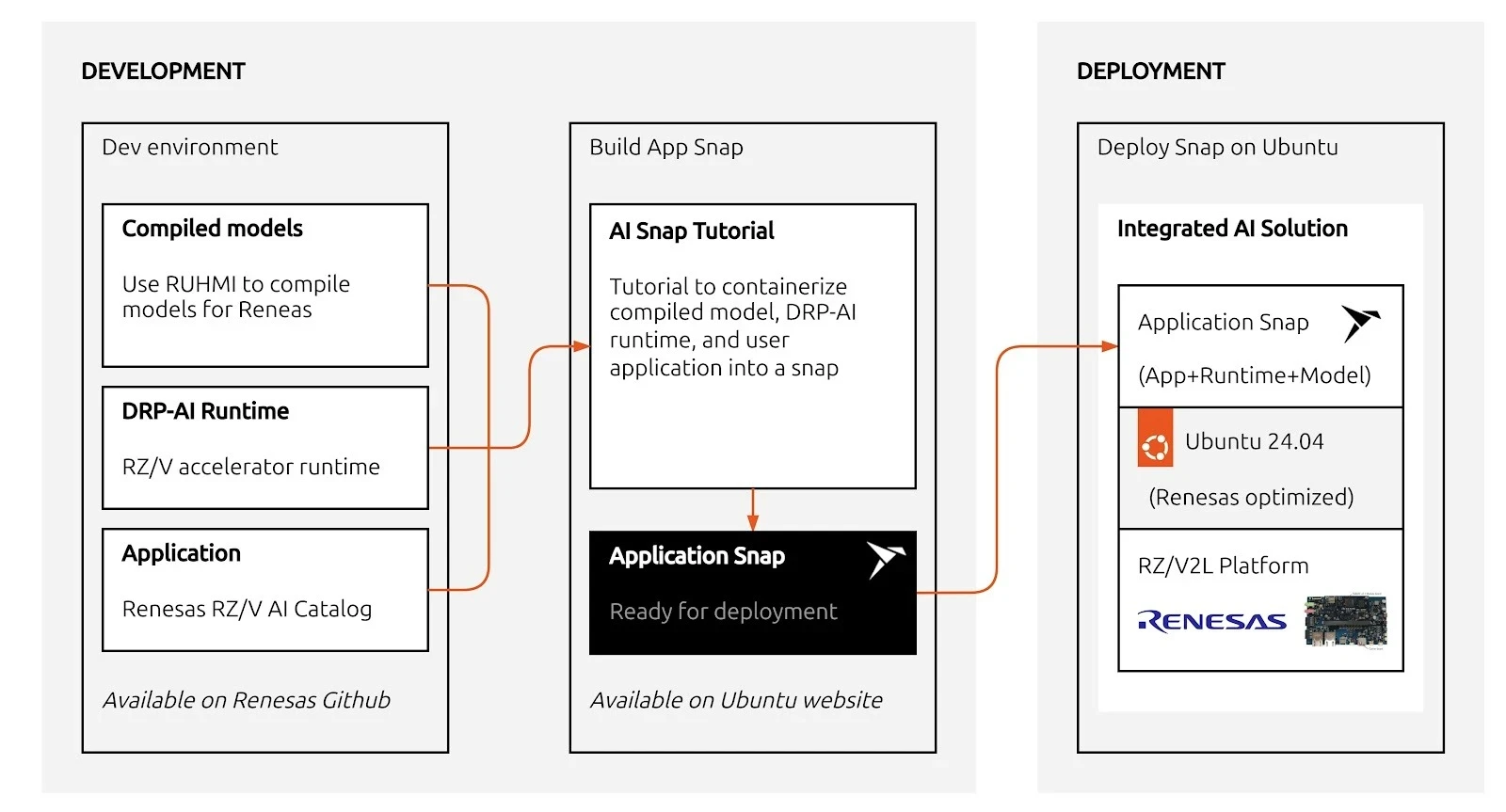
In a nutshell, running AI workloads at the edge involves preparing the model, integrating it with the runtime and application, and ensuring it can be reliably deployed on target devices, as seen on the diagram below.

The diagram shows this workflow for Renesas RZ/V platforms: development and packaging are done on a host system (such as your laptop or build server running Ubuntu), while deployment targets the RZ/V device running Ubuntu Core.

On this host system, models are compiled with the DRP-AI toolchain and packaged together with the runtime and the application into a snap; this snap is then deployed to the target device as a complete AI solution
The following sections walk through each step in detail: from model compilation with DRP-AI TVM to packaging and running inference on the device.

Compiling with DRP-AI TVM

Just like other advanced AI pipelines, DRP-AI TVM requires you to compile your model (such as ONNX) to generate Runtime Model Data. The stack leverages the EdgeCortix MERA Compiler Framework to map your AI model into a highly efficient instruction set that the CPU and DRP-AI hardware can process collaboratively.

Because model compilation relies on specific SDKs and the EdgeCortix MERA Compiler Framework, this step is typically performed on a dedicated host machine (or Docker container) and is not handled by our runtime snap.

For step-by-step instructions on how to set up your environment and compile your ONNX models, please refer to the official DRP-AI TVM Compiling Tutorials provided by Renesas.

Once your model has been pruned, optimized, and compiled on your host environment, the next step is getting both the runtime binaries and the compiled model onto your board.

Packaging your AI application in a snap

To run inference securely and reliably, we package the applications into a snap. Canonical has created an example repository, rzv_drp-ai_tvm_snap, which bundles the upstream Renesas example applications so they can be easily installed and managed via snapd.

In the snap, we package three major components:

  • The DRP-AI TVM runtime library (libdrp_tvm_rt.so and its dependencies)
  • The compiled tutorial application (tutorial_app_v2ml)
  • The pre-compiled AI model data (located in the project’s models/ directory)

Thanks to Snapcraft’s advanced tooling, you can cross-compile the entire application for arm64 right from an amd64 host.

Once built, you can transfer your resulting snap to your RZ/V2L board and install it. Currently, accessing hardware interfaces relies on devmode confinement:

sudo snap install --devmode rzv-drp-ai-tvm-examples_*.snap

Under the Hood: The snapcraft.yaml File

The magic behind this secure, cross-compiled package is the snapcraft.yaml file. This single declarative file dictates how the AI application is built and packaged. Here is a simplified snippet of how it orchestrates the three major components:

name: rzv-drp-ai-tvm-examples
base: core24
confinement: devmode

apps:
  tutorial-app:
    command: usr/bin/launch-tutorial.sh

parts:
  tvm-runtime:
    plugin: nil
    source: [https://github.com/renesas-rz/rzv_drp-ai_tvm.git](https://github.com/renesas-rz/rzv_drp-ai_tvm.git)
    override-prime: |
      craftctl default
      # 1. Install runtime library
      cp -a $CRAFT_PART_SRC/obj/build_runtime/v2m/lib/* $CRAFT_PRIME/usr/lib/
      # 2. Install the compiled model
      cp -a ${CRAFT_PROJECT_DIR}/models/ $CRAFT_PRIME/usr/bin/

  tutorial-app:
    after: [tvm-runtime]
    plugin: cmake
    source: ${CRAFT_PROJECT_DIR}/../parts/tvm-runtime/src/apps
    override-prime: |
      craftctl default
      # 3. Install compiled binary
      cp -a $CRAFT_PART_BUILD/tutorial_app_v2ml $CRAFT_PRIME/usr/bin/

This configuration maps directly to the major components we discussed:

  • Component 1: The Runtime Library: Handled by the tvm-runtime part. It fetches the upstream Renesas DRP-AI TVM source code and copies the pre-built TVM runtime libraries into the snap’s runtime path.
  • Component 2: The Compiled Model: Also handled in the tvm-runtime part. The locally prepared AI model data is pulled directly from the project’s models/ folder into the snap so it’s readily available at runtime.
  • Component 3: The Tutorial Application: Handled by the tutorial-app part. It uses the cmake plugin to cross-compile the C++ tutorial application specifically for the arm64 architecture, placing the final tutorial_app_v2ml binary into the snap.

Installing the snap

Run the following command after the successful build of the snap (XXX stands for the version).

devmode is required to access the DRP-AI devices from within the snap.

sudo snap install rzv-drp-ai-tvm-examplesXXX.snap --devmode

Running the Inference Examples

After the snap is installed, running the pre-packaged application is as simple as calling the snap command.

To run the ResNet18/ResNet50 image-classification inference (assuming you’ve provided the compiled model data and input files to the board):

rzv-drp-ai-tvm-examples.tutorial-app

Make sure to use 640×480 bmp images with the default ONNX model.

That’s it! You can completely separate your AI models from your application logic and firmware, providing a modular approach to updates. When you improve your model, Ubuntu Core and the Snap Store will help you deliver these updates reliably and securely over the air.

Thanks to Ubuntu Core, you can just focus on your development and not worry about the infrastructure on how to update devices in the field or maintain system security.

What’s next?

The Renesas DRP-AI accelerator offers a tremendous advantage for edge AI devices, delivering high-speed inference without severe power penalties. Their value for deploying embedded AI devices is indisputable.

Now is your turn. Why don’t you try packaging your optimized DRP-AI models using snaps? Through this, you will see the benefits for yourself of the infrastructure to manage and deploy software at the edge. With Ubuntu Core, you can build your production image with your targeted snaps and hardware. This will empower you to easily flash devices in production lines. Plus, in your image, you can define what user experience you want to bring, keeping your model and intellectual property secure in its sandbox.

Related posts


Canonical launches Ubuntu Core 26

Canonical announcements Article

Ubuntu Core 26 introduces precise Linux builds, optimized OTA updates, live kernel patching, and enhanced hardware-backed protection for mission-critical deployments. May 19, 2026 Today, Canonical announced the general availability of Ubuntu Core 26, its minimal, immutable operating system with up to 15 years of security maintenance.  Ubu ...


AI at the edge: simplifying infrastructure with Cisco and Canonical

AI Article

Legacy infrastructure was not designed for the requirements of the AI era. While large-scale model training remains centralized in data centers, test-time inference is rapidly shifting to the edge to reduce latency and bandwidth consumption. This shift creates a new frontier for enterprise AI, but deploying at the edge introduces signific ...