EPFO: How to view EPF passbook online?
By Aneeka Chatterjee
·
2023-03-10
·
via Infotech News, How To Guide News | The HinduBusinessLine
SENSEX 75,527.95
+ 1,695.40
CRUDEOIL 8,221.00
-123.00
SILVER 241,180.00
+ 1,527.00
SENSEX 75,527.95
+ 1,695.40
CRUDEOIL 8,221.00
-123.00
CRUDEOIL 8,221.00
-123.00
EPFO or Employee’s Provident Fund Organisation provides all the possible benefits to an employee across the country. An employee can also view their EPF passbook on the EPFO portal in a few simple steps.
Also read: Everything you need to know about the new EPFO guidelines
View EPF passbook
-
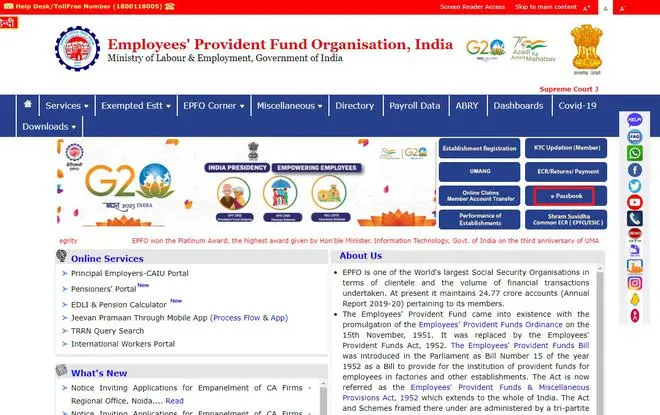
Launch the official website of EPFO.
-
Click for ePassbook on the right side of the page.
-
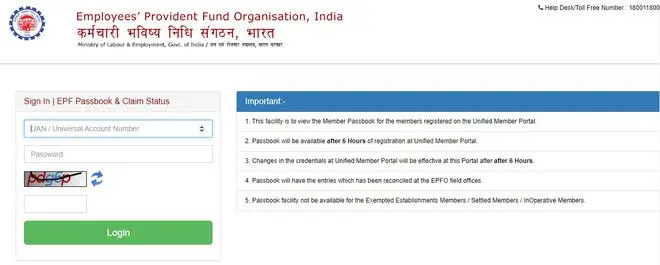
Login with UAN (Universal Account Number) and password.
-
Next, Member ID of the employee will be displayed on the screen. In case of multiple Member IDs, all of the IDs will be displayed on the scren.
-
The employee must select the particular employee ID for which they want the to view the passbook.
-
On the next page, all details of the PF account will be displayed on the screen.
-
If the employee wants, he/she can also download the PDF version of the ePassbook.
More Like This
Published on March 10, 2023
THIS AD SUPPORTS OUR JOURNALISM.
SUBSCRIBE
FOR MINIMAL ADS.
THIS AD SUPPORTS OUR JOURNALISM.
SUBSCRIBE
FOR MINIMAL ADS.
此内容由惯性聚合(RSS阅读器)自动聚合整理,仅供阅读参考。 原文来自 — 版权归原作者所有。