









DNSSEC is often presented as a security essential, but is it right for your organization? And is it truly enough to secure your DNS?
In this article, we go beyond basic overviews and examine the real impact, limitations, and strategic timing of DNSSEC adoption, considering current infrastructure, risks, and evolving best practices.
It works by digitally signing DNS records using public-key cryptography, allowing resolvers to verify that the information they receive truly comes from an authoritative source. Unlike the traditional DNS protocol, which relies solely on trust, DNSSEC introduces a chain of trust that extends from the root zone down to individual domains.
The Domain Name System was initially designed for efficiency and scalability — not security. For years, it operated on the implicit trust that DNS responses were valid and unaltered. But this trust model proved vulnerable to attacks.
Classic DNS protocol does not include any built-in verification. Resolvers simply accept and cache the first response they receive, assuming it’s correct. This opens the door for attackers to forge fake DNS responses and trick the resolver into storing them. Once the malicious data is cached, all users relying on that resolver can be silently redirected to the wrong IP address — often a phishing site, a malware server, or an attacker-controlled proxy.
One of the most influential wake-up calls came in 2008, when security researcher Dan Kaminsky revealed a critical flaw in DNS that made cache poisoning both practical and dangerous at scale. His findings demonstrated how an attacker could inject false records into a resolver’s cache, potentially redirecting traffic for entire domains.
Several successful DNS poisoning and hijacking attacks since 2008 highlight the ongoing risks of insecure DNS:
Brazil DNS Poisoning (2011): Attackers poisoned DNS caches at ISPs across Brazil, redirecting users to fake banking websites to harvest credentials and facilitate financial fraud.
The Poisoned Hurricane (2014): Exploited vulnerable BIND resolvers to inject rogue DNS records, hijacking traffic by redirecting domains through attacker-controlled servers.
DNSpionage Campaign (2018): A sophisticated campaign targeting government and private-sector domains in the Middle East by altering legitimate DNS records to redirect users to malicious infrastructure for espionage purposes.
To address this fundamental weakness, DNSSEC was developed. It focused on data integrity and authenticity, using digital signatures to allow resolvers to verify that the DNS data they receive hasn’t been forged or altered.
Let’s take a look at how DNSSEC works in practice. We won’t go deep into the protocol internals or cryptographic algorithms — all of that is already handled for you by your DNS software, DNS hosting provider, or domain registrar. Still, it’s essential to understand the basics — especially the additional DNS record types DNSSEC introduces and how they fit together to create a chain of trust. This will help you recognize what’s happening behind the scenes and troubleshoot or verify DNSSEC-enabled domains when needed.
If you want to dive deeper into the technical side, the following RFCs are the foundational documents:
First, let’s look at what actually changes at the domain level when you enable DNSSEC.
When you enable DNSSEC for a domain, several new records will be added to your DNS zone. These records add cryptographic signatures and key-related records that allow resolvers to verify the authenticity of your DNS data.
Every DNS record in your zone becomes part of a Resource Record Set (RRset) — a group of records with the same name and type. For example, let’s say the domain app.netlas.io has the following three A records:
app.netlas.io.	300	IN	A	104.26.13.97
app.netlas.io.	300	IN	A	104.26.12.97
app.netlas.io.	300	IN	A	172.67.68.5
These records all share the same name (app.netlas.io), type (A), and class (IN)1. Together, they form a single RRset.
Once DNSSEC is enabled, each RRset is automatically signed using a private key, and the resulting digital signature is stored in a new record type: RRSIG.
DNSSEC signs the entire RRset as one unit, not the individual records. These signatures are what resolvers use to verify that the DNS data hasn’t been altered.
To validate those signatures, your zone must publish a public key. In practice, you’ll see a DNSKEY record appear in your zone. This actually contains two different public keys:
    flowchart TD
	 subgraph subGraph0["ZSK Pair"]
	        ZSK_PRIV["ZSK Private Key"]
	        ZSK_PUB["ZSK Public Key"]
	  end
	 subgraph subGraph1["KSK Pair"]
	        KSK_PRIV["KSK Private Key"]
	        KSK_PUB["KSK Public Key"]
	  end
	    n1["app.netlas.io A records"] ----> C["RRSIG over<br>app.netlas.io"]
	    ZSK_PRIV -- signs --> C
	    ZSK_PUB --> D["DNSKEY (ZSK)"]
	    KSK_PUB ---> E["DNSKEY (KSK)"]
	    D --> F["RRSIG over DNSKEY"]
	    E --> F
	    KSK_PRIV -- signs ----> F

	    n1@{ shape: procs}
DNSSEC Signing Process at the Zone Level
To complete the chain of trust, your registrar will publish a DS record in the parent zone (e.g., .com or .io). This DS record contains a hash of your DNSKEY (specifically, your KSK), allowing resolvers to verify that your DNSSEC setup is legitimate and hasn’t been tampered with.
Both the ZSK and KSK must be rotated periodically to maintain security. ZSK rollovers are typically automated and occur relatively frequently — for example, monthly or quarterly. KSK rollovers are less frequent and may require coordination with your registrar, as they involve updating the DS record in the parent zone.
Trust in DNSSEC is built from the top down — starting at the DNS root zone and extending through top-level domains (TLDs) and finally to individual domain names. Each level in this hierarchy is responsible for signing its own DNS data and securely delegating trust to the level below it. This creates what’s known as a chain of trust.
Recommended Reading
FAQ: Understanding Root DNS Servers and the Root Zone
At the top, the root zone contains public keys (KSKs) used to sign TLD zones, such as .com, .net, or .io. These TLDs, in turn, publish DS (Delegation Signer) records that link to the DNSSEC-enabled domains under them. When a domain like netlas.io enables DNSSEC, it shares a hash of its KSK with the .io zone via a DS record, completing the chain from the root to the domain.
When a DNSSEC-aware recursive resolver receives a query, it can follow this chain of trust, starting from a known-trusted key at the root. It validates each layer — root, TLD, and authoritative zone — by checking digital signatures and matching them to DNSKEY and DS records along the way. If any part of the chain is missing or broken, the validation fails, and the data is treated as untrusted.
This hierarchical model ensures that no single zone can forge DNS data without being detected, as each level relies on cryptographic proof passed down from its parent.
    flowchart TD
	    Root["Root Zone"] -- Signs DS record for .io --> TLD
	    TLD["TLD Zone (.io)"] -- Signs DS record for netlas.io --> SLD
	    SLD["Authoritative Zone (netlas.io)"] -- Publishes and signs DNSKEY RRset<br>(contains KSK & ZSK) --> SLD
DNSSEC Chain of Trust
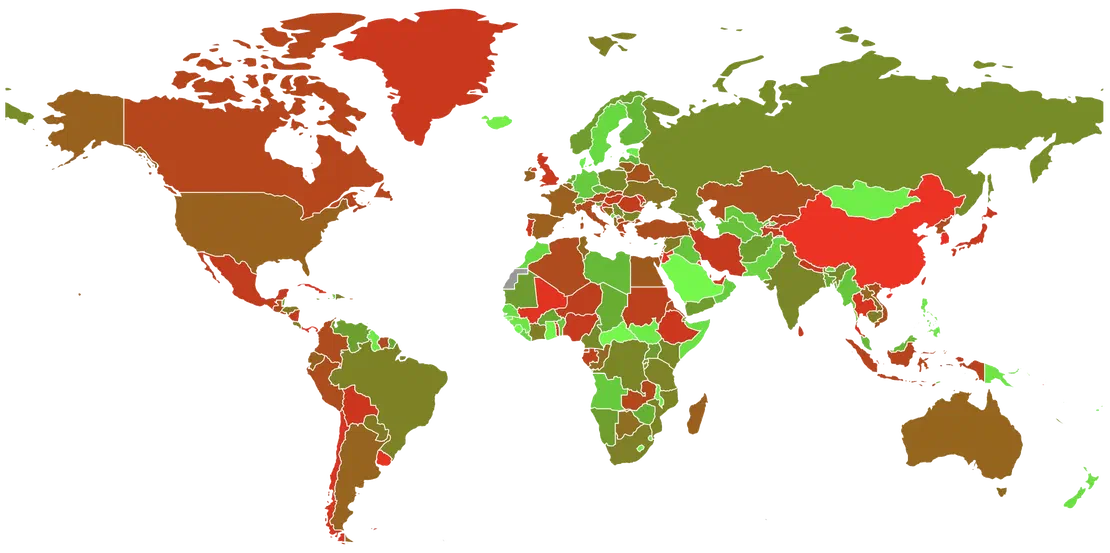
Although DNSSEC is now universally deployed at the root level and widely supported across major top-level domains (TLDs), its adoption remains limited in practice. The infrastructure is in place, but the ecosystem — particularly among domain holders, registrars, and resolvers — still has significant gaps.
According to DNSSEC Deployment Maps by GMU, many country-code TLDs (ccTLDs) like .se, .nl, and .cz have near-complete deployment and are often seen as DNSSEC pioneers. In contrast, others — particularly in parts of Asia, Africa, and Latin America — still lag behind, either due to a lack of technical readiness or low prioritization.
Some TLDs and registrars still do not support DNSSEC at all, leaving domain owners with no way to enable it, even if they want to. Others offer DNSSEC, but fail to automate key management or DS record publication, making it prone to errors and fragile for non-experts.
The story is similar on the resolver and hosting sides. Data from APNIC DNSSEC Validation Stats shows that while DNSSEC validation is steadily increasing among recursive resolvers, it is far from universal. In some countries (e.g., the U.S., parts of Europe), over 30% of queries are validated. In others, it’s under 5%.
Likewise, many hosting providers — primarily those catering to small or mid-size businesses — still don’t provide easy tooling or automation for DNSSEC. Even when DNSSEC is technically possible, operational complexity prevents wide-scale usage.
When deciding whether to enable DNSSEC for your zone, it’s crucial to understand the specific threats it mitigates and, importantly, what it does not protect against.
First, here’s a summary table. Details follow below.
| Threat | DNSSEC Protection |
|---|---|
| DNS Cache Poisoning (Resolver-Level) | ✅ Yes |
| DNS Response Tampering (On-Path/Man-in-the-Middle) | ✅ Yes |
| Domain Registrar Account Compromise (Nameserver Record Change) | ❌ No |
| Authoritative DNS Server Software Exploits (e.g., BIND Bugs) | ❌ No |
| DNS Traffic Redirection via BGP Hijacking | ❌ No |
| Local Network DNS Spoofing (Router/OS-Level Manipulation) | ❌ No |
This is precisely the threat that DNSSEC was designed to address.
Classic attacks like cache poisoning, where an attacker injects fake DNS data into a resolver’s cache, or on-path attacks (e.g., Kaminsky-style) are neutralized because:
If the signature fails validation — or if a required signature is missing — the resolver will reject the response outright.
Recommended Reading
DNS Cache Poisoning – Is It Still Relevant?
DNSSEC does not protect against attacks where an adversary:
Why? Because DNSSEC assumes trust in the registry/registrar layer and the authoritative zone itself. If the zone is re-signed maliciously, or the DS record is updated with a new (malicious) key, validators will accept it as legitimate.
In several high-profile incidents, attackers bypassed DNSSEC entirely by compromising registrar accounts and gaining access to DNS control panels. Once inside, they altered NS or A-records — actions that DNSSEC validators treated as legitimate.
This makes registrar and registry security just as critical as enabling DNSSEC.
Well, it’s obvious, but still, you should understand that DNSSEC doesn’t patch bugs or misconfigurations in DNS software. An attacker exploiting buffer overflows, command injections, or DoS vectors in DNS daemons is still a threat — with or without DNSSEC.
DNSSEC does not protect against BGP prefix hijacks or any attack at the routing layer.
Example: if an attacker hijacks traffic between a client and its resolver or authoritative DNS server, they could:
DNSSEC assumes the path is trustworthy enough to deliver data — it verifies the content, not the route.
Even if a resolver successfully validates DNSSEC, that trust may not extend to the end user. In fact, most consumer devices and operating systems do not locally validate DNSSEC responses. Typically, end-user devices and platforms depend on recursive resolvers for this validation.
| Operating System | Validates DNSSEC? | Notes |
|---|---|---|
| Windows | ❌ No (by default) | DNSSEC is not validated by the system resolver |
| macOS | ❌ No | Relies entirely on external resolver validation |
| Linux | ❌ No (generally) | Most distros do not validate unless running Unbound/Bind locally |
As a consequence, many client-side devices are vulnerable to local tampering, such as:
Encrypted DNS protocols like DNS over HTTPS (DoH) and DNS over TLS (DoT):
DNSSEC, on the other hand:
These technologies can complement each other in theory, but in practice, most applications — including web browsers like Chrome and Firefox — do not validate DNSSEC locally when using DoH. Instead, they rely solely on the security of the HTTPS connection to the DoH server, trusting that the resolver itself is secure and performing proper validation.
Before we proceed to the recommendations, let’s summarise everything we already know about DNSSEC — and add a few more points to get a complete picture.
✅ Pros
❌ Cons
I want to be clear: DNSSEC is a good thing. It strengthens the DNS trust model and protects users from a class of severe attacks, such as spoofed responses and cache poisoning. Even though these attacks are relatively rare today and can often be mitigated by other security measures, it’s still better to enable this extra layer of protection than to operate without it.
However, DNSSEC also introduces operational constraints, and like any security measure, it must be implemented carefully. If misconfigured, it can cause outages. Ensure the conditions are right before enabling it.
You might consider postponing DNSSEC if:
DNSSEC is worth adopting — just not blindly. Treat it as a critical security control that deserves planning, monitoring, and a fallback plan.
Enabling DNSSEC typically requires coordination between your domain registrar (who manages the domain delegation) and your DNS hosting provider (who signs the records).
While the exact process varies by platform, the core workflow remains similar.
Check if your DNS provider supports DNSSEC
Ensure your authoritative DNS service can generate DNSSEC records, such as DNSKEY and RRSIG, and handle key rollovers properly.
Check if your domain registrar supports DNSSEC
Your registrar must support adding a DS (Delegation Signer) record — the key that links your domain to the DNSSEC trust chain.
Enable DNSSEC in your DNS hosting provider’s dashboard
This action typically signs your zone and generates the necessary key material.
Obtain the DS record from your DNS provider
This record contains a hash of your DNSKEY. You’ll need to submit it to your registrar — unless they support automatic integration.
Submit the DS record to your registrar
In many setups, you must log in to your registrar’s dashboard and copy/paste the DS record details.
Enabling DNSSEC is conceptually simple, but operationally varies depending on how your domain registrar and DNS provider are integrated. There are three common integration models in the real world:
Check the documentation before you start
Always consult your provider’s documentation or support if you are unsure. Misconfiguring DNSSEC can make your domain unreachable to validating resolvers.
This is the ideal case, as it minimizes manual steps and reduces the risk of configuration issues. In this case, when you enable DNSSEC in your dashboard:
It’s typically available when you’re using name servers provided by your domain registrar. Some registrars also offer fully automated DNSSEC integration with third-party DNS services.
Proprietary or internal integrations often power this seamless setup. Some registrars use EPP extensions (Extensible Provisioning Protocol used in registrar operations), while others rely on automated polling of CDS/CDNSKEY records, as described in RFC 8078. The proposed DNS Operator to RRR Protocol may further simplify automation in the future.
This is the most common scenario when your DNS provider and registrar are separate entities that do not offer automated integration. In this setup, once you enable DNSSEC in your DNS provider’s dashboard and the zone is signed:
If you change name servers or perform a key rollover, you’ll need to update the DS record again. Always double-check that the published DS matches your current signing key. We’ll describe further a few services that help to check and debug the DNSSEC trust chain.
Self-hosting DNS with DNSSEC is best suited for large organizations or operators with deep DNS expertise and operational safeguards in place. It offers maximum flexibility and control.
You’ll need to generate and manage both keys, configure signing policies and rollover schedules, sign and serve your zone with DNSKEY and RRSIG records using tools like dnssec-keygen, dnssec-signzone, or BIND utilities, and manually submit the resulting DS record to your registrar.
After enabling DNSSEC, it’s crucial to verify that your domain is correctly signed and that recursive resolvers can validate it. Here are several methods for inspecting and troubleshooting DNSSEC status.
The most straightforward and user-friendly method for validating your DNSSEC configuration is to use one of these online tools.
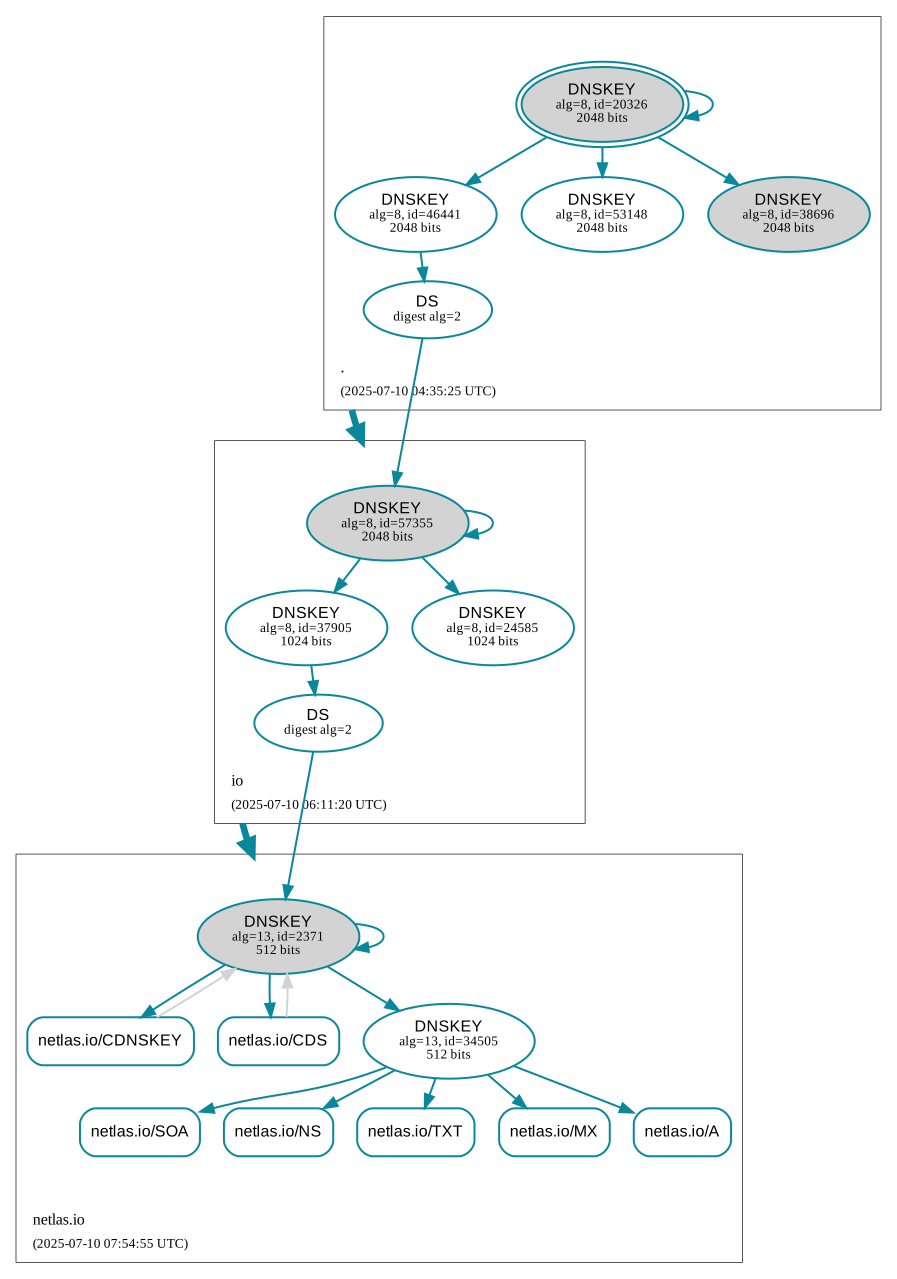 Netlas.io DNSSEC Visualization by DNSViz
digThe classic command-line tool dig can fetch DNSSEC records (such as RRSIG, DNSKEY, and CDS), but it does not perform validation checks on its own. Instead, you can use your (or any public) recursive resolver to carry out the necessary checks.
dig +dnssec +multi netlas.io; <<>> DiG 9.10.6 <<>> +dnssec +multi netlas.io
;; global options: +cmd
;; Got answer:
;; ->>HEADER<<- opcode: QUERY, status: NOERROR, id: 27028
;; flags: qr rd ra ad; QUERY: 1, ANSWER: 4, AUTHORITY: 0, ADDITIONAL: 1
;; OPT PSEUDOSECTION:
; EDNS: version: 0, flags: do; udp: 512
;; QUESTION SECTION:
;netlas.io. IN A
;; ANSWER SECTION:
netlas.io. 278 IN A 172.67.68.5
netlas.io. 278 IN A 104.26.12.97
netlas.io. 278 IN A 104.26.13.97
netlas.io. 278 IN RRSIG A 13 2 300 (
20250720180706 20250718160706 34505 netlas.io.
Ikyu/PMC8gNcstZ6ebC5GNEfI5azQrhMPJoir8fL++Zd
EpTuRGTY6SEH2nUg8Y+NCEjlDQff1/AEd1h11+ru5A== )
...This response provides a few details related to the recursive resolver. Check the flags (5th string of the answer):
qr: Query Response (standard flag indicating this is a response to a query).rd: Recursion Desired (the resolver wants recursive resolution).ra: Recursion Available (the server supports recursive queries).ad: Authenticated Data (the DNS data has been validated with DNSSEC).In my case, the ad flag indicates that the resolver has verified and validated the DNSSEC signatures, ensuring that the data returned (e.g., A records and RRSIG records) is authentic.
delvTo validate DNSSEC and check the entire chain of trust from the root DNSSEC key down to a domain, you can use the delv utility, which is included in the BIND toolkit.
Firstly, verify whether it is already installed on your system.
If not, you need to install it with the BIND package.
Do not use the default delv on macOS
The Apple-provided version of the delv binary does not support SSL, which leads to the following error when you run it:
;; none:29: no crypto support
delv: No trusted keys were loaded
To resolve this issue, install BIND using Homebrew or choose an alternative installation method of your preference.
BIND (Berkeley Internet Name Domain) is one of the most widely used DNS server software. Besides the name service itself, it includes various utilities for working with the DNS protocol, such as dig, nslookup, host, and delv, which we need.
BIND can be installed on most platforms using standard package managers or from source code.
apt:sudo apt-get update
sudo apt-get install bind9-dnsutilsThis installs delv along with other BIND utilities. No further configuration is needed if /usr/local/bin is in your $PATH.
Install BIND via yum:
sudo yum install bind-utilsSimilar to Debian-based systems, this will install delv and place it in a location already included in the default $PATH.
Install BIND using Homebrew:
Depending on your Mac’s architecture and the shell you use, ensure the installation folder is included in the $PATH.
Intel-based Mac:
export PATH="/usr/local/bin:$PATH"ARM-based Mac (M1/M2):
export PATH="/opt/homebrew/bin:$PATH"This command performs a complete DNSSEC delegation path analysis.
delv netlas.io @1.1.1.1 +vtrace;; fetch: netlas.io/A
;; validating netlas.io/A: starting
;; validating netlas.io/A: attempting positive response validation
;; fetch: netlas.io/DNSKEY
;; validating netlas.io/DNSKEY: starting
;; validating netlas.io/DNSKEY: attempting positive response validation
;; fetch: netlas.io/DS
;; validating netlas.io/DS: starting
;; validating netlas.io/DS: attempting positive response validation
;; fetch: io/DNSKEY
;; validating io/DNSKEY: starting
;; validating io/DNSKEY: attempting positive response validation
;; fetch: io/DS
;; validating io/DS: starting
;; validating io/DS: attempting positive response validation
;; fetch: ./DNSKEY
;; validating ./DNSKEY: starting
;; validating ./DNSKEY: attempting positive response validation
;; validating ./DNSKEY: verify rdataset (keyid=20326): success
;; validating ./DNSKEY: marking as secure (DS)
;; validating io/DS: in fetch_callback_dnskey
;; validating io/DS: keyset with trust secure
;; validating io/DS: resuming validate
;; validating io/DS: verify rdataset (keyid=46441): success
;; validating io/DS: marking as secure, noqname proof not needed
;; validating io/DNSKEY: in fetch_callback_ds
;; validating io/DNSKEY: dsset with trust secure
;; validating io/DNSKEY: verify rdataset (keyid=57355): success
;; validating io/DNSKEY: marking as secure (DS)
;; validating netlas.io/DS: in fetch_callback_dnskey
;; validating netlas.io/DS: keyset with trust secure
;; validating netlas.io/DS: resuming validate
;; validating netlas.io/DS: verify rdataset (keyid=37905): success
;; validating netlas.io/DS: marking as secure, noqname proof not needed
;; validating netlas.io/DNSKEY: in fetch_callback_ds
;; validating netlas.io/DNSKEY: dsset with trust secure
;; validating netlas.io/DNSKEY: verify rdataset (keyid=2371): success
;; validating netlas.io/DNSKEY: marking as secure (DS)
;; validating netlas.io/A: in fetch_callback_dnskey
;; validating netlas.io/A: keyset with trust secure
;; validating netlas.io/A: resuming validate
;; validating netlas.io/A: verify rdataset (keyid=34505): success
;; validating netlas.io/A: marking as secure, noqname proof not needed
; fully validated
netlas.io. 300 IN A 104.26.12.97
netlas.io. 300 IN A 104.26.13.97
netlas.io. 300 IN A 172.67.68.5
netlas.io. 300 IN RRSIG A 13 2 300 20250720191451 20250718171451 34505 netlas.io. YLT/82du7cBff8cbfV/csyjnyp8PK7F6BIgsVdaCyIVn5+qTVRbl2e8c msqk2toTWrvfNRN/hCwSxwbyr18VEw==While WHOIS data can provide some insight, it’s the least reliable method for checking DNSSEC status. According to an ICANN advisory for registrars, the presence of DNSSEC: signedDelegation in WHOIS data indicates that one or more DS or DNSKEY records are present for the domain.
Recommended Reading
Whois History: How to Check the Domain Owner History
You can check WHOIS data using:
whois command-line toolWHOIS is not authoritative for DNSSEC
Be aware that WHOIS data is not always authoritative for DNSSEC. WHOIS data can be inaccurate or incomplete, as not all registrars adhere strictly to the advisory’s guidelines.
DNSSEC is not a silver bullet, but it’s a critical part of a layered DNS security strategy – enabling DNSSEC enhances trust in your domain.
The deployment of DNSSEC requires thoughtful implementation. Automation is key to minimizing the likelihood of errors, and it is imperative to engage reputable providers and registrars that fully support DNSSEC.
Although DNSSEC cannot safeguard against all forms of DNS-related cyber threats, particularly those involving registrar security breaches or BGP hijacking, it remains an important addition to your security framework.

Book Your Netlas Demo
Chat with our team to explore how the Netlas platform can support your security research and threat analysis.
此内容由惯性聚合(RSS阅读器)自动聚合整理,仅供阅读参考。 原文来自 — 版权归原作者所有。