





We’re also increasing our U.S. digital wellbeing fund to support a healthier, more resilient generation of kids and teens.
General summary
Android is expanding its built-in parental controls to all devices running Android 17. You can now manage screen time, set app limits, and schedule downtime directly from your device settings. We are also increasing our digital wellbeing fund to $50 million to support healthier technology habits for kids and teens.
Summaries were generated by Google AI. Generative AI is experimental.
Basic explainer
Android is adding new parental controls to help families manage screen time more easily. Parents can now set daily limits, block specific apps and schedule downtime directly from their phone settings. These tools make it simpler to balance online fun with offline activities. Google is also investing more money to help kids build healthier habits with technology.
Summaries were generated by Google AI. Generative AI is experimental.
Explore other styles:
Your browser does not support the audio element.
Listen to article
This content is generated by Google AI. Generative AI is experimental
[[duration]] minutes
School’s out, and for many families, that means finding the right balance between summer sun and screen time. To help parents navigate the digital landscape during the break, we’re sharing new updates guided by our ongoing commitment to ensuring age-appropriate experiences. We designed these updates to provide more control and peace of mind, empowering you to make the best choices for your family’s digital wellbeing.
Expanding Android Parental Controls
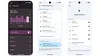
We’re expanding Android Parental Controls to all Android devices that update to Android 17. Launched last year on Pixel, Android Parental Controls make it easier for parents to manage their child’s screen time and to find balance between having fun online and offline.
These parental controls, located directly within Android Settings, provide a single, convenient home for both built-in device controls and Google Family Link. Whether your kids are exploring on their device or disconnecting for downtime, these on-device controls — protected by an easy-to-set PIN — can help you stay in the driver’s seat:
- Set the amount of screen time your child can spend on a device each day to help establish healthy habits.
- Create downtime schedules to automatically lock the device at night to ensure restful sleep without distraction.
- Set app store filters for Google Play to manage the highest content rating you want your child to be able to download.
- Control app usage by limiting time spent on specific apps, or blocking apps entirely.
Android Parental Controls also provide a direct path to easily set up Google Family Link in the Family Link app on a parent's phone. Family Link offers capabilities like School Time, Google Play app purchase approvals, location alerts and more.
Increasing our U.S. digital wellbeing fund to $50 million
Building on our long-term commitment to digital wellbeing, we’re increasing our U.S. digital wellbeing fund to more than $50 million to support a healthier, more resilient generation of kids and teens. This funding will help introduce new interventions focused on best practices for healthy technology interactions and supports that combat social isolation. Read more about how we're expanding our U.S. digital wellbeing fund.
Done. Just one step more.
Check your inbox to confirm your subscription.
You are already subscribed to our newsletter.
You can also subscribe with a