








Cybercriminals using the so-called “spray and pray” tactic love to impersonate well-known brands. Especially ones with huge customer bases.
Amazon reportedly has around 310 million active customers, so they certainly qualify as a brand worth impersonating. And it shows in the sheer volume of scams that use its name.
Amazon account take-over (ATO) scams were numerous during the holiday season, and they haven’t gone away. The scammers have ported the “product recall due to safety concerns” text message scam over to email.
The fake product recall message is one of scammers’ most popular lures, and we’ve reported on in the past.
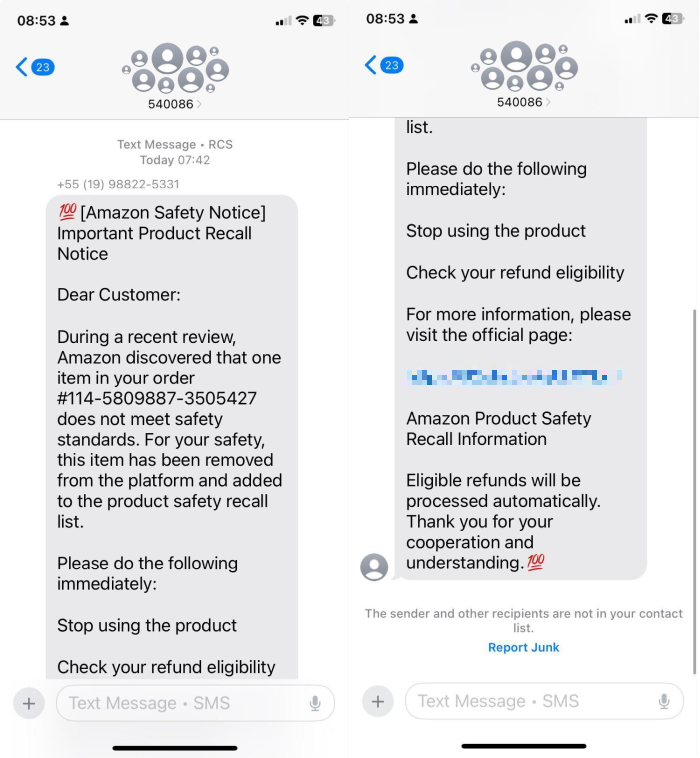
The hook in a recent email campaign is the same: something you bought does not meet safety or quality standards.
The UK’s Mirror reported on emails that read:
“Dear Customer, we are writing to inform you of a product recall affecting an item from your March 2026 order due to a design defect that may pose a potential safety risk. We apologise for any inconvenience this may cause and appreciate your prompt attention to this important safety matter. Thank you for your continued trust in Amazon.”
Following the link takes the target to a fake login page designed to steal their Amazon username and password.
These messages are intentionally vague about the nature of the product or the exact issue they’re being recalled for. The less specific they are, the more likely it is that someone will think, “This could be me.” If you’ve recently ordered something from Amazon, you’re more likely to fall for it.
How to avoid falling for Amazon phishing scams
- If you get a recall notice, don’t click any links. Instead, go straight to Amazon using the app or by typing the website into your browser. Then check the Message Centre in your account. Legitimate messages from Amazon will appear there.
- If you’ve fallen for this, change your Amazon password straight away and anywhere else you use that password. Monitor your bank statements for any unfamiliar charges, and contact your bank immediately if you see anything suspicious.
- While you’re in your Amazon account settings, turn on two-step verification.
- Report the scam to Amazon itself, whether you’ve fallen for it or not.
- In the US, forward scam texts to 7726 (SPAM) or use the “Report Junk” option. For emails, report them as spam in your inbox.
- Install web protection that can warn you of phishing sites, card skimmers, and other nasties that could lead to your data being taken.
Scammers sometimes use information they’ve found online to personalize their scam messages. Check what information is already out there about you using our free Digital Footprint scanner and then remove or change as much of it as you can.
Pro tip: Malwarebytes Scam Guard can help you spot scams and guide you through what to do next.
Something feel off? Check it before you click.
Malwarebytes Scam Guard helps you analyze suspicious links, texts, and screenshots instantly.
Available with Malwarebytes Premium Security for all your devices, and in the Malwarebytes app for iOS and Android.