
惯性聚合 高效追踪和阅读你感兴趣的博客、新闻、科技资讯
阅读原文 在惯性聚合中打开

推荐订阅源

H
Help Net Security
G
Google Developers Blog
aimingoo的专栏
aimingoo的专栏
博客园 - 聂微东
酷 壳 – CoolShell
酷 壳 – CoolShell
小众软件
小众软件
Stack Overflow Blog
Stack Overflow Blog
美团技术团队
博客园_首页
T
Tailwind CSS Blog
博客园 - 三生石上(FineUI控件)
B
Blog
D
DataBreaches.Net
腾讯CDC
C
Check Point Blog
钛媒体:引领未来商业与生活新知
钛媒体:引领未来商业与生活新知
U
Unit 42
月光博客
月光博客
V
V2EX
Vercel News
Vercel News
T
The Blog of Author Tim Ferriss
The Cloudflare Blog
博客园 - 叶小钗
Y
Y Combinator Blog

Malwarebytes

Carnival confirms data breach impacting nearly 6 million Kali365 phishing kit bypasses MFA and steals Microsoft logins Company bragged phone mics could listen to conversations. They couldn’t. Fake LinkedIn emails abuse Adobe to track victims Fake software on GitHub and SourceForge distribute Deno RAT 700+ education and tech websites hijacked in huge ClickFix malware campaign Scammers pretending to be Microsoft had help from US executives A week in security (May 18 – May 24) Update Chrome now: Critical bugs could let attackers run code Microsoft Defender vulnerabilities are being exploited in the wild TikTok, YouTube, and Roblox face scrutiny, but age gates won’t fix child safety Catch spyware in the act with Windows Webcam Monitoring Researchers left AI agents alone in a virtual town and watched it all unravel Fake malware-signing service Fox Tempest dismantled by Microsoft Firefox 151 packs big privacy upgrades into a small update Biometrics, diagnoses, and bank details exposed in major healthcare breach Facebook scam promises cheap Aldi meat boxes, steals payment info instead YouTube wants your face to fight deepfakes Microsoft is changing Edge’s plaintext password behavior A week in security (May 11 – May 17) AI is distorting the Holocaust (Lock and Code S07E10) Attackers replaced JDownloader installer downloads with malware Meta’s confusing new approach to chat privacy Why Malwarebytes blocks some Yahoo Mail redirects Deepfake sextortion forces schools to remove student photos from websites Texas sued Netflix over claims it secretly collected and sold users’ data May 2026 Patch Tuesday: no zero-days but plenty to fix Fake Claude search results lure Mac users into ClickFix attack 1 in 8 employees have sold company logins or know someone who has Stolen Canvas data was “returned” after hacker agreement, Instructure says
Apple fixes iOS bug that kept deleted notifications, incl...
2026-04-23 · via Malwarebytes

Apple has released a software update that deals with an issue that could allow deleted notifications to be retrieved. Something that, in at least one reported case, was used by law enforcement during forensic analysis.

Apple fixed the issue in iOS and iPadOS versions 18.7.8 and 26.4.2 (check availability for your device at those links). The update deals with a singular security vulnerability, tracked as CVE-2026-28950.

Although the description is brief—“a logging issue was addressed with improved data redaction”—the impact points us in the right direction.

“Notifications marked for deletion could be unexpectedly retained on the device.”

This suggests that Apple’s bug was that iOS kept copies of notification content in an internal database for longer than intended, even after the messages “disappeared” or the app was uninstalled. In a case reported by 404 Media, law enforcement was able to recover those notifications using standard forensic tools once they had access to the unlocked device. The example in that reported case involved Signal.

Mobile protection, anywhere, anytime.


A response on X by Signal states:

“The FBI was able to forensically extract copies of incoming Signal messages from a defendant’s iPhone, even after the app was deleted, because copies of the content were saved in the device’s push notification database.”

Before we go into the update process, you may want to know that you can mute or hide notifications in Signal, which also protects them from prying eyes. In Signal, open your Settings and tap on Notifications. You can adjust several settings there. For example, I have mine set so I only see the name of the sender.

Install the update

For iOS and iPadOS users, you can check if you’re using the latest software version by going to Settings > General > Software Update. It’s also worth turning on Automatic Updates if you haven’t already. You can do that on the same screen.
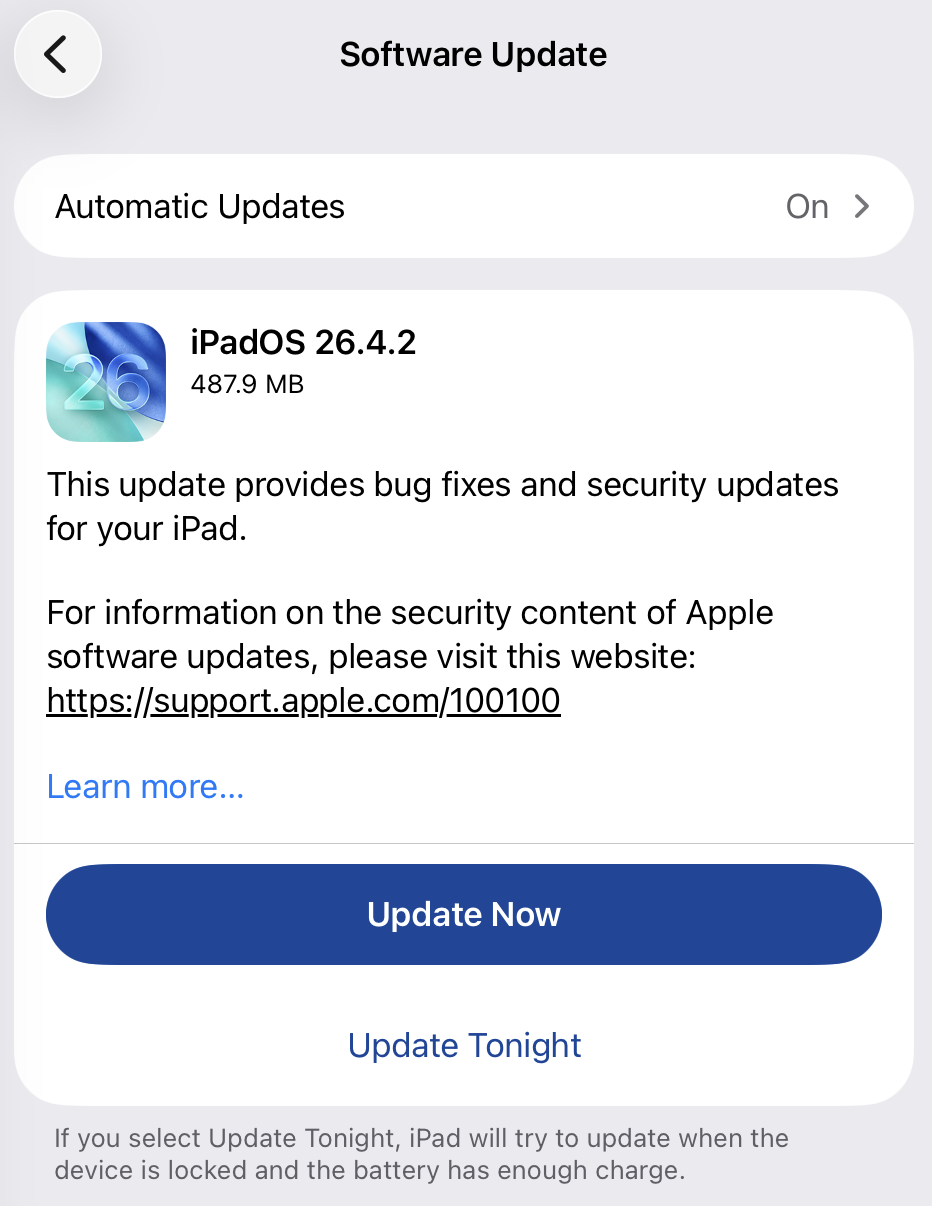
Update settings on iPad

Scammers know more about you than you think. 

Malwarebytes Mobile Security protects you from phishing, scam texts, malicious sites, and more. With real-time AI-powered Scam Guard built right in. 

Download for iOS → Download for Android → 

About the author

Was a Microsoft MVP in consumer security for 12 years running. Can speak four languages. Smells of rich mahogany and leather-bound books.