






Pushpaganda is the name researchers have given to an AI-assisted ad fraud, social engineering, and scareware operation targeting mobile users.
For most people, Pushpaganda starts as something that looks completely normal. For example, a recommended article in your Google Discover feed (the personalized news stream on your phone) or one of the suggested stories you see when you open a new Chrome tab. The operators behind this campaign use AI‑generated articles and images, plus aggressive SEO or paid placement, to get their content surfaced in those feeds so it feels like any other story about money, tech, or politics.
The topics are classic clickbait. You might see a card about a new tax refund, a government payout, a bank deposit, or some too‑good‑to‑be‑true gadget like a $100 phone with a “300MP camera.” On a small mobile screen, with a matching thumbnail and a headline tailored to your region, that’s exactly the kind of thing many people would reasonably tap.
Having tapped, you land on an attacker-controlled site that looks like a regular article page but wastes no time throwing up a browser prompt asking to send you notifications. Many users have been trained by years of pop-ups to click “Allow” just to get it out of the way, especially if the page claims you need to click “Allow” to continue reading or see the offer.
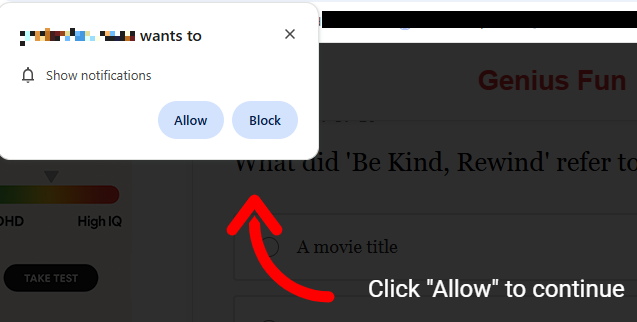
Unfortunately, with that single tap, the site now has permission to push messages straight to your Android or desktop, where they sit alongside emails, chats, and real alerts from banks or government apps. Because the notifications don’t behave like traditional pop‑ups and can bypass normal ad‑blocking, many people don’t realize they’ve effectively subscribed to a scam channel.
The result is a stream of alarming notifications that seem to come out of nowhere and have little to do with the original site you visited, so the link between the site and the notifications is usually lost on the victims. Clicking those notifications rarely leads to what they promise. Instead, you’re pushed to another domain in the same network, which may ask for even more permissions, personal data, or try to funnel you into financial scams. Over time, this can expose you to fake investment schemes, fraudulent “tech support” numbers, or pages pushing questionable subscriptions.
All of this costs you time and attention, and sometimes money. At best, you end up with a polluted notification tray full of fake alerts that make it harder to spot something genuinely important. At worst, you follow one scare message too far, hand over personal details or payment information, and become the victim of fraud, identity theft, or aggressive subscription traps. And even if you never click again, your browser is still quietly loading pages and ads you never asked for.
How to stay safe from Pushpaganda
Treat “Allow notifications” prompts as potential traps, especially on sites you’ve never heard of that you reached via a feed or a search result. And even more so if they come with additional, misleading, instructions.
Besides that you should:
- Be skeptical of sensational cards in your Discover feed that promise sudden cash, miracle devices, or dramatic political revelations.
- Don’t trust buttons that scream “Apply now,” “Claim now,” or “Join WhatsApp” on pages that already feel pushy or poorly written.
- Keep your browser, operating system (OS), and other important software up to date.
- Use a security app that can block malicious websites and scam pages before they load.
Scammers know more about you than you think.
Malwarebytes Mobile Security protects you from phishing, scam texts, malicious sites, and more. With real-time AI-powered Scam Guard built right in.