
惯性聚合 高效追踪和阅读你感兴趣的博客、新闻、科技资讯
阅读原文 在惯性聚合中打开

推荐订阅源

雷峰网
雷峰网
博客园 - 聂微东
酷 壳 – CoolShell
酷 壳 – CoolShell
宝玉的分享
宝玉的分享
奇客Solidot–传递最新科技情报
奇客Solidot–传递最新科技情报
罗磊的独立博客
Hugging Face - Blog
Hugging Face - Blog
T
Tailwind CSS Blog
OSCHINA 社区最新新闻
OSCHINA 社区最新新闻
IT之家
IT之家
博客园_首页
博客园 - 三生石上(FineUI控件)
博客园 - 叶小钗
Apple Machine Learning Research
freeCodeCamp Programming Tutorials: Python, JavaScript, Git & More
量子位
钛媒体:引领未来商业与生活新知
钛媒体:引领未来商业与生活新知
人人都是产品经理
人人都是产品经理
美团技术团队
小众软件
小众软件
Jina AI
Jina AI
S
SegmentFault 最新的问题
博客园 - Franky
让小产品的独立变现更简单 - ezindie.com

Malwarebytes

Carnival confirms data breach impacting nearly 6 million Kali365 phishing kit bypasses MFA and steals Microsoft logins Company bragged phone mics could listen to conversations. They couldn’t. Fake LinkedIn emails abuse Adobe to track victims Fake software on GitHub and SourceForge distribute Deno RAT 700+ education and tech websites hijacked in huge ClickFix malware campaign Scammers pretending to be Microsoft had help from US executives A week in security (May 18 – May 24) Update Chrome now: Critical bugs could let attackers run code Microsoft Defender vulnerabilities are being exploited in the wild TikTok, YouTube, and Roblox face scrutiny, but age gates won’t fix child safety Catch spyware in the act with Windows Webcam Monitoring Researchers left AI agents alone in a virtual town and watched it all unravel Fake malware-signing service Fox Tempest dismantled by Microsoft Firefox 151 packs big privacy upgrades into a small update Biometrics, diagnoses, and bank details exposed in major healthcare breach Facebook scam promises cheap Aldi meat boxes, steals payment info instead YouTube wants your face to fight deepfakes Microsoft is changing Edge’s plaintext password behavior A week in security (May 11 – May 17) AI is distorting the Holocaust (Lock and Code S07E10) Attackers replaced JDownloader installer downloads with malware Meta’s confusing new approach to chat privacy Why Malwarebytes blocks some Yahoo Mail redirects Deepfake sextortion forces schools to remove student photos from websites Texas sued Netflix over claims it secretly collected and sold users’ data May 2026 Patch Tuesday: no zero-days but plenty to fix Fake Claude search results lure Mac users into ClickFix attack 1 in 8 employees have sold company logins or know someone who has Stolen Canvas data was “returned” after hacker agreement, Instructure says
Browser Guard gets even better with Access Control
Malwarebytes Labs · 2026-04-16 · via Malwarebytes

Have you ever been on a website when a pop-up suddenly asked for access to your camera, microphone, location, or notifications? Whether you clicked “allow,” dismissed it, or just wondered why it appeared, those permission requests aren’t always harmless. Some sites can abuse those permissions.

With Access Control, a new feature in Browser Guard, you decide exactly which websites can access your device and stop the rest. That means you choose which websites can: 

  • Use your camera
  • Use your microphone
  • Access your location
  • Send you notifications 

Further, not only can you control which websites have access to your devices, but you can also block websites or even require those specific sites to request permission every single time they try to gain access to your machines. You can always allow trusted sites to access your camera or location while blocking everything else.  

Access Control is now available for Malwarebytes subscribers using Chrome and Edge browsers on a Windows device. 

How to use Access Control 

We designed Access Control to be both powerful and simple because we know every moment you spend getting set up is another moment you’re left unprotected.  

How to use Access Control:  

  • Install/Open Browser Guard: Click the Malwarebytes icon in your browser’s header 
  • Access Dashboard: Click the Dashboard tab at the bottom of the extension panel. 
  • Navigate to Access Control: On the left sidebar of the web page, select Access Control. 
  • Manage Permissions: See visited websites, click “Allow” to enable or disable Malwarebytes’ ability to see visited sites.
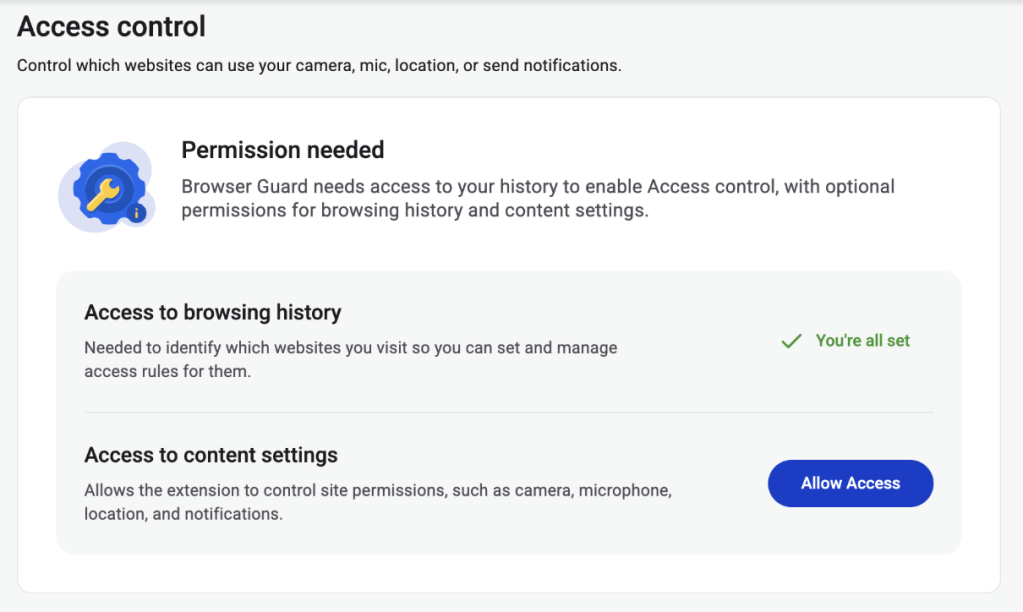
  • Access Control requires some access to your browsing to protect you online
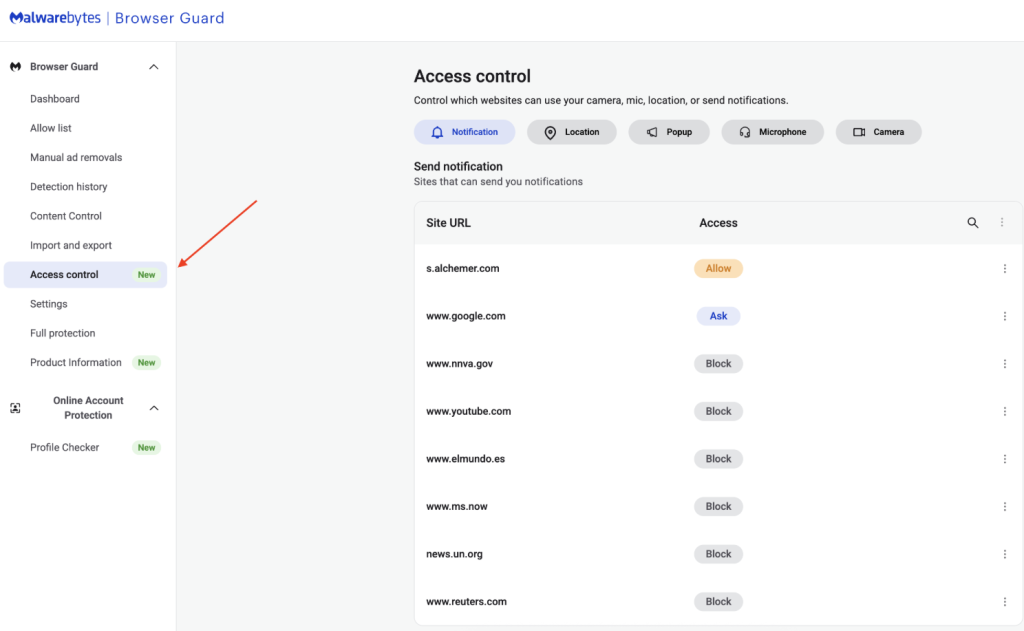
  • Access Control lets you choose individual sites to block and allow

This feature is rolling out in beta first, so you might see improvements and updates as we refine it. Currently, the feature works across Chrome and Edge, but will roll out to other browsers soon.  

Access Control is another step toward making privacy simple and accessible.  Not a subscriber yet? Check out  Malwarebytes’ plans today to unlock this feature and more. 


We don’t just report on threats—we remove them

Cybersecurity risks should never spread beyond a headline. Keep threats off your devices by downloading Malwarebytes today.