


惯性聚合 高效追踪和阅读你感兴趣的博客、新闻、科技资讯
阅读原文 在惯性聚合中打开

推荐订阅源

大猫的无限游戏
大猫的无限游戏
月光博客
月光博客
博客园 - Franky
博客园 - 三生石上(FineUI控件)
爱范儿
爱范儿
博客园 - 司徒正美
博客园 - 叶小钗
Apple Machine Learning Research
美团技术团队
OSCHINA 社区最新新闻
OSCHINA 社区最新新闻
The Cloudflare Blog
B
Blog RSS Feed
阮一峰的网络日志
阮一峰的网络日志
宝玉的分享
宝玉的分享
V
Visual Studio Blog
奇客Solidot–传递最新科技情报
奇客Solidot–传递最新科技情报
IT之家
IT之家
博客园_首页
S
SegmentFault 最新的问题
A
About on SuperTechFans
Blog — PlanetScale
Blog — PlanetScale
GbyAI
GbyAI
H
Help Net Security
MongoDB | Blog
MongoDB | Blog

Malwarebytes

Carnival confirms data breach impacting nearly 6 million Kali365 phishing kit bypasses MFA and steals Microsoft logins Company bragged phone mics could listen to conversations. They couldn’t. Fake LinkedIn emails abuse Adobe to track victims Fake software on GitHub and SourceForge distribute Deno RAT 700+ education and tech websites hijacked in huge ClickFix malware campaign Scammers pretending to be Microsoft had help from US executives A week in security (May 18 – May 24) Update Chrome now: Critical bugs could let attackers run code Microsoft Defender vulnerabilities are being exploited in the wild TikTok, YouTube, and Roblox face scrutiny, but age gates won’t fix child safety Catch spyware in the act with Windows Webcam Monitoring Researchers left AI agents alone in a virtual town and watched it all unravel Fake malware-signing service Fox Tempest dismantled by Microsoft Firefox 151 packs big privacy upgrades into a small update Biometrics, diagnoses, and bank details exposed in major healthcare breach Facebook scam promises cheap Aldi meat boxes, steals payment info instead YouTube wants your face to fight deepfakes Microsoft is changing Edge’s plaintext password behavior A week in security (May 11 – May 17) AI is distorting the Holocaust (Lock and Code S07E10) Attackers replaced JDownloader installer downloads with malware Meta’s confusing new approach to chat privacy Why Malwarebytes blocks some Yahoo Mail redirects Deepfake sextortion forces schools to remove student photos from websites Texas sued Netflix over claims it secretly collected and sold users’ data May 2026 Patch Tuesday: no zero-days but plenty to fix Fake Claude search results lure Mac users into ClickFix attack 1 in 8 employees have sold company logins or know someone who has Stolen Canvas data was “returned” after hacker agreement, Instructure says
“iCloud storage is full” scam is back, and now it wants y...
Pieter Arntz · 2026-04-16 · via Malwarebytes

A few months ago, we reported on a fake cloud storage alert that triggered a redirect chain to an app that has since been delisted from the Apple Store.

The threat of losing your photos is a powerful lure, so scammers are now using it to steal personal and financial details.

The Guardian warns about an iCloud-themed campaign that start with a few “your iCloud storage is full’ messages, then escalates to threats. If you don’t respond or take action, the emails claim your data will be wiped on a specific date.

US Consumer Affairs has urged users not to click any links and to contact Apple directly if they receive such messages.

The deadline in the emails is never far away, usually just two days. No scammer ever wants you to think things through before you act, so there is always time pressure.

We’ve seen these emails in English and Spanish. Oddly, the monthly rate is set at 99 pence or 99 euro cents respectively.

The 0.99 seems to be the magic number. In reality, scammers don’t care about the payment. What they want is for you fill out the form on their phishing site.
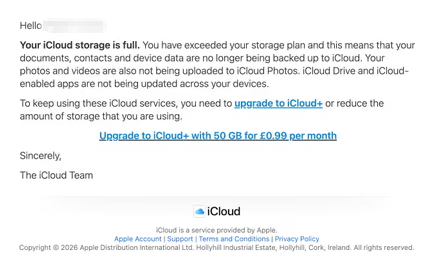
Email saying you must upgrade to iCloud+ or lose your photos

The screenshot above is just one of many examples. There are plenty of variations, but they all follow the same them: make a small payment to stop the files in your iCloud storage from being deleted.

The websites these emails link to also vary, but they all ask for personal and payment details to complete that payment.

How to stay safe

It’s worth remembering that Apple does notify users when their iCloud storage is nearing capacity, but those alerts appear within your device settings or as official system notifications. They don’t come through unsolicited text messages or emails with external links. If you need to check your storage, go directly to Settings on your device and review your iCloud usage.

So, to stay safe:

  • Always access your account through our official website.
  • Never share your password with anyone.
  • Never click on links in unsolicited emails without verifying with a trusted source.
  • Use an up-to-date, real-time anti-malware solution with a web protection component.
  • Do not engage with websites that attract visitors like this.

Pro tip: Malwarebytes Scam Guard would have helped you identify this email as a scam and provided advice on how to proceed.


Something feel off? Check it before you click.  

Malwarebytes Scam Guard helps you analyze suspicious links, texts, and screenshots instantly.  

Available with Malwarebytes Premium Security for all your devices, and in the Malwarebytes app for iOS and Android.  

Try it free → 

About the author

Was a Microsoft MVP in consumer security for 12 years running. Can speak four languages. Smells of rich mahogany and leather-bound books.