

惯性聚合 高效追踪和阅读你感兴趣的博客、新闻、科技资讯
阅读原文 在惯性聚合中打开

推荐订阅源

WordPress大学
WordPress大学
T
The Blog of Author Tim Ferriss
F
Fortinet All Blogs
让小产品的独立变现更简单 - ezindie.com
阮一峰的网络日志
阮一峰的网络日志
The GitHub Blog
The GitHub Blog
Y
Y Combinator Blog
MyScale Blog
MyScale Blog
雷峰网
雷峰网
博客园 - 叶小钗
奇客Solidot–传递最新科技情报
奇客Solidot–传递最新科技情报
OSCHINA 社区最新新闻
OSCHINA 社区最新新闻
GbyAI
GbyAI
Cyber Security Advisories - MS-ISAC
博客园 - 三生石上(FineUI控件)
云风的 BLOG
云风的 BLOG
V
V2EX
宝玉的分享
宝玉的分享
酷 壳 – CoolShell
酷 壳 – CoolShell
N
Netflix TechBlog - Medium
Vercel News
Vercel News
美团技术团队
人人都是产品经理
人人都是产品经理
The Cloudflare Blog

Malwarebytes

Carnival confirms data breach impacting nearly 6 million Kali365 phishing kit bypasses MFA and steals Microsoft logins Company bragged phone mics could listen to conversations. They couldn’t. Fake LinkedIn emails abuse Adobe to track victims Fake software on GitHub and SourceForge distribute Deno RAT 700+ education and tech websites hijacked in huge ClickFix malware campaign Scammers pretending to be Microsoft had help from US executives A week in security (May 18 – May 24) Update Chrome now: Critical bugs could let attackers run code Microsoft Defender vulnerabilities are being exploited in the wild TikTok, YouTube, and Roblox face scrutiny, but age gates won’t fix child safety Catch spyware in the act with Windows Webcam Monitoring Researchers left AI agents alone in a virtual town and watched it all unravel Fake malware-signing service Fox Tempest dismantled by Microsoft Firefox 151 packs big privacy upgrades into a small update Biometrics, diagnoses, and bank details exposed in major healthcare breach Facebook scam promises cheap Aldi meat boxes, steals payment info instead YouTube wants your face to fight deepfakes Microsoft is changing Edge’s plaintext password behavior A week in security (May 11 – May 17) AI is distorting the Holocaust (Lock and Code S07E10) Attackers replaced JDownloader installer downloads with malware Meta’s confusing new approach to chat privacy Why Malwarebytes blocks some Yahoo Mail redirects Deepfake sextortion forces schools to remove student photos from websites Texas sued Netflix over claims it secretly collected and sold users’ data May 2026 Patch Tuesday: no zero-days but plenty to fix Fake Claude search results lure Mac users into ClickFix attack 1 in 8 employees have sold company logins or know someone who has Stolen Canvas data was “returned” after hacker agreement, Instructure says
Update WhatsApp now: Two new flaws could expose you to ma...
2026-05-05 · via Malwarebytes

Meta has published a new security advisory for messaging app WhatsApp, announcing patches for two vulnerabilities.

WhatsApp has fixed two security flaws that could be abused to interfere with how media and attachments are handled on your device. There is no evidence that either bug has been exploited in the wild.

These bugs don’t automatically infect devices, but they lower the barrier for social engineering and could be chained with other vulnerabilities for more serious attacks.

Malicious messages

The first issue, tracked as CVE‑2026‑23866, affects how WhatsApp processes AI‑generated “rich response messages” that embed Instagram Reels. On affected iOS and Android versions, incomplete validation means a specially crafted message could cause the app to load media from an attacker‑controlled URL. In some cases, this could trigger operating system‑level custom URL scheme handlers.

In other words: a booby‑trapped message could prompt your device to open content from an untrusted source.

How to update WhatsApp for Android

You can easily update WhatsApp from the Google Play Store.

  1. Open the Google Play Store
  2. Search for WhatsApp Messenger
  3. Tap Update

Note: Updates may not be available immediately in all regions.

How to update WhatsApp on iOS

To update WhatsApp on iOS:

  • Open the App Store
  • Tap your profile icon
  • Scroll to find WhatsApp and tap Update

If it’s not listed, search for WhatsApp to check if an “Update” button is available.

Misleading filenames

The second bug, CVE‑2026‑23863, affects WhatsApp for Windows before version 2.3000.1032164386.258709.

In this case, WhatsApp did not correctly handle filenames containing embedded NUL bytes. This could allow a file to appear as a harmless type in the interface while actually being treated as an executable when opened. That’s a classic recipe for social engineering: “click the PDF,” but get an .exe file.

How to update WhatsApp for Windows

You can find your WhatsApp for Windows version number by clicking on your profile picture and selecting Help and feedback.
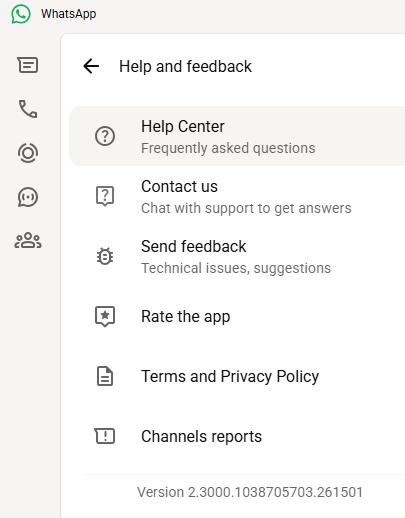
Version 2.3000.1038705703.261501

If your version number is earlier than 2.3000.1032164386.258709, update via the Microsoft Store:

  1. Click the Start menu and search for Microsoft Store to open it
  2. Click Library located at the bottom-left corner
  3. Find WhatsApp Desktop
  4. Click Get Updates or Update

Once installed, restart the app to apply the changes.

Automatic updates on Windows

My WhatsApp was already up to date because I have automatic updates turned on. Here’s how to turn it on:

  1. Click the Start menu and search for Microsoft Store to open it
  2. Select Profile (your account picture) > Settings
  3. Make sure App updates is toggled to On
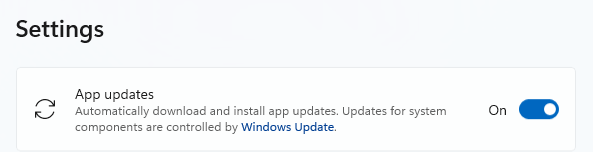
Auto updates on Windows

Scammers don’t need to hack you. They just need you to click once. 

Malwarebytes Identity Theft Protection catches suspicious activity before it becomes a problem.

About the author

Was a Microsoft MVP in consumer security for 12 years running. Can speak four languages. Smells of rich mahogany and leather-bound books.