




惯性聚合 高效追踪和阅读你感兴趣的博客、新闻、科技资讯
阅读原文 在惯性聚合中打开

推荐订阅源

IT之家
IT之家
NISL@THU
NISL@THU
The Hacker News
The Hacker News
C
CXSECURITY Database RSS Feed - CXSecurity.com
T
Tenable Blog
Forbes - Security
Forbes - Security
V2EX - 技术
V2EX - 技术
Webroot Blog
Webroot Blog
Schneier on Security
T
The Exploit Database - CXSecurity.com
T
Tor Project blog
C
Cisco Blogs
TaoSecurity Blog
TaoSecurity Blog
The Last Watchdog
The Last Watchdog
PCI Perspectives
PCI Perspectives
O
OpenAI News
C
Cyber Attacks, Cyber Crime and Cyber Security
K
KPMG report finds enterprise disconnect between AI and its ROI | CIO
cs.CL updates on arXiv.org
Google Online Security Blog
宝玉的分享
宝玉的分享
freeCodeCamp Programming Tutorials: Python, JavaScript, Git & More
量子位
D
Docker
AI
AI
Blog — PlanetScale
Blog — PlanetScale
S
Security @ Cisco Blogs
S
Schneier on Security
The GitHub Blog
The GitHub Blog
W
WeLiveSecurity
云风的 BLOG
云风的 BLOG
M
MIT News - Artificial intelligence
P
Privacy International News Feed
Cyber Security Advisories - MS-ISAC
H
Hackread – Cybersecurity News, Data Breaches, AI and More
B
Blog
C
Check Point Blog
A
About on SuperTechFans
D
Darknet – Hacking Tools, Hacker News & Cyber Security
cs.AI updates on arXiv.org
Application and Cybersecurity Blog
Engineering at Meta
Engineering at Meta
I
InfoQ
T
Threat Research - Cisco Blogs
Project Zero
Project Zero
Cloudbric
Cloudbric
MongoDB | Blog
MongoDB | Blog
Cisco Talos Blog
Cisco Talos Blog
L
Lohrmann on Cybersecurity
S
Securelist

Malwarebytes

Carnival confirms data breach impacting nearly 6 million Kali365 phishing kit bypasses MFA and steals Microsoft logins Company bragged phone mics could listen to conversations. They couldn’t. Fake LinkedIn emails abuse Adobe to track victims Fake software on GitHub and SourceForge distribute Deno RAT 700+ education and tech websites hijacked in huge ClickFix malware campaign Scammers pretending to be Microsoft had help from US executives A week in security (May 18 – May 24) Update Chrome now: Critical bugs could let attackers run code Microsoft Defender vulnerabilities are being exploited in the wild TikTok, YouTube, and Roblox face scrutiny, but age gates won’t fix child safety Catch spyware in the act with Windows Webcam Monitoring Researchers left AI agents alone in a virtual town and watched it all unravel Fake malware-signing service Fox Tempest dismantled by Microsoft Firefox 151 packs big privacy upgrades into a small update Biometrics, diagnoses, and bank details exposed in major healthcare breach Facebook scam promises cheap Aldi meat boxes, steals payment info instead YouTube wants your face to fight deepfakes Microsoft is changing Edge’s plaintext password behavior A week in security (May 11 – May 17) AI is distorting the Holocaust (Lock and Code S07E10) Attackers replaced JDownloader installer downloads with malware Meta’s confusing new approach to chat privacy Why Malwarebytes blocks some Yahoo Mail redirects Deepfake sextortion forces schools to remove student photos from websites Texas sued Netflix over claims it secretly collected and sold users’ data May 2026 Patch Tuesday: no zero-days but plenty to fix Fake Claude search results lure Mac users into ClickFix attack 1 in 8 employees have sold company logins or know someone who has Stolen Canvas data was “returned” after hacker agreement, Instructure says Yarbo responds to robot flaws that could mow down their owners A week in security (May 4 – May 10) Microsoft says Edge’s plaintext password behavior is “by design” ShinyHunters escalates Canvas attacks with school login defacements Massive AI investment scam network spans 15,500 domains If a fake moustache can fool age checks, is the Online Safety Act working? Google Chrome’s silent 4GB AI download problem Attackers adopt JavaScript runtime Bun to spread NWHStealer Millions of students’ personal data stolen in major education breach Update WhatsApp now: Two new flaws could expose you to malicious files Cyberattacks are raising your prices (Lock and Code S07E09) Thousands of Facebook accounts stolen by phishing emails sent through Google The 2026 World Cup scam economy is already running before the first whistle A week in security (April 27 – May 3) 3 easy-to-miss cybersecurity risks for small businesses Actively exploited cPanel bug exposes millions of websites to takeover More PayPal emails hijacked to deliver tech support scams Hackers stole hundreds of thousands of Roblox accounts: Here’s what to do Researchers built a chatbot that only knows the world before 1931 Microsoft won’t patch PhantomRPC: Feature or bug? Scam-checking just got a lot easier: Malwarebytes is now in Claude Fake CAPTCHA scam turns a quick click into a costly phone bill Chinese engineer stole US military and NASA software for years A week in security (April 20 – April 26) Medical data of 500,000 UK volunteers listed for sale on Alibaba How cyberattacks on companies affect everyone Apple fixes iOS bug that kept deleted notifications, including chat previews Roblox clamps down on chats and age checks as legal pressure builds Malicious trading website drops malware that hands your browser to attackers Researcher claims Claude Desktop installs “spyware” on macOS Fake Google Antigravity downloads are stealing accounts in minutes Real Apple notifications are being used to drive tech support scams Android 17 ends all-or-nothing access to your contacts Big Tech can stop scams. They just don’t (Lock and Code S07E08) Mythos: An AI tool too powerful for public release A week in security (April 13 – April 19) This old-school scam is still working “Your shipment has arrived” email hides remote access software Browser Guard gets even better with Access Control “iCloud storage is full” scam is back, and now it wants your payment details A fake Slack download is giving attackers a hidden desktop on your machine Booking.com breach gives scammers what they need to target guests AI clickbait can turn your notifications into a scam feed Fake YouTube copyright notices can steal your Google login From fake Proton VPN sites to gaming mods, this Windows infostealer is everywhere April Patch Tuesday fixes two zero-days, including one under active attack Credit Resources Vault: Why this credit email set off our scam alarms Omnistealer uses the blockchain to steal everything it can ChatGPT under scrutiny as Florida investigates campus shooting Simply opening a PDF could trigger this Adobe Reader zero-day A week in security (April 6 – April 12) Fake Claude site installs malware that gives attackers access to your computer ClickFix finds a new way to infect Macs Scammers pose as Amazon support to steal your account NSFW app leak exposes 70,000 prompts linked to individual users 30,000 private Facebook images allegedly downloaded by Meta employee This fake Windows support website delivers password-stealing malware Your extensions leak clues about you, so we made sure Browser Guard doesn’t Russian hacking group targets home and small office routers to spy on users Timeshare owners warned to watch out for cartel-linked scams Traffic violation scams swap links for QR codes to steal your card details Support platform breach exposes Hims & Hers customer data A week in security (March 30 – April 5) Killer robots are here. Now what? (Lock and Code S07E07) That dream job offer from Coca-Cola or Ferrari? It’s a trap for your passwords Blocking children from social media is a badly executed good idea Malwarebytes Privacy VPN receives full third-party audit Wikipedia’s AI agent row likely just the beginning of the bot-ocalypse WhatsApp on Windows users targeted in new campaign, warns Microsoft Why we’re still not doing April Fools’ Day
Apple expands “DarkSword” patches to iOS 18.7.7
2026-04-02 · via Malwarebytes

Apple widened its latest iOS 18 security update to cover far more iPhones and iPads, specifically to stop real‑world DarkSword attacks that can compromise a device from a single website visit.

After researchers published their findings about the DarkSword attacks and an exploit kit abusing the vulnerabilities appeared on GitHub, Apple quietly updated its March 24 security bulletin.

Apple first released iOS/iPadOS 18.7.7 on March 24 to a small set of older devices (iPhone XS/XS Max/XR and 7th‑gen iPad), fixing several vulnerabilities that are part of the DarkSword exploit chain. Newer devices that had the option to upgrade to iOS/iPadOS 26 had stopped receiving iOS 18 point updates, leaving a large group of users effectively stranded on vulnerable 18.x builds.

DarkSword is a full‑chain iOS exploit kit that strings together six vulnerabilities in WebKit, Safari, the dynamic loader, and the kernel to go from a browser visiting a malicious website to full device compromise. The chain has been observed in the wild since at least November 2025 in campaigns set up by commercial spyware vendors and state‑sponsored actors.

There is no need to tap a link in Messages or approve an install prompt. Just loading a compromised site or even a malicious advertisement inside Safari is enough to trigger the exploit chain if your device is still missing the relevant patches.

In this case, attackers combined six vulnerabilities, some already fixed, some still zero‑day at the time, into a cyber-weapon that could turn a routine website visit into a full device compromise and mass data theft. By the time the exploit chain’s details leaked and proof‑of‑concept code hit GitHub, hundreds of millions of devices were potentially exposed, and even “ordinary” users with no reason to fear state surveillance suddenly had to worry about their photos, chats, and crypto wallets.

How to update your iPhone or iPad

For years, many iPhone users have treated updates as a trade‑off between “features I don’t care about” and “battery life I do care about.” DarkSword, and Apple’s decision to reopen iOS 18 updates to more devices, is a reminder that there’s a third factor: silently accumulating risk.

For iOS and iPadOS users, here’s how to check if you’re using the latest software version:

  • Go to Settings > General > Software Update. You will see if there are updates available and be guided through installing them.
  • Turn on Automatic Updates if you haven’t already—you’ll find it on the same screen.

If you prefer, and many people do, you can stay on iOS 18 by using the Also Available option in Software Update and explicitly choosing iOS 18.7.7 instead of 26.4.

Exact steps on the iPhone

  1. Open Settings → General → Software Update.
  2. Wait for the page to load; you’ll see iOS 26.4 as the main, highlighted update at the top (assuming your device supports it).
  3. Scroll down on that same screen until you see a section called “Also Available” showing iOS 18.7.7.
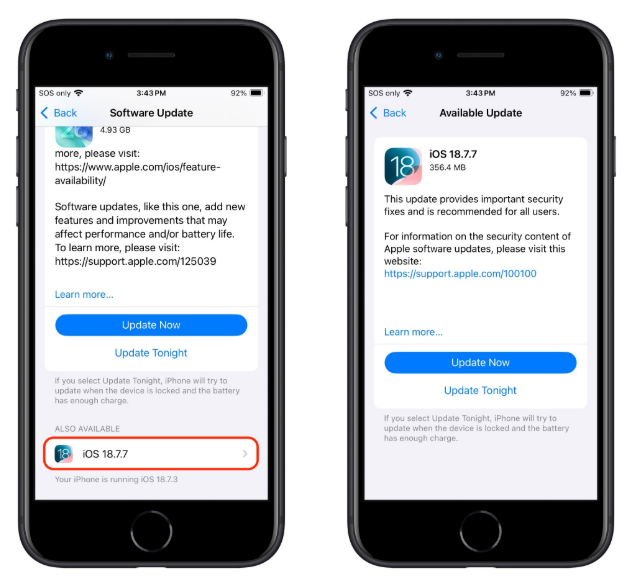
    also available updates section
    Image courtesy of TidBITS
  4. Tap iOS 18.7.7, then choose Download and Install to apply that update instead of 26.4.
  5. Make sure you do not tap the big “Upgrade to iOS 26.4” button if you want to remain on 18.x.

Other advice to stay safe

If you have reason to believe you’re a potential target for attacks of this nature (journalists, activists, or people that have access to sensitive data) it is advisable to enable Lockdown Mode:

  1. Open the Settings app.
  2. Tap Privacy & Security.
  3. Scroll down, tap Lockdown Mode, then tap Turn On Lockdown Mode.
  4. Read the presented information and tap Turn On Lockdown Mode.
  5. Tap Turn On & Restart.
  6. Enter your device passcode when prompted.

Do inform yourself about the consequences of turning on Lockdown Mode. It makes your device a lot less user-friendly, but it has proven effective against highly targeted attacks.

More general tips:

  • Use up-to-date, real-time anti-malware protection for your device to block malicious websites where possible.
  • Avoid following links sent in unsolicited messages, especially for services like Snapchat, crypto exchanges, banking, or email.
  • Use content blockers (for example Malwarebytes Browser Guard) in Safari to reduce exposure to malicious content (though they are not a silver bullet for zero‑days).
  • Move high‑value crypto assets to hardware wallets or dedicated devices, and use mobile wallets only for smaller amounts.
  • Use a password manager with strong authentication, and turn on extra security settings like Face ID/Touch ID and avoid auto‑filling high‑risk credentials.
  • Enable multi-factor authentication (FIDO2 security keys or app‑based 2FA) on exchanges and financial accounts, so stolen passwords alone are not enough to plunder your accounts.
  • Regularly review app permissions and revoke access to sensitive data (Location, Photos, Contacts, Microphone, Camera, Health) revoke where unnecessary.

Scammers know more about you than you think. 

Malwarebytes Mobile Security protects you from phishing, scam texts, malicious sites, and more. With real-time AI-powered Scam Guard built right in. 

Download for iOS → Download for Android → 

About the author

Was a Microsoft MVP in consumer security for 12 years running. Can speak four languages. Smells of rich mahogany and leather-bound books.