
惯性聚合 高效追踪和阅读你感兴趣的博客、新闻、科技资讯
阅读原文 在惯性聚合中打开

推荐订阅源

S
SegmentFault 最新的问题
博客园 - 三生石上(FineUI控件)
WordPress大学
WordPress大学
博客园 - 【当耐特】
月光博客
月光博客
Vercel News
Vercel News
D
Docker
I
InfoQ
Apple Machine Learning Research
博客园 - 叶小钗
MongoDB | Blog
MongoDB | Blog
GbyAI
GbyAI
有赞技术团队
有赞技术团队
雷峰网
雷峰网
博客园 - 聂微东
小众软件
小众软件
Y
Y Combinator Blog
腾讯CDC
L
LangChain Blog
The GitHub Blog
The GitHub Blog
宝玉的分享
宝玉的分享
Stack Overflow Blog
Stack Overflow Blog
大猫的无限游戏
大猫的无限游戏
T
The Blog of Author Tim Ferriss

Malwarebytes

Kali365 phishing kit bypasses MFA and steals Microsoft logins Company bragged phone mics could listen to conversations. They couldn’t. Fake LinkedIn emails abuse Adobe to track victims Fake software on GitHub and SourceForge distribute Deno RAT 700+ education and tech websites hijacked in huge ClickFix malware campaign Scammers pretending to be Microsoft had help from US executives A week in security (May 18 – May 24) Update Chrome now: Critical bugs could let attackers run code Microsoft Defender vulnerabilities are being exploited in the wild TikTok, YouTube, and Roblox face scrutiny, but age gates won’t fix child safety Catch spyware in the act with Windows Webcam Monitoring Researchers left AI agents alone in a virtual town and watched it all unravel Fake malware-signing service Fox Tempest dismantled by Microsoft Firefox 151 packs big privacy upgrades into a small update Biometrics, diagnoses, and bank details exposed in major healthcare breach Facebook scam promises cheap Aldi meat boxes, steals payment info instead YouTube wants your face to fight deepfakes Microsoft is changing Edge’s plaintext password behavior A week in security (May 11 – May 17) AI is distorting the Holocaust (Lock and Code S07E10) Attackers replaced JDownloader installer downloads with malware Meta’s confusing new approach to chat privacy Why Malwarebytes blocks some Yahoo Mail redirects Deepfake sextortion forces schools to remove student photos from websites Texas sued Netflix over claims it secretly collected and sold users’ data May 2026 Patch Tuesday: no zero-days but plenty to fix Fake Claude search results lure Mac users into ClickFix attack 1 in 8 employees have sold company logins or know someone who has Stolen Canvas data was “returned” after hacker agreement, Instructure says Yarbo responds to robot flaws that could mow down their owners
Update Chrome: Google patches actively exploited vulnerab...
Pieter Arntz · 2026-06-09 · via Malwarebytes

Google has issued updates for the Chrome browser, patching a number of high‑severity vulnerabilities. 

The update includes fixes for 74 vulnerabilities, including one that is being actively exploited in the wild.

The stable channel has been updated to 149.0.7827.102/.103 for Windows/Mac, and 149.0.7827.102 for Linux, which will roll out over the coming weeks.

How to update Chrome

If you don’t want to wait for the rollout to reach you, manually updating is easy.

The easiest option is to allow Chrome to update automatically. But you can end up lagging behind on updates if you never close your browser or if something goes wrong, such as an extension preventing the update.

To update manually, click the More menu (three dots), then go to Settings > About Chrome. If an update is available, Chrome will start downloading it automatically. Restart Chrome to complete the update, and you’ll be protected against these vulnerabilities.
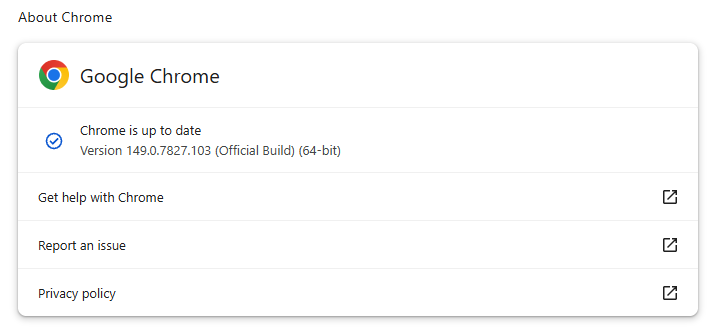
Chrome 149.0.7827.102/103 is up to date on Windows and Mac

You can also find step-by-step instructions in our guide to how to update Chrome on every operating system.

Technical details

The vulnerability that Google says is being exploited in the wild is tracked as CVE-2026-11645.

Google describes it as:

“Out of bounds read and write in V8 in Google Chrome prior to 149.0.7827.103 allowed a remote attacker to execute arbitrary code inside a sandbox via a crafted HTML page.”

This means this flaw was found in Chrome’s V8 engine—the part of Chrome (and other Chromium-based browsers) that runs JavaScript.

Such a flaw allows a program to read or write outside the memory boundaries it is supposed to use, enabling attackers to manipulate other areas of memory allocated to more critical functions. Attackers may be able to place malicious code in memory and trick the system into running it.

In this case, the vulnerability could be triggered when V8 processes specially crafted HTML content, such as a malicious website.

The phrase “inside a sandbox” means the malicious code would run in a restricted, sealed-off environment rather than directly on your whole computer. An attacker’s code is constrained to the browser, which lowers the impact compared with code running outside the sandbox. However, attackers often chain multiple vulnerabilities together to achieve more serious compromises. So, the phrase is a security limiter, not a reassurance that the bug is harmless.

The update also includes some new features, like the ability to sign PDF forms without using an extension.


Stop threats before they can do any harm.

Malwarebytes Browser Guard blocks phishing pages and malicious sites automatically. Free, one click to install. Add it to your browser →

About the author

Was a Microsoft MVP in consumer security for 12 years running. Can speak four languages. Smells of rich mahogany and leather-bound books.