
惯性聚合 高效追踪和阅读你感兴趣的博客、新闻、科技资讯
阅读原文 在惯性聚合中打开

推荐订阅源

aimingoo的专栏
aimingoo的专栏
V
V2EX
G
Google Developers Blog
F
Full Disclosure
Martin Fowler
Martin Fowler
宝玉的分享
宝玉的分享
H
Hacker News: Front Page
Exploit-DB.com RSS Feed
NISL@THU
NISL@THU
G
GRAHAM CLULEY
V
Vulnerabilities – Threatpost
Hacker News - Newest:
Hacker News - Newest: "LLM"
A
About on SuperTechFans
The Cloudflare Blog
C
Cisco Blogs
D
DataBreaches.Net
Threat Intelligence Blog | Flashpoint
Vercel News
Vercel News
P
Privacy International News Feed
Microsoft Security Blog
Help Net Security
Help Net Security
Recorded Future
Recorded Future
PCI Perspectives
PCI Perspectives
S
Schneier on Security
AI
AI
N
News | PayPal Newsroom
雷峰网
雷峰网
C
Cyber Attacks, Cyber Crime and Cyber Security
P
Proofpoint News Feed
The Last Watchdog
The Last Watchdog
L
LINUX DO - 最新话题
Hugging Face - Blog
Hugging Face - Blog
Apple Machine Learning Research
Schneier on Security
S
Securelist
云风的 BLOG
云风的 BLOG
Stack Overflow Blog
Stack Overflow Blog
博客园_首页
AWS News Blog
AWS News Blog
TaoSecurity Blog
TaoSecurity Blog
OSCHINA 社区最新新闻
OSCHINA 社区最新新闻
Recent Commits to openclaw:main
博客园 - 三生石上(FineUI控件)
C
CXSECURITY Database RSS Feed - CXSecurity.com
K
KPMG report finds enterprise disconnect between AI and its ROI | CIO
Cloudbric
Cloudbric
C
Cybersecurity and Infrastructure Security Agency CISA
Project Zero
Project Zero
C
Check Point Blog
S
Security Affairs

Malwarebytes

Kali365 phishing kit bypasses MFA and steals Microsoft logins Company bragged phone mics could listen to conversations. They couldn’t. Fake LinkedIn emails abuse Adobe to track victims Fake software on GitHub and SourceForge distribute Deno RAT 700+ education and tech websites hijacked in huge ClickFix malware campaign Scammers pretending to be Microsoft had help from US executives A week in security (May 18 – May 24) Update Chrome now: Critical bugs could let attackers run code Microsoft Defender vulnerabilities are being exploited in the wild TikTok, YouTube, and Roblox face scrutiny, but age gates won’t fix child safety Catch spyware in the act with Windows Webcam Monitoring Researchers left AI agents alone in a virtual town and watched it all unravel Fake malware-signing service Fox Tempest dismantled by Microsoft Firefox 151 packs big privacy upgrades into a small update Biometrics, diagnoses, and bank details exposed in major healthcare breach Facebook scam promises cheap Aldi meat boxes, steals payment info instead YouTube wants your face to fight deepfakes Microsoft is changing Edge’s plaintext password behavior A week in security (May 11 – May 17) AI is distorting the Holocaust (Lock and Code S07E10) Attackers replaced JDownloader installer downloads with malware Meta’s confusing new approach to chat privacy Why Malwarebytes blocks some Yahoo Mail redirects Deepfake sextortion forces schools to remove student photos from websites Texas sued Netflix over claims it secretly collected and sold users’ data May 2026 Patch Tuesday: no zero-days but plenty to fix Fake Claude search results lure Mac users into ClickFix attack 1 in 8 employees have sold company logins or know someone who has Stolen Canvas data was “returned” after hacker agreement, Instructure says Yarbo responds to robot flaws that could mow down their owners A week in security (May 4 – May 10) Microsoft says Edge’s plaintext password behavior is “by design” ShinyHunters escalates Canvas attacks with school login defacements Massive AI investment scam network spans 15,500 domains If a fake moustache can fool age checks, is the Online Safety Act working? Google Chrome’s silent 4GB AI download problem Attackers adopt JavaScript runtime Bun to spread NWHStealer Millions of students’ personal data stolen in major education breach Update WhatsApp now: Two new flaws could expose you to malicious files Cyberattacks are raising your prices (Lock and Code S07E09) Thousands of Facebook accounts stolen by phishing emails sent through Google The 2026 World Cup scam economy is already running before the first whistle A week in security (April 27 – May 3) 3 easy-to-miss cybersecurity risks for small businesses Actively exploited cPanel bug exposes millions of websites to takeover More PayPal emails hijacked to deliver tech support scams Hackers stole hundreds of thousands of Roblox accounts: Here’s what to do Researchers built a chatbot that only knows the world before 1931 Microsoft won’t patch PhantomRPC: Feature or bug? Scam-checking just got a lot easier: Malwarebytes is now in Claude Fake CAPTCHA scam turns a quick click into a costly phone bill Chinese engineer stole US military and NASA software for years A week in security (April 20 – April 26) Medical data of 500,000 UK volunteers listed for sale on Alibaba How cyberattacks on companies affect everyone Apple fixes iOS bug that kept deleted notifications, including chat previews Roblox clamps down on chats and age checks as legal pressure builds Malicious trading website drops malware that hands your browser to attackers Researcher claims Claude Desktop installs “spyware” on macOS Fake Google Antigravity downloads are stealing accounts in minutes Real Apple notifications are being used to drive tech support scams Android 17 ends all-or-nothing access to your contacts Big Tech can stop scams. They just don’t (Lock and Code S07E08) Mythos: An AI tool too powerful for public release A week in security (April 13 – April 19) This old-school scam is still working “Your shipment has arrived” email hides remote access software Browser Guard gets even better with Access Control “iCloud storage is full” scam is back, and now it wants your payment details A fake Slack download is giving attackers a hidden desktop on your machine Booking.com breach gives scammers what they need to target guests AI clickbait can turn your notifications into a scam feed Fake YouTube copyright notices can steal your Google login From fake Proton VPN sites to gaming mods, this Windows infostealer is everywhere April Patch Tuesday fixes two zero-days, including one under active attack Credit Resources Vault: Why this credit email set off our scam alarms Omnistealer uses the blockchain to steal everything it can ChatGPT under scrutiny as Florida investigates campus shooting Simply opening a PDF could trigger this Adobe Reader zero-day A week in security (April 6 – April 12) Fake Claude site installs malware that gives attackers access to your computer ClickFix finds a new way to infect Macs Scammers pose as Amazon support to steal your account NSFW app leak exposes 70,000 prompts linked to individual users 30,000 private Facebook images allegedly downloaded by Meta employee This fake Windows support website delivers password-stealing malware Your extensions leak clues about you, so we made sure Browser Guard doesn’t Russian hacking group targets home and small office routers to spy on users Timeshare owners warned to watch out for cartel-linked scams Traffic violation scams swap links for QR codes to steal your card details Support platform breach exposes Hims & Hers customer data A week in security (March 30 – April 5) Killer robots are here. Now what? (Lock and Code S07E07) That dream job offer from Coca-Cola or Ferrari? It’s a trap for your passwords Blocking children from social media is a badly executed good idea Apple expands “DarkSword” patches to iOS 18.7.7 Malwarebytes Privacy VPN receives full third-party audit Wikipedia’s AI agent row likely just the beginning of the bot-ocalypse WhatsApp on Windows users targeted in new campaign, warns Microsoft Why we’re still not doing April Fools’ Day
Fake domain renewal emails trick website owners into paying scammers
Stefan Dasic · 2026-06-25 · via Malwarebytes

You receive an email warning that your website’s domain name is about to expire. Renew now, it says, or your website and email could stop working. The link opens a professional-looking page that already knows your domain name, displays your registrar and expiry date, and starts a countdown timer.

It feels urgent and personal, so it feels real.

The site, branded Renovarix, doesn’t renew domains. Instead, it pushes visitors through a series of pages that collect personal information and eventually payment details.
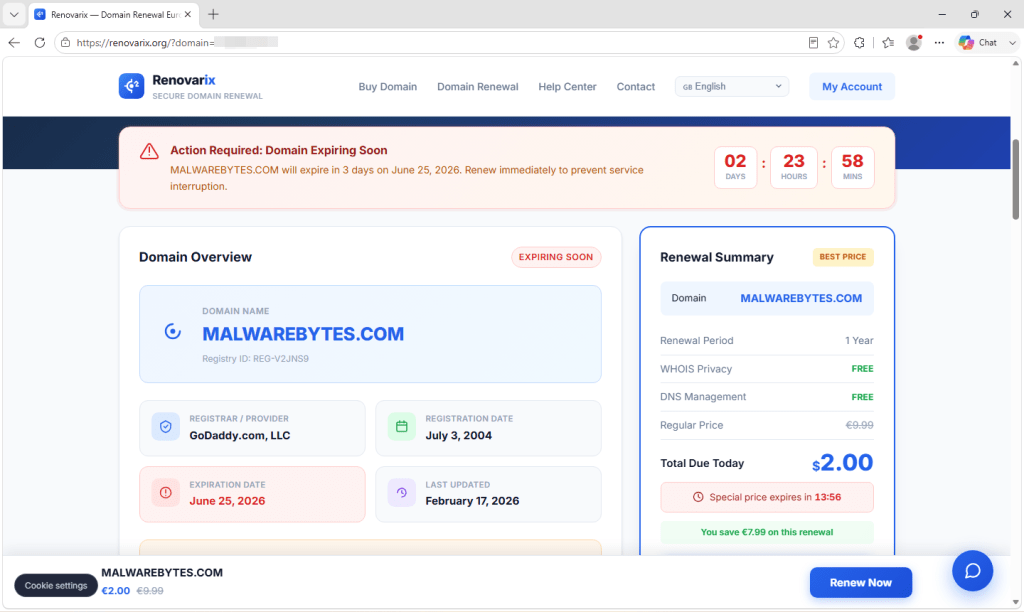
Fake renewal domain

How the scam works

Domain names really do expire, and losing one can be a serious problem. For many people and businesses, a domain is more than a web address. It’s your brand, your email, your search rankings, and the name customers type in when they want to find you. If it lapses, your website and email can stop working. If someone else registers it before you get it back, recovery can be difficult or impossible. That’s a lot to lose, and scammers know it.

This scam takes advantage of that fear with a convincing fake renewal process.

The email and website are fake. The “live registry data” is only partly real. Clicking Renew Now doesn’t renew your domain. Instead, it sends you through a chain of websites that first collect your name, address, phone number, and email, then eventually ask for payment details.

If you deleted the email, there’s nothing to worry about. If you clicked the link, simply close the page. If you entered personal or payment information, follow the guidance above.

The email that starts it

The scam begins with an email, although the presentation varies. Some are crude: a plain “Domain Renewal Reminder” from a generic “Domain Services Inc.” with an invoice number and an amount due.
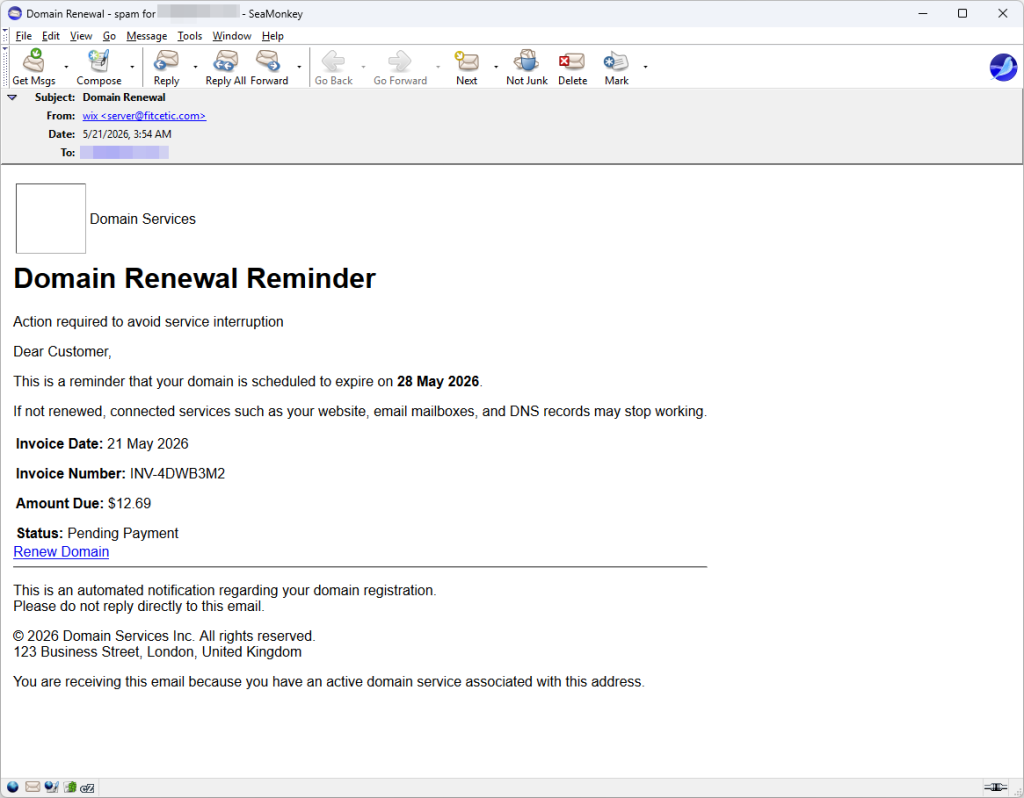
Fake renewal email

Others are much more polished, using the Renovarix brand, a reference number, and a respectable-looking London business address.
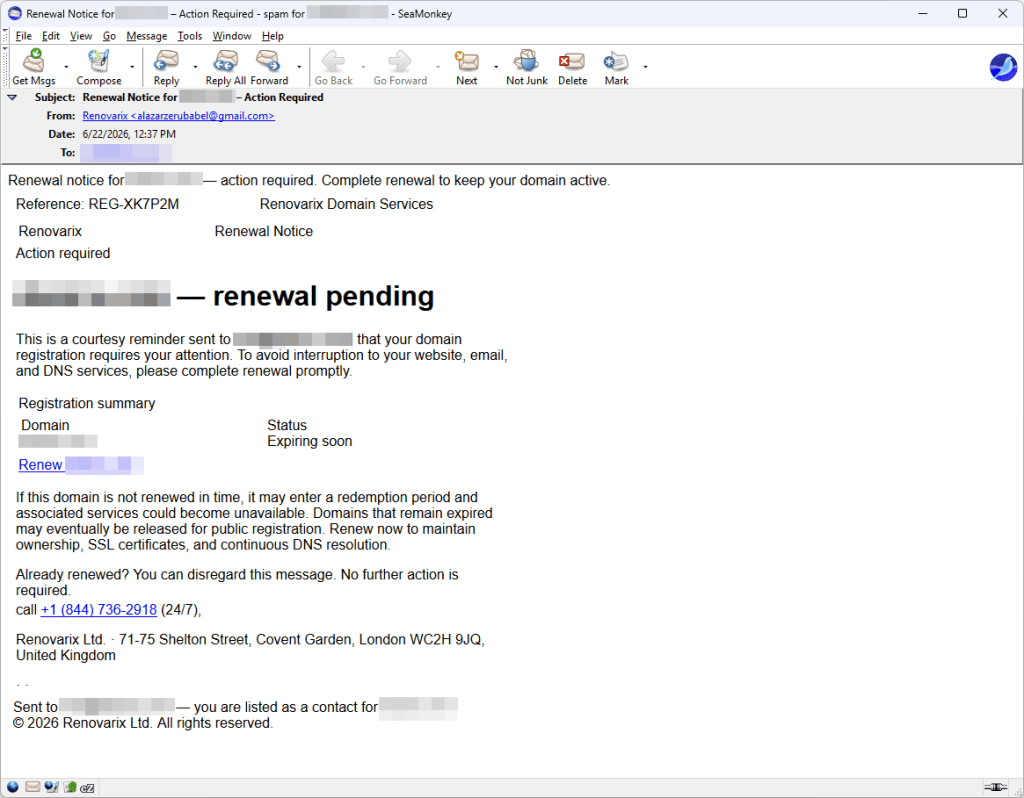
Fake renewal email

But they share the same giveaway. The “official” Renovarix renewal notice was sent from an ordinary Gmail address. A company claiming a London office and 24/7 support isn’t likely to send billing notices from Gmail. When the branding looks professional but the sender doesn’t match, that’s a major red flag.

A page that knows too much

The link opens a page that immediately performs a “lookup,” narrating its progress with messages such as “connecting to registry” and “fetching WHOIS records” before displaying your domain name, registrar, and expiry date.
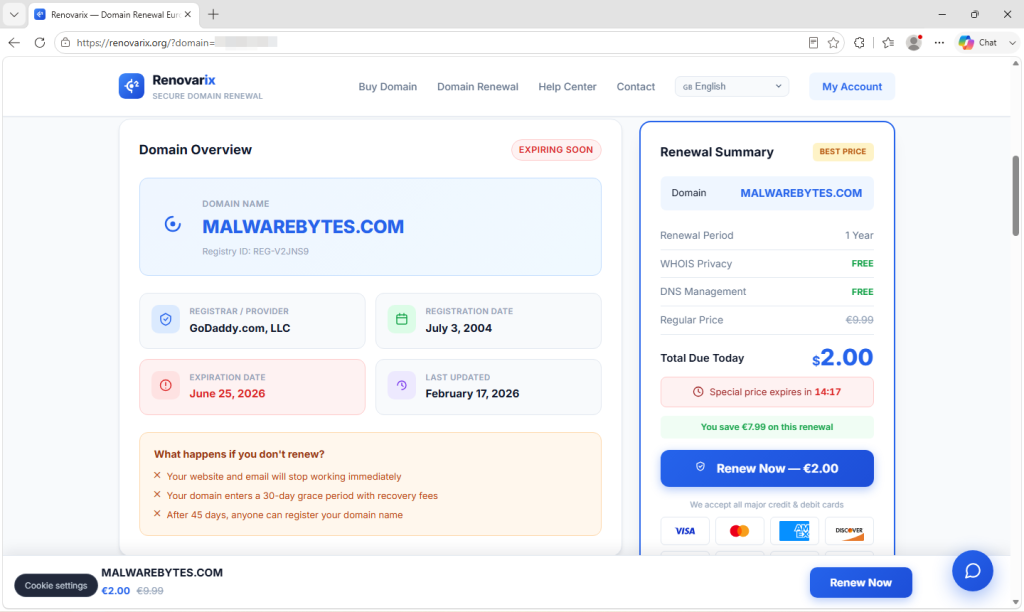
Fake renewal domain

That makes it look as though the site has queried the official domain registry. Some of the information may come from genuine public records, but much of what makes the page appear authoritative is invented. For example, the displayed “Registry ID” isn’t retrieved from any registry. It’s generated locally in your browser from your domain name and exists purely to look official.

Everything is designed to push your panic button

Once that dashboard loads, the whole page becomes a funnel built to rush you.

A red banner claims your domain expires in “03 days,” regardless of its real expiry date. A second countdown says a “special price” of €2.00, reduced from €9.99, expires in fifteen minutes. Try closing the page and a pop-up appears warning, “Wait — Your Domain Is At Risk!” with a dismiss button that reads, “No thanks, I’ll risk it.”
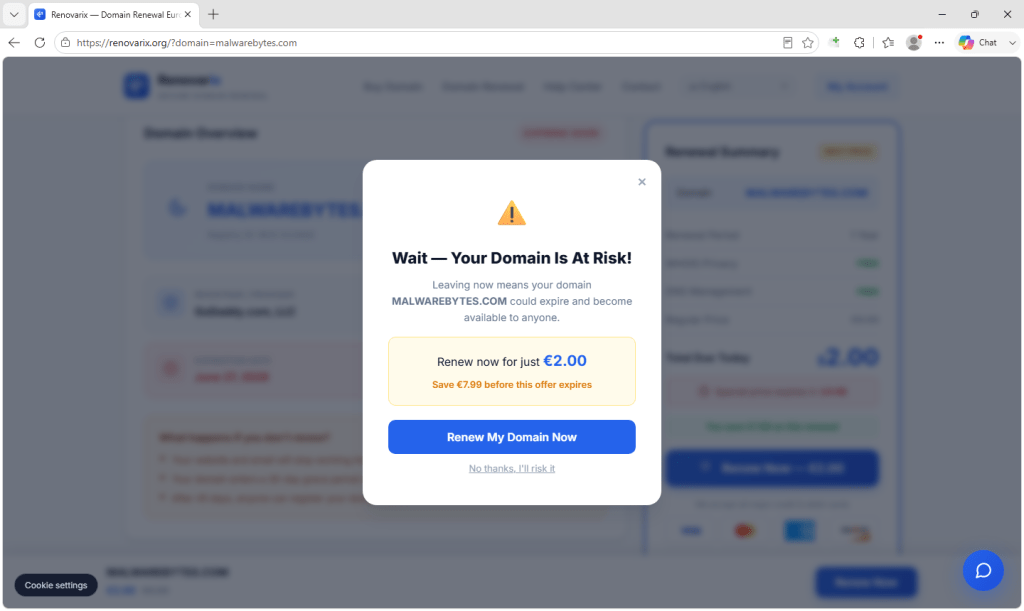
Fake renewal urgency

Legitimate registrars don’t rely on countdown timers or guilt-inducing pop-ups. The pressure is the scam.

The “renewal” renews nothing

Here’s the clearest sign something is wrong: clicking Renew Now doesn’t contact your registrar or process a renewal. It simply redirects your browser to another website.

Some versions even display a cheerful “Renewal Complete!” confirmation with a new expiry date, confirmation number, and a message claiming a receipt has been emailed. None of it reflects a real transaction. Everything is generated in your browser.

Where your details actually go

The button sends you, through a marketing affiliate link, to a page called “Secure Checkout.”
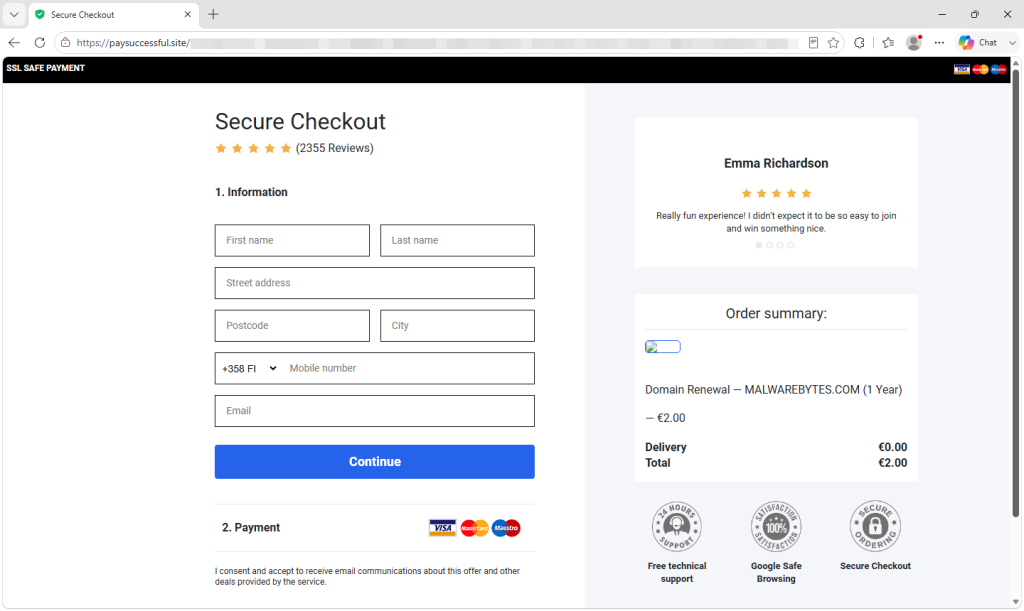
Checkout to harvest data

The page asks for your name, address, postcode, city, phone number, and email address. Once submitted, you’re passed through additional pages where payment is eventually requested.
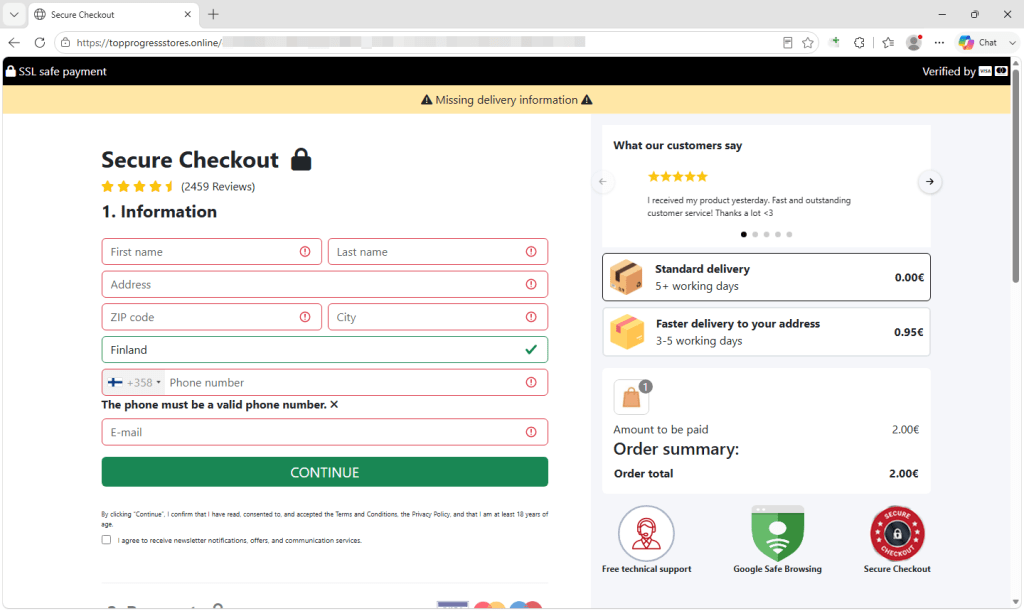
Checkout to harvest data

Two details suggest this is a recycled scam kit rather than a genuine domain service. It can automatically populate your details from the link you clicked, and its fake five-star reviews still refer to “HappyPrizes” and how easy it was to “win something nice”—leftover text from an earlier prize scam that used the same template.

Why people fall for it

The scam works because it exploits a genuine concern. The scam starts with a believable premise. Domain renewals are a normal part of running a website, so an expiry notice doesn’t seem out of place. The scammers build on that with convincing branding, public domain information, and manufactured urgency.

It also feels personal. Many people wonder how scammers knew about their specific domain. The answer is that they don’t know you personally. Every registered domain appears in public WHOIS/RDAP records, which include the domain name, registrar, important dates, and sometimes a contact email address. Scammers collect this information in bulk, then generate links that display your own domain details back to you. Seeing familiar information makes the page feel legitimate, even though it came from public records.

Finally, the scam creates urgency. Countdown timers, warnings that your domain is at risk, and a €2.00 “special offer” are all designed to make you act before you stop to verify the claim. The low price isn’t the objective. Your personal information and payment details are.

None of this makes a victim careless. It makes them human, targeted by people who know how a worried site owner reacts.

What to do

If you receive an email like this, simply delete it. The safest way to handle any domain renewal is simple:

  • Don’t click on the email’s link. Go to your registrar through your own bookmark or by typing the address yourself and check your real expiry date there. If you clicked the link, close the page. Looking at it doesn’t put your domain at risk.
  • Know who your registrar is. Renewal happens in the account you already have, not on a website you’ve never heard of.
  • Treat urgency as a warning sign, not a reason to hurry. Real renewals aren’t fifteen-minute emergencies.
  • Check the sender. Billing notices from a Gmail address, or a brand name that doesn’t match your actual provider, are red flags.
  • Malwarebytes Browser Guard is free and can help block scam and phishing pages while you browse.

If you already entered personal information (such as your name, address, phone number, or email address):

  • Be prepared for follow-up scams. Attackers may contact you by phone or email, claiming to be your registrar or referring to your domain, an “order,” or a “renewal.”
  • Don’t trust unsolicited calls or emails, even if they seem to know details about your domain.
  • If you need to contact your registrar or bank, use contact details from their official website, not those provided in the email or on the scam page.

If you entered payment card details:

Turn on transaction alerts so you’re notified as soon as your card is used.

Contact your bank or card issuer immediately. Tell them you entered your card details on a fraudulent website and ask whether they recommend blocking and replacing the card, even if you don’t see any unauthorized charges yet.

Monitor your account closely. Scammers sometimes make small “test” charges before attempting larger transactions.

Indicators of compromise

  • renovarix[.]org — fake domain renewal page
  • xe54ghj[.]com — redirector
  • paysuccessful[.]site — personal-data capture page
  • molipy8trk[.]com — redirector
  • topprogressstores[.]online — final offer landing

We don’t just report on threats—we remove them

Cybersecurity risks should never spread beyond a headline. Keep threats off your devices by downloading Malwarebytes today.

About the author

Passionate about antivirus solutions, Stefan has been involved in malware testing and AV product QA from an early age. As part of the Malwarebytes team, Stefan is dedicated to protecting customers and ensuring their security.