

惯性聚合 高效追踪和阅读你感兴趣的博客、新闻、科技资讯
阅读原文 在惯性聚合中打开

推荐订阅源

罗磊的独立博客
L
LangChain Blog
aimingoo的专栏
aimingoo的专栏
IT之家
IT之家
B
Blog
博客园_首页
博客园 - 司徒正美
有赞技术团队
有赞技术团队
博客园 - 聂微东
I
InfoQ
美团技术团队
GbyAI
GbyAI
阮一峰的网络日志
阮一峰的网络日志
H
Help Net Security
大猫的无限游戏
大猫的无限游戏
MyScale Blog
MyScale Blog
WordPress大学
WordPress大学
The GitHub Blog
The GitHub Blog
A
About on SuperTechFans
人人都是产品经理
人人都是产品经理
Microsoft Azure Blog
Engineering at Meta
Engineering at Meta
钛媒体:引领未来商业与生活新知
钛媒体:引领未来商业与生活新知
The Cloudflare Blog

Latest from TechRadar

Quordle hints and answers for Monday, April 13 (game #1540) NYT Strands hints and answers for Monday, April 13 (game #771) NYT Connections hints and answers for Monday, April 13 (game #1037) Morbid Metal developer explains why he ditched an origami art direction in favor of gritty sci-fi — 'It worked, but it didn't really feel like me' '71% of US households get routers from ISPs': Why new FCC rules could leave millions stuck with outdated,… 'The CPU is the system’s executive layer': Intel joins SambaNova as both face existential threat from… ‘More bang for your buck’: 7 easy ways to boost your MacBook Neo’s performance for free DJI Romo P vs Roborock Saros 10R — which robot vacuum comes out on top when it comes to dodging obstacles? I put… I spent 6 hours with Genshin Impact on the Galaxy S26 Ultra, and I can't believe how far mobile gaming has come What is the release date for The Testaments episode 4 on Hulu and Disney+? I reviewed the LG G6 for 3 weeks, and it's a fantastic OLED TV that's the new best option for brighter rooms Is your bird feeder camera doing more harm than good? 3 tips for using it safely as RSPB issues urgent disease warning Chelsea vs Man City Live Streams: How to watch Premier League 2025/26 from anywhere in the world, team news How to watch Alcaraz vs Sinner for FREE: TV Channels for Monte-Carlo Masters Final Sunderland vs Tottenham Live Streams: How to watch Premier League 2025/26 from anywhere in the world, team news Are these the best-designed workout headphones ever? I used them for a month to find out How to watch Snooker 900 John Virgo online (it's free) – stream O'Sullivan vs Higgins anywhere I've only just discovered the Walk With Frodo app on Garmin's Connect IQ store — and as as a huge LOTR nerd, it's going to make the next 1,800 miles fly by 'Just not sustainable': Why your monthly £25 broadband internet bill could soon hit £45 How to watch Paris-Roubaix 2026: Free Streams & TV Info as Tadej Pogacar chases third Monument How to watch Euphoria season 3 online – stream Zendaya & Sydney Sweeney drama from anywhere today '$15K bill destroyed a solo developer’s startup': How hackers are using leaked Google API keys to… There's a sneaky way to watch UFC 327 really cheap... NYT Connections hints and answers for Sunday, April 12 (game #1036) NYT Strands hints and answers for Sunday, April 12 (game #770) Quordle hints and answers for Sunday, April 12 (game #1539) Amazon's Ring cameras are the perfect solution to secure your home on a budget — shop today's best deals… I've tested every iPhone since the iPhone 12, and Ceramic Shield 2 is the first iPhone glass I fully trust UFC 327 live stream: how to watch Procházka vs Ulberg, start time, preview, full card We're officially getting the DJI Pocket 4 on April 16, but here's how Insta360 could beat it
macOS 26.5 has fixed a ‘low-key hilarious’ pr...
Alex Blake · 2026-05-12 · via Latest from TechRadar
The underside of the M4 Mac mini, showing its power button.
(Image credit: Apple / Future)

  • macOS 26.5 lets you switch on your Mac mini in a new way
  • It no longer requires pressing the power button
  • Some users feel the power button is in an awkward position

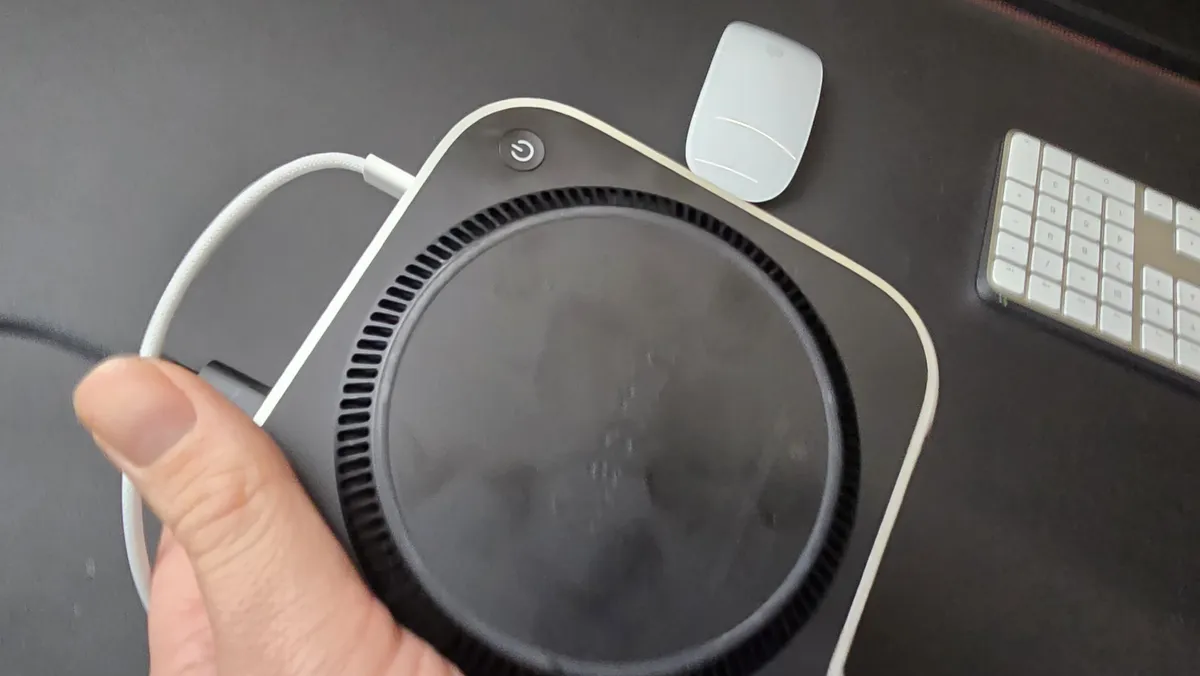
Apple’s M4 Mac mini is a brilliant little device — it’s one of the best mini PCs money can buy, in fact — but there’s one feature that has led to its fair share of criticism: the power button. Located on the underside of the device, it means you have to either flip the Mac mini over or blindly fumble around for it whenever you want to switch on the pint-sized computer.

But now that macOS 26.5 is here, users are discovering that there’s a handy way to bypass this irksome drawback. And it might mean you never have to worry about that bothersome button placement again.

As spotted by 9to5Mac, a new support document on Apple’s website details how you can switch on a Mac mini, Mac Studio or iMac without having to touch a physical button on the device. Instead, your Mac can be turned on by simply connecting it to power. That works providing you have a Mac mini or iMac from 2024 or later, or a Mac Studio from 2025 or later. You’ll also need to be running macOS 26.5 or later on your computer.

Once that’s sorted, you just need to open the System Settings app, then click Energy in the sidebar. Next to ‘Start up when power is connected,’ choose Always from the menu. Now, you can switch on your Mac whenever you connect a charging lead or power on an already-connected cable. Apple just advises that you should wait around 30 seconds between switching off your Mac and turning it on again to give the power supply time to discharge.

Apple’s odd design choice
Mac mini M4 in studio

(Image credit: Future)

When we reviewed the M4 Mac mini, we called its power button placement “an odd choice” and “not one of Apple’s better design choices.” While it wasn’t enough to detract from our five-star verdict, it was still a feature we could have done without.

At the time, the response on Reddit was mixed. User YZJay, for example, described it as “low key hilarious.” Others, however, were more generous, arguing that they barely shut down their computers anyway. That included user Eubank31, who said: “I’m not a huge Apple guy but the number of times I’ve needed to actually power down my 2020 [MacBook Pro] since I got it is probably less than 20. And I use it every day for college and after class for dev work/projects.” Apple, for its part, says that people “hardly use” the button anyway.

Interestingly, macOS 26.5 includes another change that can benefit people fed up with the Mac mini’s power button. In its release notes, Apple describes a new “Power control setting” in the Energy section of System Settings. This “enables you to power off or restart your Mac using assistive accessories like switches,” Apple says, meaning you don’t even need to worry about hooking up a power cable to have your Mac switch on.

Sign up for breaking news, reviews, opinion, top tech deals, and more.

If you find yourself regularly reaching for your Mac mini’s power switch, the latest changes in macOS 26.5 could put paid to a minor headache. Apple is rumored to be working on an M5 Mac mini, but with no new physical design expected for several years, this software tweak is your best bet at fixing the power button conundrum for some time to come.


Google logo on a black background next to text reading 'Click to follow TechRadar'

Follow TechRadar on Google News and add us as a preferred source to get our expert news, reviews, and opinion in your feeds.


Alex Blake has been fooling around with computers since the early 1990s, and since that time he's learned a thing or two about tech. No more than two things, though. That's all his brain can hold. As well as TechRadar, Alex writes for iMore, Digital Trends and Creative Bloq, among others. He was previously commissioning editor at MacFormat magazine. That means he mostly covers the world of Apple and its latest products, but also Windows, computer peripherals, mobile apps, and much more beyond. When not writing, you can find him hiking the English countryside and gaming on his PC.