










I've already waxed lyrical about the Oppo Find X9 Ultra’s camera skills, summarizing that it's the most versatile camera phone available, offering ultra-wide, 1x, 3x, and 10x zoom cameras.
In fact, in an actual shootout between the Oppo Find X9 Ultra and a $1,000 Lumix travel zoom compact camera with 15x optical zoom, the phone’s 3x and 10x cameras held up impressively.
If those zoom cameras aren't already enough, there's also a 'teleconverter' lens (read: telephoto) in the extravagant Hasselblad Earth Explorer kit, which extends that reach even further — and it's yours for an extra £499 (the phone alone costs £1,449; it's not officially available in the US, but it can be bought via import sites).
The teleconverter lens pairs with the phone's class-leading 3x telephoto camera to deliver a 13x optical zoom (though confusingly, that's calculated from the 1x main camera’s 23mm focal length, resulting in a 300mm focal length), which can be dialled up to 60x with a digital zoom for a frankly ridiculous 1380mm focal length.
These numbers all sound very impressive, especially for a phone, but how good is the teleconverter lens for real? I took the Oppo Find X9 Ultra and teleconverter lens kit to an elite soccer match — my beloved Arsenal facing up to Atletico Madrid in a high-stakes Champions League semi-final second leg — to find out.
Image
1
of
2
The hardware
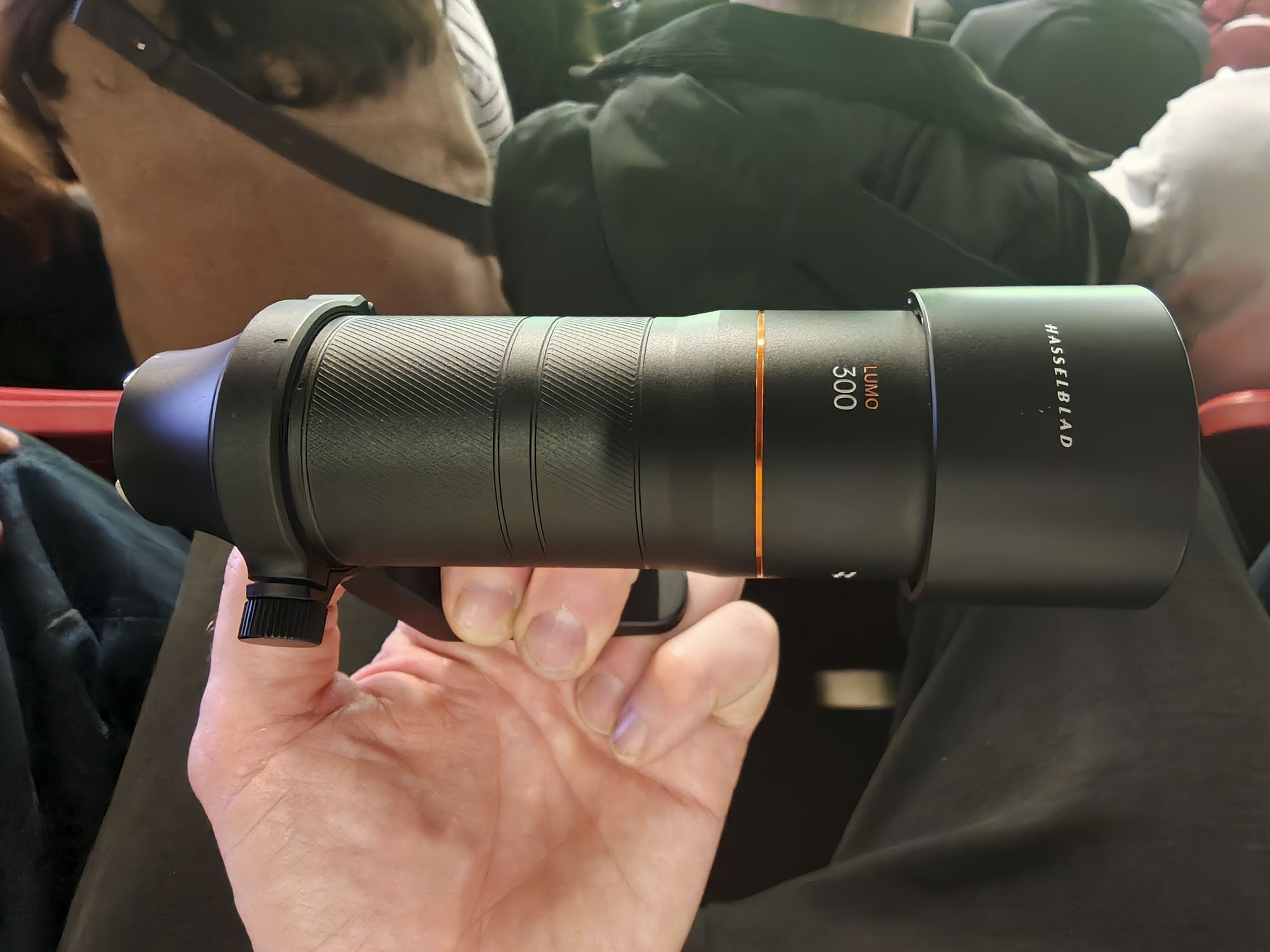
The Oppo Find X9 Ultra already has an impressive 10x zoom camera, and so a ‘mere’ 13x zoom might appear like small gains, especially when you consider how meaty the teleconverter lens is — it's around the same length as the phone itself. However, there is in fact a decent difference between 10x and 13x — the 300mm focal length gets you closer than the 230mm of the 10x zoom.
Also, the lens pairs with the phone's superior quality 3x zoom camera (the sensor is much bigger in this camera than the one used by the 10x camera), and so the quality with the lens accessory should, in theory, be much better.
In the Hasselblad Earth Explorer kit, there's a dedicated case with a USB-C battery grip, plus three rings that screw onto the camera unit; one decorative (and it looks great), one that accepts 62mm threaded filters (being ideal for video, especially where NDs are an essential accessory), and one for the teleconverter to fix onto.
The teleconverter lens itself is a premium bit of gear with an exterior that should appeal to Hasselblad fans: a svelte metal barrel, a removable tripod collar, plus it comes with a decent lens hood and Hasselblad-branded lens cap.
There are no external controls on the lens; all photo settings are adjusted in the camera app, and here I quickly discovered that my choices were rather limited.

In use
With the lens in place, you'll need to select the 'Hasselblad Teleconverter' shooting mode in the phone’s menu to pair the phone and lens. Given I was regularly using this mode, I dragged it from the 'More' option in the camera app's shooting modes nav bar, and onto the nav bar for quicker access.
Once the mode is active, you're presented with three zoom choices: the 13x optical zoom, a 30x zoom, and a 60x zoom. The latter two are digital zooms — don't be fooled by those who say the lens has a 60x optical zoom, that simply isn't true.
The phone’s computational trickery works with these digital zoom settings to create as clean an image as possible, and the effect is actually pretty decent all things considered, but the 13x zoom is easily the best of the three.
Stabilization is highly effective for all three lenses. You'd think shooting handheld using the 60x zoom would be impossible, and sure, there's some jumping around with even slight hand movement, but honestly, with a steady hand, it's entirely possible to shoot without a tripod support.
What's a bummer is that the camera settings in the teleconverter mode are properly stripped back, even more so than the regular auto 'Photo' mode. There's exposure compensation, color filters, and a few other options such as HDR, timer, and interval shooting, but not much more. The Hasselblad Master mode, on the other hand, provides a wealth of manual control for keen photographers, and the photos in this mode are less processed and feel more authentic.
Image
1
of
6
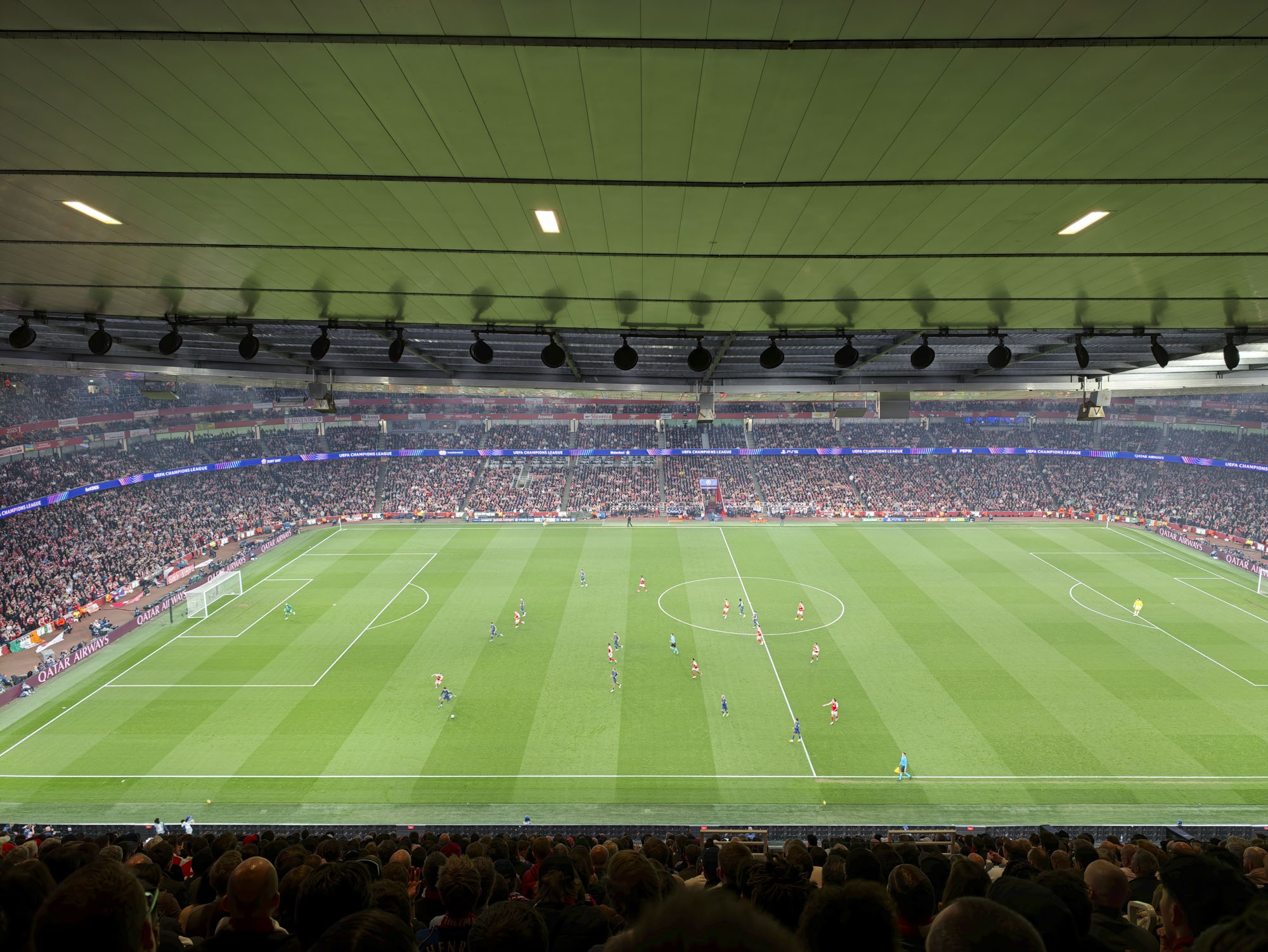
Given I was photographing fast-moving action, I would naturally want a fast shutter speed to freeze the action, but there's no manual control of shutter speed. Conversely, I also don't have that control for creative effects, such as intentional slow shutter speed to blur movement, that I could get in the Hasselblad master mode.
As such, I was finding that most of my shots of the players on the evening floodlit pitch were blurry. I dug in the menus again, hoping to find the Action Mode (which is in the regular Photo mode and my go-to mode for capturing fast-moving action), but no dice. Without manual control or a shutter speed priority mode, my hope for decent shots was fading.
Image
1
of
6
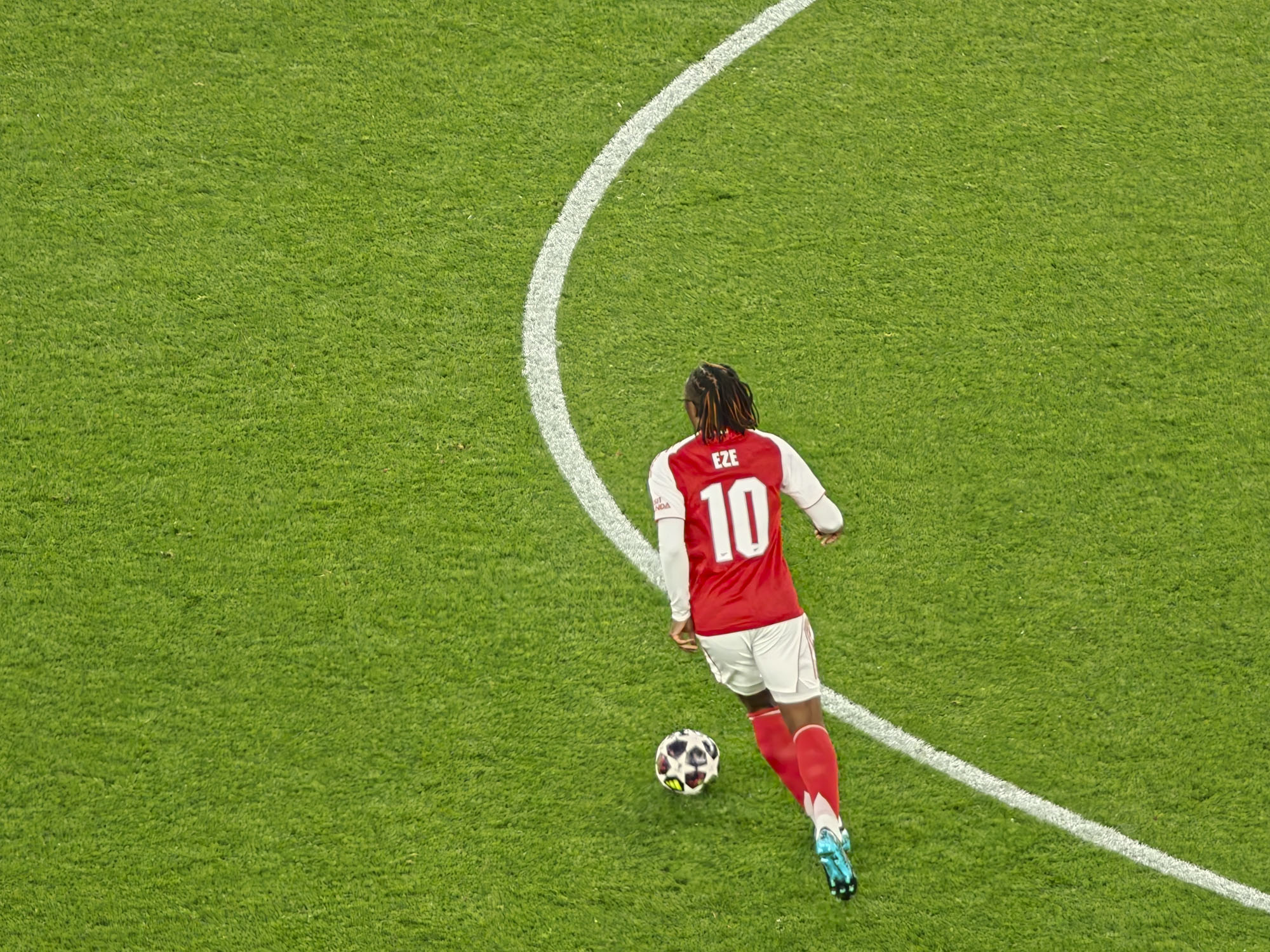
However, there was one setting that improved my shots no end, and that was selecting the Stage mode. With Stage mode active, the phone's shutter speed quickened.
I then combined Stage with -0.7EV exposure compensation, which gave another boost to shutter speed. After that, the players moving at moderate speed were frozen in my action shots and appeared crisper.
So, it's possible to freeze action with the teleconverter, but only so far, and it's hardly intuitive. I'd love to see the Action Mode added to the Hasselblad Teleconverter setting, or a way of manually controlling shutter speed.
If you hit the info option in the Hasselblad Teleconverter, it recommends the accessory for 'stage performances, travel, wildlife, and other scenarios' — I'm not so sure that sports or anything fast-moving is one of those extras until Oppo adds further control over shutter speed.
Image quality
Image quality was overall pretty impressive considering I was taking shots from a great distance in the upper tier of a 60,000+ capacity stadium, of a floodlit evening soccer match, with a phone and an add-on telephoto lens.
Judge for yourself from the pictures — I've included the same photo at all the key focal lengths of the phone and the three settings of the teleconverter (see above).
Once I had the optimum camera settings (see below), the detail is fairly sharp with the 13x zoom. However, detail is pretty mushy using the 60x zoom setting. At any setting, the faces of people in the crowds and the players look quite processed, even a little AI-generated.
Image
1
of
17

I wouldn't expect images with my pro mirrorless gear and telephoto zoom to look so processed, but then again, that gear is much bigger and heavier. And for perspective, I've given the phone and teleconverter lens the ultimate test — sports photography in low light.
I'm not typically going to walk around with the telephoto lens in my pocket, or take phone calls with it sticking out of my ear! And the fast-moving action and low light setting proved to be perhaps one step too far — quality is not a patch on my pricey mirrorless camera and telephoto zoom lens.
That said, with a few tweaks to the Hasselblad Teleconverter mode — adding the Action mode, or a way of working in elements of the Hasselblad Master mode — photo quality on the Find X9 Ultra could improve no end.
Even so, I'd still bring the teleconverter lens to an elite soccer match, and for concerts where I can get closer, and there's less movement (though I don't make the habit of enjoying live concerts through a smartphone). If I'm on holiday with the prospect of seeing some wildlife, the Find X9 Ultra is absolutely coming in the bag too.

Follow TechRadar on Google News and add us as a preferred source to get our expert news, reviews, and opinion in your feeds.