It's been a couple of years since I reluctantly walked away from Microsoft's Surface Pro and into the warm embrace of the Apple ecosystem, but recently I took the Windows 11 ferry back to familiar territory in the form of a new 13-inch Microsoft Surface Pro Gen 12 for Business.
The reason? Not to experience some wild flight of design fancy. This Surface Pro convertible system (a tablet computer with an optional keyboard and pen) looks virtually identical to the Gen 11 Surface Pro, and I have run an earlier version of Windows 11 on a Surface Pro, so nothing much new to see there.
No, what drew me back was a promise Intel made in the form of Panther Lake, its first competitive mobile laptop CPU in ages, one that can potentially rival Qualcomm Snapdragon X Elite (or Plus) chips found in, among other Windows systems, the Surface Pro 11.
Swipe to scroll horizontally
| Row 0 - Cell 0 | Row 0 - Cell 1 |
Processor | Intel Core Ultra 5 Series 3 |
Graphics | Intel Graphics |
RAM | 16GB/32GB |
Storage | 256GB/512GB/1TB |
Display | 13-inch PixelSense Touch LCD (2880x1920) |
Ports | 2x USB-C Thunderbolt 4 |
Cameras | Quad HD front |
Dimensions | 11-inch x 8.2-inch x 0.37 inch |
Weight | 1.97lbs. |
It's weird being back, kind of like visiting your childhood bedroom after years away at college or your own apartment. Everything is familiar, but also odd. Windows metaphors are all similar to macOS and also often opposite (see scroll wheel on mouse).
In recent years, it has been almost impossible to compare, say, a MacBook Air to a Surface Pro. After all, Apple's Macs now run its ARM-based Apple Silicon, which means they all enjoy enviable power and battery life. Even their graphic performance is a cut above the average.

Qualcomm's arrival has helped, bringing with it not just within-range power and efficiency, but also AI performance thanks to an on-board NPU (Apple Silicon has those, too).
I struggled to understand how anyone would buy a mobile system like the Pro on anything other than an ARM CPU. Well, there is one obvious reason: unparalleled compatibility for legacy systems. ARM systems still need emulation software to support, for instance, Windows-based Intel X86 code. That situation is improving, but it's still less than perfect, and for business users who have some almost ancient software, they cannot afford to mess around with a mobile chip parading as desktop silicon when they know it won't, for instance, run their old banking software.
For years, Intel promised mobile chips that would rival Qualcomm and Apple Silicon, but it's taken until now for the once great chip company to deliver on those promises.
So, before you read on, it's worth stating up front that the Intel Core Ultra 5 (Series 3) processor is one of the most exciting pieces of silicon Intel has produced for a laptop in years. It's a big deal and the primary reason I'm falling just a little bit again for the iconic Surface Pro.
Inside the Surface Pro for Business 13-inch
As I stated above, this 13-inch Surface Pro ($1,949.99, UK and other prices not available at press time) is, on the outside, identical to the previous model, but that doesn't make it any less appealing. One caveat here: When I talk about the Surface Pro, I'm referring to it with the pricier bundle that includes the Surface Pro 13-inch Keyboard and Slim Pen for Business. It's these two accessories that make this a complete laptop alternative.
The Surface Pro is an attractive and relatively lightweight business portable. With the keyboard and pen (and in the Wi-Fi/Cell model), it weighs roughly 2.68lbs, which is a hair lighter than the MacBook Air.
It has a lovely, crisp 13-inch PixelSense touchscreen and pen-compatible display. While there's an OLED option, my unit shipped with the more affordable LCD display. The 12th Gen display is almost exactly the same as the last model. It's still a 2880x1920, 120Hz screen. The 1M:1 contrast ratio is the same, as is the 3:2 aspect ratio.
Image
1
of
3
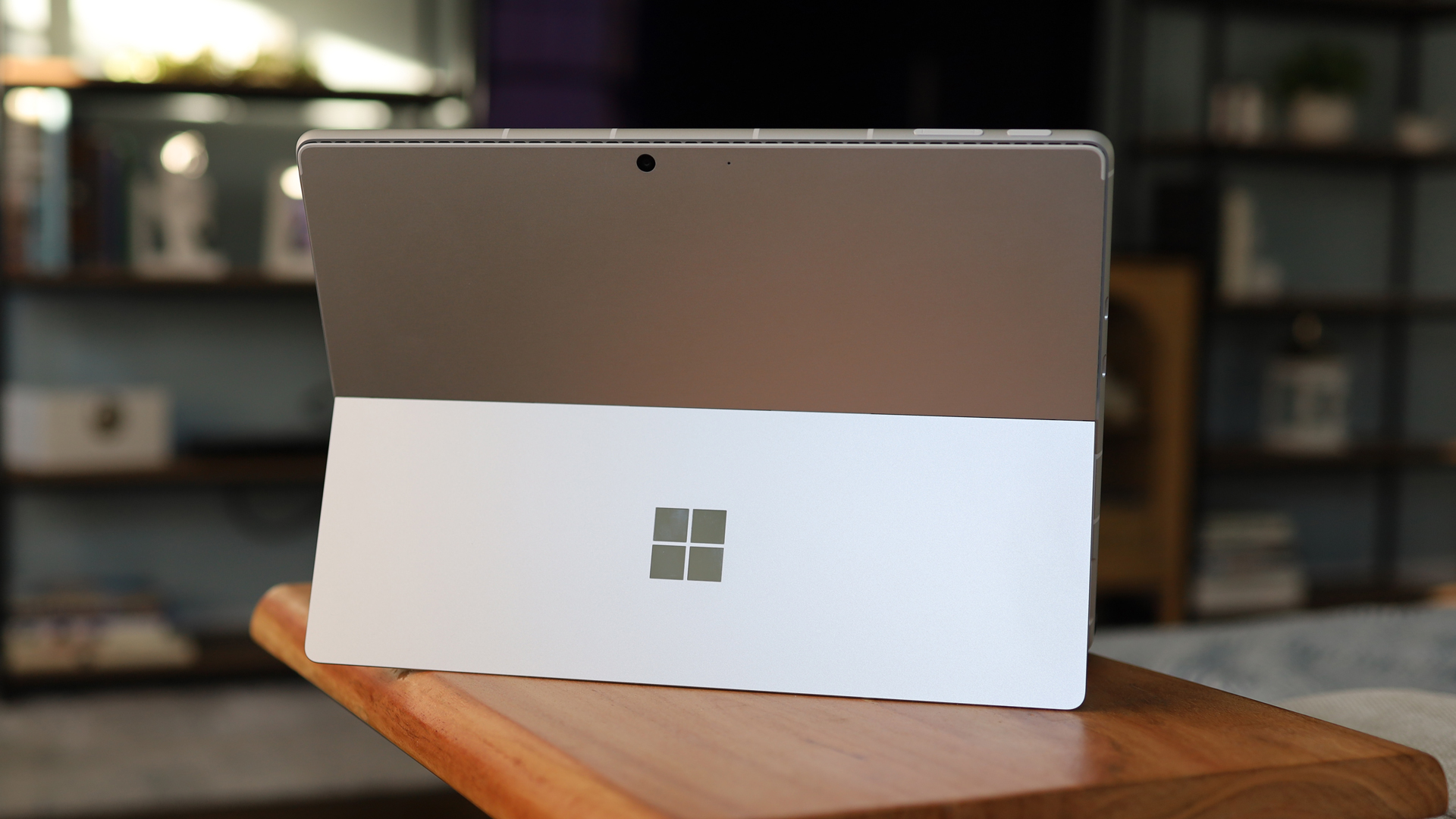
There are a couple of small differences: a new anti-reflective coating, which I like, and HDR mode, which should provide deeper blacks, whiter whites, and more details in low-light scenarios.
The screen is surrounded by slightly oversized bezels, especially the one at the top, which houses the 1440p quadHD webcam and the Windows Hello biometric system. There are also a pair of carefully hidden stereo speakers on either side of the touchscreen.
On the left are the two USB-C, Thunderbolt 4 ports, which I used for connecting to an external display and some external storage. On the top edge is the power/sleep button and a volume rocker. On the right side is the charge port or "Surface Connector," Surface's proprietary charge port, which plugs into the included 60W charger.
On the back is the signature kickstand that adjusts smoothly to almost any angle. "Lappability" is still a thing.
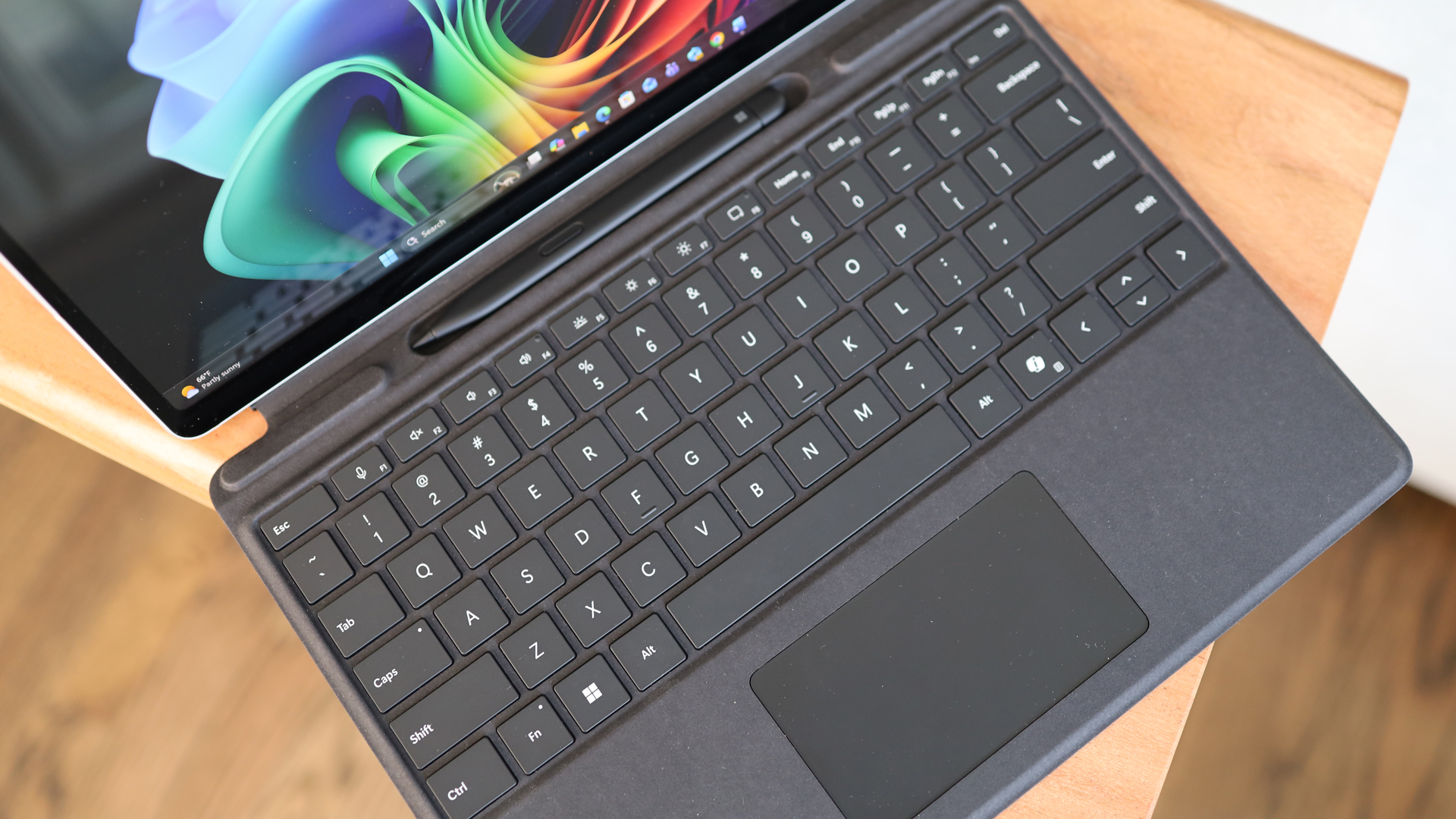
The Surface Pro 13-inch Keyboard is just as good as I remembered. It has excellent travel and response, plus it's backlit. A tug away from the magnetized screen reveals the Slim Pen for business, a fantastic markup, annotation, and sketching tool. The draftman style is an acquired taste, but I like it.
Image
1
of
2
The performance is the thing
Before I dug into the Surface Pro 12th Gen 13-inch, I handed it to Future Labs to run some benchmarks, and, perhaps more importantly, a battery rundown test.
I don't know what I was expecting (maybe not much, after all, this is an Intel system), but I was shocked when they told me that the benchmarks were close to what you'd get with a Qualcomm Snapdragon X Elite (11th Gen Surface Pro). More surprising was that the battery life is virtually identical. Granted, the Surface Pro Gen 12 13-inch with an Intel Core Ultra Series 3 is rated by Microsoft for 17 hours, but that's basically a video playback rundown.

Our Future Labs' more real-world tests got 12 hours and 15 minutes with the keyboard attached. The 11th Gen Qualcomm model got 12 hours and 10 minutes.
In my anecdotal experience, I cruised through a whole day.
Look, I know these systems have a ton of AI power. Heck, I even have the Copilot key on my Surface keyboard, but for my purposes, I wanted to see how the Surface Pro running Intel's latest mobile CPU handled my typical workday, which doesn't feature much AI content generation at all.
I did use the Copilot button a few times to quickly launch prompt-based queries. I wish it could be a bit more aware of what's on the page. I asked about a document I had opened in Edge, but it gave me a generic answer.

I didn't hold back
I launched Edge and used that for a while because it was always one of my favorite web browsers. However, to work with my office tools, I needed Chrome, so I downloaded that and started opening many, many browser windows.
I also installed Adobe Creative Cloud and Photoshop 2026 and edited a lot of photos. It was also a busy meeting day, so I launched multiple Google video meetings.
The Intel Core Ultra 5 (Series 3) handled it all. I saw maybe one slowdown in a video call, but that was short-lived.
There was, however, the fan. At first, I heard its gentle whirring in the background, but as I piled on more Chrome tabs (and also added a few Edge ones), it got louder and louder. In a quiet room, I would've drawn stares. Fortunately, I was alone. I felt the back of the laptop, and it was hot.

On a MacBook Air running the M5, there is no fan, and while the base can get warm, you never know it's struggling, until it tells you it's out of memory. To its credit, the Intel system never did that; it just ran like it was preparing for liftoff.
Swipe to scroll horizontally
| Row 0 - Cell 0 | Surface Pro For Business 13 in 12th Ed (Intel) | Microsoft Surface Pro (11th Edition, 2024) (Qualcomm) |
Geekbench | 2691 | 2813 |
Geekbench | 11329 | 14432 |
While we ran some gaming benchmarks, I did not bother trying to game with this system. All it has is Intel graphics and 128MB of RAM. At 1080, it could manage about 41fps on Sid Meier's Civilization VI: Gathering Storm. Suffice to say, this is not a gaming rig.
I wouldn't call this test definitive, but I can say this is a beautiful, versatile system that, while not cheap, should satisfy most business users. It can handle the hard work, creativity, and AI. It's almost enough for me to consider giving Windows another chance. Almost.

Follow TechRadar on Google News and add us as a preferred source to get our expert news, reviews, and opinion in your feeds.