










After a month of daily use on both Mac and PC systems, the TriScreen Pro delivered a surprisingly usable triple-screen setup. The initial setup on the Mac took a little working out, but with the 27-inch 4K screen at the center, it proved to be a great combination for both office work and social content creation.
Premium CNC aluminium build
27-inch 4K display is great for content creation
Genuinely useful triple-screen
Mac setup requires software
Side panel connector mechanism fiddly
Side panels run noticeably cooler
Why you can trust TechRadar We spend hours testing every product or service we review, so you can be sure you're buying the best. Find out more about how we test.
The Lepow TriScreen Pro arrives as several parts: the main 27-inch display with two 16-inch panels that can be attached to the side in either landscape or portrait orientation, the stand and some cables. The assembly takes a good ten minutes and can be a little fiddly, despite the quality of all the CNC aluminium, which gives it a premium feel.
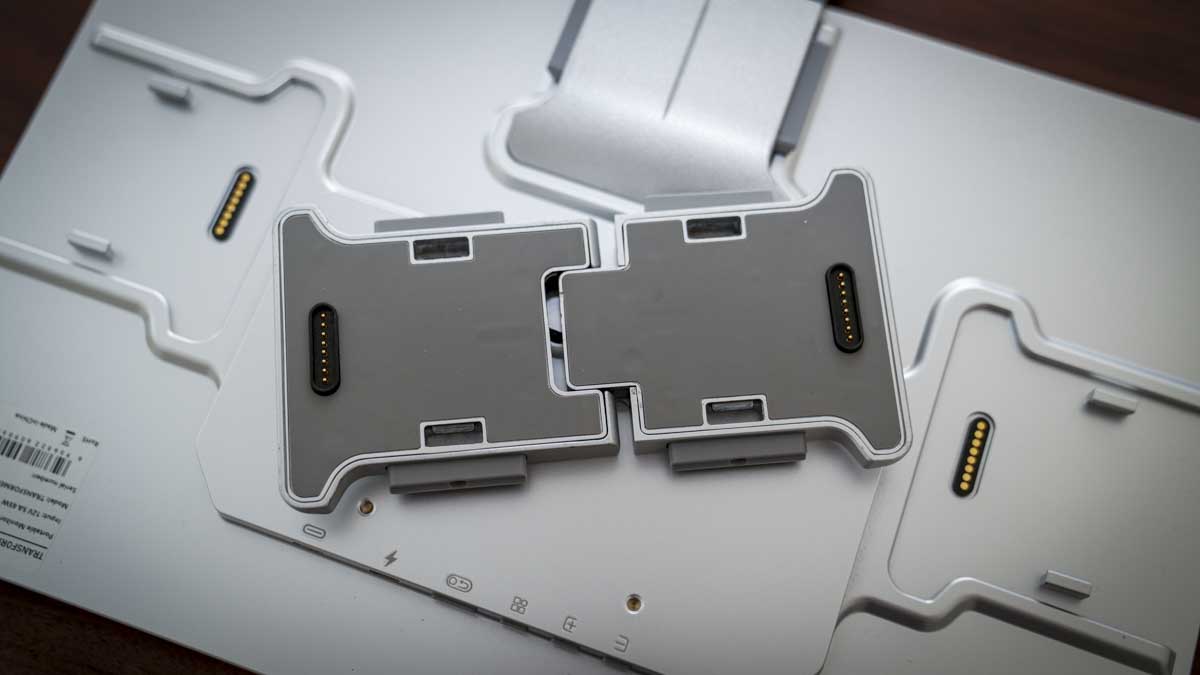
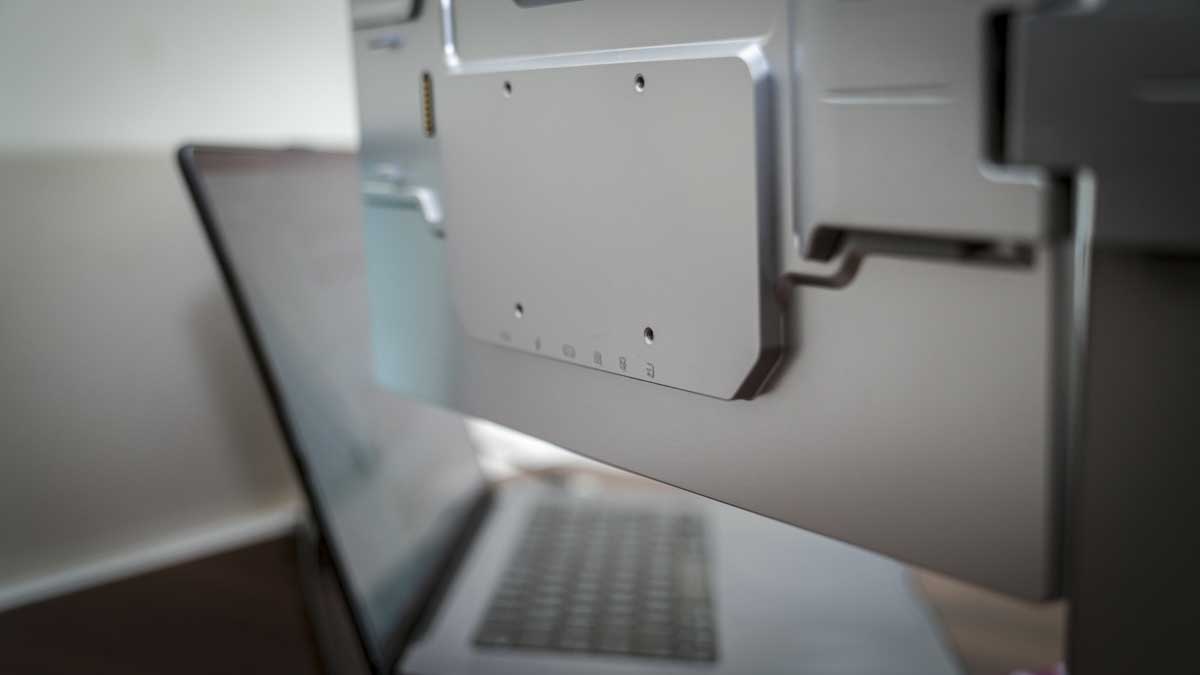
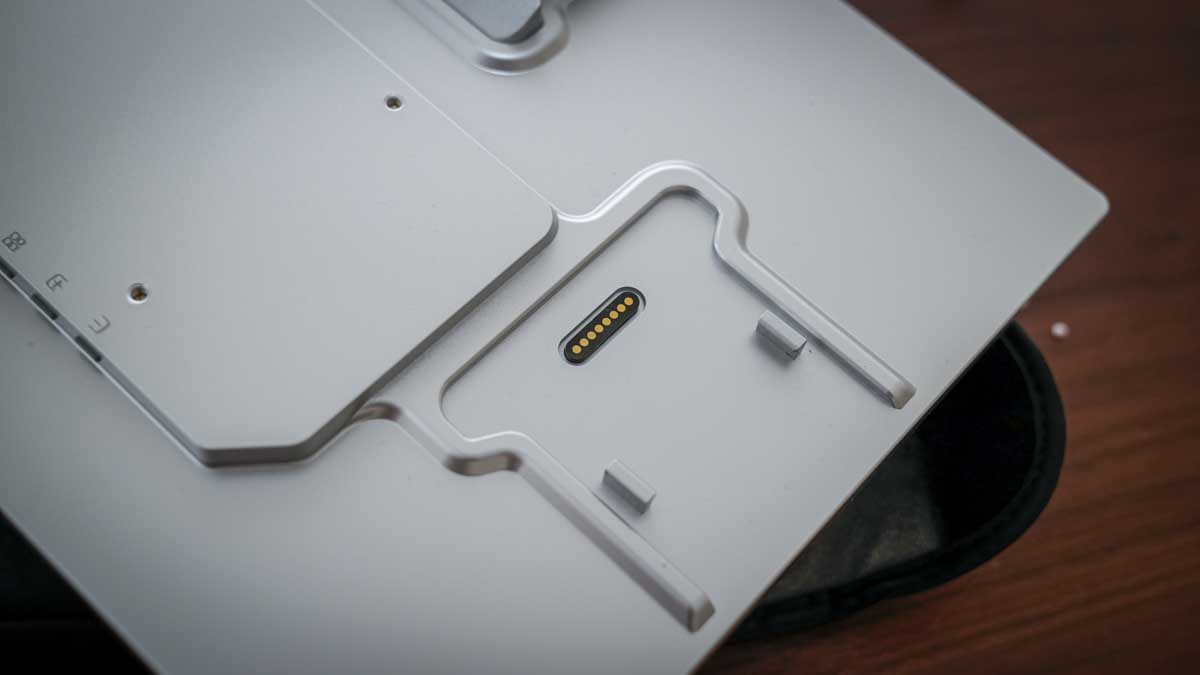
Where this monitor differs from all others is the modular 16-inch panels, which can be connected to the main monitor via Transformer connectors. Not only do these connectors enable the attachment of the additional panels, but they also contain the power and data connectors, so once clicked into place, there’s no need for any additional connections.
To start the test, I set up the monitors with my MacBook Pro, and thankfully, the instruction manual was reasonably clear; it soon became apparent there would be no hope of figuring out the setup without it.
Essentially, a USB-C cable carries all the required data, or you can use an HDMI cable and a secondary USB connection for the data. You’ll also need to download and install the USBDisplay app, which can take some time to find.
Once the software is installed, things can start to get a little tricky, as USBDisplay requires Screen and System Audio Recording permissions in the Mac Settings> Privacy and Security options. If these permissions have not been granted, the side panels won’t work.
Once you work this out, as it isn’t obvious in the manual, it all makes sense. On PC, the process is closer to plug and play; in both cases, once the software is in place, it gives you the additional options that include adjusting the monitor's orientation so you can mount them landscape or portrait.
Sign up to the TechRadar Pro newsletter to get all the top news, opinion, features and guidance your business needs to succeed!
After I’d got through the initial configuration process and everything was running across all three screens, the usefulness of this setup became apparent.
When it comes to display quality, the main 27-inch 4K display is bright, sharp, and colour-accurate enough for content creation and social media work, with 98% DCI-P3 coverage that makes it well-suited to anyone working with video and online imagery. The side panels at 1920×1200 are not color-critical displays, so for email, terminal windows, chat applications, and reference material, that’s where they’re really become useful.
The connector mechanism that links the side panels to the main display is clever, but it’s also the design's weak point. During the review, one of the side panel connectors wouldn’t clip correctly at first, leaving a very slight tilt that took plenty of fiddling to resolve.
However, once fully clipped in, everything felt solid, and tilt and articulation work well, with both side panels mirroring the angle of the main display as a single unit.
While there are a few rough edges with the product, the concept is sound. After a month of using it as my main display, it doesn’t quite match my studio panels for quality, but the price and the amount of desk space it saves make it definitely worth consideration.
The Lepow TriScreen Pro is available direct from the Lepow website, where it's priced at $1059.
The system includes the 27-inch main display, two 16-inch side panels with proprietary connectors, an HDMI cable, a USB-C cable, a power supply, and a carry case.
27-inch Main Display
Resolution: 3840 x 2160 (4K UHD)
Panel: IPS, 10-bit colour
Refresh rate: 60Hz
Colour gamut: 98% DCI-P3 / 100% sRGB
Brightness: 500 nits
Factory calibration: ΔE <2
Viewing angle: 178°
Finish: Anti-glare, CNC aluminium chassis
Speakers: Built-in stereo
VESA: 100 x 100mm
Dual 16-inch Side Displays
Resolution: 1920 x 1200 (WUXGA)
Aspect ratio: 16:10
Panel: IPS
Refresh rate: 60Hz
Brightness: 350 nits
Colour gamut: 100% sRGB
Viewing angle: 178°
Weight: 0.75kg per panel
Connection: Proprietary clip connector to main display
The TriScreen Pro's CNC aluminium chassis looks great and marks it out against many of the plastic-bodied monitors on the market; however, a close look shows that the CNC design is simple, and maybe doesn’t have the close attention to design detail that I’ve seen on many high-end displays.
That said, the main 27-inch display still feels solid and has a slim metal bezel, a matte anti-glare surface, and a solid base with decent height adjustment and tilt, enabling good flexibility in positioning the screen.
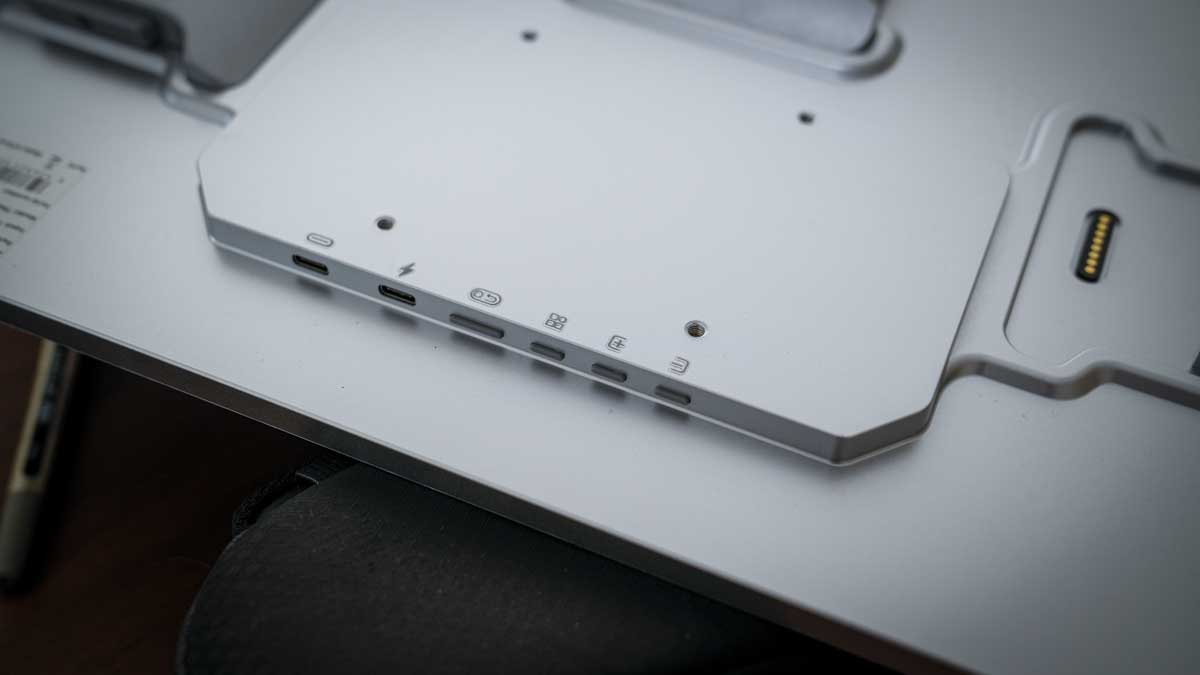
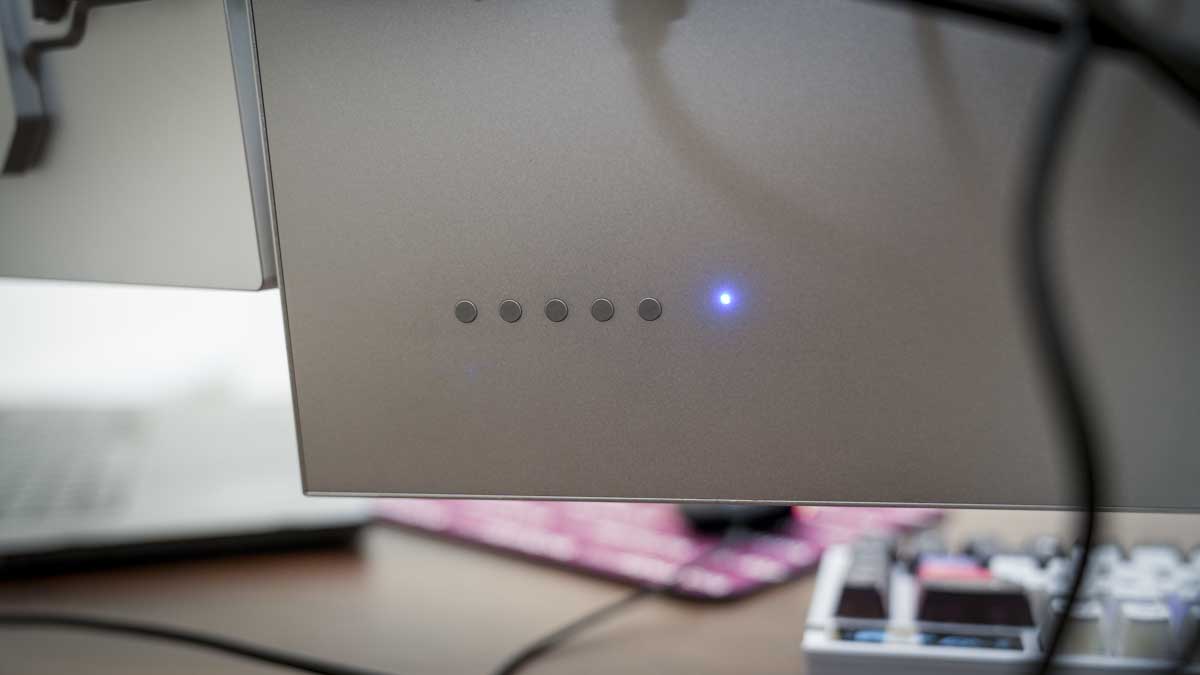
On the back of the monitor are the buttons for the on-screen display’s menu access. This menu is functional but basic in appearance; however, that also makes it straightforward to navigate for brightness and colour adjustments and some more advanced options.
As a standalone 27-inch monitor, it’s a well-made solution and nicely finished, but it’s the modular expansion that makes this monitor somewhat unique. Connectors on the back enable you to attach the two 16-inch side panels. It’s actually possible to mount even more monitors using these connectors if you feel the need.
The connectors feature a dual-mechanism system, magnetic for initial alignment, followed by more robust physical clips that properly secure the connection. In practice, the magnetic element makes it easy to position a panel quickly, but the clip mechanism requires a firm press and careful checking.
The first panel I mounted crashed to the desk surface, leading me to check the connection more closely as the test progressed. I will say, the panel itself was absolutely fine despite the small drop.
The right-hand panel, which was the one that didn’t clip correctly, took time and effort to clip in correctly, and for a while, I left it with a slight tilt, eventually using a bit of force to ensure it was all properly seated. When you first set up these displays, it's worth spending time to check everything is secure, and don’t assume the magnetic connection and click of the clasp has done the job; a second check and wiggle of the connection seems to be needed.
Once assembled and properly clipped, the side panels articulate nicely; they can be drawn inward for a more immersive configuration or pushed back for a wider spread, and they hold position well.
Tilt adjustment on the main display moves all three screens as one unit, which works well. What really stood out to me is that despite there being three monitors, the overall footprint on the desk is kept to a minimum, one stand rather than three, and it’s all good and solid.
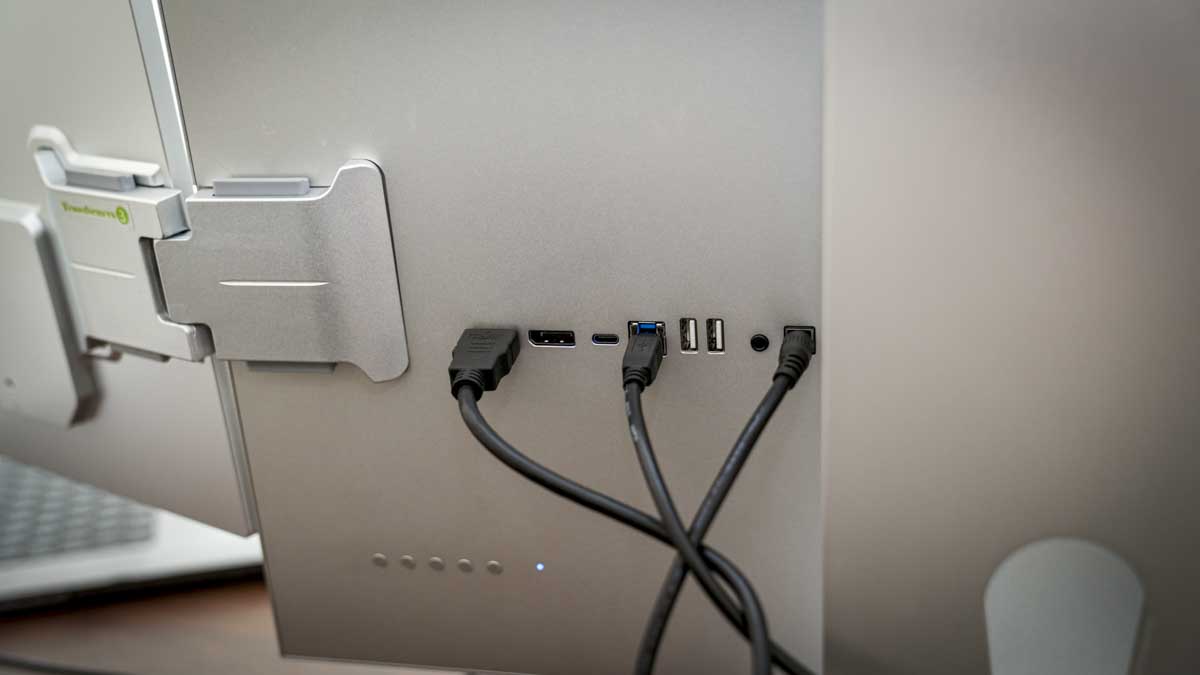
The connection ports are all around the rear of the 27-inch display and include HDMI, USB-C, and DisplayPort inputs alongside the power input. When it comes to the 16-inch side panels, they each draw their signal and power through those connectors interfaced with the main display. You can then connect to the machine using a single USB-C cable or an HDMI and USB-C cable, which is required to carry data. In this review, I’ve used HDMI and a USB connection.
Once assembled and properly clipped, the side panels articulate nicely; they can be drawn inward for a more immersive configuration or pushed back for a wider spread, and they hold position well.
Tilt adjustment on the main display moves all three screens as one unit, which works well. What really stood out to me is that despite there being three monitors, the overall footprint on the desk is kept to a minimum, one stand rather than three, and it’s all good and solid.
The connection ports are all around the rear of the 27-inch display and include HDMI, USB-C, and DisplayPort inputs alongside the power input. When it comes to the 16-inch side panels, they each draw their signal and power through those connectors interfaced with the main display.
You can then connect to the machine using a single USB-C cable or an HDMI and USB-C cable, which is required to carry data. In this review, I’ve used HDMI and a USB connection.
Unlike most displays that only feature a single monitor, here there are three, the 27-inch and then the two 16-inch. There’s also the stand and the connectors, which all need assembly.
The features of the main 27-inch display are about average for a monitor at this price, and there is a premium for the metal build and innovative design. When it comes to the main panel, it’s 4K with a resolution of 3840×2160 using an IPS panel with 10-bit color, 98% DCI-P3 and 100% sRGB coverage, and ΔE <2 factory calibration.
This specification is mid-range and makes it a great option for content creators, social media producers, and general office use. If you’re looking for a display for critical colour work that requires Adobe RGB, then this monitor won’t come up to spec.
It’s worth noting if you’re a professional photographer or videographer, as you’ll need a monitor with a wider color space. That said, for online content, social media, and video work, the P3 coverage is more than sufficient.
The brightness at 500 nits and 1000 nit HDR figure gives you a good amount of flexibility and should be bright enough for most locations and uses.
Alongside the visuals, the monitor also features built-in stereo speakers, which are designed for web conferencing and calls.
Finally, coming onto the two 16-inch side panels, these are identical and feature the contacts to connect to the main monitor. Each is rated at 100% sRGB with no DCI-P3 claim, which just highlights that the main monitor is for the main work, and the two side monitors are for productivity, reading email, media, etc.
These monitors are 1920×1200 with a 16:10 aspect ratio, and can be mounted either landscape or portrait, which means you can adapt them to your use, which makes them a good choice for email, browsing the internet and through this test, terminal sessions.
While on a PC, there is some plug-and-play functionality; on the Mac, the USBDisplay software needs to be installed before you start. This software enables the Mac to recognise the displays and seems to be an extremely lightweight application that essentially sits in the menu bar on Mac. You only need to open it if you need to change the orientation of one the side monitors.
Benchmark scores
Spyder X2 Calibration Results
27-inch Main Display
Gamut: 5.0/5
Tone Response: 3.0/5
White Point: 4.5/5 | Measured 6600–6700K
Contrast: 5.0/5 | Peak 1740:1 at 25% brightness
Luminance Uniformity: 4.5/5
Colour Uniformity: 4.0/5
Colour Accuracy: 4.0/5
Overall Rating: 4.5/5
Peak brightness (measured): 353.7 nits at 100%
16-inch Side Panel
Gamut: 5.0/5
Tone Response: 4.5/5
White Point: 2.5/5 | Measured 7200–7500K
Contrast: 5.0/5 | Peak 1700:1 at 25% brightness
Luminance Uniformity: 2.5/5
Colour Uniformity: 4.5/5
Colour Accuracy: 3.5/5
Overall Rating: 4.0/5
Peak brightness (measured): 333.2 nits at 100%
Throughout the test, I had several mini PCs land on my desk, so it seemed this monitor would be a perfect option for these small machines. Alongside the variety of Mini PC’s, I also used my MacBook Pro and a Windows desktop PC, and in all cases the TriScreen Pro provides a solid performance once set up.
The first thing that I noted about the monitor was that it isn’t simple plug and play on the Mac to a greater degree than the PC; software is required to make it work properly, and without that installation, the two side monitors won’t work at all.
Thankfully, the manual is pretty good, or at least better than many that I have come across recently and getting the monitors set up was relatively straightforward, especially on the PC.
On the Mac, however, the process was a little more challenging, as I had to locate the software download I needed, and the official website had very little in the way of support materials or direct links to what I needed; thankfully, the manual gives you just enough to complete the process .
Once the software was installed and I’d gone through the initial permissions and authorisations needed to work on the Mac, both monitors flickered to life, and I was able to use the Mac OS to configure the screens in a way that I wanted.
After a bit of adjustment, the monitor layout I decided on was to have the main 27-inch display, mirroring the MacBook screen, the left panel showing email, and the right panel showing a terminal window for ongoing development. This configuration just makes seeing everything without having to flick through the screen much easier; all the apps and windows that I would usually flick between are all open.
Through the test, the 27-inch display was used as the main display, and this proved to be a decent option for the content creation and social media work. The colour and tone looked great, and I liked the matte finish of the screen.
However, when the monitor arrived, the screen did look a touch too warm, and popping into the settings, I was quickly able to adjust this to cool the colours and get a more natural-looking display.
To make sure the screen quality was as good as it could be, I then used the Spyder X2 Ultra calibration tool to calibrate the monitor before running tests.
The Display Analysis confirmed a high score for the 27-inch monitor, with Gamut and Contrast both scoring 5.0/5, Luminance Uniformity at 4.5/5, and Colour Accuracy at 4.0/5.
The lower Tone Response at 3.0/5 was a bit of a surprise with the monitor set to a gamma of 2.2 by default, while this is not obviously apparent in everyday visual use, it’s something worth noting.
I was also surprised when the peak brightness result came in at 353.7 nits at 100%, which is well below the claimed 500 nits. However, as you should never use the monitor at 100% especially in a studio environment, the brightness for the intents of this review is fine.
Alongside the 27-inch monitor, there are the two 16-inch panels that use those specialist connectors to clip into the side of the unit. These monitors are of a much lower specification; still, despite being limited to a 1080p resolution, the results for Gamut and Contrast both scored a full 5.0/5.
One point I initially noted about the smaller monitors was that their colour temperature was notably different out of the box. Measuring the white point for the 16-inch shower, a value of 7200–7500K, while it read 6600–6700K on the main display.
This difference is notable, and again, once the Spyder calibration was run across all three panels, it brought them far closer in appearance. If you’re working in a colour-sensitive environment, calibrating before use is definitely a good idea.
Essentially, if you’re looking to use this monitor in office use, the difference in colour temperature between the monitors can be adjusted using the brightness settings through the OSD.
As ever, where these additional displays come into real use is when editing. Using Final Cut Pro X on the main display while having Adobe Podcast on one of the small screens processing audio, while an email was displayed on the other small display, really did help to save time.
It was good to see that even with the additional monitors attached, there didn’t appear to be any dropped frames or lag. I was also pleased to see that the USBDisplay app ran quietly in the background with no prompts or anything to distract during use.
On one occasion during the test, I had the MacBook screen open as a fourth display alongside the three TriScreen panels, and was impressed, as this is well beyond the typical MacBook Pro display output limit, which really highlights just how effective the USBDisplay approach is.
Switching between Mac and PC required minimal reconfiguration; all that was needed was for the HDMI cable to be moved to the PC, the USB-C reconnected, and the software was installed if not already.
On PC, the setup was far more straightforward than the initial Mac configuration, but once set up and permissions granted, there was little to split the use between the two operating systems.
The Lepow TriScreen Pro is a great idea and very innovative. While I initially had a few issues with the connection and the Mac setup was a little convoluted, the end result worked incredibly well.
After a month of daily use, I have warmed to the design, especially the amount of space it saves with the two smaller monitors around the large 27-inch.
and4K main display is great fneral office use and social content creation, being well-built, colour-accurate, and comfortable to use, with those three screens enabling you to see all your applications open at once.
The initial setup process on Mac does need to be better documented, as some steps, such as the software download, are included but not explained. Then there’s the side panel connector mechanism, which is again a great innovation but just feels like it needs a little more refinement to ensure consistent, solid clipping the first time.
The white point difference between the main display and side panels before calibration is an issue. If you’re using these for creative work, however, this is easy to calibrate if you have the likes of the DataColor Spyder X.
I was also surprised to see that the monitor even at 100% brightness didn’t come close to the expected brightness, however in practice in the studio office where the monitor brightness was set at around 50%this wasn’t an issue.
At $1,059, the TriScreen Pro is a decent purchase, especially considering it replaces three separate monitors with one unit and gives you back a decent amount of desk space in the process.
Swipe to scroll horizontally
For more picks, see our guides to the best business monitors and the best portable monitors.
Alastair is a photographer, filmmaker and tech writer who has been working in the publishing industry since the late 1990s. For more than 25 years he has covered photography, video and technology across Future's photography, technology and gaming brands. He runs a photography and video production company and lectures in TV and film. He can usually be found testing mini PCs or prototyping and prop building with the aid of 3D printing.
You must confirm your public display name before commenting
Please logout and then login again, you will then be prompted to enter your display name.
此内容由惯性聚合(RSS阅读器)自动聚合整理,仅供阅读参考。 原文来自 — 版权归原作者所有。