


MSI Roamii BE Pro Wi-Fi mesh system: Two-Minute Review
Back in 2024, MSI released a ‘Lite’ version of its Wi-Fi 7 Roamii mesh system that skipped the 6GHz band. The Roamii BE Pro adds that missing piece. So, should you buy it?
Once again, the kit consists of two white, triangular prism-shaped nodes, but this time there’s some snazzy RGB lighting at the bottom. It’s a refreshing change from the robot space spider school of router design, but how does the neat-and-tidy, completely hidden antenna array affect performance?

I ran my usual Wi-Fi tests in my single-story, Sydney weatherboard cottage by downloading large video files from a tethered 10Gbps Synology NVMe network-attached storage (NAS) device to a high-performance Wi-Fi 7 laptop up close, two rooms away (at the front of the house, where the second node was placed) and 15 meters (49 feet) away in the back garden.
MSI quotes a top speed of up to 11Gbps, depending on the region, spread across the 2.4GHz, 5GHz and 6GHz bands. The system also sports potentially limiting 2.5Gbps Ethernet ports. However, theoretical performance counts for nothing.
With the laptop next to the router, the Roamii BE Pro achieved a consistent transfer speed of 2,003Mbps. That’s the fastest speed I’ve ever seen from a consumer Wi-Fi router! Of course, a problem with many mesh systems is that performance can fall off a cliff when devices connect to nodes. I was disappointed to see that, with the laptop next to the second node, performance plummeted to 782Mbps.
That’s still quick in the scheme of things, but it seems that only TP-Link and Asus regularly create mesh kits that don’t butcher performance when using multiple nodes. Outside in the garden, the Roamii BE Pro dropped all the way to 14Mbps, which is just enough for basic web browsing. So, performance was a (very) mixed bag.

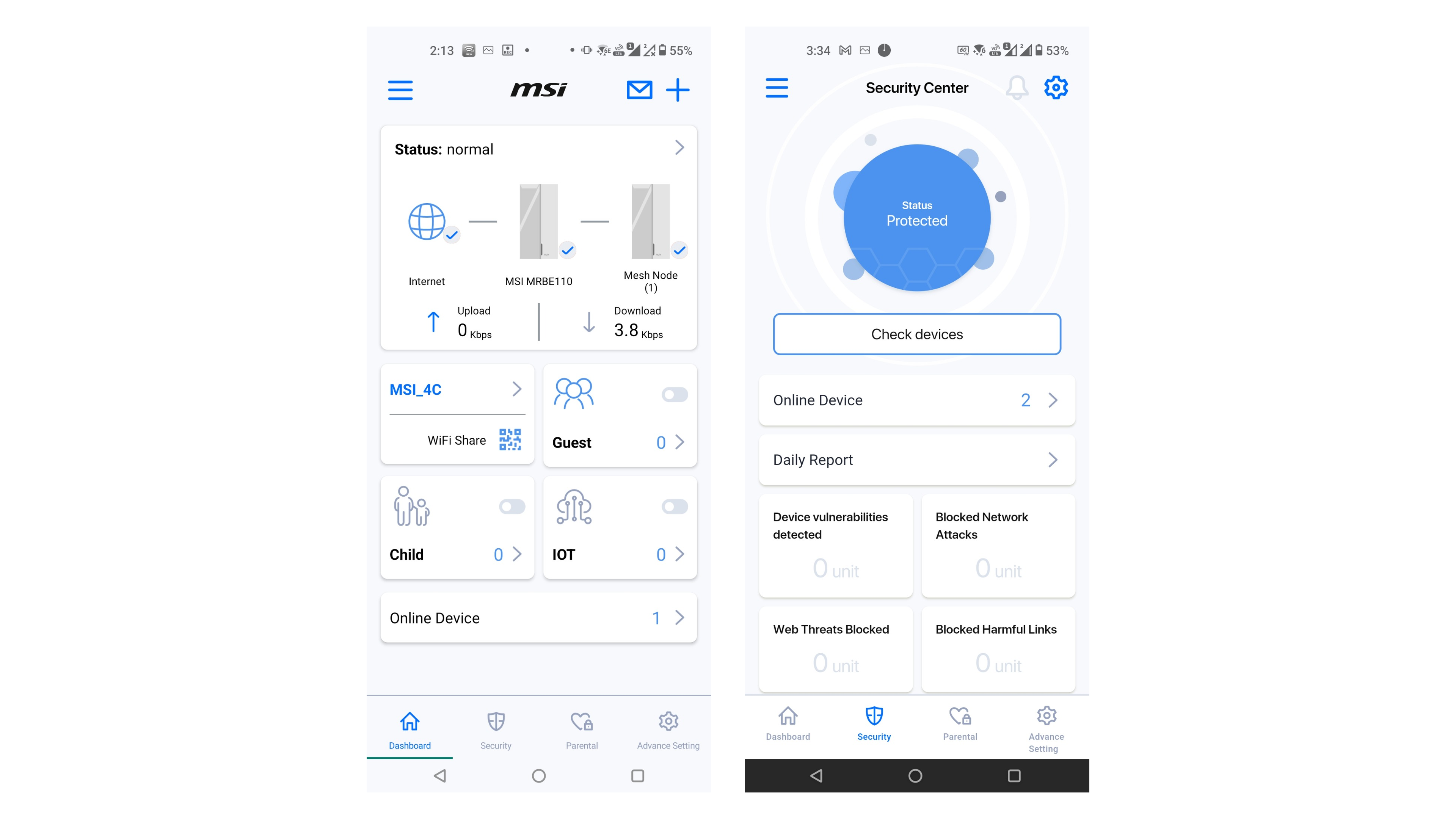
Setup was generally straightforward thanks to a phone app that’s become more responsive over the years and remains generally intuitive and feature-packed. On the first page, there are network status diagrams and options that facilitate easy access to separate networks for visitors, Internet of Things (IoT) devices and kids. A ‘FortiSecu’ security tab provides Trend Micro-powered, edge-based cybersecurity protection to both the network and devices connected to it.
There aren’t many options to configure here, but it does check for and log the most common threats. It’s also provided for free, unlike some rivals.
Parental controls are also included for free. They allow you to associate devices with different people across different age ranges and (attempt to) block various types of content. It can also force Google SafeSearch browsing and Restricted-mode YouTube access.
You can set bedtimes throughout the week and set time limits for different days. The latter two options will please many parents who routinely fight with their kids on this matter.
A fourth tab provides access to most of the usual router configuration options, with less-popular extras available via a (desktop-optimized) web browser interface.
Ultimately, all the important bases are covered in terms of features, and while I’m disappointed by the performance drop-off, this two-node kit costs a fraction of many rivals. As such, it’s a great-value buy and I’m happy to recommend it.

MSI Roamii BE Pro Wi-Fi mesh system: Price And Availability
- How much does it cost? $300 / £270 / AU$499
- When is it available? Now
- Where can you get it? Available in the US, UK and Australia
With premium Wi-Fi mesh kits often costing an arm and a leg, it’s refreshing to see a budget(ish) model. It costs $300 in the US, £270 in the UK and AU$499 in Australia. In all territories, those prices represent only a minor premium over the lesser Lite version.
There are now plenty of cheaper standalone Wi-Fi 7 routers on the market (including from MSI), but few mesh kits can match the Roamii BE Pro’s price.
Want more options? Check out our guide to the best mesh Wi-Fi systems.
- Value: 5 / 5
MSI Roamii BE Pro Wi-Fi mesh system: Design

- Smart-looking, lightweight, RGB prism design
- App is intuitive
- Three LAN ports and USB 3.0
I can’t think of any other prism-shaped Wi-Fi routers or nodes, so kudos to MSI for designing something different that doesn’t instantly polarize all those who lay eyes upon it. It can sit on a desktop or be wall-mounted (a wall-mounting kit is included).
Unlike the Lite version, it also has some cool RGB lighting at the base. However, you can’t schedule when to deactivate this so, unless you want its bright lights shining all night, you may wish to switch it off in the app.
At 830g (1.8lb), each node is heavier than the Lite version, but it still feels a little lightweight and plasticky compared to some premium rivals.
MSI Roamii BE Pro Wi-Fi mesh system: Specifications
Wi-Fi: Tri-band Wi-Fi 7 (2.4GHz/5GHz/6GHz)
Speed: Up to 11Gbps, region dependent
Connectivity: 3x 2.5Gbps Ethernet (LAN), 1x 2.5Gbps Ethernet (WAN), 1x USB 3.0
Processor: Quad-core @ 1.5GHz
Dimensions: 118.5 x 108 x 252.5mm (4.7 x 4.3 x 9.9in), 830g (1.8lb)
Setup is simple via the responsive and intuitive app. It’s worth noting that while each node has different login credentials, either can be used as a primary node. Once the primary is set up, it’ll automatically locate and connect to the secondary node and merge all credentials.
The browser-based firmware interface is slick and responsive. It doesn’t offer access to too many features beyond the standard router fare. However, in the Advanced tab you can access incredibly geeky settings like Beacon Period, Guard Interval and Request to Send (RTS) Threshold: the sort of stuff that will break the router if you don’t know what you’re doing, but also the sort of settings that some enthusiasts love to hack.
As for the hardware itself, this Pro version addresses some of the criticisms I had with the Lite version: the two Gigabit Ethernet LAN ports have been replaced by three 2.5Gbps LAN ports. These are also joined by a USB 3.0 port.
- Design: 4 / 5
MSI Roamii BE Pro Wi-Fi mesh system: Features

- Free parental and security features
- Simple multi-network setup
- Powerful parental controls
It’s good to see that the app’s home screen has large tabs to easily add a Guest Network, IoT Network and Children’s Network, as it should encourage novices to actually make use of them. There’s also a QR code for adding devices to the primary network, though this would surely be more useful to have for the guest network.
The Network Status panels usefully show you the status of the network along with what’s connected to it. It’s more responsive than when we first saw it with the Lite version back in 2024.

A Trend Micro-powered ‘FortiSecu’ Security tab can scan all connected devices and protect them against threats using edge security. That includes isolating dumb IoT devices on a separate network, reducing the risk that a compromised gadget could cause trouble elsewhere.
A third tab handles the parental controls. These offer more options than many rivals, including inappropriate app installation notifications plus forced Google SafeSearch and forced YouTube Restricted Mode. It also manages YouTube watching time separately from regular internet access, which many parents will approve of.
Image
1
of
2
Unlike the Lite version, a USB port now adorns the Roamii BE Pro. While related applications are limited, it still enables you to add storage as a file server, File Transfer Protocol (FTP) server or Samba media server.
General router tools are housed in the Advanced Settings tab. If you want more, you can press the ‘Web UI’ button, which launches a web page that isn’t optimized for mobile and contains more settings.
While there aren’t too many features beyond the basics, you’re able to mess with the more intricate networking and power settings if you dare. Don’t try if you don’t know what you’re doing, though.
- Features: 4 / 5
MSI Roamii BE Pro Wi-Fi mesh system: Performance

- Incredibly fast at close range
- Not great at long distance
- Sluggish node interconnect speed
The Lite version of this router was dual-band Wi-Fi 7, so it missed out on the 6GHz band. The Pro variant adds 6GHz support and boosts the rated aggregate wireless speed to a region-dependent maximum of 11Gbps. Naturally, real-world speeds won’t come close to that.
I ran my usual tests of downloading large video files from a fast, 10Gbps Ethernet-equipped Synology NAS to a Wi-Fi 7-equipped laptop in a single-story cottage with thin walls.
MSI Roamii BE Pro Wi-Fi mesh system benchmarks
Large video file transfer from 10Gbps Ethernet-equipped Synology NAS to Wi-Fi 7 laptop
Up close, next to router: 2,003Mbps
Two rooms away, next to second node: 782Mbps
15 meters (49 feet) away, back garden: 14Mbps
Up close, the Roamii managed an incredible 2,003Mbps, which is the fastest score I’ve seen from any router and more than double the 943Mbps that the Lite version managed. That’s more than quick enough for wireless, multi-stream 4K video editing.
Two rooms away (at the front of the house), by the second node, the Roamii dropped to 782Mbps. While that’s not slow (and quicker than the Lite’s 455Mbps), it’s still a disappointing drop-off for a mesh system.
Finally, 15 meters (49 feet) away, in the back garden (where signal strength drops much more quickly), the Roamii dropped to 14Mbps. That’s even slower than the 24Mbps of the Lite version (likely due to shorter range on the 6GHz band), but neither score is particularly good. It should afford some basic web browsing and basic streaming capabilities. It’s worth noting that some other, lesser routers couldn’t even connect at this distance.
- Performance: 4 / 5
Should You Buy The MSI Roamii BE Pro Wi-Fi mesh system?
Buy the MSI Roamii BE Pro if...
Don’t buy it if...
MSI Roamii BE Pro Wi-Fi mesh system: Scorecard
Swipe to scroll horizontally
Attributes | Notes | Score |
|---|---|---|
Value | Despite the significant upgrade in performance and features, the Roamii BE Pro only costs a little more than its good-value ‘Lite’ sibling. | 5 / 5 |
Design | The Roamii looks good but feels a bit lightweight, which raises quality concerns. The RGB lighting looks great but is a pain to turn off every night. | 4 / 5 |
Features | The Roamii’s app puts the important features front and center and doesn’t charge extra for them. You can easily set up additional networks, run security scans and configure numerous parental controls. | 4 / 5 |
Performance | Though capable of blistering speed up close, performance drops very quickly as you get further away from a node. | 4 / 5 |
Final Score | There’s much to like about the Roamii Pro mesh kit. It’s relatively cheap, it’s got all the features most consumers want, but it’ll struggle to service larger homes without buying extra nodes. | 4 / 5 |
MSI Roamii BE Pro Wi-Fi mesh system: Also Consider
If you're undecided about the MSI Roamii BE Pro Wi-Fi mesh system, I've compared its specs with two other options that might be a better fit.
Swipe to scroll horizontally
| Row 0 - Cell 0 | MSI Roamii BE Pro Wi-Fi mesh system | TP-Link Deco BE63/BE65 | Asus ROG Rapture GT-BE98 (router) |
Price (as reviewed) | $300/£270/AU$499 | $799.99 / £699.99 / AU$1,099 | N/A |
Price per node | $150 / £135 / AU$250 | $267 / £233 / AU$366 | $750 / £700 / AU$1,499 |
Wi-Fi | Tri-band Wi-Fi 7 | Tri-band Wi-Fi 7 | Quad-band Wi-Fi 7 |
Wi-Fi speed | Up to 11Gbps, region dependent | 10Gbps (BE63) / 11Gbps (BE65) | 24.4Gbps |
Connectivity | 1x 2.5Gbps Ethernet (WAN), 3x 2.5Gbps Ethernet (LAN), 1x USB 3.0 | 4x 2.5Gbps Ethernet (WAN/LAN), 1x USB 3.0 | 1x 10Gbps Ethernet (WAN/LAN), 1x 2.5Gbps Ethernet (WAN/LAN), 1x 10Gbps Ethernet (LAN), 3x 2.5Gbps Ethernet (LAN), 1x Gigabit Ethernet (LAN), 1x USB 3.2 Gen 1, 1x USB 2.0 |
Processor | Quad-core 1.5GHz | Unspecified | Quad-core 2.6GHz |
Memory | Unspecified | Unspecified | 2GB RAM |
Storage | Unspecified | Unspecified | 256MB flash |
Dimensions | 118.5 x 108 x 252.5mm (4.7 x 4.3 x 9.9in) | 108 x 108 x 176mm (4.3 x 4.3 x 6.9in) | 350 x 350 x 221mm (13.8 x 13.8 x 8.7in) |